
1. Продукт бүтүп калдыview
The Motorola 53727 Earpiece with Microphone is a compact and comfortable accessory designed for use with compatible Motorola two-way radios. It allows for discreet communication, fitting conveniently in either ear, and features a microphone that clips to your collar or sleeve for easy access.
This unit delivers clear audio, even in noisy environments, and includes a Push-to-Talk (PTT) button for seamless communication without needing to handle your radio directly.
Негизги өзгөчөлүктөрү:
- Earpiece for Motorola 2-way radios.
- Compatible with Spirit GT, Spirit GT+, and various TalkAbout series radios.
- Enables communication without holding the radio.
- Comfortable earbud design.
- Tiny push-to-talk microphone clips to collar or sleeve.
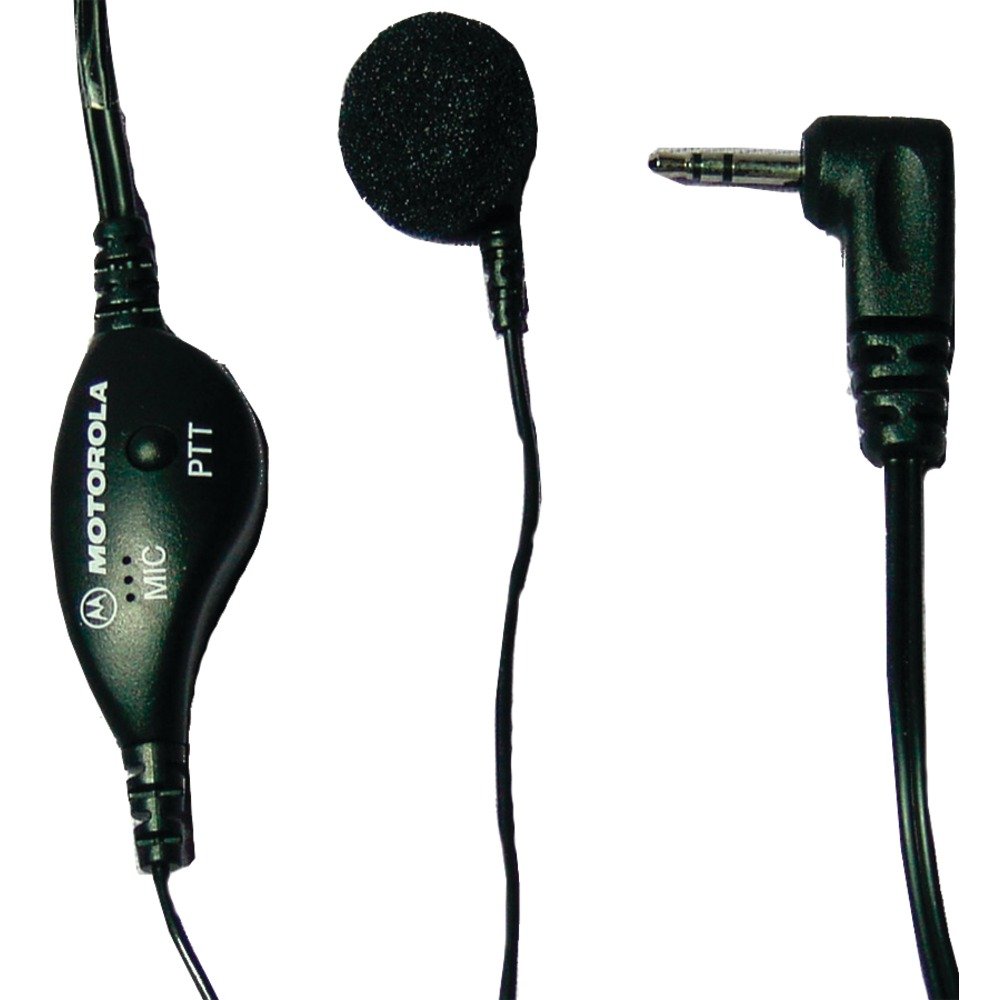
Image 1.1: Motorola 53727 Earpiece with Microphone. This image shows the compact design of the earpiece and its integrated microphone.
2. Орнотуу жана орнотуу
Follow these steps to properly set up and install your Motorola 53727 Earpiece with Microphone:
- Identify the Radio Port: Locate the single pin accessory port on your compatible Motorola two-way radio. This is typically on the side of the radio.
- Connect the Earpiece: Carefully insert the earpiece's connector into the radio's accessory port. Ensure it is fully seated for a secure connection.
- Наушникти жайгаштырыңыз: Place the earbud comfortably into either ear. Adjust its position until it feels secure and provides clear audio.
- Clip the Microphone: Attach the tiny push-to-talk microphone to your collar or sleeve. Position it close to your mouth for optimal voice transmission.
Шайкештик:
The Motorola 53727 Earpiece is compatible with the following Motorola two-way radio series:
- Spirit GT and Spirit GT+ Series
- Talkabout 270, 280, T289 Series
- Talkabout T5100, T5200, T5300, T5320, T5400, T5410, T5420, T5600, T5620, T5700, T5720, T5800, T5820 Series
- Talkabout T6200, T6210, T6220, T6250, T6300, T6320, T6400 Series
- Talkabout T7200 Series
- FR50, FR60 Radios

Image 2.1: Talkabout Accessory Compatibility Chart. This chart provides a visual guide to compatible radio models for Motorola accessories.

Сүрөт 2.2: Мисample of a compatible Motorola two-way radio.

Image 2.3: Another example of a compatible Motorola two-way radio.
3. Иштөө нускамалары
Using your Motorola 53727 Earpiece with Microphone is straightforward:
- угуу: Once connected, audio from your two-way radio will be directed to the earpiece. Ensure your radio's volume is set to an appropriate level for clear listening.
- Жөнөтүү (Push-to-Speak): To speak, press and hold the Push-to-Talk (PTT) button located on the microphone unit. Speak clearly into the microphone. Release the PTT button when you are finished speaking to return to receive mode.
The earpiece allows for hands-free communication, enabling you to talk and listen without needing to remove the radio from your belt or pocket.

Image 3.1: Close-up of the earpiece and microphone unit, highlighting the PTT button.
4. Техникалык тейлөө жана кам көрүү
To ensure the longevity and optimal performance of your Motorola 53727 Earpiece with Microphone, follow these maintenance guidelines:
- Тазалоо: Gently wipe the earpiece and microphone with a soft, damp cloth. Avoid using harsh chemicals or abrasive cleaners. Ensure the earpiece is dry before connecting it to your radio.
- Сактагыч: When not in use, store the earpiece in a clean, dry place, away from extreme temperatures and direct sunlight. Avoid tangling the cable.
- Колдонуу: Do not pull on the cable to disconnect the earpiece from the radio. Always grasp the connector itself. Avoid bending or twisting the cable excessively.
5. Кыйынчылыктарды
If you encounter issues with your earpiece, refer to the following common troubleshooting steps:
- Аудио жок же үнү төмөн:
- Ensure the earpiece connector is fully inserted into the radio's port.
- Check the volume level on your two-way radio.
- Test the earpiece with another compatible radio if available, or test the radio with another accessory to isolate the issue.
- Микрофон өткөрбөй жатат:
- Confirm the PTT button is being pressed and held firmly while speaking.
- Микрофондун туура жайгаштырылышын жана тоскоол болбогонун текшериңиз.
- Verify the earpiece is fully connected to the radio.
- Үзгүлтүксүз туташуу:
- Check the earpiece cable for any visible damage or kinks.
- Туташтыргычтын таза жана калдыктары жок экенин текшериңиз.
If these steps do not resolve the issue, please refer to the "Support and Warranty" section for further assistance.
6. Техникалык шарттар
| Өзгөчөлүк | Деталь |
|---|---|
| Бренд | Motorola Solutions |
| Модель номери | 53727 |
| Түс | Кара |
| Кулак жайгаштыруу | Кулакта |
| Форма фактору | Кулакта |
| Noise Control | Жок |
| Элемент Салмагы | 0.5 унция |
| Байланыш технологиясы | Зымдуу |
| Наушник уясы | 2.5 мм Джек |
| Кабелдик өзгөчөлүктөрү | Push to Talk Microphone |
| Сууга туруктуулук деңгээли | Сууга чыдамдуу |
| Башкаруу түрү | Push To Talk микрофону |
| Шайкеш түзмөктөр | Spirit GT, Spirit GT+, Talkabout 270, 280, T289, T5100, T5200, T5300, T5320, T5400, T5420, T6200, T6300, T6400, T7200 Series, FR50, FR60 |
7. Кепилдик жана колдоо
Кепилдик маалыматы:
This Motorola 53727 Earpiece with Microphone comes with a 90 күндүк кепилдик сатып алынган күндөн тартып.
Маанилүү эскертүү: The warranty does not cover misuse of the product. Please ensure proper handling and care as outlined in this manual.
Кардарларды колдоо:
For technical assistance, warranty claims, or further inquiries, please contact Motorola Solutions customer support. Refer to your product packaging or the official Motorola Solutions webакыркы байланыш маалыматы үчүн сайт.
Сиз да зыярат кылсаңыз болот Amazonдагы Motorola Solutions дүкөнү кошумча продукт маалымат жана ресурстар үчүн.