
Introduction
Сатып алганыңыз үчүн рахматasing the Sharp XL-70-H Compact Stereo System. This manual provides essential information for the safe and efficient operation of your audio system. Please read it thoroughly before use and keep it for future reference.
Коопсуздук маалыматы
Коопсуз иштөөнү камсыз кылуу жана зыян келтирбөө үчүн төмөнкү сактык чараларын сактаңыз:
- Өрт же электр тогуна урунуп калбаш үчүн аппаратты жамгырга же нымга тийгизбеңиз.
- Вентиляция тешиктерин жаап албаңыз. Аба агымы туура болушу үчүн аппараттын айланасында жетиштүү мейкиндикти камсыз кылыңыз.
- Агрегатты туруктуу, түз бетке коюңуз.
- Суюктуктар толтурулган нерселерди, мисалы, вазаларды аппараттын үстүнө койбоңуз.
- Unplug the unit from the wall outlet during lightning storms or when unused for long periods.
- Бардык тейлөөлөрдү квалификациялуу тейлөө кызматкерлерине тапшырыңыз.
Пакеттин мазмуну
Пакетте бардык буюмдар бар экенин текшериңиз:
- Sharp XL-70-H Main Unit (Tower)
- Two 2-way MDF Speakers
- Электр кабели
- Remote Control (if included, not explicitly mentioned but common)
- Динамик кабельдер
Продукт бүттүview
The Sharp XL-70-H is a compact stereo system designed for versatile audio playback. It features a CD player with a glass lid, a full logic cassette deck, and an auxiliary input for connecting external devices. The system includes two 2-way MDF speakers for clear sound reproduction.
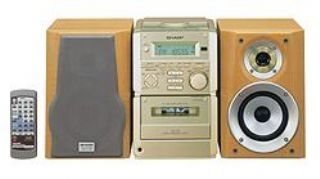
1-сүрөт: Фронт view of the Sharp XL-70-H Compact Stereo System, showing the main unit and two speakers. The main unit features a central display, control buttons, and the CD tray.
Жайгашуу
1. Speaker Connection
Connect the included 2-way MDF speakers to the main unit. Ensure that the positive (+) and negative (-) terminals on the speakers match the corresponding terminals on the main unit. Incorrect polarity can affect sound quality.
2. Power Connection
Plug the AC power cord into the power input on the rear of the main unit, then plug the other end into a standard wall outlet (AC 230V, 50Hz).
3. Баштапкы күйгүзүү
Press the Power button on the main unit or remote control to turn on the system. The display will illuminate.
Иштөө нускамалары
CD ойноткучтун иштеши
- басыңыз CD CD функциясын тандоо үчүн баскычты басыңыз.
- басыңыз АЧУУ/ЖАБУУ button. The glass lid will open via motor assistance.
- Place a CD (CD-DA format) with the label side up on the disc tray.
- басыңыз АЧУУ/ЖАБУУ button again to close the lid.
- басыңыз ОЙНОО/ТЫНЫТТЫРУ ойнотууну баштоо үчүн
- колдонуу ӨТКӨРҮҮ тректер арасында өтүү үчүн баскычтар.
Кассета ойноткучтун иштеши
- басыңыз ЛЕНТ button to select the cassette function.
- басыңыз АЧУУ/ЧЫГАРУУ button to open the cassette deck.
- кассетаны салыңыз.
- басыңыз ОЙНОО ойнотууну баштоо үчүн
- колдонуу КАЙРА АЙРУУ жана ТЕЗ АЛГА навигация үчүн баскычтар.
- басыңыз ТОКТОТУУ/ЧЫГАРУУ ойнотууну токтотуу жана кассетаны чыгаруу үчүн баскычты басыңыз.
AUX киргизүү операциясы
Connect an external audio device (e.g., smartphone, MP3 player) to the AUX input jack on the main unit using a 3.5mm audio cable. Press the AUX button to select the auxiliary input. Audio from the connected device will play through the system speakers.
Үндү жана тонду башкаруу
- Көлөмү: Rotate the motorized SERVO VOLUME knob or use the volume buttons on the remote control to adjust the sound level.
- Бас/жогорку: арналганын колдонуңуз БАС жана ҮЧЧҮ controls to adjust the low and high frequency response of the audio.
Clock, Timer, and Sleep Functions
The system includes a clock display, a timer function for scheduled operations, and a sleep function to automatically turn off the system after a set period. Refer to the on-screen menu and Multi Jog Control for setting these features.
Техникалык тейлөө
Агрегатты тазалоо
Wipe the exterior of the unit with a soft, dry cloth. Do not use abrasive cleaners, waxes, or solvents as they may damage the finish. For stubborn stains, lightly dampen the cloth with water and mild detergent, then wipe dry.
CD Player Care
Handle CDs by their edges to avoid fingerprints. If a CD is dirty, wipe it gently from the center outwards with a soft, lint-free cloth. Do not use solvents or abrasive cleaners on CDs.
Cassette Deck Care
Periodically clean the tape heads and pinch rollers using a specialized cassette head cleaning kit to ensure optimal sound quality and prevent tape damage.
Проблемаларды чечүү
| Көйгөй | Мүмкүн себеп | Чечим |
|---|---|---|
| Күч жок | Электр зымы туташкан эмес; Электр розеткалары активдүү эмес. | Ensure power cord is securely plugged in; Check the wall outlet with another device. |
| Үн жок | Volume too low; Speakers not connected; Incorrect input selected. | Increase volume; Check speaker connections; Select the correct input source (CD, TAPE, AUX). |
| CD ойнобойт | CD туура эмес салынган; CD кир же чийилген; Дисктин форматы колдоого алынбайт. | Insert CD with label side up; Clean or replace CD; Ensure CD is CD-DA format. |
| Кассета ойнотулбай жатат | Tape inserted incorrectly; Tape heads dirty. | Ensure tape is inserted correctly; Clean tape heads. |
Бул чечимдерди колдонуп көргөндөн кийин көйгөй чечилбесе, кардарларды колдоо менен байланышыңыз.
Техникалык шарттар
- Модел: XL-70-H
- Бренд: Sharp
- Output Power (DIN 45324):
- Peak Music Power: 120W (Total)
- Music Power: 60W (30W + 30W)
- Sine Wave Power: 40W (20W + 20W)
- Өлчөмдөрү (W x Y x D):
- Main Unit (Tower): 160mm x 241mm x 298mm
- Speakers: 160mm x 240mm x 189mm
- Элемент Салмагы: 8 кг
- Байланыш: Көмөкчү
- Динамик түрү: 2-way MDF speaker system
- Кубат булагы: AC-adapter (connected to a standard wall outlet)
- Шайкеш түзмөктөр: Cassette player, AUX device
- Колдоого алынган аудио форматы: CD-DA
- Баяндамачылардын саны: 2
- Аудио чыгаруу режими: Стерео (2.0 канал)
- Түсү: Silver
- Bluetooth колдоо: Ооба
Кепилдик жана колдоо
This product comes with a standard manufacturer's warranty. For detailed warranty information, please refer to the warranty card included with your purchase or visit the official Sharp webсайт. Техникалык колдоо же тейлөө боюнча суроолоруңуз болсо, Sharp кардарларды тейлөө кызматына кайрылыңыз.