
1. Киришүү
This manual provides essential information for the safe and efficient operation of your Crosley WR18 Mini Bubbler Jukebox. Please read these instructions thoroughly before using the unit and retain them for future reference.
The Crosley WR18 is a reproduction of a 1946-style jukebox, featuring percolating bubble tubes, neon lights, a front-loading compact disc player, FM radio, and stereo speakers. It is operated primarily via a 12-button remote control.
2. Коопсуздук нускамалары
- Агрегатты жамгырга же нымдуулукка дуушар кылбаңыз.
- Эч кандай желдетүүчү тешиктерди жаап албаңыз.
- Агрегаттын туруктуу, түз бетине коюлганын текшериңиз.
- Чагылган бороондо же узак убакыт бою колдонбогондо, розеткадан ажыратыңыз.
- Бардык тейлөөлөрдү квалификациялуу тейлөө кызматкерлерине тапшырыңыз.
3. Орнотуу
3.1 Пакеттен чыгаруу жана жайгаштыруу
Carefully remove the jukebox from its packaging. Place the unit on a flat, stable surface away from direct sunlight, heat sources, and excessive dust or moisture. Ensure there is adequate space around the unit for ventilation.
3.2 Кубат туташтыруу
Connect the AC power cord to the power input on the back of the unit, then plug it into a standard wall outlet. The unit is designed for 120V AC, 60Hz power supply.
3.3 Алыстан башкарууну жөндөө
Insert two AAA batteries (not included) into the remote control, observing the correct polarity. The remote control is essential for operating most functions of the jukebox.
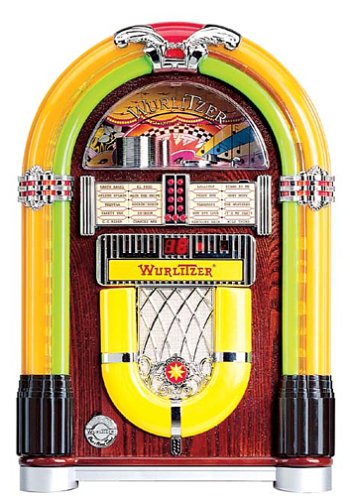
1-сүрөт: Фронт view of the Crosley WR18 Mini Bubbler Jukebox. This image shows the main unit with its distinctive bubble tubes, neon lights, and speaker grilles. The CD player slot is visible below the main display area.
4. Иштөө нускамалары
4.1 Күйгүзүү/өчүрүү
басыңыз КҮЧ аппаратты күйгүзүү же өчүрүү үчүн пульттун баскычын басыңыз.
4.2 CD ойноткучтун иштеши
- басыңыз CD button on the remote to select CD mode.
- басыңыз АЧУУ/ЖАБУУ button on the remote to open the CD tray.
- Place a compact disc, label side up, into the tray.
- Басыңыз АЧУУ/ЖАБУУ again to close the tray. The unit will begin reading the disc.
- колдонуу ОЙНОО/ТЫНЫТТЫРУ ойнотууну баштоо же тындыруу үчүн баскыч.
- колдонуу АЛГА ӨТҮҢҮЗ (|>>) же АРТКА ӨТКӨРҮҮ (<<|) тректер арасында багыттоо үчүн баскычтар.
- The ПРОГРАММА function allows you to create a custom playback order for tracks. Refer to the remote control diagram for specific programming steps.
- The КАЙТАЛОО function allows you to repeat the current track or the entire disc.
4.3 FM радиосунун иштеши
- басыңыз FM button on the remote to select FM radio mode.
- Extend the external FM antenna located at the back of the unit for optimal reception. Adjust its position for clearer sound.
- колдонуу КӨҢҮЛДӨ (+) же ЖӨНДӨТҮҮ (-) buttons on the remote to manually tune to desired radio stations.
4.4 Үндү башкаруу
Үнүн колдонуп, үнүн жөндөңүз ҮН КӨШҮРҮҮ (+) жана ҮН КӨЧҮРҮҮ (-) buttons on the remote control. Note that all volume adjustments are made via the remote.
4.5 Neon Lights and Bubble Tubes
The genuine multicolored neon lights and percolating bubble tubes activate automatically when the unit is powered on, enhancing the retro aesthetic. There are no separate controls for these features.
5. Техникалык тейлөө
5.1 Кабинетти тазалоо
Wipe the handcrafted hardwood cabinet with a soft, dry cloth. For stubborn marks, a slightly damp кездемени колдонсо болот, андан кийин дароо кургатуу. Абразивдүү тазалагычтардан же эриткичтерден качыңыз.
5.2 CD ойноткучту тейлөө
To ensure optimal performance, keep the CD tray and lens clean. Use a specialized CD lens cleaner disc periodically. Avoid touching the CD lens directly.
5.3 Bubble Tubes and Neon Lights
The bubble tubes and neon lights are sealed units and require no user maintenance. If any issues arise with these components, contact customer support.
6. Кыйынчылыктарды
| Көйгөй | Мүмкүн себеп | Чечим |
|---|---|---|
| Күч жок | Электр шнуру туташтырылган эмес; розетка иштебейт | Электр шнурунун бекем сайылганын текшериңиз; розетканы башка түзмөк менен текшериңиз. |
| Үн жок | Volume too low; incorrect mode selected | Increase volume using remote; ensure correct mode (CD/FM) is selected. |
| CD ойнобой жатат | Disc inserted incorrectly; disc dirty/scratched; CD mode not selected | Reinsert disc correctly; clean disc; select CD mode. |
| FM кабыл алуу начар | Antenna not extended/positioned correctly | Fully extend and adjust the external FM antenna. |
| Пульт иштебей жатат | Batteries depleted; line of sight blocked; remote malfunction | Replace batteries; ensure no obstructions between remote and unit; if remote remains unresponsive, contact customer support as many functions are remote-only. |
7. Техникалык шарттар
- Модель номери: WR18
- Продукциянын өлчөмдөрү: 12 x 22 x 16 дюйм (туурасы x бийиктиги x тереңдиги)
- Элемент Салмагы: 16.8 фунт
- Өндүрүүчү: Crosley Radio
- Аудио өзгөчөлүктөрү: Stereo sound with two 4-inch speakers and built-in ampөмүрлүү
- Медиа ойнотуу: CD player with program and repeat functions, FM radio with external antenna
- Эстетикалык өзгөчөлүктөрү: Handcrafted hardwood cabinet, genuine multicolored neon lights, bubble tube accents
- Контролдоо: 12-button mini jukebox remote control
8. Кепилдик жана колдоо
The Crosley WR18 Mini Bubbler Jukebox typically comes with a manufacturer's warranty. Based on user reports, the Crosley warranty period is 90 days. Please note that for warranty service, you may be responsible for shipping the unit back to the manufacturer and an additional fee for return shipping and handling after repair.
For technical support, warranty claims, or service inquiries, please contact Crosley Radio customer service directly. Refer to the contact information provided with your product packaging or visit the official Crosley webакыркы колдоо маалымат үчүн сайт.