
1. Киришүү
This manual provides comprehensive instructions for the safe and efficient use of your Logisys PS480D 480W ATX Power Supply. Please read this manual thoroughly before installation and operation to ensure proper functionality and to prevent damage to the unit or other components.

Figure 1: Logisys PS480D 480W ATX Power Supply, front view with cables bundled.
2. Коопсуздук маалыматы
ЭСКЕРТҮҮ: Power supplies contain high voltage компоненттери. Электр менен камсыздоо булагын ачпаңызasinг. Ичинде колдонуучу тейлей турган бөлүктөр жок.
- Орнотуудан же тейлөөдөн мурун кубат булагы AC розеткасынан ажыратылганын текшериңиз.
- Always ground yourself to prevent electrostatic discharge (ESD) when handling internal computer components.
- Электр менен камсыздоону нымдуу же ысык абалда иштетпеңизamp шарттар.
- Ашыкча ысып кетүүнүн алдын алуу үчүн кубат менен камсыздоонун айланасында туура желдетүүнү камсыз кылыңыз.
- Берилген кубат кабелдерин жана туташтыргычтарын гана колдонуңуз.
3. Продукциянын өзгөчөлүктөрү
The Logisys PS480D is a 480W ATX power supply designed for personal computers. Key features include:
- Жогорку натыйжалуулук
- Low Noise & Ripple
- Voltage Коргоо
- Кыска туташуулардан коргоо
- Built-in EMI Filter
- Insulation Resistance 100MΩ min.
- Complies with FCC part 15J class B 115VAC operation and CISPR 22 230 VAC operation.
- Meets UL 1950, CSA 22.2 LEVEL 3 Requirement.
- 100% Burn-in test / Vibration test / Hi-pot test / Leakage current test.
- MTBF above 100,000 hours at 25 °C.

Figure 2: Rear panel of the power supply with fan, AC inlet, and power switch.
4. Орнотуу жана орнотуу
Follow these steps to install the Logisys PS480D power supply into your computer system.
- Даярдоо: Ensure your computer is completely powered off and unplugged from the wall outlet. Open your computer case according to its manufacturer's instructions.
- Эски кубат менен жабдууну алып салуу (эгер бар болсо): Disconnect all cables from the old power supply to the motherboard, drives, and other components. Unscrew and remove the old power supply from the case.
- Install New Power Supply: Carefully place the Logisys PS480D into the power supply bay of your computer case. Secure it with screws.
- Негизги кубаттуулукту туташтыруу: Connect the 20+4 pin ATX mainboard connector to your motherboard. If your motherboard uses a 20-pin connector, detach the 4-pin section. If it uses a 24-pin connector, connect both sections.
- CPU кубатын туташтыруу: Connect the 4-pin +12V power connector to the corresponding port on your motherboard.
- Перифериялык кубаттуулукту туташтыруу:
- Use the 4-pin standard drive connectors for HDDs and CD/DVD-ROM drives.
- Use the 4-pin 3.5" FDD or ZIP connectors for floppy disk drives or similar devices.
- Use the Serial ATA (SATA) connectors for SATA hard drives and SSDs.
- Кабелдик башкаруу: Корпустун ичинде абанын туура айланышын камсыз кылуу үчүн кабелдерди тыкан өткөрүңүз.
- Ишти жабуу: Бардык туташуулар коопсуз болгондон кийин, компьютериңиздин корпусун жабыңыз.
- AC кубатына туташтыруу: Plug the AC power cord into the power supply's AC inlet and then into a wall outlet.
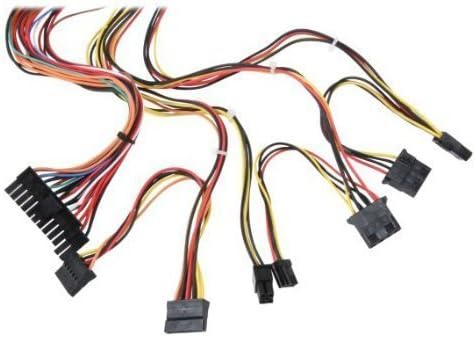
Figure 3: ашыкview of power supply connectors.

Figure 4: Power supply dimensions and included AC power cord.
5. Иштөө нускамалары
After successful installation, you can power on your computer.
- Ensure the power switch on the rear of the power supply (Figure 2) is in the "ON" (I) position.
- Компьютериңиздин корпусундагы кубат баскычын басыңыз.
- The power supply will provide stable power to your system components.
- To power off, shut down your operating system normally. For complete power disconnection, switch the power supply to the "OFF" (O) position and unplug the AC cord.
6. Техникалык тейлөө
Үзгүлтүксүз техникалык тейлөө электр менен камсыздооңуздун узак мөөнөттүү жана оптималдуу иштешин камсыз кылууга жардам берет.
- Тазалоо: Periodically clean dust from the power supply's fan and vents using compressed air. Ensure the power supply is unplugged before cleaning.
- Аба агымы: Ensure that the computer case has adequate airflow and that the power supply's fan is not obstructed.
- Кабелдин бүтүндүгү: Periodically check all power cables for secure connections and signs of wear or damage.
7. Кыйынчылыктарды
Эгер сиз кубат менен камсыз кылууда көйгөйлөргө туш болсоңуз, төмөнкү жалпы көйгөйлөрдү чечүү кадамдарын караңыз:
- Кубат жок:
- AC кубат шнуру кубат булагына жана розеткага бекем сайылганын текшериңиз.
- Ensure the power switch on the rear of the power supply is in the "ON" (I) position.
- Розетканын иштеп жатканын башка түзмөктү сайып текшериңиз.
- Check all internal power connections (20/24-pin ATX, 4-pin +12V, peripheral connectors) are firmly seated.
- Системанын туруксуздугу/Кокус өчүрүүлөр:
- This could indicate an overloaded or failing power supply. Ensure your system's power requirements do not exceed the PS480D's 480W capacity.
- Тийиштүү желдетүүнү текшерип, кубат булагынын желдеткичи айланып турганын текшериңиз. Ашыкча ысып кетүү туруксуздукка алып келиши мүмкүн.
- адаттан тыш ызы-чуу:
- A loud fan noise might indicate dust buildup or a failing fan bearing. Clean the fan as described in the Maintenance section.
If problems persist after attempting these steps, contact Logisys customer support or a qualified technician.
8. Техникалык шарттар
| Өзгөчөлүк | Спецификация |
|---|---|
| Бренд | Logisys |
| Модель номери | PS480D |
| Чыгуу Wattage | 480 Ватт |
| Форма фактору | ATX |
| Өлчөмдөрү (LxWxH) | 6" L x 5.5" В x 3.25" Ж (15.24 x 13.97 x 8.25 см) |
| Элемент Салмагы | 2.06 фунт (0.93 кг) |
| Mainboard Connector | 1x 20+4 Pin ATX |
| CPU Power Connector | 1x 4 Pin +12V |
| Standard Drive Connectors | 4x 4 Pin (Molex) |
| FDD/ZIP Connectors | 1x 4 Pin 3.5" |
| Сериялык ATA туташтыргычтары | 1x SATA |
| Муздатуу ыкмасы | Аба |
| Коргоо | Voltage Коргоо, Кыска туташуулардан коргоо |
| Сертификаттар | FCC part 15J class B, CISPR 22, UL 1950, CSA 22.2 LEVEL 3 |
9. Кепилдик жана колдоо
For warranty information, technical support, or service inquiries, please refer to the official Logisys webсайтка же кардарларды тейлөө бөлүмүнө кайрылыңыз. Сатып алганыңыздын далили катары сатып алуу дүмүрчөгүңүздү сактаңыз.