
1. Киришүү
Сатып алганыңыз үчүн рахматasing the GPX CDP6806DT Personal CD Player. This manual provides important safety instructions, operational guidelines, and maintenance procedures to ensure optimal performance and longevity of your device. Please read this manual thoroughly before using the product and retain it for future reference.
2. Коопсуздук маалыматы
Маанилүү коопсуздук нускамалары
- Агрегатты сууга же нымга тийгизбеңиз.
- Аппаратты радиаторлор, жылуулук регистрлери, мештер же башка аппараттар (анын ичинде) сыяктуу жылуулук булактарынын жанына коюудан алыс болуңуз. ampкөтөргүчтөр) жылуулукту пайда кылуучу.
- Түзмөктү бөлүктөргө бөлүүгө же өзгөртүүгө аракет кылбаңыз. Бардык тейлөө иштерин квалификациялуу тейлөө кызматкерлерине тапшырыңыз.
- Use only the specified batteries (2 x AA batteries). Ensure correct polarity when inserting batteries.
- Бирдик узак убакыт бою колдонулбай турган болсо, батарейкаларды алып салыңыз.
- Угуу жөндөмүнө зыян келтирбөө үчүн узак убакыт бою жогорку үн деңгээлинде угуудан алыс болуңуз.
- Агрегатты кургак чүпүрөк менен гана тазалаңыз.
3. Пакеттин мазмуну
Carefully unpack your GPX CDP6806DT Personal CD Player and ensure all items are present:
- GPX CDP6806DT Personal CD Player
- Колдонуучунун Колдонмосу (бул документ)
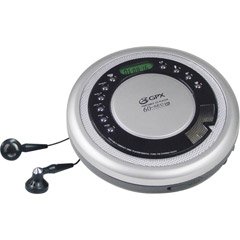
Figure 1: GPX CDP6806DT Personal CD Player. This image illustrates the compact design and general appearance of the device.
4. Башкаруу элементтери жана өзгөчөлүктөрү
Familiarize yourself with the controls and features of your GPX CDP6806DT for optimal use.
- LCD дисплей: 6-digit display for track number, time, and FM frequency.
- ОЙНОТУУ/ТЫНДЫРУУ (►/−): Press to start or pause CD playback.
- STOP (■): Press to stop CD playback.
- SKIP/SEARCH (◀◀/▶▶): Press to skip tracks. Hold to search within a track.
- Көлөмү (+/-): Аудио чыгаруу деңгээлин тууралайт.
- РЕЖИМ/ПРОГ: Selects playback mode (Repeat, Random) or programs CD tracks.
- FM TUNER (ON/OFF/BAND): Switches to FM radio mode, turns FM on/off, or changes FM band.
- PRESET (+/-): Navigates saved FM radio presets.
- CD бөлүмү: Area for inserting audio CDs.
- Батарея бөлүмү: Located on the bottom, holds 2 AA batteries.
- Наушник уячасы (3.5 мм): Жеке угуу үчүн кулакчындарды туташтырат.
Figure 2: GPX CDP6806DT Controls Layout. This image provides a visual reference for the location of various buttons and ports on the device.
5. Орнотуу
5.1 Батареяны орнотуу
The GPX CDP6806DT requires two (2) AA batteries (not included) for portable operation.
- Аппараттын астындагы батарея отсегин табыңыз.
- Батарея бөлүгүнүн капкагын жылдырыңыз.
- Бөлүмдүн ичинде көрсөтүлгөндөй, туура полярдуулукту (+ жана -) текшерип, эки AA батарейкасын салыңыз.
- Батарея уясынын капкагын бекем жабыңыз.
5.2 Наушниктерди туташтыруу
For private listening, connect your 3.5mm stereo headphones (not included) to the headphone jack located on the side of the unit.
6. Иштөө нускамалары
6.1 CD ойнотуу
The unit supports CD and CD-R/RW disc formats.
- Open the CD compartment lid by gently pressing the OPEN button (if present, or lifting the lid).
- Place a CD with the label side facing up onto the center spindle.
- Close the CD compartment lid firmly until it clicks.
- басыңыз PLAY/PAUSE (►/−) button to begin playback. The track number and elapsed time will appear on the LCD display.
- Ойнотууну тындыруу үчүн, басыңыз PLAY/PAUSE (►/−). Улантуу үчүн дагы бир жолу басыңыз.
- Ойнотууну токтотуу үчүн, басыңыз STOP (■) баскычы.
- Кийинки трекке өтүү үчүн басыңыз SKIP/SEARCH (▶▶).
- To go back to the beginning of the current track, press ӨТКӨРҮП ЖИБЕРҮҮ/ИЗДӨӨ (◀◀) once. Press twice to go to the previous track.
- To search rapidly forward or backward within a track, hold down SKIP/SEARCH (▶▶) or (◀◀) тиешелүү түрдө.
- Үнүн колдонуп, үнүн жөндөңүз Көлөмү (+/-) башкаруу элементтери.
6.2 FM радиосунун иштеши
The unit features a digital FM tuner with station presets.
- жылдырыңыз FM TUNER switch to the ON position or press the БАНД FM режимине өтүү үчүн баскычты басыңыз.
- басыңыз SKIP/SEARCH (▶▶) or (◀◀) каалаган жыштыкка кол менен тууралоо үчүн баскычтар.
- To auto-scan and save stations, hold down the PLAY/PAUSE (►/−) button (or refer to specific instructions for auto-scan if available on the device).
- To recall saved presets, use the PRESET (+/-) баскычтар.
6.3 CD Programming (24-Track)
Белгилүү бир тартипте ойнотуу үчүн 24га чейин тректи программалай аласыз.
- CD токтоп турганда, баскычын басыңыз MODE/PROG баскычын басыңыз. Дисплейде "PROG" деген жазуу күйүп-өчүп турат.
- колдонуу SKIP/SEARCH (▶▶) or (◀◀) buttons to select the first track you wish to program.
- Басыңыз MODE/PROG again to confirm the selection. The display will show the program number and the next available program slot.
- Repeat steps 2 and 3 to add up to 24 tracks to your program.
- Бардык каалаган тректерди программалагандан кийин, баскычын басыңыз PLAY/PAUSE (►/−) программаланган ойнотууну баштоо үчүн.
- To clear the program, press the STOP (■) баскычын эки жолу басыңыз.
6.4 Anti-Skip Protection (ASP)
The GPX CDP6806DT features a 60-second Anti-Skip Protection system. This system buffers audio data to minimize interruptions caused by minor shocks or vibrations during CD playback. The ASP activates automatically when a CD is playing.
7. Техникалык тейлөө
7.1 Агрегатты тазалоо
- Аппараттын сыртын жумшак, кургак чүпүрөк менен сүртүңүз.
- Абразивдүү тазалагычтарды, момдорду же эриткичтерди колдонбоңуз.
- If the CD lens needs cleaning, use a specialized CD lens cleaner disc or a soft, lint-free cloth designed for optical lenses.
7.2 Батареяга кам көрүү
- Remove batteries if the unit is not used for an extended period to prevent leakage.
- Эски жана жаңы батарейкаларды же ар кандай типтеги батареяларды аралаштырбаңыз.
- Колдонулган батарейкаларды жергиликтүү эрежелерге ылайык таштаңыз.
8. Кыйынчылыктарды
If you experience issues with your GPX CDP6806DT, please consult the following table for common problems and solutions.
| Көйгөй | Мүмкүн болгон себеп / Чечим |
|---|---|
| Түзмөк күйбөйт. | Check if batteries are inserted correctly with proper polarity. Ensure batteries are fresh and not depleted. |
| Наушниктен үн чыкпайт. | Ensure headphones are fully plugged into the headphone jack. Increase the volume level. Test with another pair of headphones. |
| CD ойнотулбай жатат же ойнотуу үзгүлтүккө учурады. | Ensure the CD is clean and free of scratches or smudges. Clean the CD with a soft, lint-free cloth. Ensure the unit is on a stable surface or held steadily during use. |
| CD ойнобойт. | Ensure the CD is inserted correctly with the label side up. Close the CD compartment lid completely. Check if the CD is a supported format (CD, CD-R/RW). |
| FM радиосун кабыл алуу начар. | Extend the headphone cable as it acts as the antenna. Try moving to a different location. |
9. Техникалык шарттар
- Бренд: GPX
- Модел: CDP6806DT
- Колдоого алынган диск форматтары: CD, CD-R / RW
- Өткөрүп жиберүүгө каршы коргоо: 60 секунд
- Дисплей: 6 орундуу LCD
- Радио: Digital FM Tuner with Presets
- CD Programming: 24-трек
- Кубат булагы: 2 x AA батарейкалар (киргизилген эмес)
- Байланыш: 3.5 мм гарнитура уячасы (көмөкчү)
10. Кепилдик жана колдоо
For detailed warranty information, please refer to the warranty card included with your original product packaging. For technical support, service inquiries, or to purchase replacement parts, please visit the official GPX webсайтына кириңиз же продуктуңуздун документтеринде берилген байланыш маалыматын колдонуп, алардын кардарларды тейлөө бөлүмүнө кайрылыңыз.
Кепилдик дооматтары үчүн сатып алганыңыздын далилин сактап коюңуз.