
1. Киришүү
This manual provides detailed instructions for the setup, operation, and maintenance of your Bushnell Onix 200 Portable GPS Navigator. The Onix 200 is designed for outdoor use, offering navigation capabilities with satellite and aerial photos on a 2.7-inch sunlight-readable LCD screen. It features a rugged, waterproof design (IPX7) and 32 MB of internal memory for storing navigational data.
2. Продукт бүтүп калдыview
2.1 Негизги өзгөчөлүктөрү
- Navigation with satellite and aerial photos.
- Rugged rubber armor and IPX7 waterproof rating.
- Sunlight-readable 2.7-inch LCD screen.
- Колдонуучу Profiles for customized activity settings.
- Night-mode screen viewопциясы.
- 32 MB internal memory.
- USB туташуу.
2.2 Компоненттер
The Bushnell Onix 200 package typically includes:
- Bushnell Onix 200 GPS Unit
- Билек тоо
- USB кабели (маалыматтарды өткөрүү жана кубаттоо үчүн)
- Колдонуучунун Колдонмосу (бул документ)
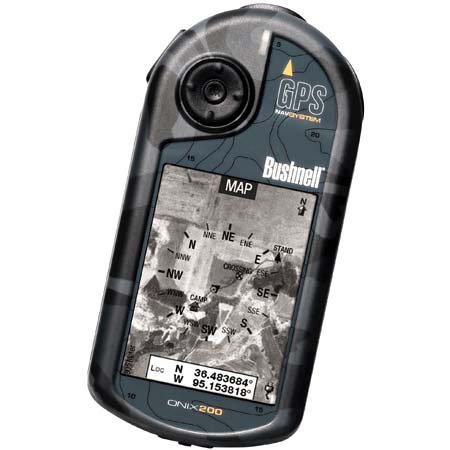
Figure 1: Bushnell Onix 200 handheld GPS unit, showing its rugged design and screen.
3. Орнотуу
3.1 Батареяны орнотуу
The Bushnell Onix 200 does not include batteries. It requires standard AA batteries (not included). To install:
- Аппараттын артындагы батарея бөлүкчөсүнүн капкагын табыңыз.
- Капкакты белгилерге ылайык жылдырып же ачуу аркылуу ачыңыз.
- Туура полярдуулукту (+/-) камсыз кылып, керектүү сандагы AA батарейкаларын салыңыз.
- Securely close the battery compartment cover to maintain the waterproof seal.
3.2 Баштапкы күйгүзүү жана негизги орнотуулар
- Экран жарык кылганга чейин кубат баскычын басып, кармап туруңуз.
- Upon first use, the device may prompt you to set basic preferences such as language, time zone, and measurement units. Follow the on-screen instructions.
- Allow the device to acquire a GPS signal. This may take several minutes, especially during the first use or after a long period of inactivity. Ensure you are in an open area with a clear view асмандын.
3.3 Компьютерге туташуу
Use the provided USB cable to connect the Onix 200 to your computer for data transfer, map updates, or firmware updates. The device is compatible with Windows operating systems.
4. Иштөө нускамалары
4.1 Navigation with Satellite/Aerial Photos
The Onix 200 allows you to overlay navigation information directly onto satellite or aerial photographs. This feature provides enhanced situational awareness, especially in unfamiliar terrain.
- Access the map view негизги менюдан.
- Select the desired map type (e.g., satellite, aerial, USGS map) from the display options.
- Use the touch screen or voice controls to pan, zoom, and interact with the map.
- Your current position will be indicated on the map, along with any loaded waypoints or routes.
4.2 User Profiles
The "User Profiles" feature allows you to customize the device's settings and menu options based on your activity (e.g., hiking, fishing, hunting). This streamlines access to relevant functions.
- "Profiles" section in the main menu.
- Учурдагы профессионалды тандаңызfile же жаңысын түзүү.
- Customize settings such as display preferences, data fields, and shortcut menus for that specific activity.
- Activate the desired profile before starting your activity.
4.3 Түнкү режим
For low-light conditions, activate the night-mode screen viewing option. This adjusts the display's backlight and color scheme to reduce eye strain and improve visibility in the dark.
- Access display settings from the main menu.
- Toggle the "Night Mode" option to ON.
4.4 Контролдоо ыкмалары
The Onix 200 supports both touch screen and voice control for interacting with the device. Refer to the on-screen prompts and the device's internal help system for specific voice commands.
5. Техникалык тейлөө
5.1 Аппаратты тазалоо
- Экранды жана сыртын жумшак менен сүртүңүз, гamp, түксүз кездеме.
- Do not use abrasive cleaners, solvents, or aerosol sprays, as these can damage the device's finish and screen.
- Ensure all ports are dry before connecting cables.
5.2 Waterproofing Care (IPX7)
The Onix 200 is waterproof to IPX7 standards, meaning it can withstand immersion in water up to 1 meter for 30 minutes. To maintain this rating:
- Ensure the battery compartment cover and any port covers are securely closed before exposure to water.
- Do not intentionally submerge the device beyond its rated depth or duration.
- If the device gets wet, dry it thoroughly before opening any compartments or connecting to power.
5.3 Сактоо
Store the device in a cool, dry place away from direct sunlight and extreme temperatures when not in use. Remove batteries if storing for extended periods to prevent leakage.
6. Кыйынчылыктарды
6.1 Күч жок
- Check if batteries are correctly installed and fully charged.
- Эски батарейкаларды жаңысына алмаштырыңыз.
- Кубат баскычы басылып, жетиштүү кармалып турганын текшериңиз.
6.2 GPS сигналынын жоголушу же так эместиги
- Ачык жерде экениңизди тактаңыз view of the sky, away from tall buildings, dense foliage, or strong electromagnetic interference.
- Allow the device more time to acquire a signal.
- Perform a soft reset (refer to the device's internal menu for this option, if available).
6.3 Экран жооп бербейт
- Экран таза жана кургак экенин текшериңиз.
- If the touch screen is resistive, apply firm but gentle pressure.
- Аппаратты кайра иштетиңиз.
6.4 Device Not Connecting to Computer
- USB кабелинин түзмөккө да, компьютерге да бекем туташтырылганын текшериңиз.
- Компьютериңиздеги башка USB портун колдонуп көрүңүз.
- Ensure necessary drivers are installed on your Windows operating system.
For further assistance, please refer to the official Bushnell support resources.
7. Техникалык шарттар
| Өзгөчөлүк | Спецификация |
|---|---|
| Бренд | Bushnell |
| Модель аты | Onix 200 |
| Модель номери | 36-2000 |
| Screen Size | 2.7 дюйм |
| Резолюция | 160 x 240 |
| Дисплей түрү | LCD |
| Сенсордук экран түрү | Резистенттүү |
| Эстутум сактоо сыйымдуулугу | 32 MB |
| Байланыш технологиясы | USB |
| Карта түрү | Спутник |
| Колдоого алынган спутниктик навигация системасы | GPS |
| Өзгөчө өзгөчөлүк | Суу өткөрбөйт (IPX7) |
| Башкаруу ыкмасы | Тийүү, Үн |
| Операция системасы | Windows (for PC connection) |
| Өлчөмдөрү (W x Y x D) | 1.1 x 8.0 x 2.2 дюйм |
| Элемент Салмагы | 15.2 унция |
| Батареялар камтылган | No (Requires AA) |
| UPC | 029757362001 |
8. Кепилдик жана колдоо
For detailed warranty information, product registration, and technical support, please visit the official Bushnell webсайтка же кардарларды тейлөө бөлүмүнө кайрылыңыз.
Көбүрөөк маалымат жана колдоо булактарын бул жерден таба аласыз Amazon'догу Бушнелл дүкөнү.