
Zoom ZOO G92TT
Zoom G9.2tt Guitar Effects Console
User Manual
Introduction
This manual provides comprehensive instructions for the setup, operation, maintenance, and troubleshooting of your Zoom G9.2tt Guitar Effects Console. Please read this manual thoroughly before using the unit to ensure proper and safe operation, and to fully utilize its extensive features.
The Zoom G9.2tt is a powerful multi-effects processor designed for guitarists, offering a wide range of effects, amplifier models, and advanced features to shape your sound. It features dual vacuum tubes for enhanced tone and dynamic response, along with a unique Z-pedal for multi-directional expression control.
Продукт бүттүview

1-сүрөт: Жогорку view of the Zoom G9.2tt Guitar Effects Console. This image displays the main control surface, including the central display, various knobs for effects and pre-amp settings, five footswitches at the bottom, and two large expression pedals on either side.
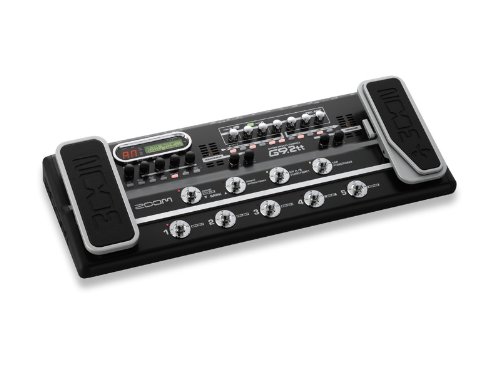
2-сүрөт: Бурчтуу view of the Zoom G9.2tt Guitar Effects Console. This perspective shows the unit's overall form factor, emphasizing the robust construction and the ergonomic placement of the expression pedals relative to the main control panel.
The G9.2tt features a robust metal chassis designed for durability. Key components include:
- Dual Expression Pedals: For volume, wah, pitch, and other real-time parameter control.
- Z-Pedal: A unique 3D expression pedal allowing control over three parameters simultaneously (X, Y, and Z axes).
- Бут өчүргүчтөр: For patch selection, effect on/off, and tap tempo.
- Башкаруу баскычтары: Dedicated knobs for various effect parameters and ampкөтөргүч орнотуулары.
- LCD дисплей: Provides visual feedback for patch names, parameter values, and system settings.
- Tube Accelerators/Energizers: Integrated vacuum tubes for adding warmth and harmonic richness to your tone.
Жайгашуу
1. Таңгактан чыгаруу жана текшерүү
Carefully remove the Zoom G9.2tt from its packaging. Inspect the unit for any signs of damage that may have occurred during transit. Retain the original packaging for future transport or storage.
2. Power Connection
Connect the supplied AC adapter to the DC IN jack on the rear panel of the G9.2tt. Plug the other end of the adapter into a standard AC power outlet. Ensure the power source matches the voltage requirements specified on the adapter (9 Volts).
3. Аудио байланыштары
The G9.2tt offers various input and output options:
- Гитара киргизүү: Стандарттык 1/4 дюймдук аспап кабелин колдонуп, гитараңызды INPUT уячасына туташтырыңыз.
- чыгаруу үчүн Ampкөтөргүч/PA: L/MONO жана R OUTPUT уячаларын гитараңызга туташтырыңыз amplifier, mixer, or PA system using 1/4-inch cables. For mono operation, use only the L/MONO jack.
- Гарнитуранын чыгышы: Үнсүз машыгуу үчүн, кулакчындарды PHONES уячасына туташтырыңыз.
- External Loop: The unit includes an external effects loop (SEND/RETURN jacks) for integrating external pedals into your signal chain.
4. USB Connection (Optional)
Connect the G9.2tt to your computer via the USB port for direct recording, patch management, and firmware updates. Ensure you have the necessary drivers installed on your computer, available from the Zoom webсайт.
Иштөө нускамалары
1. Күйгүзүү жана өчүрүү
To power on the unit, ensure all connections are secure, then plug in the AC adapter. There is no dedicated power switch; the unit powers on automatically when connected to power. To power off, disconnect the AC adapter.
2. Патч тандоо
The G9.2tt organizes sounds into "patches." There are 100 user patches and 100 preset patches, totaling 200. Patches are grouped into banks. Use the BANK UP/DOWN footswitches to navigate between banks. Within each bank, use the numbered footswitches (1-5) to select individual patches.
3. Патчтарды түзөтүү
To edit a patch, select it, then use the various knobs and the LCD display to adjust parameters for effects, amplifier models, and cabinet simulations. The unit features 10 effect modules and 120 effect types. Up to 10 effects can be used simultaneously. Refer to the detailed parameter list in the full manual for specific adjustments.
- Сактоо тактары: After editing, press the "STORE" button (or equivalent, as indicated by the LED) to save your changes to a user patch location.
- Tube Controls: The "ACCELERATOR" and "ENERGIZER" tube controls (physical knobs) are global and affect the overall voicing. Note that their settings are жок stored per patch and must be adjusted manually for different guitars, amps, or room acoustics.
4. Using the Z-Pedal
The Z-Pedal is a multi-dimensional expression pedal. It allows control over parameters not just by rocking forward and back (X-axis), but also by moving it left/right (Y-axis) and pressing down (Z-axis). Assign desired parameters to each axis within the patch editing mode for dynamic real-time control.
5. Айланып өтүү функциясы
The G9.2tt does not feature a true bypass. When the digital effects processor is bypassed, the signal still passes through analog components, including the solid-state preamp and tube exciters. This means the unit will always impart some coloration to your sound, even in "bypass" mode. This characteristic can be beneficial for solid-state amplifiers but may affect the clean tone of tube ampаман калгандар.
Техникалык тейлөө
1. Тазалоо
Wipe the unit regularly with a soft, dry cloth. For stubborn dirt, use a slightly damp cloth and then dry thoroughly. Do not use abrasive cleaners, waxes, or solvents, as these can damage the finish and internal components.
2. Сактоо
When not in use for extended periods, store the G9.2tt in a cool, dry place, away from direct sunlight and extreme temperatures. If possible, use the original packaging or a dedicated carrying case to protect it from dust and physical damage.
3. Жалпы кам көрүү
- Агрегаттын үстүнө суюктуктарды төгүүдөн сактаңыз.
- Агрегаттын үстүнө оор нерселерди койбоңуз.
- Protect the unit from excessive vibrations or impacts.
- Иштеп жаткан учурда блоктун айланасын туура желдетүүнү камсыз кылыңыз.
Проблемаларды чечүү
If you encounter issues with your Zoom G9.2tt, refer to the following common problems and solutions:
| Көйгөй | Мүмкүн себеп | Чечим |
|---|---|---|
| Үн жок же үнү төмөн. | Incorrect cable connections; volume levels too low; patch settings. | Check all input/output cables. Ensure guitar volume is up. Adjust master volume on the G9.2tt and your amplifier. Verify patch volume levels. |
| Керексиз ызы-чуу же ызы-чуу. | Ground loop; faulty cables; high gain settings; external interference. | Use shielded cables. Try a different power outlet. Reduce gain settings on the G9.2tt. Utilize the built-in ZNR (Zoom Noise Reduction) function. |
| Footswitch or button unresponsive. | Debris under switch; internal contact issue. | Gently clean around the switch. If persistent, contact customer support for service. |
| Difficulty achieving desired tone with tube controls. | Misunderstanding of global nature of tube controls. | Remember that ACCELERATOR and ENERGIZER settings are global and not saved per patch. Adjust them manually to suit your current setup (guitar, amp, room). |
| Sound is "muddy" or lacks clarity with tube amp. | Unit's bypass coloring the signal. | The G9.2tt does not have a true bypass. Its analog components (preamp, tube exciters) are always in the signal path. Experiment with different output modes or consider using the unit primarily with solid-state amps if a completely uncolored signal is critical for your tube amp's clean tone. |
Техникалык шарттар
- Модел: ZOO G92TT
- Эффект түрлөрү: 120
- Эффект модулдары: 10
- Maximum Simultaneous Effects: 10
- Patch Memory: User 100 + Preset 100 (Total 200)
- Sampling жыштыгы: 96кГц
- Сигнал форматы: Аналог
- Аппараттык интерфейс: 1/4-inch Audio, USB
- Кубат булагы: Электр зымдары
- Тtage: 9 вольт
- Ampкарылык: 300 миллионamps
- Түсү: Кара
- Элемент Салмагы: 2.72 kg (approx. 2 kg 720 g)
- Пакеттин өлчөмдөрү: 72.14 x 28.7 x 11.68 см
- Өндүрүүчү: Чоңойтуу
- Биринчи жеткиликтүү: 9 август 2012 жыл
Кепилдик жана колдоо
Кепилдик жөнүндө толук маалымат алуу үчүн, өнүмүңүз менен кошо берилген кепилдик картасын караңыз же расмий Zoom веб-сайтына кириңиз. webсайт. Кепилдиктин шарттары жана шарттары аймакка жараша өзгөрүшү мүмкүн.
For technical support, service, or to download the latest drivers and firmware updates, please visit the official Zoom support website or contact your local authorized Zoom dealer. Keep your purchase receipt as proof of purchase for warranty claims.
Расмий Zoom Webсайт: www.zoom.co.jp (Note: Link provided as an example, actual product page may vary)
Ask a question about this manual
Ask about setup, troubleshooting, compatibility, parts, safety, or missing instructions. Manuals+ will review the question and use this page’s manual context to help answer it.