
1. Киришүү
The Supermicro SBM-CMM-001 Chassis Management Module is designed to provide comprehensive remote management and monitoring capabilities for SuperBlade server systems. This module integrates advanced features to ensure efficient operation and maintenance of your server infrastructure.
Негизги өзгөчөлүктөр төмөнкүлөрдү камтыйт:
- Remotely manage and monitor server blades, power supplies, cooling fans, and networking switches.
- IPMI 2.0 compliant, with KVM over LAN / KVM over IP for remote console access.
- Serial over LAN (SOL) for remote serial port redirection.
- Virtual Media Over LAN (Virtual USB Floppy/CD and Drive Redirection) for remote media access.
- LAN Alert-SNMP Trap for network-based event notifications.
2. Орнотуу жана орнотуу
This section outlines the steps for installing and initially configuring your SBM-CMM-001 module within a SuperBlade chassis.
2.1 Физикалык орнотуу
- Өчүрүү: Ensure the SuperBlade chassis is completely powered off and disconnected from all power sources before proceeding.
- Орун табыңыз: Identify the designated Chassis Management Module slot in your SuperBlade chassis. Refer to your SuperBlade chassis manual for exact slot location.
- Модулду киргизүү: Carefully slide the SBM-CMM-001 module into the designated slot until it is firmly seated. Ensure the connectors align properly.
- Коопсуз модулу: Secure the module using any retaining screws or latches provided by the chassis design.
- Тармакка туташуу: Connect an Ethernet cable from your network to the LAN port on the SBM-CMM-001 module.
- Күйгүзүү: Reconnect power to the SuperBlade chassis and power it on. The SBM-CMM-001 module will initialize automatically.
2.2 Баштапкы тармак конфигурациясы
Upon first boot, the SBM-CMM-001 may obtain an IP address via DHCP. If DHCP is not available or a static IP is required, you will need to access the module's console or use a discovery tool provided by Supermicro.
- Демейки кирүү: Consult the Supermicro documentation for the default IP address or method to discover the module's IP address on your network.
- Web Интерфейс: Once the IP address is known, access the module's web- негизделген башкаруу интерфейси аркылуу web браузер.
- Кирүү: Use the default username and password (refer to Supermicro documentation for defaults) to log in. It is highly recommended to change default credentials immediately after initial login.
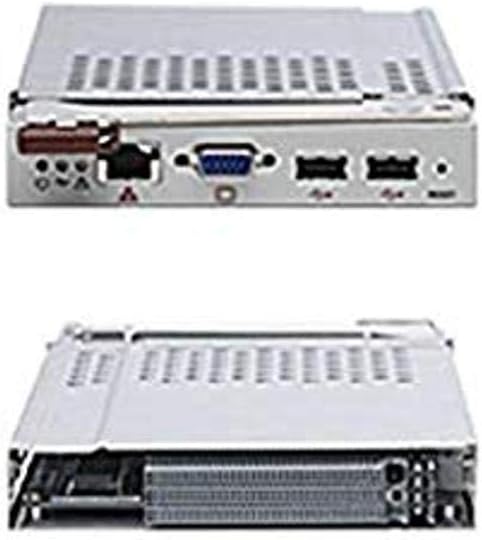
Figure 1: Supermicro SBM-CMM-001 Chassis Management Module showing its various ports and form factor.
3. Операция
The SBM-CMM-001 provides a robust set of tools for managing your SuperBlade environment. This section covers the primary operational aspects.
3.1 Web- Негизделген башкаруу интерфейси
The primary method for managing the SBM-CMM-001 is through its intuitive web interface. This interface allows you to:
- Monitor the status of server blades, power supplies, and cooling fans.
- Access KVM over IP for remote console control of individual blades.
- Perform power control operations (power on, off, reset) for server blades.
- Configure network settings, user accounts, and security parameters.
- Manage virtual media for remote OS installation or diagnostics.
- View system event logs and sensor readings.
3.2 KVM over IP
The KVM over IP feature allows you to remotely access the video, keyboard, and mouse of any server blade within the chassis. This is crucial for operating systems installation, BIOS configuration, and troubleshooting without physical presence.
- Navigate to the KVM section in the web интерфейс.
- Select the desired server blade.
- Launch the KVM console viewer (typically a Java or HTML5 application).
3.3 Виртуалдык медиа
Virtual Media allows you to redirect local CD/DVD-ROM drives or ISO image files from your client machine to a remote server blade. This is invaluable for installing operating systems or running diagnostic tools.
- Access the Virtual Media section in the web интерфейс.
- Select the type of media to redirect (e.g., CD/DVD, Floppy, ISO image).
- Browse for the local media or ISO file and connect it to the remote server.
4. Техникалык тейлөө
Regular maintenance ensures the longevity and optimal performance of your SBM-CMM-001 module.
4.1 Микропрограмма жаңыртуулары
Supermicro periodically releases firmware updates to improve performance, add features, or address security vulnerabilities. It is recommended to keep your module's firmware up to date.
- Visit the official Supermicro webсайт (www.supermicro.com) to download the latest firmware for the SBM-CMM-001.
- Follow the instructions provided with the firmware package for the update process, typically performed through the web интерфейс.
- Абайлаңыз: Do not interrupt the power supply during a firmware update, as this may damage the module.
4.2 Тазалоо
Keep the module and its surrounding area free from dust and debris to ensure proper airflow and prevent overheating.
- Use a soft, dry cloth to wipe the exterior of the module.
- For internal cleaning (if necessary and only by qualified personnel), use compressed air to remove dust from vents and components.
5. Кыйынчылыктарды
This section provides solutions to common issues you might encounter with your SBM-CMM-001 module.
5.1 Модуль жооп бербей жатат
- Күчтү текшерүү: Ensure the SuperBlade chassis is powered on and the module is receiving power.
- Reseat Module: Power off the chassis, then carefully remove and reinsert the SBM-CMM-001 module to ensure it is properly seated.
- Тармакка туташуу: Verify that the Ethernet cable is securely connected and that your network is functioning correctly. Try pinging the module's IP address.
- Модулду калыбына келтирүү: If accessible, perform a soft reset of the module via the chassis management interface or by temporarily removing power.
5.2 KVM Console Not Displaying
- Браузердин шайкештиги: Сиздин камсыз кылуу web browser is compatible with the KVM viewer. Some older modules may require Java.
- Firewall жөндөөлөрү: Check if your local firewall or network firewall is blocking the necessary ports for KVM communication.
- Server Blade Status: Verify that the target server blade is powered on and functioning correctly.
- Микропрограмма: Ensure the SBM-CMM-001 firmware is up to date.
6. Техникалык шарттар
Detailed technical specifications for the Supermicro SBM-CMM-001 Chassis Management Module.
| Өзгөчөлүк | Description |
|---|---|
| Бренд | Supermicro |
| Модель номери | SBM-CMM-001 |
| Иштөө режими | KVM |
| Туташтыргыч түрү | USB |
| Controller Type | Remote Management Controller |
| Башкаруу ыкмасы | Алыстан |
| Connectivity Protocol | Ethernet |
| Элементтин өлчөмдөрү (L x W x Y) | 17.2 x 1.7 x 14.5 дюйм |
| Элемент Салмагы | 2.2 фунт |
| Дата биринчи жеткиликтүү | 1-октябрь, 2007-жыл |
| UPC | 672042016112, 672042017928 |
7. Кепилдик жана колдоо
Кепилдик жана техникалык колдоо боюнча толук маалымат алуу үчүн, расмий Supermicro компаниясына кайрылыңыз webсайтка же түздөн-түз кардарларды тейлөөгө кайрылыңыз.
- Официалдуу Webсайт: www.supermicro.com
- Колдоо булактары: Supermicro website provides drivers, firmware, FAQs, and contact information for technical assistance.