1. Киришүү
The Microsoft Digital Media Keyboard 3000 is a wired keyboard designed to enhance your digital media experience and productivity. It offers convenient one-touch access to various functions, including media playback, email, and document navigation. This keyboard is compatible with Windows Vista and other specified operating systems, providing a sleek and functional input solution.
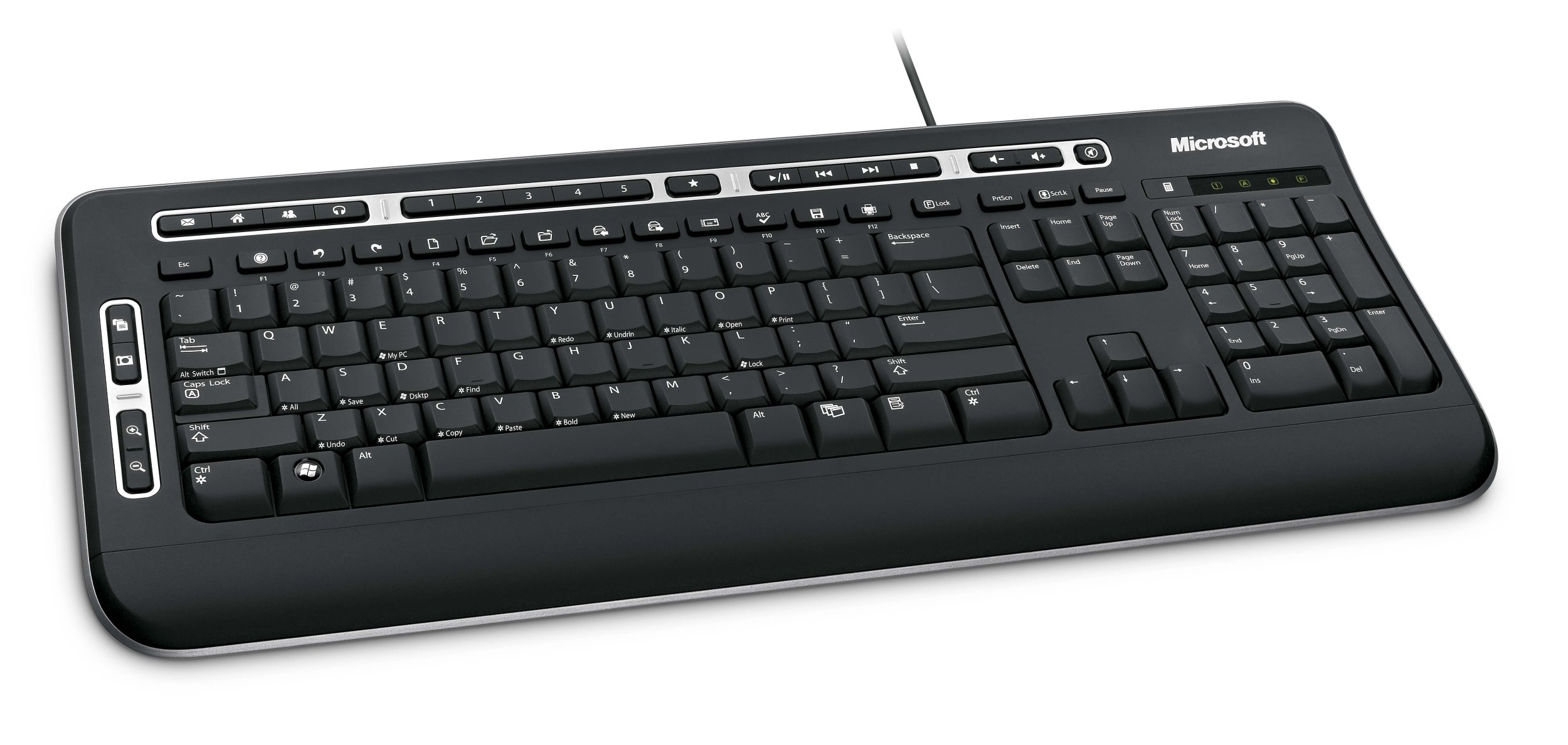
Figure 1: ашыкview of the Microsoft Digital Media Keyboard 3000.
2. Негизги өзгөчөлүктөрү
- Медиа борбордун башкаруу элементтери: Manage your media playback with dedicated buttons.
- Ыкчам баскычтар: Quick access to applications like Windows Media Player, email, web browser, calculator, My Documents, instant messaging, and photos.
- Чоңойтуу функциясы: Easily zoom in and out of images, documents, and maps.
- "My Favorites" Hot Keys: Five customizable keys for instant access to frequently used photos, folders, fileс, же web pages. Set by pressing and holding the desired key.
- Enhanced F Keys: Perform common commands directly from the F1-F12 keys.
- Windows® Flip 3D Key: (For Windows Vista) Displays a 3D overlay of open windows for easy cycling.
- Windows баштоо баскычы: Launches the Start menu. In Windows Vista, allows searching your PC or the web.
- Spill-Resistant Keys: Designed with integrated water channels to drain liquids, offering protection against accidental spills.

Figure 2: Close-up of the keyboard layout, highlighting media and function keys.
3. Орнотуу нускамалары
- Баскычтопту таңгактан чыгаруу: Баскычтопту таңгагынан кылдаттык менен чыгарып алыңыз.
- USB портуна туташуу: Баскычтоптун USB туташтыргычын компьютериңиздеги жеткиликтүү USB портуна сайыңыз.
- Драйверди орнотуу: Your operating system should automatically detect and install the necessary drivers. If prompted, follow the on-screen instructions. For advanced features and customization, you may need to install the IntelliType software from the included CD or Microsoft's support webсайт.
- Баскычтоптун жантайышын тууралоо: The keyboard features adjustable feet on the underside. Flip these out to change the typing angle for personal comfort.

Figure 3: Underside of the keyboard with adjustable feet.
4. Иштөө нускамалары
4.1. Using Media Keys
The dedicated media keys located at the top of the keyboard allow for quick control of your audio and video playback. These include Play/Pause, Stop, Previous Track, Next Track, Volume Up, Volume Down, and Mute.
4.2. Utilizing Hot Keys
Press the designated hot keys to instantly launch applications such as your web browser, email client, or Windows Media Player. Refer to the icons on the keys for their specific functions.
4.3. Чоңойтуу функциясы
Use the Zoom keys to quickly magnify or reduce the view of documents, images, or web pages. This feature is particularly useful for detailed work or viewing content at a comfortable size.
4.4. Windows® Flip 3D (Windows Vista Only)
If you are using Windows Vista, press the Windows Flip 3D key to activate a dynamic 3D view of all open windows, allowing you to cycle through them efficiently.
5. Ыңгайлаштыруу
5.1. "My Favorites" Hot Keys
To customize one of the five "My Favorites" keys, navigate to the desired photo, folder, file, же web page. Then, press and hold the chosen "My Favorites" key until the setting is saved. This allows for personalized shortcuts to your most frequently accessed items.
5.2. Enhanced F Keys
The Enhanced F Keys provide additional functionality beyond standard F1-F12 operations. These can often be configured through the IntelliType software to perform specific commands or macros, enhancing your workflow.
6. Техникалык тейлөө
6.1. Тазалоо
Баскычтопту тазалоо үчүн аны компьютериңизден ажыратыңыз. жумшак колдонуу, damp cloth to wipe the surface. For stubborn dirt between keys, a can of compressed air can be used. Avoid using harsh chemicals or abrasive cleaners.
6.2. Spill Resistance
The keyboard is designed with spill-resistant features, meaning it has integrated channels to help drain liquids away from sensitive components. In case of a spill, immediately disconnect the keyboard, turn it upside down to drain liquid, and allow it to dry completely before reconnecting. While spill-resistant, it is not waterproof, and excessive liquid exposure should be avoided.
7. Кыйынчылыктарды
- Баскычтоп жооп бербейт: Ensure the USB cable is securely plugged into a working USB port. Try a different USB port or restart your computer.
- Ачкычтар туура иштебейт: Check for any debris under the keys. If the issue persists, ensure the correct drivers are installed.
- Мультимедиа баскычтары иштебей жатат: Verify that the IntelliType software (if applicable) is installed and running. Some functions may require specific media player software to be active.
- Үзгүлтүктүү туташуу: Ensure the USB cable is not damaged. Avoid routing the cable in areas where it might be pinched or stressed.
8. Системалык талаптар
- Операция системасы: Windows Vista®/XP or Mac OSX v.10.2–10.5.X
- Катуу диск мейкиндиги: 100 MB for Windows Vista®/XP, 30 MB for Mac OSX
- Байланыш: Жеткиликтүү USB порту
- Башка: CD drive (for software installation, if not downloaded)
9. Техникалык шарттар
| Бренд | Microsoft |
| Модель номери | J93-00001 |
| Продукциянын өлчөмдөрү | 1.61 x 8.23 x 19.57 дюйм |
| Элемент Салмагы | 1.09 фунт |
| Байланыш технологиясы | USB |
| Keyboard Description | Мультимедиа |
| Өзгөчө өзгөчөлүк | Төгүлүүгө туруктуу |
| Түс | Кара |
| Материал | Пластик |
| Камтылган компоненттер | Баскычтоп |
10. Кепилдик жана колдоо
For information regarding product warranty, technical support, or service, please refer to the documentation included with your purchase or visit the official Microsoft support webсайт. Кепилдик дооматтар үчүн сатып алганыңыздын далилин сактаңыз.