
1. Киришүү
The BlueAnt Z9i is an advanced Bluetooth headset designed for clear communication in various environments. Featuring BlueAnt's Voice Isolation Technology, it provides superior noise suppression, echo cancellation, and wind noise reduction. This manual will guide you through the setup, operation, and maintenance of your Z9i headset.
2. Пакеттин мазмуну
Verify that all items are present in your BlueAnt Z9i package:
- BlueAnt Z9i Bluetooth Headset
- Ear hooks (various sizes)
- Кулакчындар (ар кандай өлчөмдөрдө)
- USB заряддоо кабели
- AC кубаттагыч
- Колдонуучунун Колдонмосу (бул документ)

1-сүрөт: BlueAnt Z9i Retail Packaging. Contents may vary slightly.
3. Продукт бүтүп калдыview
Familiarize yourself with the components of your BlueAnt Z9i headset:
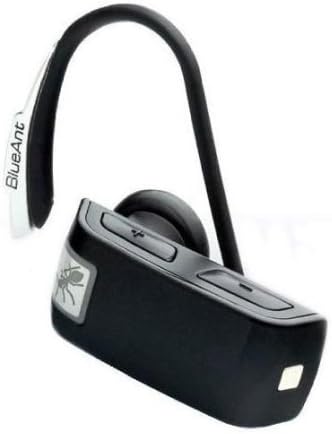
2-сүрөт: BlueAnt Z9i Bluetooth Headset.
- Көп функциялуу баскыч (MFB): Power on/off, answer/end calls, pairing mode.
- Көлөмдү өйдө / ылдый баскычтары: Adjust call volume, navigate menus.
- Заряддоо порту: Connect USB charging cable.
- LED көрсөткүчү: Displays status (power, pairing, battery).
- Микрофон: Captures your voice.
- Кулак илгич: Secures the headset to your ear.
4. Орнотуу
4.1. Гарнитураны заряддоо
Before first use, fully charge your BlueAnt Z9i headset.
- USB кубаттоочу кабелдин кичинекей учун гарнитуранын кубаттоочу портуна туташтырыңыз.
- Connect the other end of the USB cable to the AC wall charger or a powered USB port on your computer.
- Жарык диодунун индикатору заряддоо учурунда кызыл түстө күйөт, ал эми толук заряддалганда көк түскө айланат.
- Толук кубаттоо, адатта, болжол менен 2 саатты талап кылат.
4.2. Bluetooth түзмөгү менен жупташуу
The BlueAnt Z9i can be paired with up to 5 devices and connected to two phones simultaneously (multipoint functionality).
- Гарнитура өчүрүлгөнүн текшериңиз.
- Press and hold the Multi-Function Button (MFB) for approximately 5-7 seconds until the LED indicator flashes blue and red alternately. This indicates pairing mode.
- On your Bluetooth-enabled device (e.g., smartphone), go to the Bluetooth settings and enable Bluetooth.
- Издөө available devices. The BlueAnt Z9i will appear in the list.
- Select "BlueAnt Z9i" from the list. If prompted for a passcode, enter "0000".
- Once paired, the LED indicator on the headset will flash blue periodically.
5. Гарнитураны иштетүү
5.1. Күйгүзүү/өчүрүү
- Күйгүзүү үчүн: Press and hold the MFB for 2 seconds until the LED flashes blue.
- Өчүрүү үчүн: Press and hold the MFB for 3 seconds until the LED flashes red and then turns off.
5.2. Чалууларды башкаруу
- Чалууга жооп берүү: MFB бир жолу басыңыз.
- Чалууну бүтүрүү: MFB бир жолу басыңыз.
- Чалууну четке кагуу: MFBди 2 секунд басып туруңуз.
- Акыркы номерди кайра терүү: MFBди эки жолу басыңыз.
- Үн менен терүү: Press the MFB once (if supported by your phone).
5.3. Үндү башкаруу
Press the Volume Up (+) or Volume Down (-) buttons during a call to adjust the listening volume.
5.4. Voice Isolation Technology
The Z9i features two Voice Isolation modes: Standard and Max.
- Стандарттык режим: Provides effective noise and echo cancellation for most environments.
- Макс режими: Enhances noise suppression for extremely noisy environments.
To switch between modes, press and hold both Volume Up and Volume Down buttons simultaneously for 2 seconds. The headset will announce the current mode.
5.5. Multipoint Functionality
To connect to two phones simultaneously:
- Pair the Z9i with the first phone as described in Section 4.2.
- Гарнитураны өчүрүңүз.
- Put the headset back into pairing mode and pair it with the second phone.
- Once paired with the second phone, turn off the headset and then turn it back on. It will attempt to connect to both previously paired phones.
5.6. Үн буйруктары
The Z9i supports voice commands for checking status:
- Press the MFB once, then say "Status" to hear battery level and connection status.
6. Техникалык тейлөө
- Тазалоо: Гарнитураны тазалоо үчүн жумшак, кургак чүпүрөктү колдонуңуз. Катуу химиялык заттарды же абразивдүү материалдарды колдонбоңуз.
- Сактагыч: Гарнитураны салкын, кургак жерде, экстремалдык температурадан жана тике күн нурунан алыс сактаңыз.
- Батареяга кам көрүү: Батареянын иштөө мөөнөтүн узартуу үчүн, бат-баттан батарейканы толук зарядсыздандырбаңыз. Гарнитураны узак убакыт бою колдонбосо дагы, дайыма заряддап туруңуз.
7. Кыйынчылыктарды
| Көйгөй | Чечим |
|---|---|
| Гарнитура күйбөйт. | Ensure the headset is charged. Connect to the charger and wait a few minutes before attempting to power on. |
| Гарнитураны түзмөгүм менен жупташтырууга мүмкүн болбой жатат. | Make sure the headset is in pairing mode (flashing blue/red). Ensure Bluetooth is enabled on your device and it is discoverable. Try restarting both devices. |
| Үн жок же үн сапаты начар. | Check the volume levels on both the headset and your connected device. Ensure the headset is within range of your device. Re-pair the headset if necessary. |
| Гарнитура бат-баттан ажыратылат. | Ensure the headset is within the recommended Bluetooth range (typically 10 meters/33 feet) of your device. Avoid obstacles that may interfere with the signal. |
| Voice Isolation is not effective. | Ensure the microphone is positioned correctly. Try switching to 'Max' Voice Isolation mode for extremely noisy environments. |
8. Техникалык шарттар
- Модел: BlueAnt Z9i
- Байланыш: Bluetooth зымсыз
- Форма фактору: In-Ear
- Башкаруу ыкмасы: Үн, Баскычтар
- Өзгөчөлүктөрү: Voice Isolation Technology (Standard & Max), Echo Cancellation, Noise Cancellation, Wind Noise Reduction, Multipoint
- Шайкеш түзмөктөр: Смартфондор, ноутбуктар, планшеттер, акылдуу динамиктер
- Салмагы: Болжол менен 0.32 фунт
9. Кепилдик жана колдоо
9.1. Кепилдик маалыматы
The BlueAnt Z9i Bluetooth Headset comes with a BlueAnt 2 Year Replacement Warranty. Кепилдик дооматтары үчүн сатып алганыңыздын далилин сактап коюңуз. Кепилдик нормалдуу колдонууда өндүрүштүк кемчиликтерди камтыйт. Бул туура эмес колдонуудан, кырсыктардан, уруксатсыз өзгөртүүлөрдөн же кадимки эскирүүдөн келип чыккан зыянды камтыбайт.
9.2. Кардарларды колдоо кызматы
For technical assistance, troubleshooting, or warranty inquiries, please visit the official BlueAnt website or contact their customer support directly. Refer to the packaging or BlueAnt's official webакыркы байланыш маалыматы үчүн сайт.