
Introduction
This manual provides instructions for the proper use and maintenance of your Presto 04213 Digital Timer. This electronic timer is designed for various timing needs, featuring both countdown and stopwatch functions. It includes an easy-to-read LCD display, an audible alarm, and a memory function for convenience.
Пакеттин мазмуну
- Presto 04213 Digital Timer
- 1 AAA Батарея (кошулган)
Жайгашуу
Батарея орнотуу
- Locate the battery compartment on the back of the timer. This is typically covered by the clip/easel stand.
- Gently open the clip/easel stand to access the battery compartment.
- Оң (+) жана терс (-) терминалдары бөлүмдүн ичиндеги белгилер менен туура дал келишин камсыз кылып, бир AAA батареясын салыңыз.
- Close the battery compartment securely. The timer display should now be active.

Сүрөт: Артка view of the timer with the easel stand deployed, revealing the battery compartment and a separate AAA battery.
Жайгаштыруу параметрлери
The Presto 04213 Digital Timer offers versatile placement options:
- Магниттик тиркеме: A magnet on the back allows the timer to be attached to metallic surfaces like refrigerators or ovens.
- Easel Stand: The integrated clip can be extended to form an easel stand for tabletop use.
- Клип: The clip can also be used to attach the timer to clothing or other objects.
Иштөө нускамалары
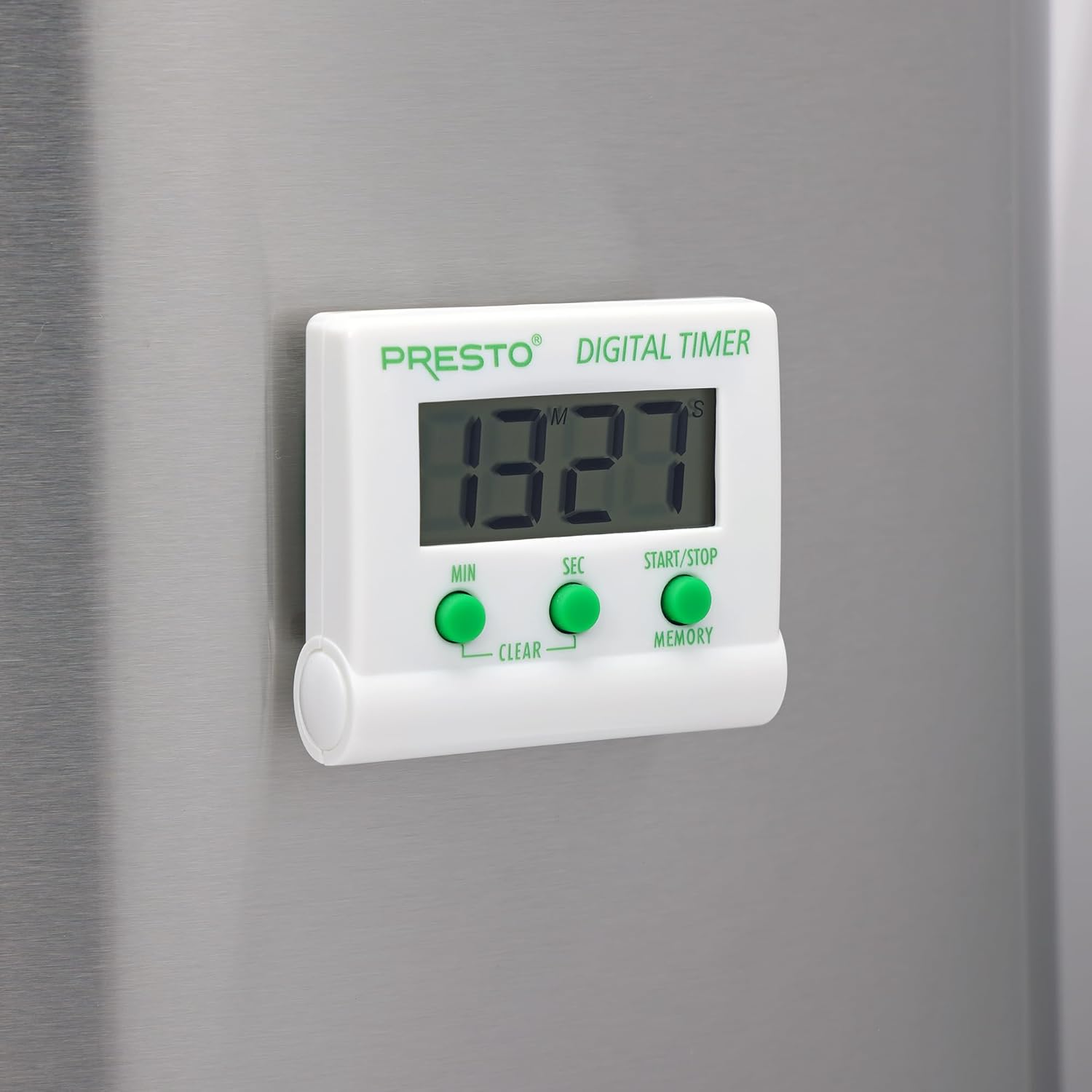
Сүрөт: алдыңкы view of the Presto Digital Timer, displaying the time and showing the MIN, SEC, and START/STOP/MEMORY buttons.
Артка саноо таймерин орнотуу
- басыңыз MIN button to set the desired minutes (up to 99).
- басыңыз SEC button to set the desired seconds (up to 59).
- To clear the current time setting, press both MIN жана SEC баскычтарды бир эле учурда.
- басыңыз START/STOP артка санаууну баштоо үчүн баскычты басыңыз.
- When the time reaches zero, an alarm will sound. Press START/STOP сигналдын үнүн басуу.
Using the Stopwatch Function (Count-Up)
- Ensure the timer display is set to "00:00". If not, press both MIN жана SEC buttons to clear it.
- басыңыз START/STOP саноону баштоо үчүн баскычты басыңыз.
- Басыңыз START/STOP секундомерди тындыруу үчүн кайрадан басыңыз.
- Улантуу үчүн басыңыз START/STOP. To reset to "00:00", press both MIN жана SEC buttons while the stopwatch is paused.
Memory Function
The timer automatically stores the last countdown setting. After the alarm sounds and is silenced, or if the timer is stopped before reaching zero, pressing the ЭСКЕРТҮҮ button will recall the last set countdown time for quick reuse.
Өзгөчөлүктөрү
- Counts down from any time up to 99 minutes and 59 seconds.
- Functions as a stopwatch (counts up).
- Easy-to-read digital display shows minutes and seconds.
- Audible alarm signals when countdown is complete.
- Memory feature stores the last countdown setting.
- Versatile design with a convenient clip, easel stand, and magnet for various mounting options.
- Operates on one AAA battery.
Техникалык тейлөө
Тазалоо
To clean the timer, carefully wipe it with a slightly damp cloth. Do not immerse the timer in water or use abrasive cleaners, as this can damage the electronic components.
Батареяны алмаштыруу
When the display becomes dim or the timer stops functioning, replace the AAA battery following the installation steps in the "Setup" section.
Проблемаларды чечүү
- Таймер күйбөй жатат: Ensure the AAA battery is correctly installed with proper polarity and is not depleted. Replace the battery if necessary.
- Дисплей күңүрт же бош: This indicates a low battery. Replace the AAA battery.
- Сигнал чыкпай жатат: Check if the timer reached zero. Ensure there are no obstructions to the speaker.
- Баскычтар жооп бербейт: Ensure the timer is clean and free from debris around the buttons. If the issue persists after battery replacement, contact customer support.
Техникалык шарттар
| Модель номери | 04213 |
| Бренд | Presto |
| Материал | Пластик |
| Өлчөмдөр (D x W x H) | 0.5" x 2.25" x 2.5" |
| Элемент Салмагы | 2.88 унция |
| Power Source | 1 AAA Батарея |
| Max Countdown | 99 мүнөт, 59 секунд |
| Түс | Ак |

Image: The Presto Digital Timer with its dimensions (2.5" H, 2.25" W, 0.5" D) clearly indicated.
Кепилдик жана колдоо
Кепилдик маалымат
This Presto 04213 Digital Timer comes with a 1 жылдык чектелген кепилдик сатып алынган күндөн тартып. Бул кепилдик нормалдуу колдонуудагы материалдардагы жана жасалгадагы кемчиликтерди камтыйт. Бул туура эмес колдонуудан, авариядан, өзгөртүүдөн же уруксатсыз оңдоодон келип чыккан зыянды камтыбайт.
Кардарларды колдоо
For warranty claims, technical assistance, or any questions regarding your Presto Digital Timer, please contact Presto customer service. Refer to the official Presto webакыркы байланыш маалыматы үчүн сайт же продукт таңгак.
Сиз да зыярат кылсаңыз болот Presto Store on Amazon кошумча продукт маалымат жана колдоо ресурстар үчүн.