
1. Киришүү
This manual provides detailed instructions for the safe and efficient operation of your Samsung Glyde U940 mobile phone. Please read this manual thoroughly before using your device to ensure proper functionality and to understand all features.
2. Пакеттин мазмуну
Продукцияңыздын таңгагында төмөнкү элементтер бар экенин текшериңиз:
- Samsung Glyde U940 Mobile Phone
- Стандарттык Батарея
- Travel Adapter/Charger
- Колдонуучунун Колдонмосу (бул документ)
- Эскертүү: Айрым аксессуарлар аймакка же сатуучуга жараша өзгөрүшү мүмкүн.
3. Түзмөк бүттүview
The Samsung Glyde U940 features a large touch-sensitive display and a slide-out QWERTY keyboard for versatile input.
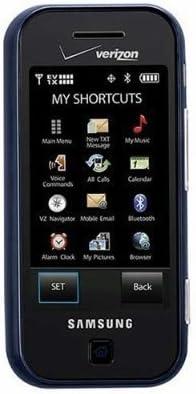
3.1-сүрөт: Фронт view of the Samsung Glyde U940, showing the 2.8-inch display and navigation buttons. The screen displays "MY SHORTCUTS" with icons for various functions like Main Menu, New TXT Message, My Music, Voice Commands, All Calls, Calendar, Mobile Email, Bluetooth, Alarm Clock, My Pictures, and Browser. "SET" and "Back" buttons are visible below the screen.
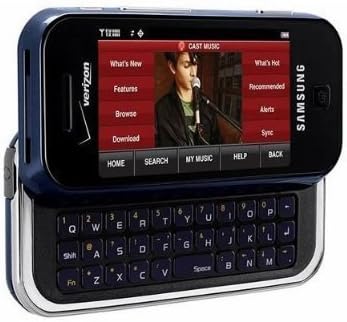
3.2-сүрөт: Samsung Glyde U940 with its full QWERTY keyboard extended. The phone is oriented horizontally, displaying a media interface on the screen with options like "What's New", "Features", "Browse", "Download", "What's Hot", "Recommended", "Alerts", and "Sync". Navigation buttons for "HOME", "SEARCH", "MY MUSIC", "HELP", and "BACK" are visible below the screen.
Негизги өзгөчөлүктөрү:
- Large 2.8" Display
- Slide-out QWERTY Keyboard
- Сенсордук экран интерфейси
- Full HTML Browser
- 2.0 MP Camera and Camcorder
4. Орнотуу
4.1. Батареяны орнотуу
- Телефондун арткы бетиндеги батарея капкагын табыңыз.
- Gently remove the battery cover by sliding or lifting it.
- Батареянын алтын түстүү контакттарын батарея бөлүмүнүн контакттары менен тегиздеңиз.
- Батареяны ордуна бекем салыңыз.
- Батареянын капкагын бекем жабыңыз, ал чыкылдаган үн чыкканын текшериңиз.
4.2. Батареяны заряддоо
- Connect the travel adapter to the charging port on your phone.
- Plug the other end of the travel adapter into a standard electrical outlet.
- Телефонду биринчи жолу колдонуудан мурун толугу менен заряддаңыз. Экрандагы батареянын индикатору заряддоо абалын көрсөтөт.
- Батарея толук заряддалгандан кийин заряддагычты ажыратыңыз.
4.3. Күйгүзүү / Өчүрүү
- Күйгүзүү үчүн: Press and hold the Power/End key until the screen lights up.
- Өчүрүү үчүн: Press and hold the Power/End key until the power-off options appear, then select "Power off".
5. Иштөө нускамалары
5.1. Сенсордук экранды колдонуу
The Samsung Glyde U940 features a resistive touch screen. Use your fingertip or a stylus (if provided) to interact with the display.
- таптаңыз: Lightly touch the screen once to select an item or open an application.
- Сүйрөө: Бир нерсени басып кармап туруңуз, андан кийин анын ордун өзгөртүү үчүн манжаңызды экран боюнча жылдырыңыз.
- Жылдыруу: Slide your finger up or down on the screen to navigate through lists or web барактар.
5.2. Using the QWERTY Keyboard
Slide the screen horizontally to reveal the full QWERTY keyboard. This keyboard is ideal for typing messages, emails, and web даректер.
- Press individual keys to input characters.
- колдонуу Shift key for uppercase letters and symbols.
- The Fn key provides access to additional functions or symbols.
5.3. Чалууларды кабыл алуу жана кабыл алуу
- Чакыруу: From the home screen, tap the Phone icon or dial the number using the keypad and press the Call key.
- Чалуу кабыл алуу: When a call comes in, tap the "Answer" button on the screen.
- Чалууну аяктоо: Tap the "End" button on the screen or press the Power/End key.
5.4. Кабарлашуу (SMS/MMS)
To send a text or multimedia message:
- From the main menu, select "Messages" or "New TXT Message".
- Алуучунун телефон номерин киргизиңиз же байланыштарыңыздан тандаңыз.
- Type your message using either the touch screen or the QWERTY keyboard.
- To add multimedia (pictures, videos, audio), select the attachment option.
- "Жөнөтүү" баскычын таптаңыз.
5.5. Camera and Camcorder Functions
The Glyde U940 is equipped with a 2.0 MP camera.
- Сүрөткө тартуу: Open the Camera application, frame your shot, and press the dedicated camera button or tap the capture icon on the screen.
- Видеолорду жаздыруу: Switch to camcorder mode within the Camera application, press the record button to start, and press again to stop.
- Access your captured media in the "My Pictures" or "Gallery" application.
5.6. Web Браузер
Utilize the full HTML browser to access the internet.
- From the main menu, select "Browser".
- Каалаганды киргизиңиз web дареги боюнча URL бар.
- Use the touch screen to navigate pages, zoom in/out, and click links.
6. Техникалык тейлөө
6.1. Батареяга кам көрүү
- Батареяны экстремалдуу температурага тийгизүүдөн сактаңыз.
- Батареяны тешип же зыян келтирбеңиз.
- For optimal battery life, avoid frequent partial discharges and charges.
- Эгер телефон көпкө чейин колдонулбаса, аны жарым-жартылай заряддалган батарейкасы менен сактаңыз.
6.2. Аспапты тазалоо
- Use a soft, lint-free cloth to clean the screen and exterior of the phone.
- Do not use harsh chemicals, cleaning sprays, or abrasive materials.
- Ensure no moisture enters openings such as the charging port or headphone jack.
6.3. Программалык камсыздоону жаңыртуу
Periodically check for available software updates to improve performance and add new features. Consult your service provider or the Samsung webжаңыртуу процедуралары үчүн сайт.
7. Кыйынчылыктарды
This section addresses common issues you might encounter with your Samsung Glyde U940.
| Көйгөй | Мүмкүн чечим |
|---|---|
| Телефон күйбөйт. | Ensure the battery is correctly installed and fully charged. Connect the charger and attempt to power on. |
| Touch screen is unresponsive or erratic. |
|
| Батарея бат эле түгөнөт. |
|
| Чалууларды кабыл алуу же жасоо мүмкүн эмес. | Check network signal strength. Ensure "Airplane Mode" is not enabled. Contact your service provider if network issues persist. |
| QWERTY keyboard input is incorrect. | Ensure the keyboard is fully extended and locked into position. Restart the device if keys are unresponsive. |
8. Техникалык шарттар
| Өзгөчөлүк | Деталь |
|---|---|
| Модель номери | U940 |
| Дисплей | 2.8 Inches, Touch Screen |
| Киргизүү ыкмасы | Touch Screen, Slide-out QWERTY Keyboard |
| Камера | 2.0 MP (Camera and Camcorder) |
| Браузер | Full HTML Browser |
| Элемент Салмагы | 11.2 унция |
| Өлчөмдөр | 8.1 x 5.4 x 2.2 дюйм (Пакеттин өлчөмдөрү) |
| Байланыш | Wireless, USB 2.0 |
| Өндүрүүчү | Samsung |
9. Кепилдик жана колдоо
Кепилдик маалыматы үчүн продуктуңузга кошулган кепилдик картасын караңыз же расмий Samsung компаниясына баш багыңыз website. For technical support, contact your service provider or Samsung customer service.
Samsung кардарларды тейлөө: www.samsung.com/us/support/