
Panasonic HDC-TM300
Panasonic HDC-TM300 Twin Media HD Camcorder User Manual
Introduction
This manual provides essential information for the setup, operation, and maintenance of your Panasonic HDC-TM300 Twin Media HD Camcorder. The HDC-TM300 is a high-definition camcorder featuring a 3MOS system for superior image quality, capable of recording to both a 32 GB internal hard drive and SD/SDHC memory cards. It supports Full HD 1920 x 1080 video capture and 10.6-megapixel still images. Key features include a 12x Leica Dicomar lens with Optical Image Stabilization, a 2.7-inch widescreen touch-panel LCD, 5.1-channel surround sound with 5 microphones, a manual control ring, and AF Tracking for consistent focus.

Сүрөт 1: Алдыңкы view of the Panasonic HDC-TM300 camcorder with the LCD screen open.
Жайгашуу
1. Таңгактан чыгаруу жана алгачкы текшерүү
Carefully unpack all components. Ensure the following items are present: Panasonic HDC-TM300 Camcorder Body, Lithium Ion Battery, AC Adapter/Charger. Inspect the camcorder for any visible damage.
2. Батареяны орнотуу жана заряддоо
- Видеокамерадагы батарея бөлүкчөсүн табыңыз.
- Insert the included Lithium Ion battery into the compartment, ensuring it clicks securely into place.
- Connect the AC adapter to the camcorder and a power outlet. The charging indicator light will illuminate (typically green) to show charging is in progress. Charge the battery fully before first use. Note that the indicator light may not change color or turn off when charging is complete.
3. Эстутум картасын киргизүү
The HDC-TM300 supports SD and SDHC memory cards for additional storage. It also has a 32 GB built-in memory.
- Locate the SD card slot, usually covered by a protective flap.
- Insert the SD/SDHC card with the contacts facing the correct direction until it clicks into place.
- Close the protective flap.
4. Баштапкы күйгүзүү жана орнотуулар
- Open the LCD screen to power on the camcorder, or use the dedicated power button if available.
- Датаны, убакытты жана тилди коюу үчүн экрандагы көрсөтмөлөрдү аткарыңыз.
Иштөө нускамалары
1. Basic Video Recording
- Видеокамераны күйгүзүңүз.
- Select the video recording mode using the mode dial or touch screen menu.
- Frame your shot using the LCD screen. The camcorder features a 12x optical zoom.
- басыңыз ЖАЗУУ/ТОКТОТУУ button to begin recording. Press it again to stop.
- The camcorder will automatically focus using AF Tracking, which keeps subjects in focus even if they move.
2. Still Image Capture
The HDC-TM300 can capture still images up to 10.6 megapixels.
- Switch to still image mode using the mode dial or touch screen.
- басыңыз ТАПКАН button halfway to focus, then press fully to take the picture.
3. Чоңойтуу операциясы
Use the zoom lever, typically located near the top of the camcorder, to control the 12x optical zoom. Push the lever towards 'T' for telephoto (zoom in) and 'W' for wide-angle (zoom out).
4. Manual Controls
The camcorder features a manual ring for precise control over focus, zoom, and exposure settings. Access these functions via the ФУНКЦИЯ button and the manual ring.
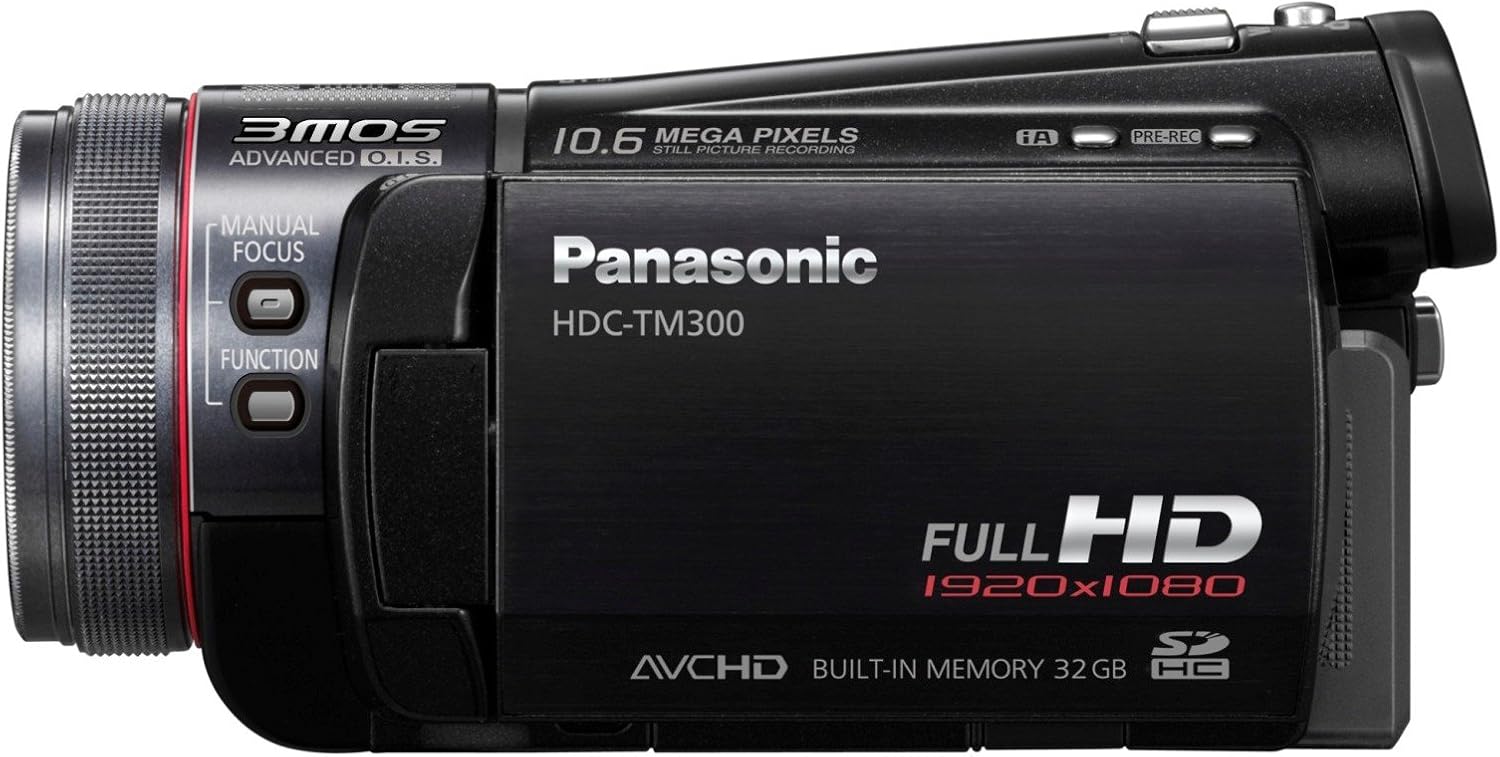
2-сүрөт: Каптал view of the camcorder, highlighting the manual focus ring and function buttons.
5. Ойнотуу
- Switch the camcorder to playback mode.
- Use the touch-panel LCD to navigate through your recorded videos and photos.
- The Highlight Playback function allows for quick viewing of key scenes.
6. Тышкы түзмөктөргө туташуу
The HDC-TM300 is compatible with computers, tablets, and TVs. Use appropriate cables (e.g., USB for computer, HDMI for TV) to connect the camcorder for viewберүү же өткөрүп берүү files.
Техникалык тейлөө
1. Видеокамераны тазалоо
- Объектив: Оптикалык линзалар үчүн атайын иштелип чыккан жумшак, түксүз кездемени колдонуңуз. Күчтүү химиялык заттардан алыс болуңуз.
- LCD экран: Gently wipe with a soft, dry cloth. For stubborn smudges, use a screen cleaner designed for electronics.
- Дене: Wipe the camcorder body with a soft, dry cloth. Do not use solvents or abrasive cleaners.
2. Батареяга кам көрүү
- Always use the original Panasonic charger.
- Батареяны бат-баттан толук кубаттап калуудан алыс болуңуз.
- If storing the camcorder for an extended period, remove the battery and store it in a cool, dry place with approximately 50% charge.
3. Сактоо
Store the camcorder in a dry, dust-free environment away from extreme temperatures and direct sunlight. Use a padded camera bag for protection during transport.
Проблемаларды чечүү
Жалпы маселелер жана чечимдер
- Poor Low-Light Performance: The camcorder performs best in well-lit environments. In low light, video may appear washed out or grainy. Adjusting manual iris/gain settings can improve results, but excessive gain should be avoided to prevent graininess. Consider using external lighting in dim conditions.
- Choppy Video on YouTube: Direct upload of AVCHD (.mts) files to YouTube may result in choppy playback due to transcoding issues. Converting your video to a more common format like 720p MPEG-2 before uploading is recommended for smoother playback.
- Туруксуз Footage on Tripod: When using a tripod, ensure that Optical Image Stabilization (OIS) is disabled. The OIS system can interfere with the stability provided by a tripod, potentially causing unintended motion or blur.
- Camcorder Does Not Power On: Ensure the battery is fully charged and correctly inserted. If using the AC adapter, verify it is securely connected to both the camcorder and a working power outlet.
- Жаздыруудагы каталар: Check if the memory card has sufficient free space. If using an SD/SDHC card, ensure it is properly inserted and not write-protected. Try formatting the memory card (this will erase all data).
Техникалык шарттар
| Өзгөчөлүк | Description |
|---|---|
| Бренд | Panasonic |
| Модель номери | HDC-TM300-K |
| Видео тартуунун резолюциясы | 1080p (1920 x 1080) |
| Натыйжалуу дагы эле чечим | 10 депутат |
| Фото сенсор технологиясы | 3MOS |
| Оптикалык масштаб | 12x |
| Линзанын түрү | Leica Dicomar |
| Image Stabilization | Оптикалык сүрөттү турукташтыруу (OIS) |
| Flash эс тутум түрү | SD, SDHC |
| Камтылган эс тутум | 32 ГБ HDD |
| Screen Size | 2.7 Inches (Widescreen Touch-Panel LCD) |
| Элемент Салмагы | 0.85 фунт |
| Батарея | 1 Литий-ион (кошулган) |
| Видео тартуу форматы | AVCHD, H.264 |
| Колдоого алынган аудио формат | AAC (5.1-channel surround sound) |
| Шайкеш түзмөктөр | Computer, Tablet, TV |
Кепилдик маалымат
The Panasonic HDC-TM300 Camcorder comes with a warranty covering Тетиктер үчүн 1 жыл жана эмгек үчүн 90 күн. Кепилдик дооматтары үчүн сатып алганыңыздын далилин сактап коюңуз. Көбүрөөк шарттарды жана шарттарды өнүмүңүзгө камтылган кепилдик картасын караңыз же расмий Panasonicге баш багыңыз webсайт.
Кардарларды колдоо
For further assistance, technical support, or service inquiries regarding your Panasonic HDC-TM300 camcorder, please visit the official Panasonic support website or contact their customer service department. You can also find more information and accessories at the Panasonic дүкөнү.
Ask a question about this manual
Ask about setup, troubleshooting, compatibility, parts, safety, or missing instructions. Manuals+ will review the question and use this page’s manual context to help answer it.