
1. Киришүү
The Parasound Z Amp v.3 is a stereo power amplifier designed for custom installations and compact audio systems. It delivers 45 watts per channel into an 8-ohm load, or 60 watts per channel into 4-ohm loads. It can also be bridged to provide over 90 watts mono into 8 ohms. Its compact 'half-width' chassis (1-3/4 inches tall, 9-1/2 inches wide) makes it suitable for various applications, including multi-room audio, PC/desktop audio, and small stereo systems. The Zamp v.3 features fully discrete, direct-coupled DC servo circuitry, high-speed bipolar output transistors, and a high-quality toroid power transformer.
2. Негизги өзгөчөлүктөрү
- Компакт кубаттуулук amplifier with multiroom capabilities.
- Каналга 45 Уоттс 8 Омго.
- Жеке угуу үчүн гарнитура уячасы.
- Independent level controls for each channel on the rear panel.
- Fully discrete circuitry with a high-quality Toroid power transformer.
3. Орнотуу жана байланыштар
Кандайдыр бир туташууларды жасоодон мурун ampкөтөргүч өчүрүлгөн жана AC розеткасынан суурулган.
3.1 Front Panel Overview

This image shows the Parasound Z Amp v3 amplifier from the front, held in a hand to illustrate its compact, half-width design. The front panel features the power button, headphone jack, and indicators for protection and temperature.
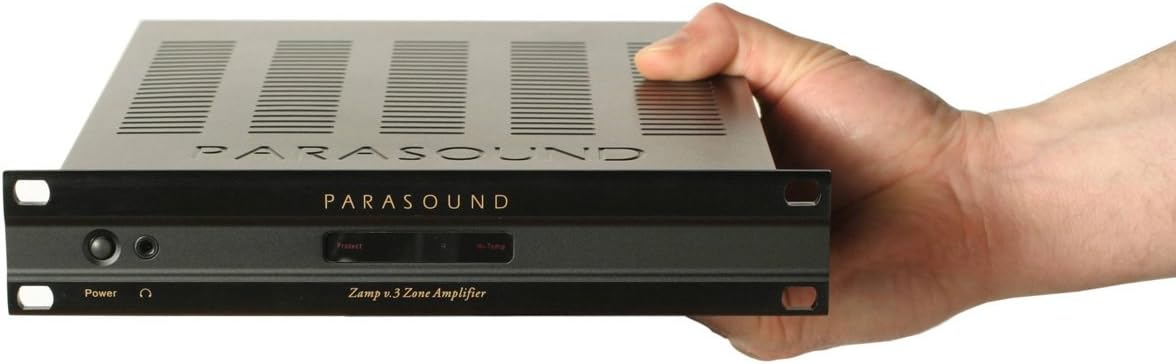
Детальдуу фронт view of the Parasound Z Amp v3 amplifier, highlighting the power button, headphone jack, and status indicators. The unit is shown with optional rack mount ears attached.
алдыңкы панели камтыйт:
- Кубат баскычы: Агрегатты күйгүзөт же өчүрөт.
- Гарнитура уячасы: Наушниктерди туташтыруу үчүн.
- Коргоо көрсөткүчү: Illuminates if the amplifier enters protection mode due to overload or overheating.
- Hi-Temp Indicator: Illuminates if the amplifier is overheating.
- Left/Right Channel Status Indicators: Show operational status for each channel.
3.2 Арткы панелдин туташуулары
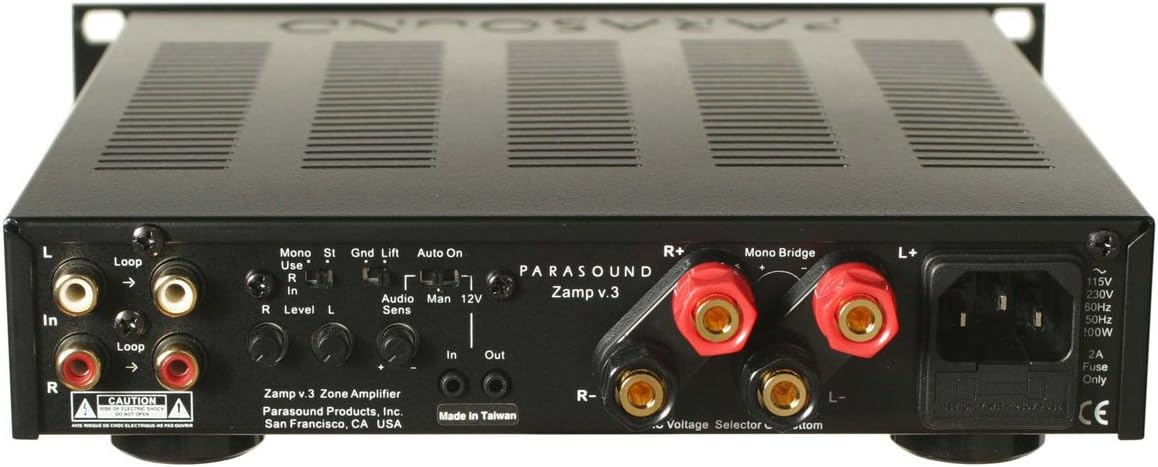
This image displays the rear panel of the Parasound Z Amp v3 amplifier, detailing all input and output connections. Visible features include RCA line-level inputs and loop outputs, speaker binding posts, mono bridge switch, ground lift switch, auto on/manual/12V trigger switch, and independent level controls for each channel.
- Line-Level Inputs (RCA): Connect your audio source (e.g., preamplifier, multi-room controller) to these inputs.
- Line-Level Loop Outputs (RCA): Allows you to pass the input signal to another amplifier or audio component.
- Спикерди байланыштыруучу билдирүүлөр: Connect your speakers using high-quality speaker wire. Ensure correct polarity (+ to + and - to -). The Z Amp v3 supports 8-ohm and 4-ohm speakers.
- Моно көпүрө которуштуруу: Use this switch to bridge the amplifier for mono operation, providing higher power output to a single speaker (e.g., a subwoofer). Refer to the markings for correct speaker connection in bridged mode.
- Жер көтөргүчтү которгуч: Helps eliminate hum caused by ground loops. Try both positions if you experience hum.
- Auto On / Manual / 12V Trigger Switch:
- Авто күйгүзүү: The amplifier will automatically turn on when an audio signal is detected.
- Кол менен: The amplifier is controlled solely by the front panel power button.
- 12V триггер: The amplifier turns on/off via a 12V trigger signal from another component.
- Level Controls (L/R): Independently adjust the input sensitivity for each channel to match your source component and achieve ideal gain staging.
- AC Power Inlet: Connect the supplied AC power cord here.
- Тtage Тандоочу: Ensure this is set to the correct voltage for your region (e.g., 115V or 230V).
- Страховка кармагыч: Негизги электр сактагычын камтыйт.
- Динамиктин импедансынын чегинде экенин текшериңиз amplifier's specified range (4-8 ohms for stereo, 8 ohms for bridged mono).
- Use appropriate gauge speaker wire for your cable length.
- Tighten binding posts securely, but do not overtighten.
3.3 Speaker Connection Guidelines
For optimal performance and safety, observe the following:
4. Иштөө нускамалары
4.1 Күйгүзүү/өчүрүү
Depending on the setting of the Auto On / Manual / 12V Trigger switch:
- Кол менен: Press the front panel power button to turn the ampөмүрдү күйгүзүү же өчүрүү.
- Авто күйгүзүү: The amplifier will power on automatically when an audio signal is detected at the inputs and power off after a period of no signal.
- 12V триггер: The amplifier will power on or off in response to a 12V trigger signal from a connected component.
4.2 Үндү тууралоо
З Amp v3 does not have a master volume control on the front panel. Volume is controlled by your source component (e.g., preamplifier, receiver) or by the individual Left and Right level controls on the rear panel. Adjust the rear panel level controls to achieve a balanced sound and appropriate gain for your system.
4.3 Гарнитураны колдонуу
Plug your headphones into the front panel headphone jack. When headphones are connected, speaker output will typically be muted.
5. Техникалык тейлөө
To ensure the longevity and optimal performance of your Parasound Z Amp v3, follow these maintenance guidelines:
- Тазалоо: Сыртын тазалоо үчүн жумшак, кургак чүпүрөктү колдонуңуз ampкөтөргүч. Абразивдүү тазалагычтардан же эриткичтерден качыңыз.
- Вентиляция: Ensure adequate ventilation around the unit. Do not block the ventilation slots on the top or sides. Avoid placing the amplifier in enclosed spaces without proper airflow.
- Электр кабели: Мезгил-мезгили менен электр шнурунун бузулуу белгилерин текшерип туруңуз.
- Байланыштары: Occasionally check all audio and speaker connections to ensure they are secure.
6. Кыйынчылыктарды
If you encounter issues with your Z Amp v3, consult the following troubleshooting tips:
6.1 Күч жок
- Check if the power cord is securely plugged into the ampкөтөргүч жана AC розетка.
- Кондиционер розеткасы иштеп турганын текшериңиз.
- Check the fuse on the rear panel. If blown, replace it with a fuse of the exact same type and rating.
- Ensure the front panel power button is pressed (if in Manual mode) or the Auto On/12V Trigger settings are correct.
6.2 Үн жок
- Confirm the audio source is playing and its output is connected correctly to the Z Amp v3's inputs.
- Бардык динамиктердин туташууларынын туура полярдуулугун жана бекем байланышын текшериңиз.
- Ensure the rear panel level controls are not set to minimum.
- If headphones are plugged in, unplug them to restore speaker output.
6.3 Distorted Sound or Low Volume
- Adjust the rear panel level controls to match the output of your source component.
- Ensure your speakers' impedance is compatible with the ampөмүрлүү.
- Динамик зымдарынын бош же бузулганын текшериңиз.
- Verify the audio source is not overdriving the ampкөтөргүчтүн кириштери.
6.4 Protection or Hi-Temp Indicator Illuminates
- The amplifier may be overheating. Turn off the unit, allow it to cool down, and ensure adequate ventilation.
- Check speaker connections for short circuits.
- Ensure speaker impedance is not too low for the ampөмүрлүү.
6.5 Hum or Buzzing Noise
- Try flipping the Ground Lift switch on the rear panel.
- Ensure all components are plugged into the same AC circuit if possible.
- Check for faulty interconnect cables.
7. Техникалык шарттар
| Спецификация | Нарк |
|---|---|
| Бренд | Parasound |
| Модель аты | Z Amp v3 |
| Модель номери | Z Amp v3 |
| Power Output (Stereo, 8 ohms) | 45 watts per channel (20 Hz - 20 kHz, both channels driven) |
| Power Output (Stereo, 4 ohms) | Каналга 60 Вт |
| Power Output (Bridged Mono, 8 ohms) | Over 90 watts |
| Элементтин өлчөмдөрү (L x W x Y) | 10 x 9.5 x 2 дюйм |
| Элемент Салмагы | 3.5 килограмм |
| UPC | 791084500066 |
| GTIN | 791084500066 |
| Өндүрүүчү | Parasound |
8. Кепилдик жана колдоо
For warranty information and technical support, please refer to the official Parasound webсайтка же түздөн-түз кардарларды тейлөөгө кайрылыңыз. Сатып алуу квитанциясын кепилдик дооматтары үчүн сатып алуунун далили катары сактаңыз.