
Introduction
Thank you for choosing the iLuv JXMP144 4 GB MP3 Player. This compact and portable device allows you to enjoy your favorite music on the go. This manual provides detailed instructions for setting up, operating, and maintaining your MP3 player, along with troubleshooting tips and product specifications.
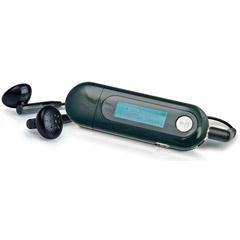
Image: The iLuv JXMP144 MP3 Player, showcasing its compact design and integrated USB plug.
Пакеттин мазмуну
Пакетте бардык буюмдар бар экенин текшериңиз:
- iLuv JXMP144 4 GB MP3 Player
- Earphones (3.5 mm stereo jack)
- Колдонуучунун Колдонмосу (бул документ)
Жайгашуу
1. Батареяны орнотуу
The JXMP144 requires one (1) AAA battery for operation.
- Аппараттагы батарея бөлүкчөсүнүн капкагын табыңыз.
- Slide or open the cover.
- Insert one AAA battery, ensuring the correct polarity (+ and -) as indicated inside the compartment.
- Батарея уясынын капкагын бекем жабыңыз.
2. Компьютерге туташуу
The MP3 player features a built-in USB 2.0 plug for direct connection to your computer. No additional cable is required.
- Ensure your computer is running a compatible operating system (Windows 98/ME/2000/XP/Vista).
- Carefully remove the cap covering the USB plug on the MP3 player.
- Insert the MP3 player's USB plug directly into an available USB port on your computer.
- Your computer should detect the device as a removable storage drive.
3. Музыканы өткөрүп берүү Files
Once connected to your computer, you can transfer MP3 and WMA audio files to the player's 4 GB internal flash memory.
- Open "My Computer" or "This PC" and locate the removable disk drive corresponding to your MP3 player.
- Drag and drop your desired MP3 or WMA files into the player's storage.
- After transferring, safely eject the device from your computer before physically removing it.
4. Наушниктерди туташтыруу
Plug the included 3.5 mm stereo jack earphones into the earphone port on the MP3 player.
Иштөө нускамалары
Күйгүзүү/өчүрүү
To power on the device, press and hold the Power/Play button. To power off, press and hold the Power/Play button again until the screen turns off.
Негизги ойнотуу
- Ойнотуу/тындыруу: Ойнотууну баштоо же тындыруу үчүн Play/Pause баскычын басыңыз.
- Кийинки трек: Press the "Next" button to skip to the next song.
- Мурунку трек: Press the "Previous" button to go back to the beginning of the current song, or press twice to go to the previous song.
- Үндү көзөмөлдөө: Үндү катуулатуу (+) жана үндү азайтуу (-) баскычтарын колдонуп, угуунун катуулугун жөндөңүз.
LCD дисплей
The backlit LCD displays track information, playback status, battery level, and menu options. The device supports ID3 tag and lyric display for compatible files.
Меню Багыттоо
Use the navigation buttons (usually Next/Previous and Play/Pause) to browse through menus and select options. Refer to the on-screen prompts for specific functions like:
- Алдын ала коюлган EQ: Select from various equalizer settings (e.g., Pop, Rock, Jazz, Classical) to enhance audio.
- Кайталоо режими: Choose to repeat the current track, all tracks, or a specific folder.
- Кокус ойноо: Enable shuffle mode for random track playback.
- Тилдер: Каалаган дисплей тилин тандаңыз.
Hold Function
Activate the hold function to prevent accidental button presses during transport. Locate the "Hold" switch on the device and slide it to the "On" position. Slide it back to "Off" to resume normal operation.
Техникалык тейлөө
- Тазалоо: Use a soft, dry cloth to clean the exterior of the MP3 player. Do not use liquid cleaners or abrasive materials.
- Сактагыч: When not in use for extended periods, remove the AAA battery to prevent leakage. Store the device in a cool, dry place away from direct sunlight and extreme temperatures.
- Батареяны алмаштыруу: Replace the AAA battery when the low battery indicator appears on the LCD or when the device fails to power on. Dispose of used batteries responsibly.
- Нымдуулуктан качыңыз: Keep the MP3 player away from water and high humidity to prevent damage to internal components.
Проблемаларды чечүү
| Көйгөй | Мүмкүн себеп | Чечим |
|---|---|---|
| Түзмөк күйбөйт. | Батарея аз же түгөндү; батарея туура эмес орнотулган. | Replace the AAA battery; ensure correct polarity. |
| Наушниктен үн чыкпайт. | Earphones not properly connected; volume too low; corrupted audio file. | Ensure earphones are fully plugged in; increase volume; try a different audio file. |
| Computer does not detect the MP3 player. | Loose USB connection; incompatible operating system; driver issue. | Ensure the USB plug is firmly inserted; verify OS compatibility (Windows 98/ME/2000/XP/Vista); try a different USB port. |
| Fileойнобой жатат. | Колдоого алынбайт file форматтоо; бузулган file. | камсыз кылуу files are MP3 or WMA format; re-transfer the files. |
| Экран бош же катып калган. | Убактылуу программалык ката. | Түзмөктү баштапкы абалга келтирүү үчүн батарейканы алып чыгып, кайра салыңыз. |
Техникалык шарттар
| Модель номери | JXMP144 |
| Бренд | Мен сүйөм |
| Эстутум сактоо сыйымдуулугу | 4 GB (internal flash memory) |
| Колдоого алынган аудио форматтары | MP3, WMA |
| Байланыш технологиясы | USB 2.0 (built-in plug), 3.5 mm Aux (for earphones) |
| Дисплей | Арткы жарыктуу LCD |
| Power Source | 1 x AAA Батарея |
| Системалык талаптар | Windows 98/ME/2000/XP/Vista |
| Элемент Салмагы | 0.15 фунт |
Кепилдик жана колдоо
The iLuv JXMP144 MP3 Player comes with a 1 жылдык чектелген кепилдик from the date of purchase. This warranty covers defects in materials and workmanship under normal use. It does not cover damage caused by misuse, accident, unauthorized modification, or external causes such as power surges.
For warranty claims or technical support, please contact iLuv customer service. Keep your proof of purchase for warranty validation.
Note: Warranty terms may vary by region. Please refer to the specific warranty information provided with your product at the time of purchase.