
Introduction
This manual provides essential instructions for the safe and efficient operation of your Optoma TX612 XGA DLP Multimedia Projector. Please read this manual thoroughly before using the projector and retain it for future reference. The Optoma TX612 is designed to deliver clear and vibrant images for various presentation environments.
Коопсуздук маалыматы
- Do not look directly into the projector lens качан лamp is on. The intense light can damage your eyes.
- Проектордун айланасында туура желдетүүнү камсыз кылыңыз. Вентиляция тешиктерин жаап албаңыз as this can lead to overheating.
- Avoid placing the projector in direct sunlight, near heat sources, or in environments with high humidity or excessive dust.
- Use only the power cord supplied with the projector. Connect to a properly grounded outlet.
- Бул продуктту өзүңүз тейлөөгө аракет кылбаңыз. Бардык тейлөөлөрдү квалификациялуу тейлөө кызматкерлерине тапшырыңыз.
- Электр шнурын ажыратыңыз from the wall outlet before cleaning or if the projector will not be used for an extended period.
Продукт өзгөчөлүктөрү
- Жогорку жарыктык: 3500 ANSI lumens for clear, easy-to-read text and vibrant images.
- Жогорку контраст катышы: 3000:1 contrast ratio enhances image detail.
- Энергияны үнөмдөө: Standby VGA and audio pass-through features reduce power consumption.
- Зымсыз туташуу: Supports optional wireless dongle for flexible setup.
- Коопсуздук өзгөчөлүктөрү: Control panel lock and password protection to customize security settings.
- Төмөн тейлөө: Filter-free design contributes to a low cost of ownership.
Жайгашуу
1. Физикалык байланыштар
Connect your video sources and audio devices to the appropriate ports on the rear panel of the projector. Ensure all cables are securely connected.
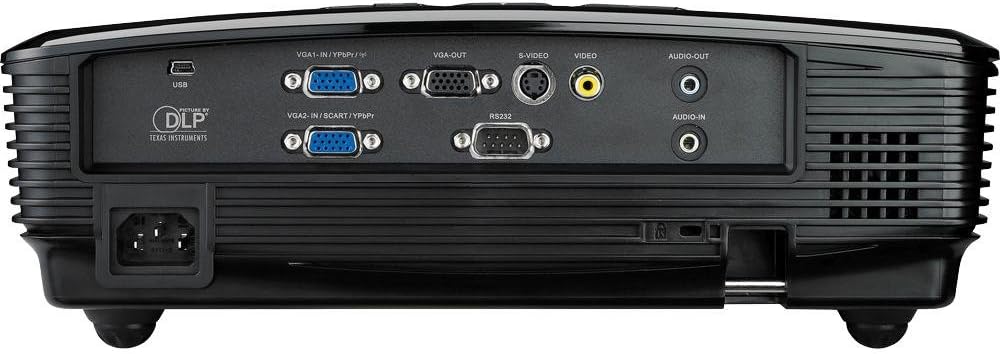
This image displays the rear panel of the Optoma TX612 projector, highlighting various connectivity options including VGA-IN (VGA1-IN/YPbPr, VGA2-IN/SCART/YPbPr), VGA-OUT, S-VIDEO, VIDEO, AUDIO-OUT, AUDIO-IN, RS232, and USB ports, along with the power input.
- VGA-IN (VGA1-IN/YPbPr, VGA2-IN/SCART/YPbPr): Connect to a computer or other VGA-compatible device.
- ВИДЕО: Connect to composite video sources.
- S-VIDEO: Connect to S-Video sources.
- АУДИО-КИРИШҮҮ: Connect audio cables from your source device.
- АУДИО ЧЫГЫШ: Connect to external speakers if desired.
- USB: For service or optional wireless dongle.
- 232: Компьютер же башкаруу системасы аркылуу проекторду башкаруу үчүн.
- Кубат киргизүү: Берилген кубат шнурын бул жерге туташтырыңыз.
2. Күйгүзүү/өчүрүү
- Күйгүзүү үчүн: Кубат шнурун туташтырыңыз жана басыңыз Күч button on the control panel or remote control. The power indicator light will turn on.
- Өчүрүү үчүн: басыңыз Күч button twice. The projector will enter a cooling down cycle before completely shutting off. Do not unplug the projector during the cooling cycle.
3. Сүрөттү тууралоо
Adjust the projected image using the lens rings and control panel buttons.

This image shows the top of the Optoma TX612 projector, featuring the control panel with buttons for power, source selection, re-sync, and navigation. Also visible are the focus and zoom rings for lens adjustment.
- Фокус шакеги: айлантыңыз ФОКУС сүрөт так жана даана болгонго чейин линзанын айланасына тегерете айландырыңыз.
- Масштабдуу шакек: айлантыңыз ZOOM проекцияланган сүрөттүн өлчөмүн тууралоо үчүн шакекче басыңыз.
- Негизги ташты оңдоо: Проектор экранга так перпендикуляр болбосо, трапециянын бурмаланышын оңдоо үчүн меню параметрлерин колдонуңуз.
Проекторду иштетүү
1. Киргизүү булагын тандоо
басыңыз БУЛАК button on the control panel or remote control to cycle through available input sources (VGA1, VGA2, Video, S-Video, etc.) until your desired source is displayed.
2. Меню навигациясы
басыңыз МЕНЮ button to access the On-Screen Display (OSD) menu. Use the arrow buttons to navigate through options and the ENTER тандоо үчүн баскычын басыңыз. МЕНЮ кайра чыгуу үчүн.
- Сүрөт жөндөөлөрү: Жарыктыгын, контрастын, түсүн, өңүн жана курчтугун тууралаңыз.
- Дисплейдин жөндөөлөрү: Configure aspect ratio, keystone correction, and projection mode.
- Setup Settings: Manage language, auto power off, and security features.
Техникалык тейлөө
- Lamp Алмаштыруу: Проектор лamp чектүү өмүрү бар. Качан лamp indicator lights up or the image becomes dim, the lamp алмаштыруу керек болушу мүмкүн. Толук маалымат алуу үчүн толук тейлөө колдонмосун караңызamp алмаштыруу боюнча нускамаларды алыңыз же квалификациялуу тейлөө кызматкерлерине кайрылыңыз.
- Линзаны тазалоо: Оптикалык линзалар үчүн атайын жасалган жумшак, түксүз кездемени колдонуңуз. Абразивдүү тазалагычтарды же эриткичтерди колдонбоңуз.
- Cleaning the Projector Casing: с сүртүңүзasing жумшак менен, гamp кездеме. Катуу химиялык заттарды колдонуудан алыс болуңуз.
- Фильтрсиз дизайн: The Optoma TX612 features a filter-free design, reducing the need for regular filter cleaning.
Проблемаларды чечүү
| Көйгөй | Мүмкүн чечим |
|---|---|
| Сүрөт көрсөтүлгөн жок |
|
| Сүрөт бүдөмүк |
|
| Сүрөт бурмаланган (трапеция формасы) |
|
| Аудио жок |
|
Техникалык шарттар
| Өзгөчөлүк | Деталь |
|---|---|
| Модель номери | TX612 |
| Display Resolution | 1024 x 768 (XGA) |
| Жарыктык | 3500 ANSI челинин |
| Контраст катышы | 3000:1 |
| Байланыш технологиясы | Wireless (with optional dongle) |
| Өзгөчө өзгөчөлүк | интегралдык баяндамачылар |
| Продукциянын өлчөмдөрү | 9.21 x 12.76 x 3.82 дюйм |
| Элемент Салмагы | 10 фунт |
| Өндүрүүчү | Optoma |
| Тил | Англисче |
Кепилдик жана колдоо
For detailed warranty information, technical support, or service inquiries, please refer to the warranty card included with your product or visit the official Optoma webсайт. Сатып алуу квитанциясын кепилдик дооматтары үчүн сатып алуунун далили катары сактаңыз.
Онлайн ресурстар: For the latest drivers, firmware updates, and additional support documentation, please visit www.optoma.com.