
1. Киришүү
This manual provides detailed instructions for the proper setup, operation, and maintenance of your Veho VMS-004 Discovery Deluxe USB Microscope. Please read this manual thoroughly before using the device to ensure optimal performance and longevity.
The Veho VMS-004 is a versatile USB microscope designed for detailed observation and digital capture of magnified images and videos. It features up to 400x magnification, a 2.0 Megapixel CMOS lens, and adjustable LED illumination, making it suitable for various applications including educational, hobbyist, and professional use.
2. Коопсуздук маалыматы
- Бөлүп салбаңыз: Attempting to disassemble or modify the microscope may cause damage and void the warranty.
- Күндүн түз нурларынан сактаныңыз: Микроскопту түз күн нуруна же жогорку температурага дуушар кылбаңыз.
- Этияттык менен мамиле кылуу: The lens and internal components are delicate. Avoid dropping or subjecting the device to strong impacts.
- Кургак бойдон калыңыз: Бул аппарат суу өткөрбөйт. Суунун же жогорку нымдуулуктун таасиринен алыс болуңуз.
- Кубат булагы: Use only the specified USB power source.
- Балдар: Keep out of reach of small children. Adult supervision is recommended during use.
3. Пакеттин мазмуну
Пакетиңизде бардык буюмдар бар экенин текшериңиз:
- Veho VMS-004 Discovery Deluxe USB Microscope
- Flexi Alloy Stand
- Software CD (for drivers and application)
- Колдонуучунун Колдонмосу (бул документ)
4. Продукт бүтүп калдыview
Familiarize yourself with the main components of the Veho VMS-004 microscope.

Figure 4.1: The Veho VMS-004 Discovery Deluxe USB Microscope mounted on its flexi alloy stand.
- Микроскоптун корпусу: Contains the lens, CMOS sensor, and illumination LEDs.
- Фокус дөңгөлөк: Located on the microscope body, used to adjust the focus for clear images.
- Сүрөт баскычы: A button on the microscope body for capturing still images.
- LED Illumination Control: A small wheel or dial to adjust the brightness of the built-in LEDs.
- USB кабели: For connecting the microscope to your computer.
- Flexi Alloy Stand: Provides a stable base and adjustable positioning for the microscope.

Сүрөт 4.2: Жакын пландан view of the focus wheel and magnification markings on the microscope body.

Сүрөт 4.3: Алдыңкы view of the microscope lens, showing the integrated LED illumination ring.
5. Орнотуу
5.1 Стендди чогултуу
The flexi alloy stand provides stability and allows for precise positioning of the microscope.
- Attach the microscope holder to the flexible arm of the stand.
- Secure the microscope into the holder. Ensure it is firmly seated but not overly tightened to avoid damage.
- Стендди туруктуу, тегиз бетке коюңуз.
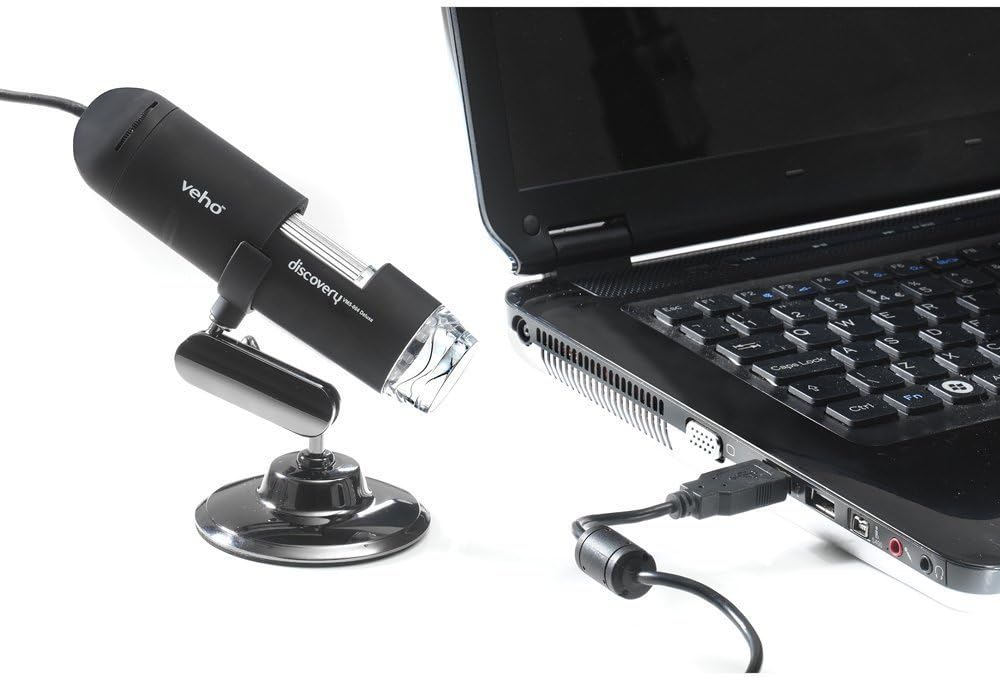
Figure 5.1: The microscope securely mounted on its flexi alloy stand.
5.2 Программалык камсыздоону орнотуу
The Veho VMS-004 requires driver and software installation for full functionality on your computer (PC or Mac compatible).
- Insert the provided software CD into your computer's CD/DVD drive. If your computer does not have a CD drive, please visit the official Veho support website to download the necessary drivers and software.
- Follow the on-screen instructions to install the drivers and the accompanying application.
- Орнотуудан кийин суралса, компьютериңизди өчүрүп-күйгүзүңүз.
5.3 Микроскопту туташтыруу
Once the software is installed, connect the microscope to your computer.
- Plug the USB cable of the microscope into an available USB port on your computer.
- The computer should automatically detect the device.
- Launch the installed microscope application. You should see a live feed from the microscope's camera.

Figure 5.2: The USB microscope connected to a laptop, ready for use.
6. Иштөө нускамалары
6.1 Placing the Object
Position the object you wish to observe directly beneath the microscope lens. Adjust the flexible stand to bring the lens close to the object.

Figure 6.1: The microscope positioned over a coin for observation.
6.2 Чоңойтууну жана фокусту тууралоо
The microscope offers up to 400x digital magnification. To achieve a clear image:
- Adjust the distance between the microscope lens and the object using the flexible stand.
- Rotate the focus wheel on the microscope body until the image on your computer screen is sharp and clear.
- Эскертүү: The effective magnification changes with the distance from the object and the focus setting.
6.3 LED Illumination Control
The microscope features built-in LEDs to illuminate your subject. To adjust the brightness:
- Locate the LED illumination control (a small wheel or dial) on the microscope cable or body.
- Rotate the control to increase or decrease the LED brightness as needed for optimal viewing.
6.4 Сүрөттөрдү жана видеолорду тартуу
The included software allows you to capture still images and record videos.
- Still Image: Press the snapshot button on the microscope body or click the capture button within the software interface.
- Видео жаздыруу: Use the record function within the software application to start and stop video capture.
- Басып алынган files are typically saved to a default folder on your computer, which can usually be configured within the software settings.
6.5 Measurement Software
The accompanying software includes measurement capabilities. Refer to the software's help documentation for detailed instructions on how to calibrate and use the measurement tools. For accurate measurements, it is recommended to use a known reference scale in your image.
7. Техникалык тейлөө
- Линзаны тазалоо: Оптикалык линзалар үчүн атайын жасалган жумшак, түксүз кездемени колдонуңуз. Абразивдүү тазалагычтарды же эриткичтерди колдонбоңуз.
- Денени тазалоо: Микроскоптун корпусун сүртүп, кургак же бир аз кургак чүпүрөк менен коюңуз.amp, жумшак кездеме.
- Сактагыч: When not in use, store the microscope in a clean, dry, and dust-free environment.
- Программалык камсыздоо жаңыртуулары: Periodically check the Veho official website for software and driver updates to ensure compatibility and optimal performance.
8. Кыйынчылыктарды
| Көйгөй | Мүмкүн себеп | Чечим |
|---|---|---|
| No image on screen / Device not detected |
|
|
| Сүрөт бүдөмүк же фокуста эмес |
|
|
| Сүрөт өтө караңгы же өтө жарык |
|
|
| Magnification does not appear to be 400x |
|
|
9. Техникалык шарттар
| Модель номери | VMS-004D |
| Чоңойтуу | Up to x400 (digital) |
| Объектив | 2.0 мегапиксель CMOS |
| Жарыктандыруу | On/Off LEDs (adjustable brightness) |
| Турак жай | Tacton Rubber Touch |
| Тур | Flexi Alloy Stand |
| Байланыш | USB |
| Шайкештик | PC жана Mac шайкеш |
| Продукциянын өлчөмдөрү | 13.46 x 10.92 x 22.35 см |
| Элемент Салмагы | 159 г |
| Тtage | 5 вольт (USB менен иштейт) |
| Жарык булагы түрү | Галоген |
| Чыныгы бурч View | 30 градус |
10. Кепилдик жана колдоо
For warranty information, technical support, or service inquiries, please refer to the warranty card included with your product or visit the official Veho webсайт. Кепилдик дооматтар үчүн сатып алганыңыздын далилин сактаңыз.
Veho Official Webсайт: www.veho-world.com