
Introduction
Сатып алганыңыз үчүн рахматasing the Snakebyte Wireless Bluetooth Premium PS3 Controller. This manual provides detailed instructions for setting up, operating, maintaining, and troubleshooting your new controller. Please read this manual thoroughly before use to ensure optimal performance and longevity of your device.
Пакеттин мазмуну
Пакетте бардык буюмдар бар экенин текшериңиз:
- Snakebyte Wireless Bluetooth Premium PS3 Controller
- USB Charging Cable (approximately 3 meters)
- Көрсөтмө (бул документ)

Image: The Snakebyte Wireless Bluetooth Premium PS3 Controller shown in its retail blister packaging, indicating the product and included cable.
Жайгашуу
1. Контроллерди заряддоо
Before initial use, fully charge the controller. Connect the supplied USB charging cable to the controller's charging port and the other end to a USB port on your PlayStation 3 console or a compatible USB power adapter. The indicator lights on the controller will show charging status and turn off or change color when fully charged.
2. PlayStation 3ке туташуу
To connect the controller wirelessly to your PlayStation 3 console:
- PlayStation 3 консолуңуз күйүп турганын текшериңиз.
- Connect the controller to the PS3 console using the supplied USB charging cable. This will register the controller with the console.
- басыңыз PS баскычы (located in the center of the controller) once. The controller will power on and attempt to establish a connection.
- Once the controller is registered and connected, the indicator lights will illuminate, typically assigning a player number.
- You can now disconnect the USB cable for wireless gameplay. If the connection is lost, reconnect the USB cable and press the PS button again.

Сүрөт: алдыңкы view of the Snakebyte Wireless Bluetooth Premium PS3 Controller, showing the button layout including the central PS button.
Иштөө нускамалары
Контроллердин жайгашуусу жана функциялары
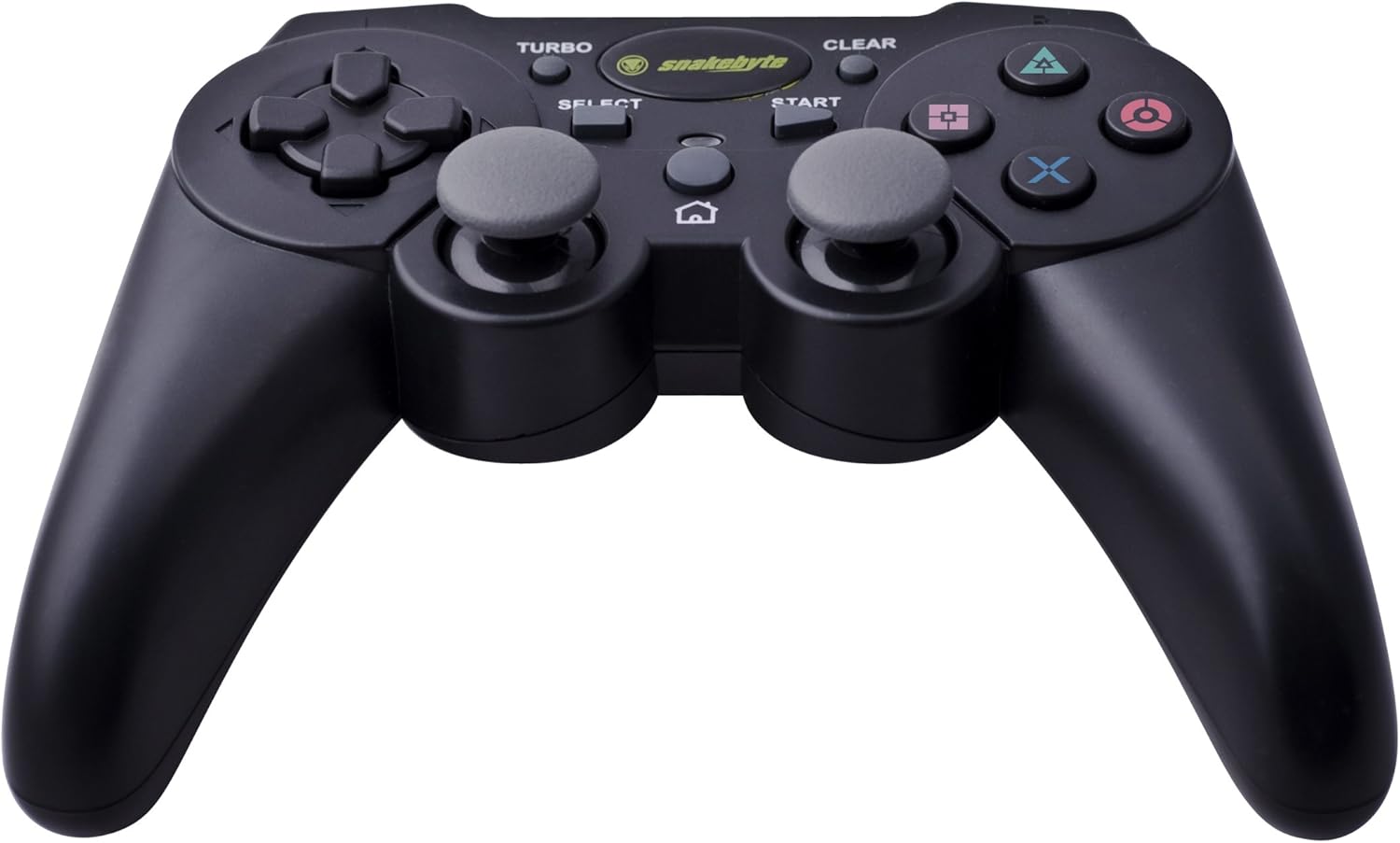
Image: The Snakebyte Wireless Bluetooth Premium PS3 Controller, highlighting the dual analog sticks and various buttons.
- Багыттоочу такта (D-Pad): For precise directional input in games.
- Сол аналогдук таякча: Кыймылдын негизги башкаруусу.
- Оң аналогдук таякча: Camera control or secondary movement.
- Аракет баскычтары (Үч бурчтук, Тегерек, Крест, Төрт бурчтук): Game-specific actions.
- L1/R1 баскычтары: Оюндагы ар кандай функциялар үчүн ийин баскычтары.
- L2/R2 триггерлери: Analog triggers for pressure-sensitive input, often used for acceleration/braking or aiming/firing.
- START баскычы: Pauses games or opens menus.
- ТАНДОО баскычы: Opens in-game maps, inventories, or other menus.
- PS баскычы: Powers on the controller, accesses the PS3 XMB (Cross Media Bar) menu, or turns off the controller/console.
- TURBO баскычы: Activates the turbo function for other buttons.
- ТАЗАЛОО баскычы: Deactivates the turbo function.
Турбо функциясы
The controller features a TURBO function, allowing a selected button to register multiple presses rapidly with a single hold. This can be useful for certain game mechanics.
- To activate TURBO: Press and hold the TURBO баскычы, then press the desired action button (e.g., Cross, Square, Circle, Triangle, L1, R1, L2, R2). Release both buttons. The selected button will now have the TURBO function enabled.
- To deactivate TURBO for a specific button: Press and hold the CLEAR баскычы, then press the button for which TURBO is currently active. Release both buttons.
- To deactivate all TURBO functions: Press the CLEAR баскычы once without holding it down.
Motion Sensing and Vibration Feedback
This controller supports motion sensing capabilities, allowing for intuitive control in compatible games. It also provides vibration feedback to enhance immersion during gameplay, reacting to in-game events such as impacts or explosions.
Күйгүзүү жана өчүрүү
- Күйгүзүү үчүн: басыңыз PS баскычы.
- To power off: The controller will automatically enter sleep mode after a period of inactivity to conserve battery. Alternatively, you can hold the PS баскычы for several seconds to bring up the PS3 menu, where you can choose to turn off the controller.
Техникалык тейлөө
- Тазалоо: Контроллерди тазалоо үчүн жумшак, кургак чүпүрөктү колдонуңуз. Абразивдүү тазалагычтарды же эриткичтерди колдонбоңуз.
- Сактагыч: Контроллерди түз күн нурунан жана экстремалдык температурадан алыс салкын, кургак жерде сактаңыз.
- Батареяга кам көрүү: Батареянын иштөө мөөнөтүн узартуу үчүн, контроллерди тез-тез толук зарядсыздандырбаңыз. Аны үзгүлтүксүз колдонбосоңуз да, үзгүлтүксүз кубаттап туруңуз.
- Зыяндан качуу: Do not drop the controller or expose it to excessive force or moisture.
Проблемаларды чечүү
| Көйгөй | Мүмкүн чечим |
|---|---|
| Контроллер зымсыз туташпайт. |
|
| Баскычтар же аналогдук таякчалар жооп бербейт. |
|
| Controller does not charge. |
|
Контроллерди баштапкы абалга келтирүү
If the controller behaves erratically or becomes unresponsive, you can perform a reset. Locate the small reset button on the back of the controller (often in a small hole). Use a thin, pointed object (like a straightened paperclip) to press and hold the reset button for a few seconds. This will restart the controller's internal electronics.
Техникалык шарттар
- Бренд: Снейкбайт
- Модель номери: SB904714
- Шайкеш платформа: Sony PlayStation 3
- Байланыш: Зымсыз (Bluetooth)
- Баскычтардын саны: 16
- Өлчөмдөрү (L x W x Y): Болжол менен 23.01 x 16.31 x 8.51 см (9.06 x 6.42 x 3.35 дюйм)
- Салмагы: Болжол менен 419.99 г (0.93 фунт)
- Түсү: Кара
Кепилдик жана колдоо
For warranty information and technical support, please refer to the documentation provided with your purchase or contact your retailer. You may also visit the official Snakebyte webкошумча жардам жана продукт маалымат алуу үчүн сайт.