
HEWLETT PACKARD J9450A
HP Procurve 1810G-24 Switch (J9450A) User Manual
Модел: J9450A
Introduction
The HP Procurve 1810G-24 Switch (J9450A) is a managed Gigabit Ethernet switch designed for small and medium-sized businesses. It provides reliable network connectivity with advanced features for enhanced performance and security. This manual provides essential information for the setup, operation, maintenance, and troubleshooting of your switch.

Figure 1: HP Procurve 1810G-24 Switch (J9450A) - Front Angled View
This image shows the overall design of the HP Procurve 1810G-24 Switch, highlighting its compact form factor and the arrangement of its ports and indicators.
Пакеттин мазмуну
Пакетте бардык буюмдар бар экенин текшериңиз:
- HP Procurve 1810G-24 Switch (J9450A)
- Электр кабели
- Стойкага орнотуу үчүн топтом
- Консолдук кабель
Жайгашуу
1. Физикалык орнотуу
The HP Procurve 1810G-24 Switch can be placed on a desktop or mounted in a standard 19-inch equipment rack using the included rack-mount kit.
- Стойкага орнотуу: Attach the rack-mount brackets to the sides of the switch using the provided screws. Secure the switch into the rack.
- Иш тактада жайгаштыруу: Ensure adequate ventilation around the switch. Do not block any ventilation openings.
2. Power Connection
Connect the provided power cable to the power inlet on the rear of the switch and then to a grounded AC power outlet. The switch will power on automatically.

Figure 2: Rear Panel of the Switch
This image displays the rear panel of the HP Procurve 1810G-24 Switch, showing the power input and product labels.
3. Тармактык байланыштар
Connect your network devices (computers, servers, other switches) to the RJ45 ports on the front panel of the switch using standard Ethernet cables. The switch supports 10/100/1000 Mbps connections.

3-сүрөт: Коммутатордун алдыңкы панели
Бул сүрөт ачык-айкын камсыз кылат view of the front panel of the HP Procurve 1810G-24 Switch, detailing the 24 Gigabit Ethernet ports and indicator lights.
The switch also features dual-personality ports (ports 23 and 24) which can function as either 10/100/1000 RJ45 ports or mini-GBIC (SFP) slots for optional fiber connectivity (e.g., Gigabit-SX, -LX, -LH, or 100-FX).

Figure 4: Front Panel Indicators and Controls
This close-up image highlights the power indicator, fault locator, LED mode, and speed indicators on the front panel of the HP Procurve 1810G-24 Switch.
Которгучту иштетүү
Web Interface Management
The HP Procurve 1810G-24 Switch features an intuitive web-based management interface for configuration, monitoring, and administration. To access the web интерфейс:
- Компьютериңиздин коммутаторго туташтырылганын текшериңиз.
- ачуу а web browser and enter the default IP address of the switch (refer to the product documentation or sticker for the default IP).
- Log in using the default credentials (if applicable).
- From web interface, you can configure various settings, including:
- VLAN Support and Tagгин: Configure up to 64 port-based VLANs and dynamic IEEE 802.1Q VLAN tagging for network segmentation and security.
- Порт конфигурациясы: Adjust port speed, duplex settings, and enable/disable ports.
- Шилтемелерди бириктирүү: Өткөрүү жөндөмдүүлүгүн жана резервдик көчүрмөнү жогорулатуу үчүн бир нече портторду бириктириңиз.
- Кызматтын сапаты (QoS): Маанилүү тиркемелер үчүн тармактык трафикке артыкчылык бериңиз.
LED көрсөткүчтөрү
The front panel LEDs provide visual status of the switch and its ports:
- Power LED: Кубаттын абалын көрсөтөт.
- Fault Locator LED: Системадагы каталарды көрсөтөт.
- Шилтеме/Аракет LED'лери (ар бир порт үчүн):
- Solid Green: Link established.
- Flashing Green: Activity on the port.
- Speed LEDs (per port):
- Off: 10 Mbps
- Flash: 100 Mbps
- On: 1000 Mbps (Gigabit)
Техникалык тейлөө
The HP Procurve 1810G-24 Switch is designed for low maintenance. It operates without internal fans, contributing to a quiet environment and reduced dust accumulation.
- Программалык камсыздоонун жаңыртуулары: Periodically check the official HP website for firmware updates to ensure optimal performance and security. Follow the instructions provided with the firmware update package.
- Тазалоо: Которгучтун сыртын тазалоо үчүн жумшак, кургак чүпүрөктү колдонуңуз. Суюктук же аэрозолдук тазалоочу каражаттарды колдонбоңуз.
- Вентиляция: Ашыкча ысып кетүүнүн алдын алуу үчүн вентиляция тешиктери тосулуп калбагандыгын текшериңиз.
Проблемаларды чечүү
Күч жок
- Кубат кабелинин өчүргүчкө да, розеткага да бекем туташтырылганын текшериңиз.
- Электр розеткасынын иштешин башка аспап менен текшерип текшериңиз.
No Link Light on Port
- Ethernet кабелинин туташуусун эки учунан тең текшериңиз (коммутатор жана туташкан түзмөк).
- Башка Ethernet кабелин колдонуп көрүңүз.
- Test the port with a known working device.
- Туташкан аппараттын күйгүзүлгөнүн жана туура иштегенин текшериңиз.
Connectivity Issues After Power Failure
In some rare instances, the switch may not fully restore network connectivity to all ports immediately after a power outage. If this occurs:
- Power Cycle: Disconnect the power cable from the switch, wait for approximately 30 seconds, and then reconnect it.
- Reseat Cables: Physically disconnect and reconnect the Ethernet cables for affected devices.
- Заводдун баштапкы абалга келтирүү: If issues persist, a factory reset may be necessary. This will revert all settings to their default values. Consult the detailed product manual for the specific procedure, which often involves using a small pointed object (like a paperclip) to press a reset button.
Web Interface Inaccessible
- Verify your computer's IP address is in the same subnet as the switch's default IP address.
- Браузериңиздин кэшин жана кукилерин тазалаңыз.
- Башкасын байкап көрүңүз web браузер.
- Perform a factory reset if you have forgotten the login credentials or if the interface remains unresponsive.
Техникалык шарттар
| Өзгөчөлүк | Description |
|---|---|
| Модель номери | J9450A |
| Которуу түрү | Башкарылган Gigabit Ethernet Switch |
| Порттардын саны | 24 (22 x 10/100/1000BASE-T, 2 x Dual-Personality 10/100/1000BASE-T or SFP) |
| Маалыматтарды өткөрүү ылдамдыгы | Секундасына 1000 мегабит (Гигабит) |
| Interface Type | RJ45, SFP |
| Иштин материалы | Металл |
| Өлчөмдөрү (L x W x Y) | 17 x 7 x 2 дюйм (болжол менен) |
| Элемент Салмагы | 5 фунт |
| Power Input | 100-127V ~ 0.75A (0.75A), 200-240V ~ 0.4A (0.4A) |
| Иштөө температурасы | 0°Cден 40°Cге чейин (32°F—104°F) |
| Муздатуу | Күйөрмансыз |
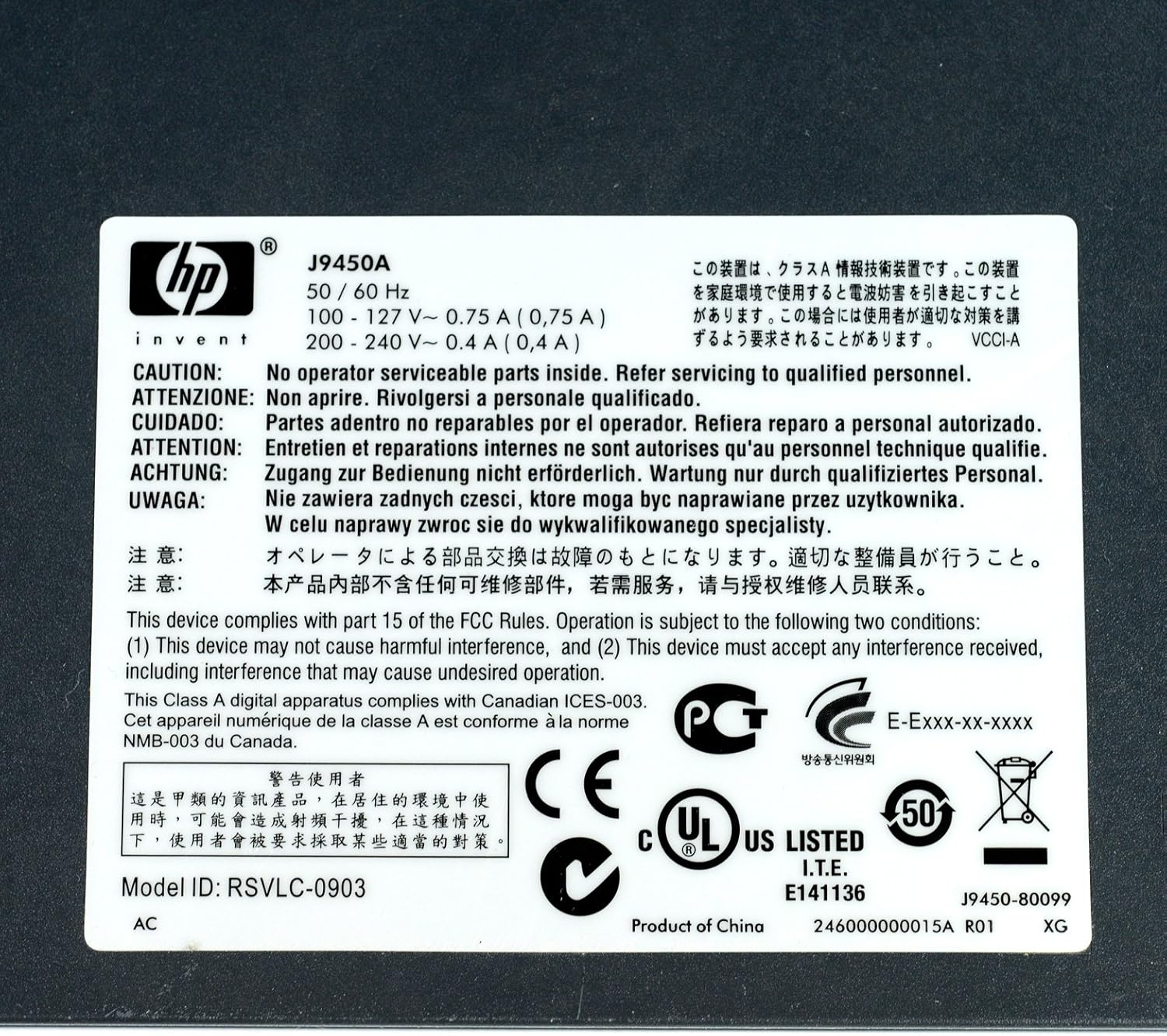
5-сүрөт: Техникалык мүнөздөмөлөрү бар продукттун этикеткасы
This image displays the product label, which includes the model number, electrical ratings, and various compliance marks.
Кепилдик жана колдоо
Кепилдик маалымат
The HP Procurve 1810G-24 Switch typically comes with a Өмүр бою алмаштыруу кепилдиги for the original owner. Please refer to the official HP warranty documentation for complete terms and conditions, as warranty details may vary by region and purchase date.
Техникалык колдоо
For technical assistance, product registration, or to download the latest drivers and firmware, please visit the official HP support website. Have your product model number (J9450A) and serial number ready when contacting support.
Адатта, колдоо ресурстарын төмөнкү жерден таба аласыз: www.hp.com/support
Ask a question about this manual
Ask about setup, troubleshooting, compatibility, parts, safety, or missing instructions. Manuals+ will review the question and use this page’s manual context to help answer it.