
1. Introduction and Overview
The Testavit Schuki 2K is a compact and reliable socket tester designed for quick and safe verification of 230V electrical outlets. It integrates an RCD (Residual Current Device) test function with adjustable nominal residual current settings, making it an essential tool for electricians and DIY enthusiasts. This manual provides detailed instructions for the proper use and maintenance of your device.
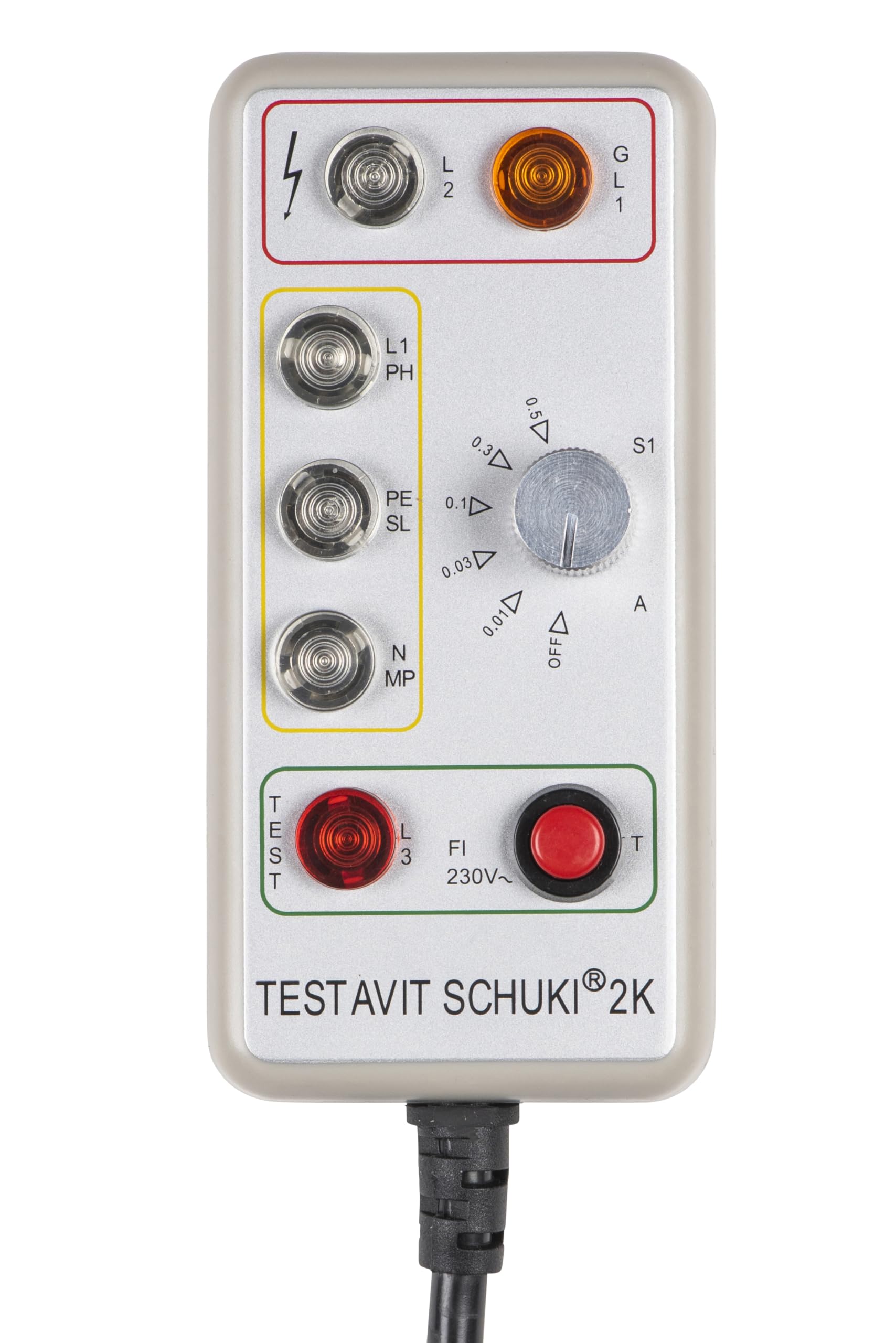
Image 1.1: The Testboy Testavit Schuki 2K socket tester, showing its compact design and integrated plug.
2. Коопсуздук маалыматы
Always prioritize safety when working with electrical systems. This device is designed for testing live circuits; therefore, extreme caution must be exercised. Failure to follow safety guidelines can result in electric shock, injury, or damage to property.
- Колдонуудан мурун ушул нускаманы окуп чыгыңыз.
- Ensure the device is in good condition. Do not use if it appears damaged.
- This device is compliant with IEC 61010-1 standards.
- Always wear appropriate personal protective equipment (PPE) when performing electrical tests.
- Түзмөктү ачууга же оңдоого аракет кылбаңыз. Тейлөө үчүн квалификациялуу адистерге кайрылыңыз.
- Томду ырастаңызtage of the circuit before testing to ensure it matches the device's specifications (230V AC).
3. Продукциянын өзгөчөлүктөрү
The Testavit Schuki 2K offers several key features for comprehensive socket testing:
- Advanced System: Equipped with a cable and earthed plug, allowing easy checking of sockets in 230V systems, including those in hard-to-reach locations.
- RCD Test Function: Perform RCD tests with an adjustable nominal residual current. Selectable settings include 10 mA, 30 mA, 100 mA, 300 mA, or 500 mA.
- Сапат жана коопсуздук: All Testboy devices undergo stringent quality and safety tests in the company's production facility.
- Компакт дизайн: Its small and ergonomic size ensures comfortable handling and easy storage in any toolbox.
- Батареясыз иштөө: The device is powered directly by the circuit being tested, eliminating the need for batteries.
4. Компоненттер жана башкаруу элементтери
Familiarize yourself with the different parts and controls of the Testavit Schuki 2K:
- LED көрсөткүчтөрү: Multiple LEDs display the status of Phase (L1/PH), Earth (PE/SL), and Neutral (N/MP) connections.
- RCD Current Selector Dial (S1): Used to select the desired nominal residual current for the RCD test (10mA, 30mA, 100mA, 300mA, 500mA, OFF).
- RCD Test Button (T): Initiates the RCD test.
- Test Button (TEST): Used for specific wiring tests.
- Earthed Plug: Connects the device to the socket under test.
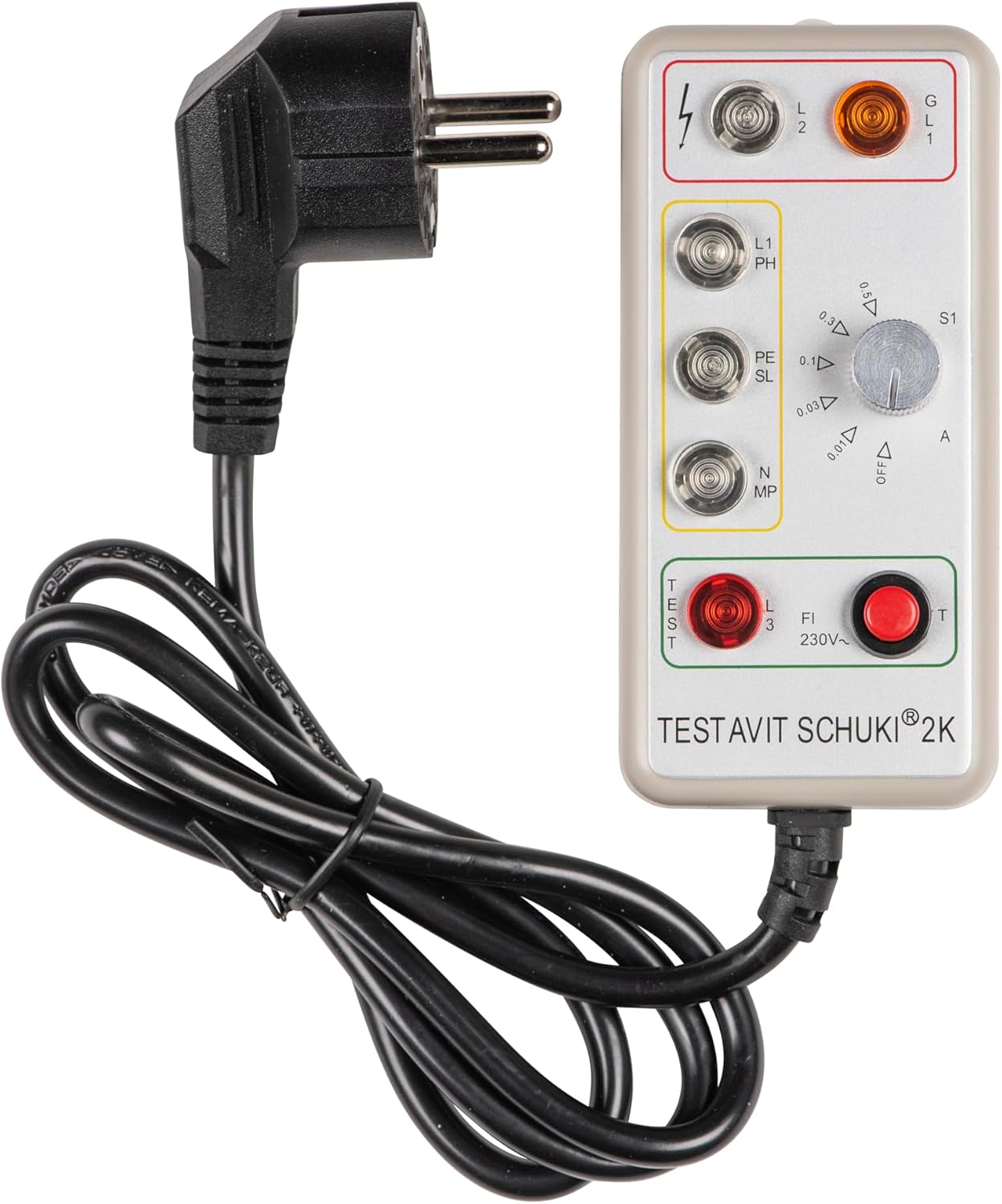
Сүрөт 4.1: Жакын пландан view of the LED indicators, RCD current selector dial, and test buttons on the Testavit Schuki 2K.
5. Орнотуу
Setting up the Testavit Schuki 2K is straightforward:
- Ensure the socket to be tested is live and operating at 230V AC.
- Visually inspect the Testavit Schuki 2K for any signs of damage.
- Plug the device's earthed plug firmly into the socket you wish to test.
- The device will immediately begin to indicate the wiring status via its LED display.

Image 5.1: The Testavit Schuki 2K plugged into a standard wall socket, ready for testing.
6. Иштөө нускамалары
6.1. Socket Wiring Test
Once plugged into a 230V socket, the device's LEDs will illuminate to indicate the wiring status. Refer to the legend on the device for specific interpretations. Common indications include:
- Туура зымдар: All LEDs illuminate in a specific pattern (refer to device markings).
- Missing Earth: A specific LED pattern indicates the absence of an earth connection.
- Reversed Phase/Neutral: Another pattern indicates incorrect phase and neutral connections.
- Missing Phase or Neutral: Specific LEDs will not illuminate.
Always consult the detailed legend on the device itself for precise interpretation of the LED patterns for various fault conditions.
6.2. RCD (Residual Current Device) Test
The RCD test function verifies the proper operation of the residual current device protecting the circuit.
- Plug the Testavit Schuki 2K into the socket.
- Rotate the RCD Current Selector Dial (S1) to the desired nominal residual current setting (e.g., 30 mA).
- Press and hold the red RCD Test Button (T).
- Observe the RCD (circuit breaker) in your electrical panel. A functional RCD should trip (switch off) within a short period (typically less than 200ms).
- If the RCD trips, it indicates that the RCD is functioning correctly at the selected current. Reset the RCD at your electrical panel.
- If the RCD does not trip, it indicates a potential fault with the RCD or the wiring. Do not use the circuit and consult a qualified electrician.
- After testing, return the RCD Current Selector Dial (S1) to the "OFF" position.

Сүрөт 6.1: Детальдуу view of the RCD current selector dial and the red RCD test button.
7. Техникалык тейлөө
The Testavit Schuki 2K requires minimal maintenance to ensure its longevity and accurate operation.
- Тазалоо: Түзмөктү жумшак, кургак чүпүрөк менен сүртүңүз. Абразивдүү тазалоочу каражаттарды же эриткичтерди колдонбоңуз. Түзмөккө ным кирбегенин текшериңиз.
- Сактагыч: Store the device in a dry, cool place, away from direct sunlight and extreme temperatures. Keep it in its original packaging or a protective case when not in use.
- Текшерүү: Periodically inspect the cable and plug for any signs of wear, cuts, or damage. If any damage is found, discontinue use immediately.
- There are no user-serviceable parts inside the Testavit Schuki 2K. Any repairs should only be performed by authorized service personnel.
8. Кыйынчылыктарды
If you encounter issues with your Testavit Schuki 2K, consider the following:
| Көйгөй | Мүмкүн себеп | Чечим |
|---|---|---|
| сайылганда эч кандай LED жарыктары күйбөйт. | No power to the socket; device is faulty. | Check the circuit breaker for the socket. Test the socket with another known working appliance. If still no lights, the device may be faulty. |
| Incorrect wiring indicated (e.g., missing earth). | Actual wiring fault in the socket. | Do not use the socket. Consult a qualified electrician to inspect and repair the wiring. |
| RCD does not trip during test. | Faulty RCD; incorrect RCD current setting; no earth connection. | Ensure the RCD current selector is not on "OFF". Verify socket wiring (especially earth). If the RCD still doesn't trip, it may be faulty and requires inspection by a qualified electrician. |
| Device appears damaged. | Физикалык зыян. | Discontinue use immediately. Do not attempt to repair. Contact Testboy customer support. |
9. Техникалык шарттар
| Спецификация | Нарк |
|---|---|
| Бренд | Test boy |
| Модель номери | Testavit Schuki 2K |
| Power Source | Electrical power with cable (no batteries required) |
| Стиль | Компакт |
| Түс | Боз |
| Элементтин өлчөмдөрү (L x W x Y) | 15.5 x 9 x 5.5 сантиметр |
| Минималдуу иштетүү көлөмүtage | 230 Volts AC (VAC) |
| Максималдуу иштөө көлөмүtage | 230 вольт |
| Шайкештик стандарты | IEC 61010-1 |
| Өлчөө түрү | Ohmmeter or Multimeter (for internal functions) |
| ЕБнын запастык бөлүктөрүнүн болушу | 1 жыл |
| Келип чыккан өлкө | Кытай |
10. Кепилдик жана колдоо
Testboy products are manufactured to high-quality standards. This product comes with a stated EU spare parts availability of 1 year. For warranty claims, technical support, or service inquiries, please contact Testboy customer service through their official channels. Keep your purchase receipt as proof of purchase.