
1. Продукт бүтүп калдыview
The TP-Link TL-SF1008D Fast Ethernet Switch is designed to expand your network connectivity for small office or home office (SOHO) environments. This unmanaged switch offers 8 10/100 Mbps auto-negotiation RJ45 ports, providing a simple and efficient solution for adding more wired connections to your router or modem. Its plug-and-play design requires no configuration, making setup straightforward. The device incorporates innovative energy-efficient technology to reduce power consumption and features a fanless design for quiet operation.
Негизги өзгөчөлүктөрү:
- Plug-and-Play: Easy setup with no configuration or software needed.
- 8 Fast Ethernet порттору: 8 10/100 Mbps auto-negotiation RJ45 ports for expanding network capacity.
- Энергия үнөмдүү: Innovative green technology saves power consumption by up to 70%.
- желдеткичсиз дизайн: Ensures quiet operation, ideal for any environment.
- Автоматтык түрдө MDI/MDIX: Eliminates the need for crossover cables.
- Ишенимдүү маалыматтарды өткөрүп берүү: IEEE 802.3x flow control provides dependable data transmission.
- Компакт дизайн: Desktop or wall-mounting options for flexible placement.
2. Пакеттин мазмуну
Пакетиңизде төмөнкү заттар бар экенин текшериңиз:
- TP-Link 8-Port 10/100Mbps Desktop Switch (TL-SF1008D)
- Кубаттуу адаптер
- Колдонуучунун колдонмосу
3. Физикалык мүнөздөмө
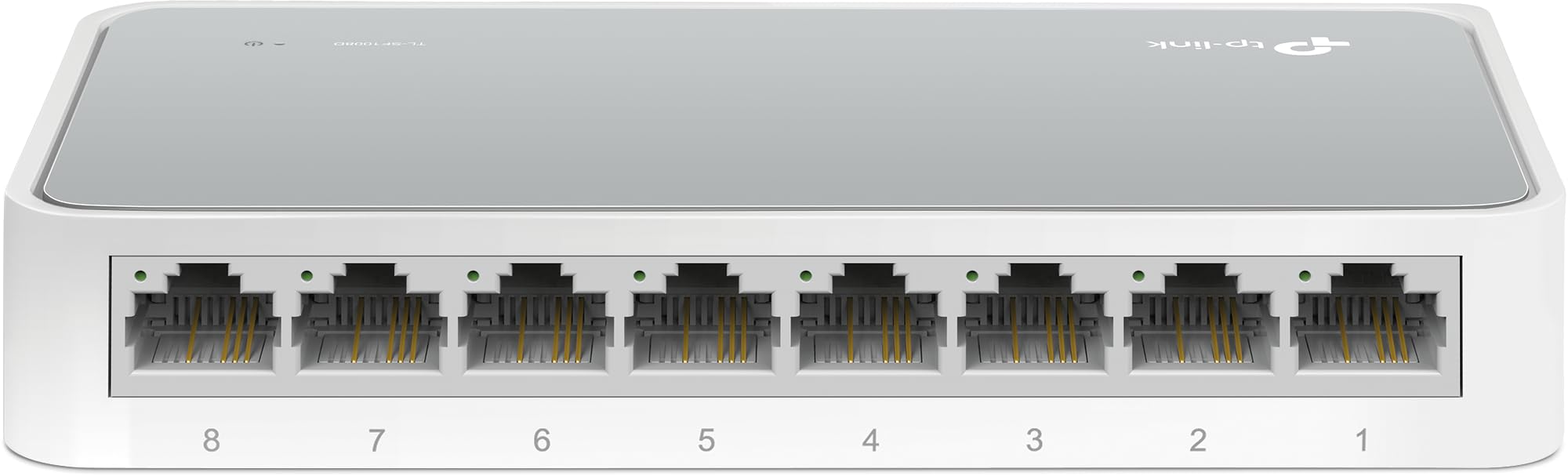
1-сүрөт: Жогору жактан ылдый бурчтуу view of the TP-Link TL-SF1008D 8-Port Fast Ethernet Switch, showing the compact white casing and the eight RJ45 ports on the front.

Сүрөт 2: Алдыңкы бурчтуу view of the TP-Link TL-SF1008D 8-Port Fast Ethernet Switch, highlighting the eight RJ45 ports labeled 1 through 8, and the power LED indicator.

3-сүрөт: Жогорку view of the TP-Link TL-SF1008D 8-Port Fast Ethernet Switch, showing the TP-Link logo, model number, and the power and link/activity LED indicators.
LED көрсөткүчтөрү:
- Power LED: Которгучтун кубат абалын көрсөтөт. Күйгүзүлгөндө күйөт, жок болгондо өчүк.
- Байланыш/Акт светодиоддору (1-8): Indicates the link status and network activity for each port. Solid green indicates a valid network link, blinking indicates data transmission.
4. Орнотуу жана орнотуу
The TL-SF1008D switch is designed for simple plug-and-play installation. No software configuration is required.
- Кубат адаптерин туташтыруу: Plug the provided power adapter into the switch's power port and then into a standard electrical outlet. Ensure the Power LED on the switch illuminates.
- Тармагыңызга туташыңыз: Connect an Ethernet cable from your router or modem to any of the 8 RJ45 ports on the switch. The corresponding Link/Act LED for that port should light up, indicating a successful connection.
- Түзмөктөрүңүздү туташтырыңыз: Connect your network devices (e.g., computers, gaming consoles, printers, smart TVs) to the remaining RJ45 ports on the switch using Ethernet cables. The Link/Act LEDs for these connected devices should also light up.
The switch automatically detects the speed and cable type (Auto-MDI/MDIX) for each connected device, eliminating the need for manual configuration or special crossover cables.
5. Иштөө нускамалары
Once installed, the TL-SF1008D operates automatically. It functions as an unmanaged switch, meaning it requires no user intervention for basic network operation. Data packets are forwarded and filtered at full wire-speed for maximum throughput.
Автоматтык сүйлөшүүлөр:
Each port on the switch supports auto-negotiation, which automatically determines the optimal connection speed (10 Mbps or 100 Mbps) and duplex mode (half or full duplex) with the connected device. This ensures compatibility and optimal performance without manual settings.
Агымды башкаруу:
The switch supports IEEE 802.3x flow control. This mechanism helps prevent data loss during periods of high network traffic by temporarily pausing data transmission from a congested device, ensuring reliable data transfer across your network.
6. Техникалык тейлөө
To ensure optimal performance and longevity of your TP-Link TL-SF1008D switch, consider the following maintenance tips:
- Жайгашкан жери: Place the switch in a well-ventilated area to prevent overheating. Avoid placing it near heat sources or in enclosed spaces.
- Тазалоо: Коммутатордун сыртын жумшак, кургак чүпүрөк менен үзгүлтүксүз тазалап туруңуз. Суюк же аэрозоль тазалагычтарды колдонбоңуз.
- Кабелдик башкаруу: Ensure Ethernet cables are neatly organized and not excessively bent or kinked to prevent damage and maintain signal integrity.
- Электр камсыздоо: Аппарат менен кошо берилген кубат адаптерин гана колдонуңуз.
7. Кыйынчылыктарды
If you encounter issues with your TL-SF1008D switch, try the following basic troubleshooting steps:
- Кубат жок: Check if the power adapter is securely connected to the switch and a working electrical outlet. Verify the Power LED is on.
- Портто шилтеме/аракет жок:
- Ethernet кабелинин коммутатордун портуна жана туташкан түзмөккө бекем туташтырылганын текшериңиз.
- Кабелдин бузулушун жокко чыгаруу үчүн башка Ethernet кабелин колдонуп көрүңүз.
- Туташкан түзмөктүн күйгүзүлгөнүн жана туура иштеп жатканын текшериңиз.
- Аппаратты которгучтун башка портуна туташтырууга аракет кылыңыз.
- Жай тармак ылдамдыгы:
- Ensure all connected devices and cables support 100 Mbps speeds for optimal performance.
- Тармагыңызда иштеген ашыкча тармак трафигин же өткөрүү жөндөмдүүлүгүн талап кылган тиркемелерди текшериңиз.
Көбүрөөк жардам алуу үчүн, 9-бөлүмдөгү колдоо маалыматын караңыз.
8. Техникалык шарттар
| Продукциянын өлчөмдөрү | 5.3"L x 5.3"W x 0.9"H |
| Элемент Салмагы | 0.86 фунт (13.8 унция) |
| Тtage | 110 вольт (AC) |
| Иштин материалы | Aluminum or Alloy Steel or Metal |
| Жогорку температура рейтинги | 40 градус |
| Interface Type | RJ45 |
| Маалыматтарды өткөрүү ылдамдыгы | 100 Мегабит секундасына |
| Учурдагы рейтинг | 0.6 Amps |
| Порттардын саны | 8 |
| Түс | Ак |
| Шайкеш түзмөктөр | Desktop, Gaming console, Router, Printer, Laptop, Camera |
9. Кепилдик жана колдоо
TP-Link provides unlimited 24/7 technical support for free. For any issues or questions regarding your TL-SF1008D switch, please contact TP-Link support.
Байланыш маалыматы:
- Телефондук колдоо: (866) 225-8139
- Webсайт: myproducts.tp-link.com/us
- Электрондук почта колдоо: support.USA@tp-link.com
Юридикалык баш тартуу:
Each item is provided AS IS, and there is no warranty on these items. If an item does not work, please contact the manufacturer directly, as we do not test every unit for reliability.