
Introduction
This manual provides detailed instructions for the operation and maintenance of your Garmin GPSMAP 78sc 2.6-Inch Waterproof Marine GPS and Chartplotter. The GPSMAP 78sc series is designed for recreational navigation, featuring a bright 2.6-inch LCD color display, built-in basemap, and a high-sensitivity GPS receiver. All models are waterproof to IPX7 standards and float in water, making them suitable for boating and watersports. Key features include a built-in microSD card slot for additional maps and a dedicated Man Over Board (MOB) button.
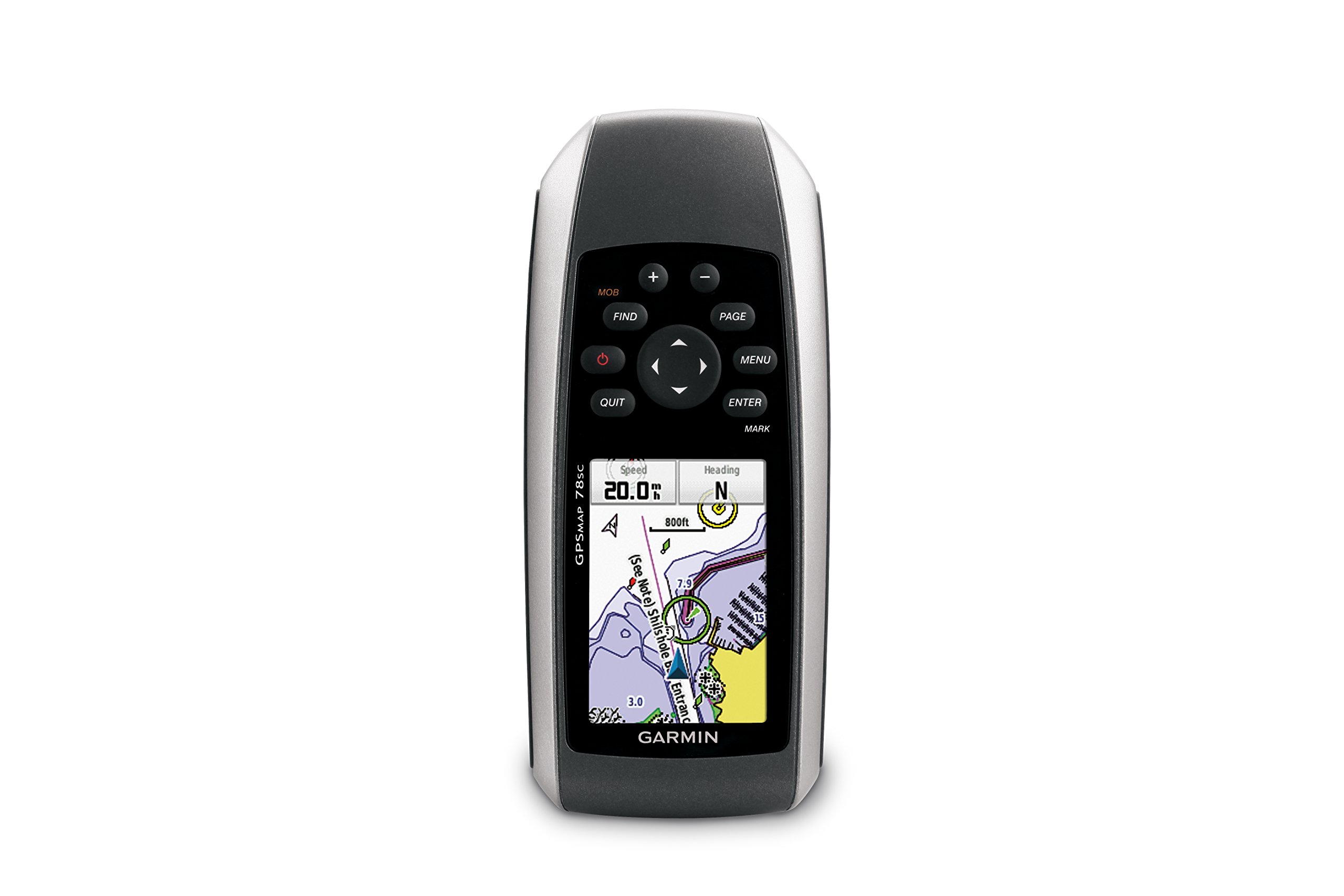
Сүрөт 1: Алдыңкы view of the Garmin GPSMAP 78sc handheld marine GPS and chartplotter.
Продукт бүттүview
Негизги өзгөчөлүктөрү:
- Marine-friendly handheld with high-sensitivity GPS receiver and 2.6-inch color TFT display.
- Waterproof to IPX7 standards; floats in water.
- Built-in BlueChart g2 U.S./Bahamas coastal charts with shorelines, depth contours, navaids, harbors, marinas, and more.
- Built-in 3-axis tilt-compensated electronic compass and barometric altimeter for heading, altitude, and weather information.
- Wireless sharing of waypoints, tracks, routes, and geocaches with other compatible devices.
Кутуда эмне бар:
- GPSMAP 78sc device
- Билек боо
- USB кабели
- Manual

2-сүрөт: Бурчтуу view of the Garmin GPSMAP 78sc, highlighting its button interface.
Продукт видеолору:
Garmin GPSmap 78 handheld GPS Overview
Бул видео жалпы маалымат беретview of the Garmin GPSMAP 78 handheld GPS, demonstrating its features and design.
Продукт бүттүview Video
A concise product overview video from the seller, highlighting key aspects of the device.
Жайгашуу
1. Батареяларды орнотуу:
The GPSMAP 78sc operates on two AA batteries (not included). To install:
- Аппараттын артындагы батарея бөлүкчөсүнүн капкагын табыңыз.
- Капкакты ачып, алып салуу үчүн D-формасындагы шакекти саат жебесине каршы бураңыз.
- Туура полярдуулукту (+ жана -) камсыз кылып, эки AA батарейкасын салыңыз.
- Replace the cover and twist the D-ring clockwise to secure it.

3-сүрөт: Артка view of the Garmin GPSMAP 78sc, illustrating the battery compartment.
2. Күйгүзүү/өчүрүү:
басып, кармап туруңуз Күч button (located on the left side) to turn the device on or off. A short press will adjust the backlight.
3. Баштапкы орнотуулар:
Upon first use, the device may prompt you to set language, time zone, and other preferences. Follow the on-screen instructions using the directional pad and ENTER баскычы.
Иштеп жатат
Navigation Basics:
- Башкы меню: басыңыз МЕНЮ button twice to access the main menu.
- Бет баскычы: Басыңыз БЕТ to cycle through the main pages (Map, Compass, Trip Computer, etc.).
- Багыттоочу такта: Use the directional pad to scroll through menus, pan the map, or adjust settings.
- ENTER баскычы: Басыңыз ENTER to select an item or confirm an action.
- QUIT баскычы: Басыңыз ЧЫГУУ to return to the previous page or cancel an action.
Жол чекиттерин түзүү:
To mark your current location as a waypoint:
- басыңыз МАРК баскычы.
- Edit the waypoint name, symbol, and coordinates if desired.
- Тандоо Бүттү or Сактоо to store the waypoint.
Man Over Board (MOB) Function:
Шашылыш учурда, баскычын басыңыз MOB button to immediately mark the current location and initiate navigation back to that point. This feature is critical for safety in marine environments.
Техникалык тейлөө
Аппаратты тазалоо:
Түзмөктү чүпүрөк менен сүртүңүз dampened with a mild detergent solution. Dry thoroughly. Avoid using abrasive cleaners or solvents that could damage the device's finish or screen.
Батареяга кам көрүү:
Always use fresh, high-quality AA batteries. If the device will not be used for an extended period, remove the batteries to prevent leakage and corrosion.
Программалык камсыздоо жаңыртуулары:
Гарминди мезгил-мезгили менен текшерип туруңуз website for software updates to ensure optimal performance and access to the latest features. Updates can typically be installed by connecting the device to a computer via the USB cable.
Проблемаларды чечүү
Түзмөк күйбөй жатат:
- Батареялар туура орнотулганын жана толук заряддалганын текшериңиз.
- Try new batteries.
- Батареянын контакттарын коррозия бар-жогун текшериңиз.
GPS сигналы начар:
- Аппараттын таза болушун текшериңиз view асмандын.
- Avoid areas with tall buildings, dense foliage, or other obstructions.
- Allow sufficient time for the device to acquire satellites, especially after being off for a long period.
Экран жооп бербейт:
- Батареяларды чыгарып, кайра коюу менен жумшак баштапкы абалга келтирүүнү аткарыңыз.
- Экран таза жана таштандылардан таза экенин текшериңиз.
Техникалык шарттар
| Өзгөчөлүк | Деталь |
|---|---|
| Бренд | Garmin |
| Модель аты | gps картасы |
| Модель номери | 010-00864-02 |
| Screen Size | 2.6 дюйм |
| Дисплей түрү | LCD |
| Резолюция | 160 x 240 пиксель |
| Суу өткөрбөйт рейтинги | IPX7 (floats) |
| Батареянын иштөө мөөнөтү | 20 саат (типтүү) |
| Батарея түрү | 2 AA батарейкалар (киргизилген эмес) |
| Эстутум сактоо сыйымдуулугу | 1 ГБ |
| Compatible Flash Memory Type | microSD |
| Колдоого алынган спутниктик навигация системасы | GPS |
| Өзгөчөлүктөр | Rugged case, Barometric altimeter, Garmin Connect compatible, Electromagnetic compass, Garmin HotFix, Custom POIs, Automatic routing, Hunt/fish calendar, Geocaching, Photo navigation |
| Элементтин өлчөмдөрү L x W x H | 2.6"L x 1.2"W x 6"H |
| Элемент Салмагы | 7.7 унция |
Кепилдик жана колдоо
The Garmin GPSMAP 78sc comes with a 1 Year Limited Warranty. For detailed warranty information, product support, or service inquiries, please refer to the official Garmin website or contact Garmin customer service directly. The included manual also contains contact information and further support resources.