
1. Киришүү
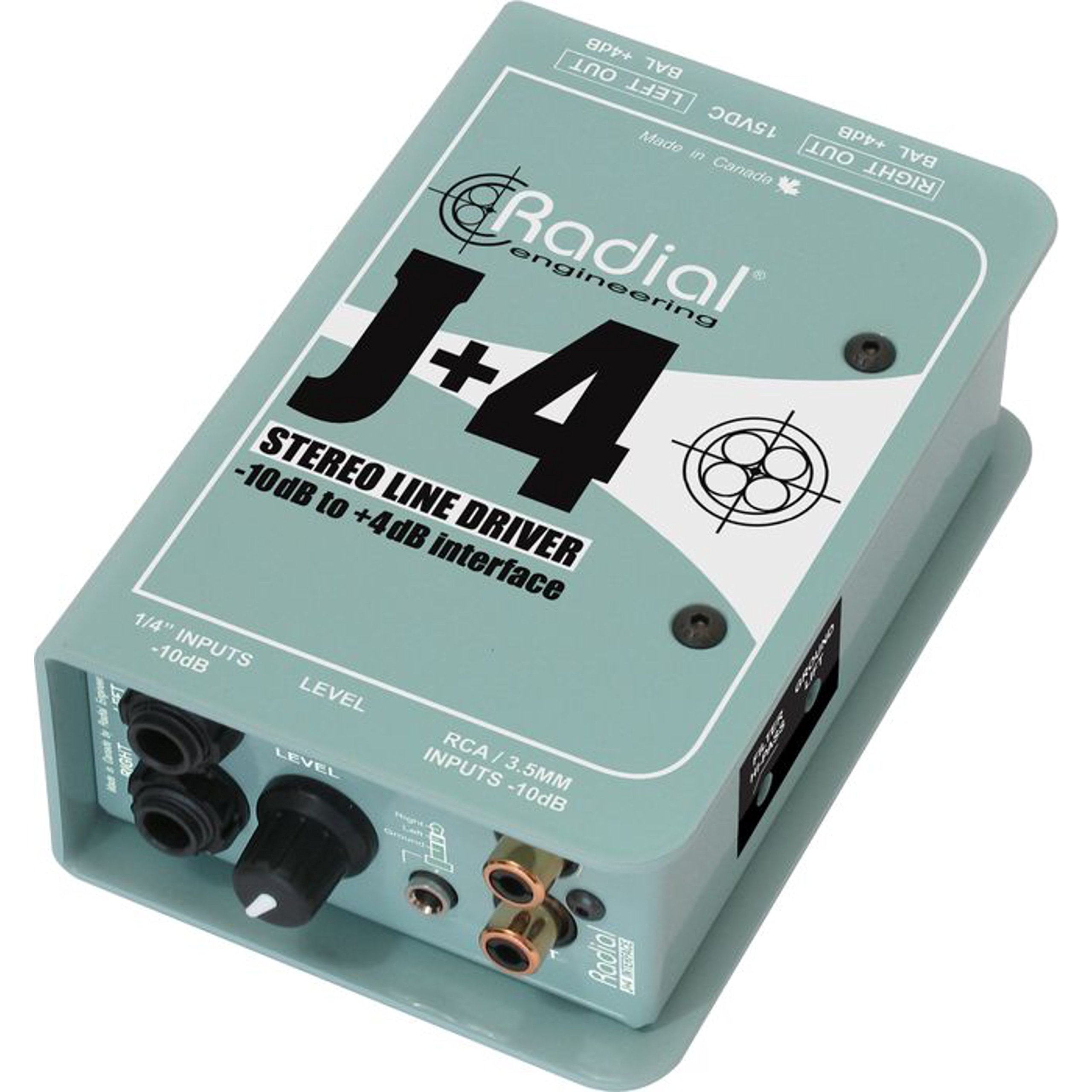
The Radial J+4 is a 2-channel signal level driver designed to interface professional audio equipment with consumer-level or low-output devices. It effectively boosts incoming signals from -10dB to a professional +4dB line level, ensuring optimal signal integrity and compatibility within recording studios, broadcast environments, and live sound applications. Its robust construction and active circuitry provide reliable performance and noise reduction.
2. Коопсуздук боюнча маанилүү маалымат
- Кубат булагы: Use only the specified power adapter for this unit. Incorrect voltage can damage the device and void the warranty.
- Нымдуулук: Түзмөктү жамгырдын, нымдуулуктун же ашыкча нымдуулуктун таасирине дуушар кылбаңыз.
- Жылуулук: Аппаратты радиаторлор, жылуулук регистрлери, мештер же башка жылуулук чыгаруучу аппараттар сыяктуу жылуулук булактарынын жанына коюудан алыс болуңуз.
- Вентиляция: Туура желдетүүнү камсыз кылыңыз. Эч кандай желдетүүчү тешиктерди жаап албаңыз.
- Тейлөө: Бардык тейлөөлөрдү квалификациялуу тейлөө кызматкерлерине тапшырыңыз. Бул продуктуну өзүңүз тейлөөгө аракет кылбаңыз.
- Кабелдер: Ensure all cables are securely connected and free from damage to prevent signal loss or electrical hazards.
3. Негизги өзгөчөлүктөрү
- 2-Channel Operation: Processes two independent audio channels.
- Signal Level Matching: Boosts -10dB consumer-level signals to +4dB professional line level.
- Discrete Circuitry: 100% discrete signal path for optimal audio fidelity.
- Active Buffering: Maintains signal integrity over long cable runs.
- Transformer Isolation: Helps eliminate ground loop hum and noise.
- Stereo Gain Control: Allows precise level adjustment for both channels.
- Highpass Filter: Reduces unwanted low-frequency rumble and noise.
- Жер көтөргүчтү которгуч: Breaks the ground connection to further combat hum.
- Ар тараптуу киргизүүлөр: Features dual 1/4" TRS, RCA, and a stereo 1/8" TRS input.
- Туруктуу курулуш: Built with 14-gauge steel for roadworthy reliability.
4. Башкаруу элементтери жана байланыштар
The Radial J+4 features a straightforward layout for easy integration into any audio setup.
Front Panel
The front panel provides access to input connections and primary controls.
- INPUTS (1/4" TRS, RCA, 1/8" TRS): Connect your low-level audio sources here. The 1/4" and RCA jacks are typically for stereo pairs, while the 1/8" TRS is for portable devices.
- GAIN Control: A rotary knob to adjust the output level of the boosted signal.
- HIGHPASS Filter Switch: Engages a filter to remove low-frequency content.
- GROUND LIFT Switch: Disconnects the audio ground from the chassis ground to eliminate hum and buzz caused by ground loops.
Арткы панель
The rear panel houses the output connections and power input.
- OUTPUTS (XLR): Balanced XLR outputs for connecting to professional audio equipment such as mixers, audio interfaces, or power ampаман калгандар.
- КҮЧ КИРГИЗҮҮ: Connection point for the external power supply.
5. Орнотуу колдонмосу
Follow these steps for initial setup of your Radial J+4:
- Power Off All Equipment: Before making any connections, ensure all audio equipment (source devices, mixers, amplifiers) are powered off.
- Киргизүү булагын туташтыруу: Connect your low-level audio source (e.g., MP3 player, computer, instrument output) to the appropriate input jacks on the front panel of the J+4 (1/4" TRS, RCA, or 1/8" TRS).
- Чыгууларды туташтыруу: Connect the XLR outputs of the J+4 to the line-level inputs of your professional audio equipment (e.g., mixer, audio interface). Use balanced XLR cables for optimal performance.
- Туташуу кубаты: Connect the provided power adapter to the POWER INPUT on the rear panel of the J+4, then plug the adapter into an appropriate power outlet.
- Күйгүзүү: Power on your professional audio equipment first, then power on your source device. The J+4 will power on automatically when connected to its power supply.
- Баштапкы күчтөндүрүү жөндөөсү: Set the GAIN control on the J+4 to its minimum position before playing audio.
6. Операция
Once connected, operating the J+4 is straightforward:
- Пайданы жөнгө салуу: Play audio from your source device. Slowly increase the GAIN control on the J+4 until the desired output level is achieved at your professional audio equipment. Monitor the input levels on your mixer or interface to avoid clipping.
- Using the Highpass Filter: If you notice excessive low-frequency rumble or unwanted bass content, engage the HIGHPASS filter switch. This can help clean up the signal, especially with vocal or acoustic instrument sources.
- Addressing Hum and Buzz: If you experience a persistent hum or buzz, try engaging the GROUND LIFT switch. This can often resolve ground loop issues by breaking the electrical ground connection between the J+4 and other equipment. If the hum persists, check all cable connections and try different power outlets.
7. Техникалык тейлөө
The Radial J+4 is designed for durability and requires minimal maintenance.
- Тазалоо: Агрегаттын сыртын тазалоо үчүн жумшак, кургак чүпүрөктү колдонуңуз. Абразивдүү тазалагычтарды, эриткичтерди же момдорду колдонбоңуз.
- Текшерүү: Кабелдерди жана туташууларды эскирүүнүн же бузулуунун белгилерин мезгил-мезгили менен текшерип туруңуз.
- Сактагыч: Эгерде аппаратты көпкө чейин колдонбосоңуз, аны кургак, чаңсыз чөйрөдө сактаңыз.
8. Кыйынчылыктарды
If you encounter issues with your Radial J+4, refer to the following common problems and solutions:
| Көйгөй | Мүмкүн себеп | Чечим |
|---|---|---|
| Үн чыгышы жок |
|
|
| Hum or Buzz |
|
|
| Бурмаланган үн |
|
|
9. Техникалык шарттар
- Модел: R800 8015
- Каналдардын саны: 2
- Байланыш технологиясы: 1/4" TRS, 1/8" TRS, RCA (inputs), XLR (outputs)
- Signal Level Conversion: -10 дБдан +4 дБга чейин
- Материал түрү: Дат баспаган болот
- Продукциянын өлчөмдөрү: 10.8 x 4.9 x 2.8 дюйм
- Элемент Салмагы: 0.01 унция
- Шайкеш түзмөктөр: Personal Computer, various audio sources
- Колдоого алынган программалык камсыздоо: Pro Tools, Logic Pro, Ableton Live, FL Studio, Cubase (when used with compatible audio interfaces)
10. Кепилдик жана колдоо
For warranty information and technical support, please refer to the official Radial Engineering webсайтка же кардарларды тейлөө бөлүмүнө кайрылыңыз. Сатып алуу квитанциясын кепилдик дооматтары үчүн сатып алуунун далили катары сактаңыз.