
DigiTech BP90
DigiTech BP90 Bass Guitar Multi-Effects Processor
User Manual
Introduction
DigiTech BP90 – бул бас-гитара үчүн атайын иштелип чыккан компакттуу көп эффекттүү педаль. Ал кеңири эффекттерди камтыйт, amplifier and cabinet models, a drum machine, a chromatic tuner, and an expression pedal into a single unit, offering comprehensive tonal control and practice tools for bassists.
Коопсуздук маалыматы
- Ensure the correct power supply is used (9V DC, 300mA). Using an incorrect power supply can damage the unit and void the warranty.
- Өрт же электр тогуна урунуп калбаш үчүн аппаратты жамгырга же нымга тийгизбеңиз.
- Аппаратты радиаторлор, жылуулук регистрлери, мештер же башка аппараттар (анын ичинде) сыяктуу жылуулук булактарынын жанына коюудан алыс болуңуз. ampкөтөргүчтөр) жылуулукту пайда кылуучу.
- Электр шнурунун басылып кетүүсүнөн же кысып калуудан сактаңыз, өзгөчө сайгычтарда, розеткаларда жана алар аппараттан чыга турган жеринде.
- Кургак чүпүрөк менен гана тазалаңыз.
- Бардык тейлөөлөрдү квалификациялуу тейлөө кызматкерлерине тапшырыңыз. Аппарат кандайдыр бир зыянга учураганда, мисалы, кубат берүүчү шнур же сайгыч бузулганда, суюктук төгүлгөндө же аппараттын ичине нерселер түшкөндө, аппарат жамгырга же нымдуулукка дуушар болгондо, нормалдуу иштебей калганда тейлөө талап кылынат. , же түшүрүлгөн.
Негизги өзгөчөлүктөрү
- 32 Bass effects
- 11 Amp моделдер
- 5 Cabinet models
- 100 Presets (50 Factory / 50 User)
- Built-in drum machine with 40 different patterns
- Built-in expression pedal for real-time control over wah, volume, and DigiTech Whammy effects
- Built-in chromatic tuner
- Independent Left/Right outputs
- Көмөкчү киргизүү
- Dedicated headphone output
- Power Supply камтылган
Башкаруу каражаттары жана байланыштар
Front Panel Overview

Сүрөт 1: Алдыңкы view of the DigiTech BP90, showing the display, control buttons, and footswitches.
The front panel of the BP90 features a clear LED display for showing preset numbers and parameter values. Below the display are several control buttons for navigating menus and adjusting settings, including "EDIT", "TONE LIBRARY", "EFFECTS LIBRARY", "EFFECTS LEVEL", "MASTER LEVEL", and "STORE". Two footswitches are located at the bottom left for preset changes and bypass, while a large expression pedal is on the right for real-time effect control.
Expression Pedal
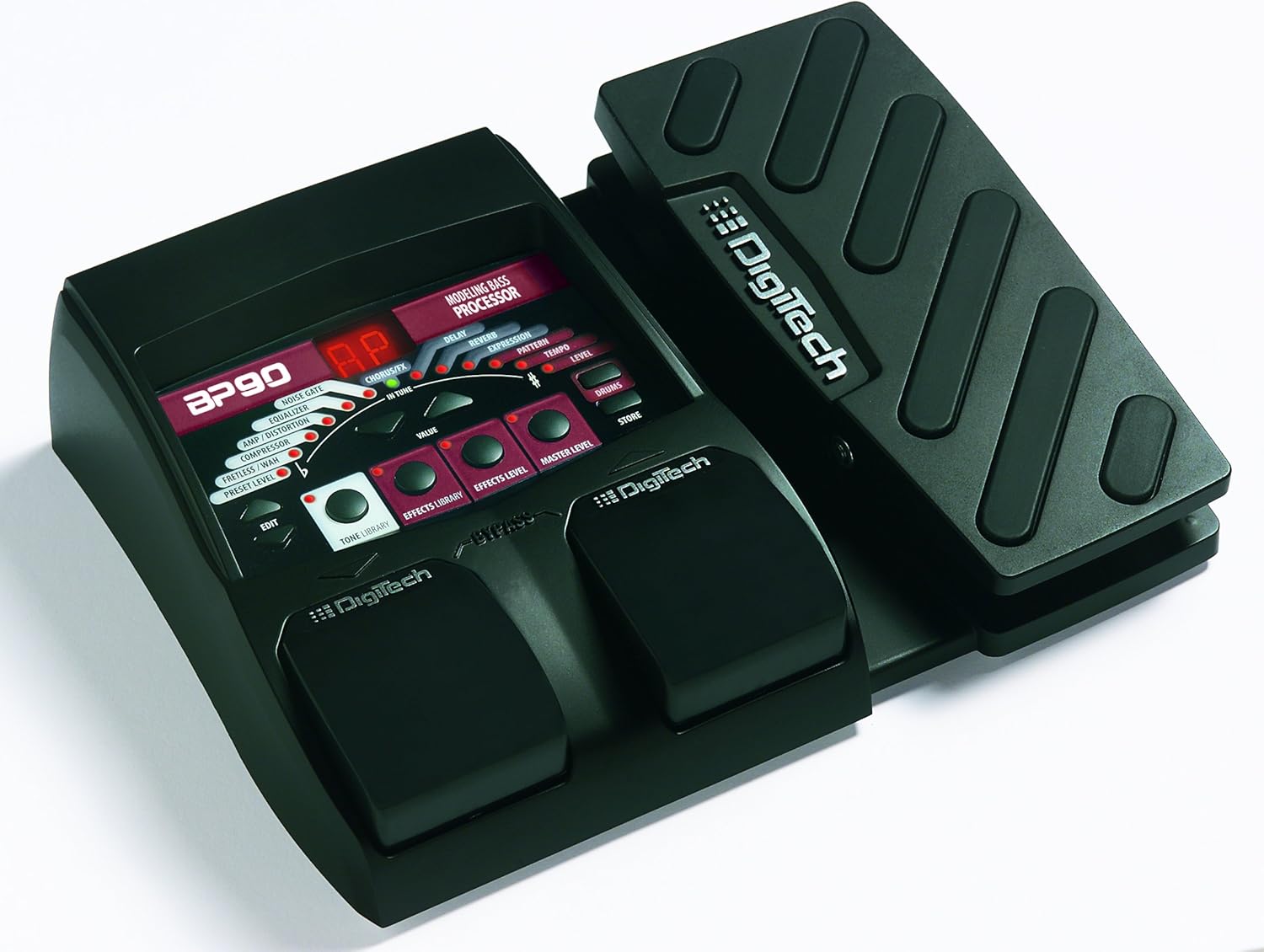
2-сүрөт: Бурчтуу view of the DigiTech BP90, highlighting the integrated expression pedal.
The integrated expression pedal allows for dynamic control over various effects such as Wah, Volume, and the unique DigiTech Whammy effect. Its robust design ensures reliable performance during live use or practice sessions.
Арткы панелдик байланыштар

3-сүрөт: Арткы view of the DigiTech BP90, displaying all input and output jacks.
The rear panel provides all necessary connections for the BP90. These include the INPUT jack for your bass guitar, СОЛ (МОНО) жана ТУУРА jacks for connecting to an amplifier or mixer, an AUX IN jack for external audio sources, a dedicated НАУШНИК ЧЫГАТ jack for silent practice, and the 9VDC 300mA электр киргизүү.
Жайгашуу
- Бас-гитараңызды туташтырыңыз INPUT jack on the rear panel of the BP90.
- туташтыруу LEFT (MONO) OUT бассыңызга джек amplifier's input or a mixer. For stereo output, connect both СОЛ жана ТУУРА jacks to a stereo ampкөтөргүч же аралаштыргыч.
- If desired, connect an external audio source (e.g., MP3 player) to the AUX IN jack for practice along with music.
- Үнсүз машыгуу үчүн, кулакчындарды туташтырыңыз НАУШНИК ЧЫГАТ джек.
- Connect the included 9V DC power supply to the 9VDC 300mA input on the rear panel and then plug it into a wall outlet. The unit will power on automatically.
Иштөө нускамалары
Чабыттоо Алдын ала орнотуулар
The BP90 comes with 100 presets, divided into 50 factory presets (51-100) and 50 user presets (01-50). Use the footswitches to cycle through presets. Pressing both footswitches simultaneously typically engages the bypass mode, allowing your clean bass signal to pass through.
Editing Effects and Amp Моделдер
басыңыз EDIT button to enter edit mode. Use the TONE LIBRARY жана EFFECTS LIBRARY buttons to select different amp models, cabinet models, and individual effects. Adjust parameters using the VALUE knob (or corresponding buttons). The EFFECTS LEVEL жана МАСТЕР ДЕҢГЭЭЛ controls adjust the overall effect mix and output volume, respectively. Remember to press ДҮКӨН to save your changes to a user preset location (01-50).
Using the Drum Machine
The BP90 includes 40 built-in drum patterns for practice. Activate the drum machine by pressing the БАРАБАНДАР button. Use the controls to select different patterns and adjust the tempo. This feature is ideal for developing rhythm and timing.
Камтылган хроматикалык тюнер
The integrated chromatic tuner allows for accurate tuning of your bass. Refer to the display for tuning indications. The tuner typically mutes the output signal when engaged, allowing for silent tuning.
Expression Pedal Functions
The expression pedal can be assigned to control various parameters within a preset, such as wah intensity, volume level, or the pitch shift of the Whammy effect. Consult the detailed manual for specific instructions on assigning and calibrating the expression pedal for different effects.
Техникалык тейлөө
- Аппаратты жумшак, кургак чүпүрөк менен сүртүп, таза кармаңыз. Абразивдүү тазалоочу каражаттарды же эриткичтерди колдонуудан алыс болуңуз.
- Store the BP90 in a cool, dry place away from direct sunlight and extreme temperatures.
- Узак убакыт бою колдонулбаган учурда, электр тогунан ажыратыңыз.
- Regularly check all cables and connections for wear and tear to ensure optimal performance and safety.
Проблемаларды чечүү
| Көйгөй | Мүмкүн себеп | Чечим |
|---|---|---|
| Үн чыгышы жок. | Incorrect connections, low volume, unit in tuner/bypass mode. | Check all cable connections. Ensure Master Level is up. Exit tuner mode or bypass mode by pressing footswitches. |
| Бурмаланган же ызы-чуу үн. | Input level too high, faulty cables, incorrect power supply. | Adjust input level on your bass or the BP90. Try different cables. Ensure you are using the correct 9V DC 300mA power supply. |
| Түзмөк күйбөйт. | Power supply not connected, faulty power supply or outlet. | Verify power supply is securely connected to the unit and a working power outlet. Test the outlet with another device. |
| Expression pedal not responding. | Pedal not assigned to a parameter, calibration issue. | Ensure the expression pedal is assigned to the desired effect parameter within the preset. Refer to the full manual for calibration procedures. |
Техникалык шарттар
- Элемент Салмагы: 1.52 фунт
- Продукциянын өлчөмдөрү: 6.5 x 8.5 x 2 дюйм
- Модель номери: BP90
- Түсү: Кара/Кызыл
- Аппараттык интерфейс: HP-HSC
- Сигнал форматы: Аналог
- Кубат булагы: Электр зымдары
- Тtage: 9V
- Биринчи жеткиликтүү датасы: 24-июнь, 2010-жыл
Кепилдик жана колдоо
Кепилдик жана техникалык колдоо боюнча толук маалымат алуу үчүн, расмий DigiTech компаниясына кайрылыңыз webсайтына кириңиз же алардын кардарларды тейлөө кызматына кайрылыңыз. Кепилдик боюнча дооматтар үчүн сатып алганыңызды тастыктаган документти сактап коюңуз.
You can often find additional resources, FAQs, and firmware updates on the manufacturer's support pages.
Ask a question about this manual
Ask about setup, troubleshooting, compatibility, parts, safety, or missing instructions. Manuals+ will review the question and use this page’s manual context to help answer it.