
1. Киришүү
The BUFFALO Giga Switching Hub LSW3-GT-24NSR is a 24-port Gigabit Ethernet switch designed for high-speed network environments. It is ideal for small to medium-sized offices and workplaces requiring robust and reliable network connectivity. This device supports full Gigabit speeds across all ports, ensuring efficient data transfer.
Key features include a fanless design for silent operation and enhanced reliability, as well as a loop detection function to prevent network disruptions caused by accidental network loops.
2. Коопсуздук маалыматы
Please read and understand the following safety precautions before using the device to prevent injury or damage.
- Электр камсыздоо: Use only the provided power adapter. Ensure the power outlet meets the specified voltagд талаптар.
- Вентиляция: Желдетүүчү тешиктерди жаппаңыз. Ашыкча ысып кетүүнүн алдын алуу үчүн түзмөктүн айланасында жетиштүү аба айланышын камсыз кылыңыз.
- Курчап турган чөйрө: Avoid exposing the device to water, high humidity, extreme temperatures, or direct sunlight.
- Колдонуу: Do not drop or subject the device to strong impacts. Do not attempt to open or repair the device yourself. Refer all servicing to qualified personnel.
- Кабелдер: Ensure all network cables are properly connected and secured.
3. Пакеттин мазмуну
Пакетте бардык буюмдар бар экенин текшериңиз:
- BUFFALO Giga Switching Hub LSW3-GT-24NSR Unit
- Электр кабели
- Rack Mount Brackets (if included with your model)
- Резина буттар (үстөлдөргө жайгаштыруу үчүн)
4. Орнотуу
4.1 Физикалык орнотуу
The LSW3-GT-24NSR can be installed on a desktop or mounted in a 19-inch equipment rack.
Иш тактада жайгаштыруу:
- Attach the included rubber feet to the bottom of the unit to prevent slipping and provide stability.
- Place the unit on a flat, stable surface with adequate ventilation.
Стойкага орнотуу:
- Attach the rack mount brackets to the sides of the unit using the provided screws.
- Secure the unit into a standard 19-inch equipment rack using appropriate rack screws (not included).
4.2 Тармактык кабелдерди туташтыруу
Connect your network devices (computers, servers, other switches) to any of the 24 RJ-45 ports on the front panel using standard Ethernet cables (Category 5e or higher recommended for Gigabit speeds).

Сүрөт 1: Алдыңкы панелдин үстүндөview with 24 Ethernet Ports and Status LEDs.
4.3 Кубатты туташтыруу
- Connect the power cable to the AC IN port on the rear of the device.
- Электр кабелинин экинчи учун ылайыктуу розеткага сайыңыз.
- The device will power on automatically. The POWER LED on the front panel should illuminate.

2-сүрөт: Арткы панелдин үстүндөview with AC IN Power Port.
5. Иштөө нускамалары
5.1 LED көрсөткүчтөрү
The front panel features several LED indicators to monitor the status of the switch and its ports.
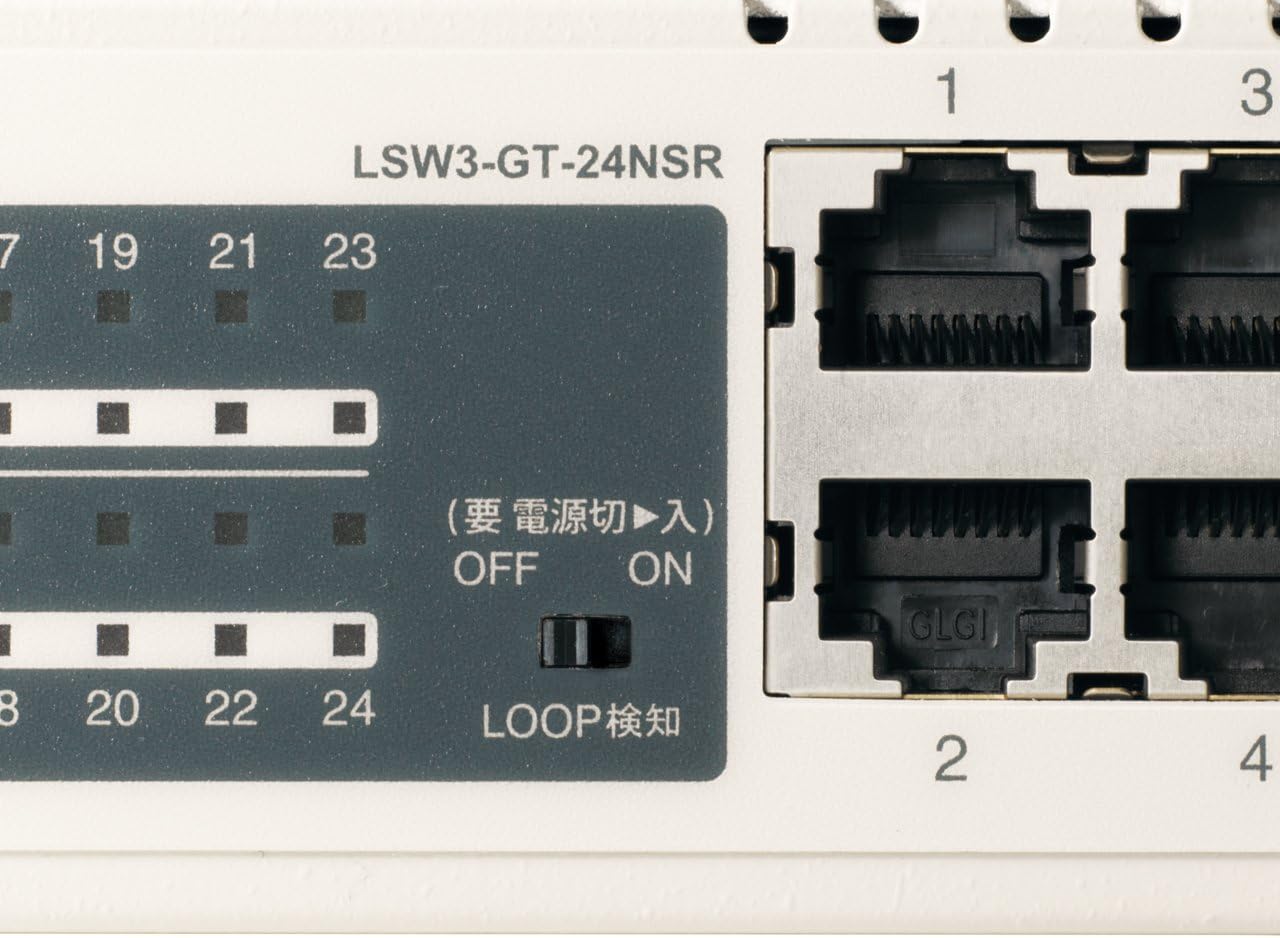
3-сүрөт: Детальдуу view of LED Indicators and Loop Detection Switch.
| LED аты | Статус | Description |
|---|---|---|
| КҮЧ | On | Аппарат күйгүзүлгөн. |
| LINK / ACT (портко) | On | A network device is connected and a link is established. |
| Жаркылдоо | Маалыматтар порт аркылуу берилет же кабыл алынат. | |
| 1000/100/10M (портко) | Жашыл | Port is operating at 1000 Mbps (Gigabit Ethernet). |
| Ачык күрөң | Port is operating at 100 Mbps (Fast Ethernet). | |
| Өчүк | Port is operating at 10 Mbps (Ethernet). | |
| LOOP DETECT | On | A network loop has been detected. |
5.2 Loop Detection Function
The LSW3-GT-24NSR features a hardware switch for enabling or disabling the loop detection function. This function helps prevent network instability caused by accidental network loops.
Figure 4: Loop Detection Switch (ON/OFF).
- КҮЙҮК: Loop detection is active. If a loop is detected, the corresponding port will be automatically shut down to prevent network broadcast storms, and the LOOP DETECT LED will illuminate.
- ӨЧҮК: Loop detection is disabled.
It is recommended to keep the loop detection function ON for network stability.
6. Техникалык тейлөө
6.1 Аппаратты тазалоо
Оптималдуу иштөөсүн сактоо үчүн, өчүргүчтүн сыртын мезгил-мезгили менен тазалап туруңуз.
- Тазалоодон мурун электр кабелин сууруп алыңыз.
- Бетти сүртүү үчүн жумшак, кургак чүпүрөктү колдонуңуз.
- Do not use liquid cleaners, aerosols, or solvents, as these may damage the casing же ички компоненттер.
6.2 Айлана-чөйрөнү коргоо
Ensure the device is operated within its specified environmental conditions:
- Температура: 0°Cден 40°Cге чейин (32°F—104°F)
- Нымдуулук: 10% - 85% (конденсацияланбаган)
7. Кыйынчылыктарды
If you encounter issues with your BUFFALO Giga Switching Hub, refer to the following common problems and solutions.
7.1 Күч жок
- Белги: POWER LED өчүк.
- Чечим: Check if the power cable is securely connected to both the device and the power outlet. Ensure the power outlet is functional.
7.2 No Link or Slow Speed on a Port
- Белги: The LINK/ACT LED for a connected port is off, or the 1000/100/10M LED indicates a lower speed than expected (e.g., 100M instead of 1000M).
- Чечим:
- Ethernet кабелинин эки учунан тең бекем туташтырылганын текшериңиз.
- Try a different Ethernet cable. Ensure it is a Category 5e or higher cable for Gigabit speeds.
- Түзмөктү коммутатордогу башка портко туташтырыңыз.
- Check the network adapter settings on the connected device (computer, server) to ensure it is configured for auto-negotiation or the correct speed.
7.3 Network Instability / LOOP DETECT LED is On
- Белги: The LOOP DETECT LED is illuminated, and network performance is degraded or unstable.
- Чечим:
- A network loop has been detected. This typically occurs when two ports on the same switch (or different switches) are connected to each other, creating an infinite data path.
- Carefully inspect your network cabling to identify and remove any redundant connections that form a loop.
- If the loop detection switch is ON, the affected port will be automatically shut down. Once the loop is resolved, the port should resume normal operation.
8. Техникалык шарттар
| Өзгөчөлүк | Description |
|---|---|
| Бренд | BUFFALO |
| Модель номери | LSW3-GT-24NSR |
| Порт саны | 24 x 10/100/1000BASE-T RJ-45 порттору |
| Switching Capacity | 48 Гбит/сек (бөгөттөөсүз) |
| Багыттоо баасы | 35.7 Mpps |
| MAC дарек столунун көлөмү | 8K жазуулар |
| Jumbo Frame колдоо | 9KB чейин |
| Өзгөчөлүктөрү | Auto-MDI/MDIX, Auto-Negotiation, Loop Detection Function, Fanless Design |
| Электр камсыздоо | Ички өзгөрмө ток менен камсыздоо |
| Өлчөмдөрү (W x D x H) | (Specific dimensions not provided in source, typical for 1U rackmount) |
| Салмагы | (Specific weight not provided in source) |
| Иштөө температурасы | 0°Cден 40°Cге чейин |
| Иштөө нымдуулугу | 10% - 85% (конденсацияланбаган) |
9. Кепилдик жана колдоо
This BUFFALO product is covered by a manufacturer's warranty. Please refer to the warranty card included with your product or visit the official BUFFALO webдеталдуу кепилдик шарттары жана шарттары үчүн сайт.
For technical support, product registration, or further assistance, please visit the official BUFFALO support webсайтка же кардарларды тейлөө бөлүмүнө кайрылыңыз. Байланыш маалыматы, адатта, өндүрүүчүнүн сайтынан тапса болот webсайтында же продуктунун таңгагында.