
HEWLETT PACKARD JC507A
HP 3502 IP Phone User Manual
Model: JC507A
1. Киришүү
This manual provides comprehensive instructions for the setup, operation, and maintenance of your HP 3502 IP Phone. The HP 3502 is a robust Voice over IP (VoIP) telephone designed for business environments, featuring four softkeys and full-duplex speakerphone capabilities for clear communication.
2. Пакеттин мазмуну
Төмөндө көрсөтүлгөн бардык буюмдар таңгагыңызда бар экенин текшериңиз. Эгерде кандайдыр бир буюмдар жок болсо же бузулуп калса, дароо сатуучуга кайрылыңыз.
- HP 3502 IP Phone Unit
- Телефон
- Телефон шнур
- Ethernet кабели (RJ-45)
- Power Adapter (if not using Power over Ethernet - PoE)
- Quick Start Guide
3. Продукт бүтүп калдыview
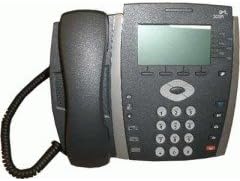
3.1-сүрөт: Фронт view of the HP 3502 IP Phone. The image displays the phone's handset resting on its cradle on the left side. The main unit features a rectangular display screen at the top, below which are four softkeys. To the right of the display is a navigation cluster, and below that is a standard numeric keypad with additional function buttons.
The HP 3502 IP Phone is designed for intuitive use and reliable performance. Key features include:
- Дисплей экраны: A 4.3-inch screen for call information, menus, and status.
- жумшак баскычтар: Four context-sensitive buttons located directly below the display, whose functions change based on the phone's current state.
- Толук дуплекстүү динамик: Allows for hands-free conversations with clear audio.
- Сандык баскычтоп: Standard 0-9 keys for dialing, along with * and #.
- Навигация кластери: Buttons for menu navigation and selection.
- Атайын функция баскычтары: Includes buttons for volume control, mute, headset, speaker, and message waiting indicator.
- Кубат булагы: Supports both Corded Electric power and Power over Ethernet (PoE).
4. Орнотуу
4.1 Физикалык байланыш
- Телефонду туташтыруу: Оролгон трубканын шнурунун бир учун трубкага, экинчи учун телефондун түбүндөгү трубка портуна сайыңыз.
- Тармакка туташуу:
- Locate the "LAN" or "NETWORK" port on the back of the phone.
- Connect one end of the Ethernet cable to this port and the other end to an active network port (e.g., a wall jack or network switch).
- Туташуу кубаты:
- If your network supports Power over Ethernet (PoE), the phone will power on automatically once the Ethernet cable is connected.
- If PoE is not available, connect the provided power adapter to the "POWER" port on the phone and then plug the adapter into a standard electrical outlet.
- Баштапкы жүктөө: The phone will power on and begin its boot sequence. This may take a few moments. The display will show boot progress and then indicate network status.
4.2 Network and Account Configuration
The HP 3502 IP Phone typically obtains network settings (IP address, subnet mask, gateway, DNS) automatically via DHCP. VoIP account registration (SIP or H.323) is usually provisioned by your IT administrator or service provider. Consult your IT department for specific configuration details if manual setup is required.
- Automatic Provisioning: Most enterprise deployments use automatic provisioning servers to configure the phone.
- Кол менен конфигурациялоо: If manual configuration is necessary, access the phone's menu system (often via a "Menu" or "Settings" button) to enter network parameters and SIP/H.323 account details. Refer to your IT administrator's instructions for these values.
5. Иштөө нускамалары
5.1 Чалууларды жасоо
- Көтөрүү аппараты: Телефонду алыңыз же басыңыз Баяндамачы button for hands-free mode. You will hear a dial tone.
- Номерди терүү: Сандык баскычтопту колдонуп, керектүү телефон номерин киргизиңиз.
- Чакырууну баштоо: басыңыз Терүү softkey (if available) or wait a few seconds for the call to automatically connect.
5.2 Чалууларды кабыл алуу
- Телефон шыңгыраганда, жооп берүү үчүн трубканы көтөрүңүз.
- Же болбосо, басыңыз Баяндамачы button to answer in hands-free mode, or press the Жооп жумшак баскыч.
5.3 In-Call Functions
- Үндү көзөмөлдөө: колдонуу Көлөм buttons (usually +/-) to adjust the handset, headset, or speakerphone volume during a call.
- Үнсүз: басыңыз Үнсүз Микрофонуңуздун үнүн басуу үчүн баскычты басыңыз. Үнүн чыгаруу үчүн аны кайра басыңыз.
- Кармап туруу: басыңыз кармап туруңуз softkey or button to place the current call on hold. Press it again to resume the call.
- өткөрүүсү:
- Активдүү чалуу учурунда, басыңыз Transfer softkey or button.
- Чакырууну өткөргүңүз келген номерди териңиз.
- басыңыз Transfer softkey again to complete a blind transfer, or wait for the other party to answer and then press Transfer for a supervised transfer.
- Конференция:
- Активдүү чалуу учурунда, басыңыз Конференция softkey or button.
- Үчүнчү тараптын номерин териңиз.
- Үчүнчү тарап жооп бергенден кийин, баскычын басыңыз Конференция Бардык тараптарга кошулуу үчүн кайрадан жумшак баскычты басыңыз.
- Чакырууну аяктоо: Replace the handset in the cradle, or press the Чакырууну аяктоо softkey or Баяндамачы button if in hands-free mode.
6. Техникалык тейлөө
Proper care ensures the longevity of your HP 3502 IP Phone.
- Тазалоо: Телефондун бетин тазалоо үчүн жумшак, кургак, түксүз чүпүрөктү колдонуңуз. Өжөр тактар үчүн бир аз сүртүңүзampчүпүрөктү суу менен. Катуу химиялык заттарды, абразивдүү тазалагычтарды же эриткичтерди колдонуудан алыс болуңуз.
- Курчап турган чөйрө: Keep the phone away from excessive heat, direct sunlight, and moisture. Ensure adequate ventilation around the device.
- Колдонуу: Телефонду түшүрүп алуудан же катуу соккуга кабылтуудан алыс болуңуз.
7. Кыйынчылыктарды
This section addresses common issues you might encounter with your HP 3502 IP Phone.
| Көйгөй | Мүмкүн себеп | Чечим |
|---|---|---|
| No dial tone / Phone not powering on | No power, network cable loose, network issue. |
|
| Чалууларды кабыл алуу же жасоо мүмкүн эмес | No network connection, incorrect VoIP account registration, firewall issues. |
|
| Үн сапаты начар (жаңылык, статикалык) | Network congestion, faulty cable, environmental interference. |
|
If the problem persists after attempting these solutions, please contact your IT support or the product manufacturer for further assistance.
8. Техникалык шарттар
| Өзгөчөлүк | Деталь |
|---|---|
| Бренд | HP (Hewlett Packard) |
| Модель номери | JC507A |
| Продукт түрү | IP Phone (VoIP Phone) |
| Дисплей өлчөмү | 4.3 дюйм |
| Power Source | Corded Electric, Power over Ethernet (PoE) |
| Терүүчү түрү | Жалгыз баскычтоп |
| Жооп берүү системасынын түрү | Санарип |
| Көп линия операциясы | Көп линиялуу операция |
| Элемент Салмагы | 3.95 фунт (болжол менен 1.79 кг) |
| Пакеттин өлчөмдөрү | 14.9 x 10.7 x 4.4 дюйм (болжол менен 37.8 x 27.2 x 11.2 см) |
| UPC | 885631695951 |
| Биринчи жеткиликтүү күн | 13-июль, 2010-жыл |
9. Кепилдик жана колдоо
The HP 3502 IP Phone is covered by a standard manufacturer's warranty. For specific warranty terms and conditions, please refer to the warranty card included with your product or visit the official HP support webсайт.
For technical support, troubleshooting assistance beyond this manual, or to inquire about service, please contact HP customer support or your authorized HP reseller. Contact information can typically be found on the HP official webсайтында же продукт документациясында.
HP колдоо Webсайт: www.hp.com/support
Ask a question about this manual
Ask about setup, troubleshooting, compatibility, parts, safety, or missing instructions. Manuals+ will review the question and use this page’s manual context to help answer it.