
Introduction
The Mackie HD1221 is a 12-inch 2-way compact high-definition powered loudspeaker designed for professional audio applications. It features 1200W of Class-D Fast Recovery amplification, high-definition audio processing, and custom-designed transducers by EAW. This manual provides essential information for the safe and effective use of your HD1221 loudspeaker, including setup, operation, maintenance, and troubleshooting.
Коопсуздук маалыматы
Before operating the Mackie HD1221 loudspeaker, please read and understand all safety instructions. Failure to do so may result in electric shock, fire, or other injuries. Keep these instructions for future reference.
- Кубат булагы: Түзмөктү колдонуу боюнча нускамада сүрөттөлгөн же шайманда белгиленген түрдөгү кубат булагына гана туташтырыңыз.
- Негиздөө: Ensure the loudspeaker is properly grounded to prevent electric shock.
- Вентиляция: Эч кандай желдетүүчү тешиктерди жаап албаңыз. Өндүрүүчүнүн көрсөтмөлөрүнө ылайык орнотуу.
- Суу жана ным: Бул аппаратты суунун жанында колдонбоңуз же аны тамчылап же чачыратып жибербеңиз.
- Тазалоо: Кургак чүпүрөк менен гана тазалаңыз.
- Тейлөө: Бардык тейлөөлөрдү квалификациялуу тейлөө кызматкерлерине тапшырыңыз. Аппарат кандайдыр бир зыянга учураганда, мисалы, кубат берүүчү шнур же сайгыч бузулганда, суюктук төгүлгөндө же аппараттын ичине нерселер түшкөндө, аппарат жамгырга же нымдуулукка дуушар болгондо, нормалдуу иштебей калганда тейлөө талап кылынат. , же түшүрүлгөн.
- Монтаждоо: Өндүрүүчү белгилеген же аппарат менен бирге сатылган араба, стенд, штатив, кронштейн же үстөл менен гана колдонуңуз. Араба колдонулганда, оодарылып кетүүдөн жаракат албаш үчүн арабаны/аппаратты айкалыштырууда этият болуңуз.
Пакеттин мазмуну
Verify that the following items are included in your Mackie HD1221 package:
- Mackie HD1221 Powered Loudspeaker
- Электр кабели
- Ыкчам баштоо колдонмосу (эгер бар болсо)
- Кепилдик маалымат
Эгерде кандайдыр бир буюмдар жок же бузулуп калса, дароо дилериңизге кайрылыңыз.
Продукт бүттүview
The Mackie HD1221 is a versatile loudspeaker designed for various applications, including main PA, stage monitor, and flown installations. It features a robust construction and advanced audio processing.
Алдыңкы жана каптал Views
1-сүрөт: алдыңкы жана каптал view of the HD1221 loudspeaker, highlighting the durable grille and integrated handles for portability.

2-сүрөт: Сол жагы view of the HD1221 loudspeaker.
Арткы панелдин башкаруу элементтери жана байланыштары

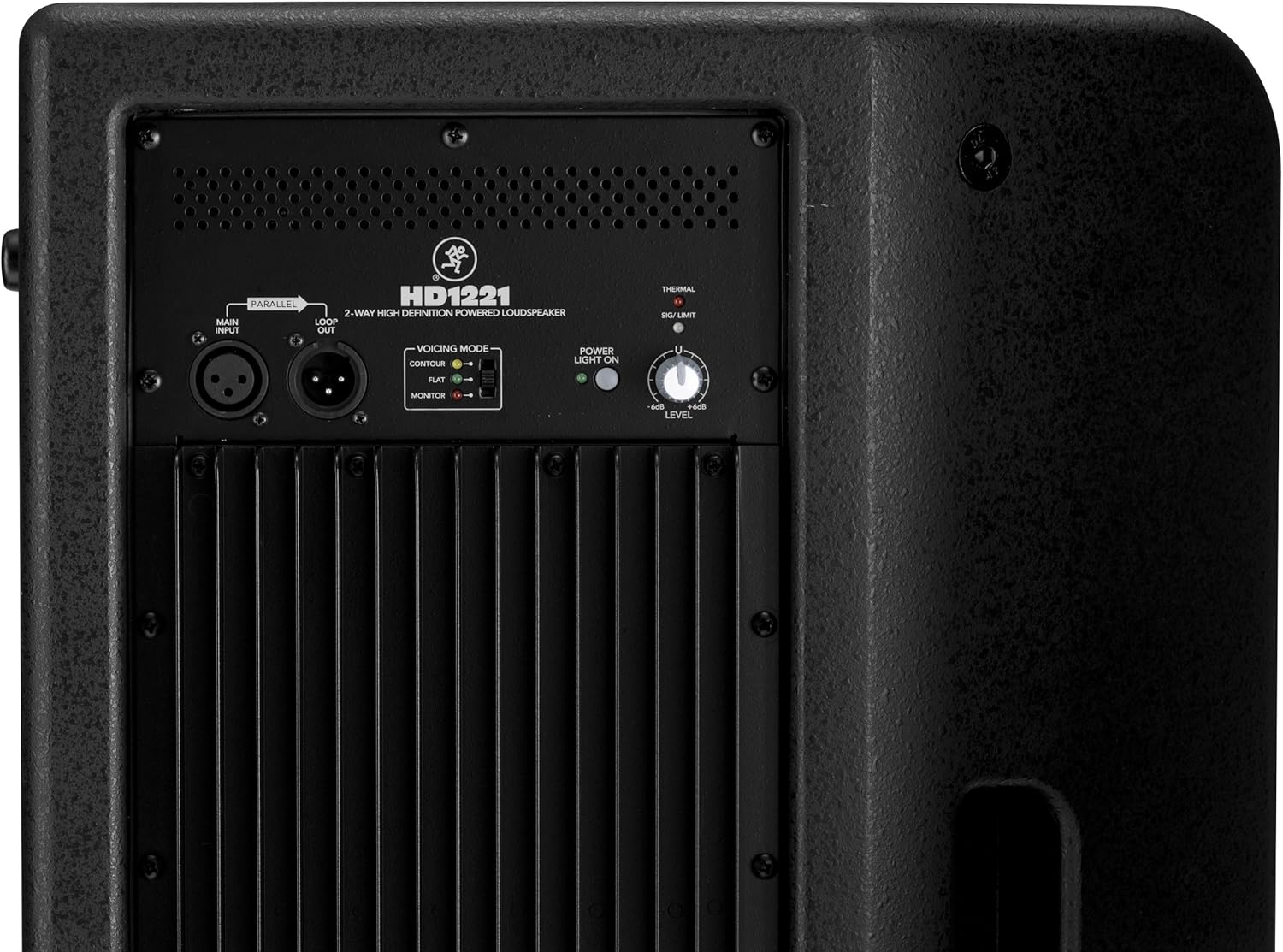
Figure 3: Rear panel of the HD1221, detailing the input/output section, voicing mode switch, power indicator, and level control knob.
- Main Input (XLR): Connect your audio source here.
- Loop Out (XLR): Provides a parallel output of the main input signal for connecting to additional loudspeakers or other audio equipment.
- Voicing Mode Switch: Selects between Contour, Flat, and Monitor modes to optimize the loudspeaker's frequency response for different applications.
- Күйгүзүү жарыгы: Бирдиктин кубаттуулугун көрсөтөт.
- Thermal/Sig/Limit Indicators: Provide visual feedback on the loudspeaker's operational status, including thermal protection, signal presence, and limiting.
- Деңгээлди көзөмөлдөө: Adjusts the overall output volume of the loudspeaker.
- AC кубаттуулугун киргизүү: Электр кабелин электр булагына туташтырат.
Ички компоненттер
4-сүрөт: Ички view of the HD1221, showcasing the 12-inch neodymium woofer and 1.75-inch titanium compression driver, designed by EAW.
Жайгашуу
Proper setup ensures optimal performance and safety. Follow these steps for initial setup:
Power Connection
- Ensure the Level control on the rear panel is set to its minimum position.
- Connect the supplied AC power cable to the AC Power Input on the rear panel of the HD1221.
- Электр кабелинин экинчи учун жерге туташтырылган электр розеткасына сайыңыз.
Аудио байланыштар
- Connect your audio source (e.g., mixer, instrument) to the Main Input (XLR) on the rear panel.
- If connecting multiple loudspeakers, use the Loop Out (XLR) to send the signal to the next loudspeaker.
Монтаждоо параметрлери
The HD1221 offers several mounting options for flexibility:
Полякка орнотуу

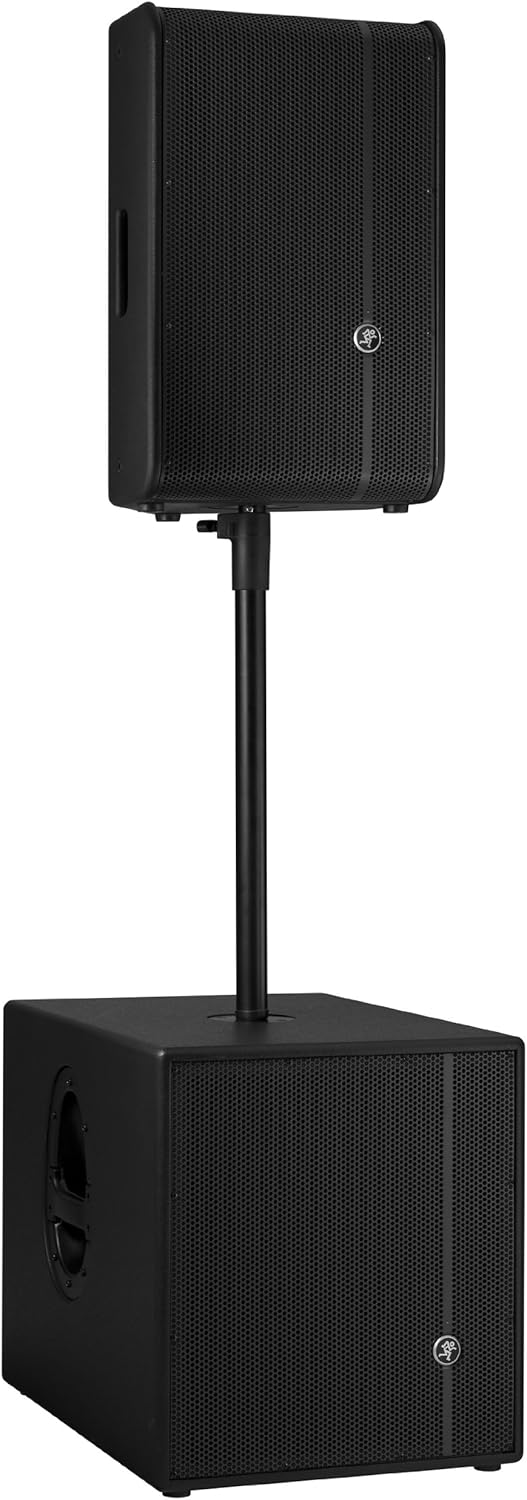
Figure 5: The HD1221 mounted on a pole, typically above a subwoofer like the HD1501 for a full-range PA system.
The HD1221 can be mounted on a standard speaker pole stand. Ensure the stand is stable and rated for the weight of the loudspeaker (approximately 58 lbs).
Stage Monitor Placement
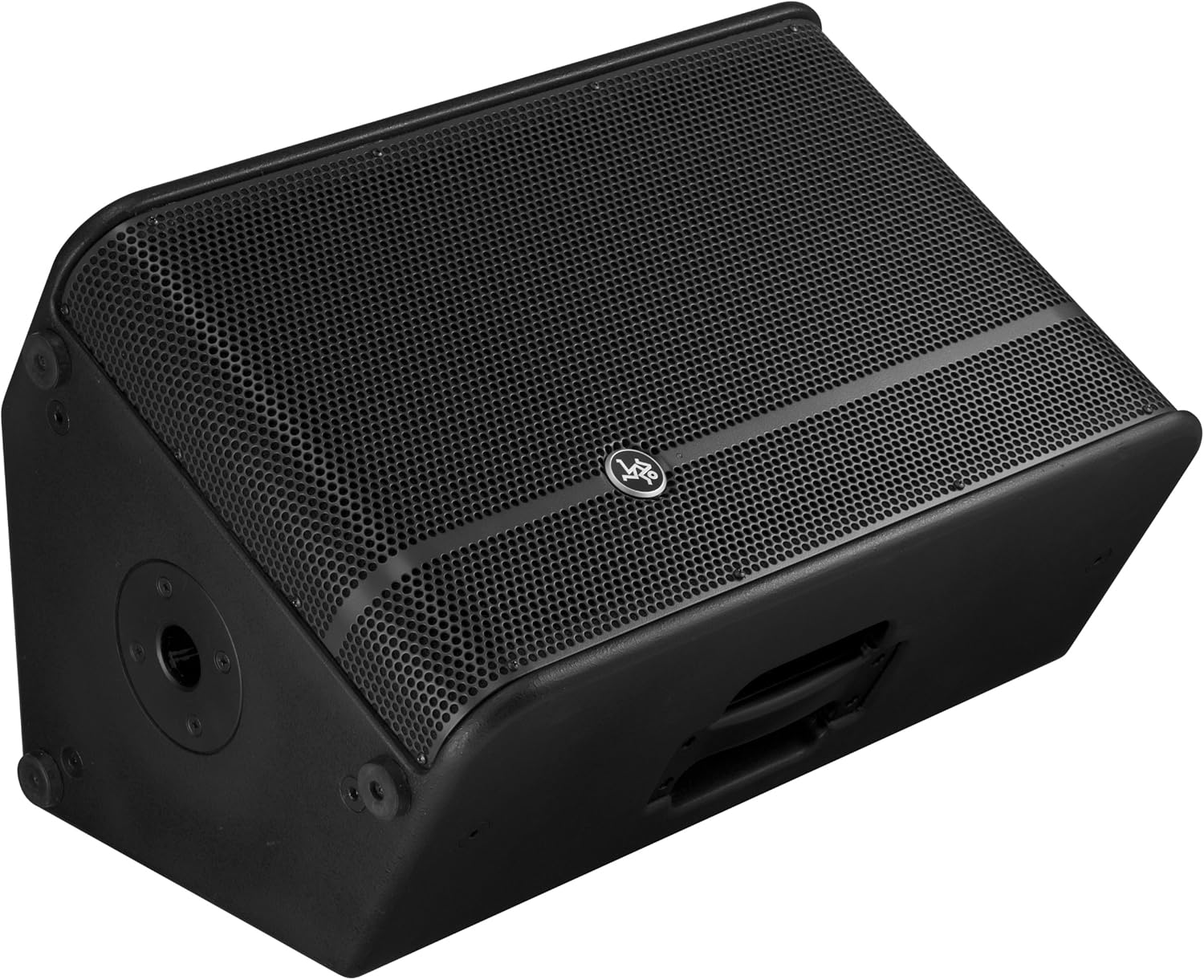
Figure 6: The HD1221 configured as a stage monitor, utilizing its 60-degree angle for optimal sound projection towards the performer.
Шкафтын дизайны төмөнкүдөй колдонууга мүмкүндүк беретtage monitor with a 60-degree angle. Place the loudspeaker directly on the stage floor, angled towards the performer.
Flying/Suspension

Figure 7: The HD1221 suspended vertically using appropriate rigging hardware.

Figure 8: The HD1221 suspended horizontally using appropriate rigging hardware.
The HD1221 can be flown both vertically and horizontally. Always use certified rigging hardware and consult with a qualified professional for safe installation. The user-rotatable horn allows for precise sound placement in either orientation.
Иштөө нускамалары
Once the loudspeaker is set up, follow these steps for operation:
- Күйгүзүү: Turn on your audio source (mixer, etc.) first, then turn on the HD1221 loudspeaker. The 'Power Light On' indicator should illuminate.
- Set Voicing Mode: Use the Voicing Mode switch on the rear panel to select the appropriate setting for your application:
- Контур: Provides a sculpted frequency response, often suitable for music playback.
- Батир: Offers a neutral frequency response, ideal for critical listening or when external EQ is used.
- Монитор: Optimizes the frequency response for use as a stage monitor, reducing low-end rumble and enhancing clarity.
- Деңгээлин тууралоо: Slowly increase the Level control on the rear panel to achieve the desired volume. Monitor the 'Sig/Limit' indicator; if it flashes frequently or stays lit, reduce the input level from your source or the HD1221's level to prevent distortion and potential damage.
- Өчүрүү: When finished, turn off the HD1221 loudspeaker first, then turn off your audio source.
Расмий продукт Video
Видео 1: Бүттүview of the Mackie HD1221 12-inch 2-Way High-Definition Powered Loudspeaker, demonstrating its features and applications.
Техникалык тейлөө
Regular maintenance helps prolong the life and performance of your HD1221 loudspeaker.
- Тазалоо: Use a dry, lint-free cloth to clean the exterior of the loudspeaker. Do not use liquid cleaners or solvents.
- Тор: Periodically check the steel grille for any damage or debris. Clean gently if necessary.
- Байланыштары: Бардык кабелдер бекем туташтырылган жана бузулбаганын текшериңиз.
- Сактагыч: When not in use, store the loudspeaker in a dry, temperate environment, protected from dust and extreme temperatures.
Проблемаларды чечүү
If you encounter issues with your HD1221, refer to the following common problems and solutions:
| Көйгөй | Мүмкүн себеп | Чечим |
|---|---|---|
| Үн чыгышы жок | No power; incorrect connections; low level setting; faulty cable. | Check power cable and outlet. Verify audio cable connections. Increase Level control. Test with a different cable. |
| Бурмаланган үн | Input level too high; faulty cable; damaged speaker component. | Reduce input level from source or HD1221. Check 'Sig/Limit' indicator. Test with a different cable. If distortion persists, contact support. |
| Электр жарыгы жок | No power; power switch off; internal fuse blown. | Ensure power cable is connected and outlet is active. Check power switch. If still no light, contact support. |
| Overheating (Thermal indicator lit) | Insufficient ventilation; prolonged high-volume operation. | Ensure adequate airflow around the unit. Reduce volume. Allow unit to cool down. |
Техникалык шарттар
Detailed technical specifications for the Mackie HD1221 powered loudspeaker:
- Чыгуу кубаттуулугу: 1200 Вт чокусу
- Динамик түрү: 2-Way High-Definition Powered Loudspeaker
- Вуфер: 12-inch Neodymium Woofer
- Компрессия драйвери: 1.75 дюймдук титандан жасалган кысуу драйвери
- Мүйүз: Колдонуучу тарабынан айландырылуучу 90° x 50° мүйүз
- Кабинеттин материалы: 15mm Birch Plywood
- Тор: Муздак прокатталган болот
- Монитор бурчу: 60 градус
- Voicing Modes: Contour, Flat, Monitor
- Ampжашоо: Class-D Fast Recovery
- Импеданс: 8 Ом
- Элемент Салмагы: 58 фунт
- Туташуу протоколу: Wi-Fi (Note: This specification might refer to internal processing or future features, as direct Wi-Fi audio input is not typical for this type of speaker.)
- Модель номери: HD1221
- UPC: 663961030495
Кепилдик
The Mackie HD1221 loudspeaker comes with a comprehensive warranty:
- Электроника: 3 жылдык кепилдик
- Айдоочулар: 2 жылдык кепилдик
Please retain your proof of purchase for warranty claims. For full terms and conditions, refer to the warranty card included with your product or visit the official Mackie webсайт.
Колдоо
For additional assistance, technical support, or service inquiries, please contact Mackie Customer Support. You can find contact information and frequently asked questions on the official Mackie webсайт.
Онлайн ресурстар: зыярат кылыңыз Mackie Store on Amazon продукт маалымат жана жаңыртуу үчүн.