
Introduction
The GIGABYTE GM-M7600 is a wireless precision optical mouse designed for comfortable and reliable use. This manual provides instructions for setting up, operating, maintaining, and troubleshooting your device.
Пакеттин мазмуну
Сураныч, пакеттин мазмунун текшерип, бардык буюмдар бар экенин текшериңиз:
- GIGABYTE GM-M7600 Wireless Optical Mouse
- Portable Nano USB Receiver
- 2 x AAA батареялары
Жайгашуу
1. Батареяларды орнотуу
The GM-M7600 mouse requires two AAA batteries for operation. The batteries are included in the package.
- Чычкандын астыңкы бетинен батарея бөлүмүнүн капкагын табыңыз.
- Бөлүмдү ачуу үчүн капкакты акырын жылдырыңыз же көтөрүңүз.
- Insert the two AAA batteries, ensuring the positive (+) and negative (-) terminals align correctly with the markings inside the compartment.
- Батарея уясынын капкагын бекем жабыңыз.
2. USB кабылдагычты туташтыруу
The mouse connects to your computer via a portable Nano USB receiver.
- Locate the Nano USB receiver. It may be stored inside the mouse's battery compartment or packaged separately.
- Plug the Nano USB receiver into an available USB port on your computer (Laptop or Personal Computer).
- Your operating system (e.g., Windows XP, Linux) should automatically detect and install the necessary drivers. This process may take a few moments.
- Драйверлер орнотулгандан кийин, чычкан колдонууга даяр.
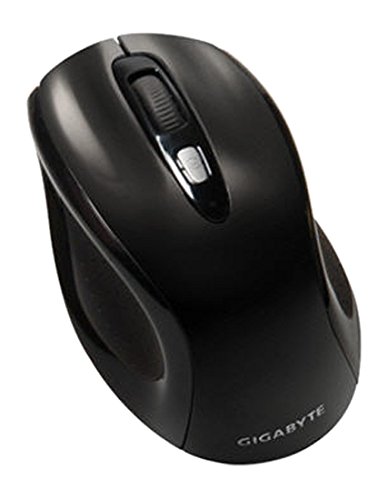
1-сүрөт: GIGABYTE GM-M7600 Wireless Optical Mouse. This image displays the ergonomic design of the mouse, highlighting its form factor and the location of its buttons. The Nano USB receiver is typically stored within the mouse or connected to a computer's USB port.
Иштөө нускамалары
1. Күйгүзүү / Өчүрүү
The mouse typically has a power switch on its underside. Slide the switch to the 'ON' position to activate the mouse. Slide it to 'OFF' when not in use to conserve battery life.
2. DPI жөндөө (сезимдүүлүк)
The GM-M7600 features an adjustable DPI switch, allowing you to change the mouse sensitivity between 800 DPI and 1600 DPI. This switch is usually located near the scroll wheel. Press the DPI button to toggle between the two sensitivity settings.
3. Чычкандын негизги функциялары
- Сол чыкылдатуу: Объекттерди тандоо үчүн негизги баскыч, ачуу fileс, жана программалык камсыздоо менен өз ара аракеттенүү.
- Оң чыкылдатуу: Контексттик менюларга жана кошумча параметрлерге кирүү үчүн кошумча баскыч.
- Жылдыруу дөңгөлөгү: Документтерди жылдыруу үчүн колдонулат жана web баракчалар. Ал ошондой эле ортоңку чыкылдатуу баскычы катары иштей алат.
Техникалык тейлөө
1. Тазалоо
Оптималдуу аткарууну жана көрүнүштү сактоо үчүн:
- Disconnect the mouse from your computer and turn off the power switch.
- Бир аз жумшак, түксүз кездемени колдонуңуз dampчычкандын бетин сүртүү үчүн суу же жумшак тазалоо эритмеси менен иштетилген.
- Катуу химиялык заттарды, абразивдүү тазалагычтарды колдонуудан же суюктуктарды чычканга түздөн-түз чачуудан алыс болуңуз.
- Clean the optical sensor area on the underside of the mouse with a dry cotton swab to remove any dust or debris.
2. Батареяны алмаштыруу
When the mouse performance degrades or it stops responding, it may be time to replace the batteries.
- Кубат баскычын колдонуп, чычканды өчүрүңүз.
- Open the battery compartment as described in the 'Installing Batteries' section.
- Эски AAA батарейкаларын алып салыңыз.
- Туура полярдуулукту (+/-) сактап, эки жаңы AAA батарейкасын салыңыз.
- Батарея бөлүмүн жаап, чычканды кайра күйгүзүңүз.
Проблемаларды чечүү
If you encounter issues with your GIGABYTE GM-M7600 mouse, try the following solutions:
- Чычкан жооп бербей жатат:
- Чычкан күйгүзүлгөнүн текшериңиз.
- Батареялар туура орнотулганын жана заряды жетиштүү экендигин текшериңиз. Керек болсо алмаштырыңыз.
- Ensure the Nano USB receiver is securely plugged into a working USB port on your computer. Try a different USB port.
- Компьютериңизди өчүрүп күйгүзүңүз.
- Курсордун туура эмес кыймылы:
- Чычкандын астындагы оптикалык сенсорду тазалаңыз.
- Чычканды ылайыктуу бетте колдонуп жатканыңызды текшериңиз. Өтө жарык чагылдыруучу же тунук беттерден алыс болуңуз.
- Check for any wireless interference. Move the mouse closer to the receiver or away from other wireless devices.
- DPI switch not working:
- Чычкандын күйгүзүлгөнүн жана туташтырылганын текшериңиз.
- DPI баскычын бекем басыңыз.
Техникалык шарттар
| Модель аты | GM-M7600 |
| Бренд | GIGABYTE |
| Байланыш технологиясы | 2.4 ГГц радио жыштыктагы зымсыз |
| Кыймылды аныктоо | Оптикалык |
| Жөнгө салынуучу DPI | 800 / 1600 DPI |
| баскычтардын саны | 3 (Left, Right, Scroll Wheel/Middle Click) |
| Power Source | 2 x AAA Батареялар (кошулган) |
| Алуучунун түрү | Portable Nano USB Receiver |
| Шайкеш түзмөктөр | Ноутбук, персоналдык компьютер |
| Операциялык системаны колдоо | Linux, Windows XP |
| Коргоочу материал | Plastic with Rubberized Finish |
| Түс | Кара |
Кепилдик жана колдоо
For warranty information and technical support, please refer to the warranty card included with your product or visit the official GIGABYTE webсайт. Кепилдик дооматтары үчүн сатып алуу дүмүрчөгүңүздү сактаңыз.