
cellularline BTCLIPARDP
Cellularline Roller Clip Bluetooth Headset User Manual
Model: BTCLIPARDP
Introduction
The Cellularline Roller Clip Bluetooth Headset is designed for convenient, hands-free communication. Featuring a retractable cable and a wireless Bluetooth clip, this headset offers flexibility and ease of use. It supports simultaneous connection to two mobile phones, automatically activating when a call is received or made on either device. Its automatic cable winder ensures a tidy experience, making it ideal for users who prefer to wear the headset only during calls.
Продукт бүттүview
Familiarize yourself with the components and features of your Cellularline Roller Clip Bluetooth Headset.

1-сүрөт: Фронт view of the Cellularline Roller Clip Bluetooth Headset, showing the main unit with the retractable earbud.
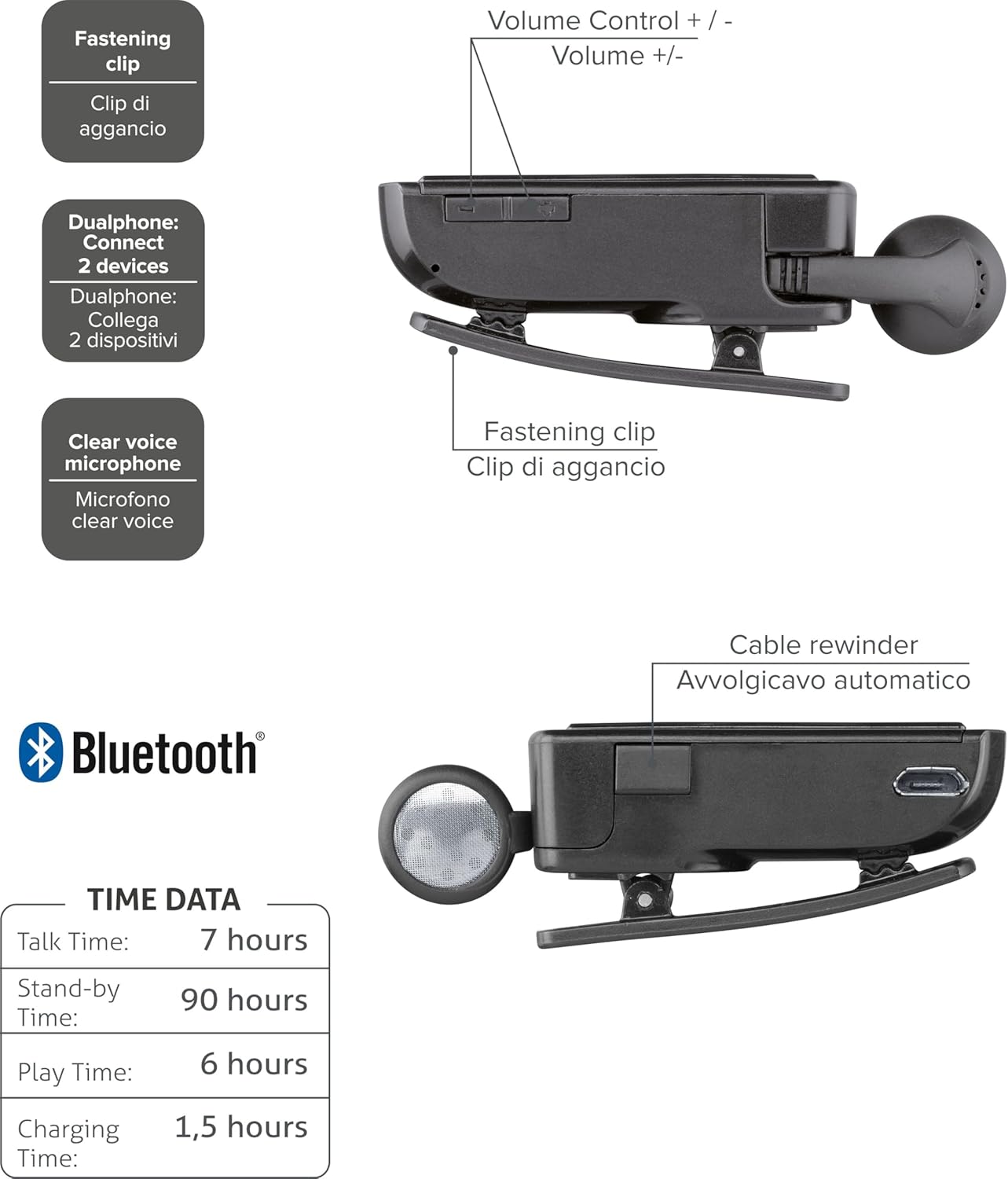
2-сүрөт: Diagram illustrating key features including the fastening clip, volume controls, dualphone connectivity, clear voice microphone, and cable rewinder.
- Retractable Earbud: The earbud cable automatically retracts into the main unit for compact storage.
- Bluetooth Clip: The main unit features a clip for attaching to clothing.
- Көлөмдү көзөмөлдөө: Buttons located on the side for adjusting audio volume.
- Көп чекиттүү туташуу: Бир эле учурда эки уюлдук телефонго туташат.
- Clear Voice Microphone: Ensures clear audio transmission during calls.
- Микро-USB порту: Аппаратты заряддоо үчүн.
Жайгашуу
1. Гарнитураны заряддоо
Before first use, fully charge the headset. Use the provided Micro-USB cable to connect the headset to a USB power source (e.g., computer USB port or wall adapter).
- Заряддоо индикатору заряддоо учурунда күйөт.
- Толук кубаттоо, адатта, болжол менен 1.5 саатты талап кылат.
- Кубаттоо аяктагандан кийин индикатор жарыгы өзгөрөт же өчөт.

3-сүрөт: Side view of the headset showing the Micro-USB charging port.
2. Pairing with a Mobile Device
To use the headset, it must be paired with your Bluetooth-enabled mobile phone or device.
- Гарнитура өчүрүлгөнүн текшериңиз.
- Press and hold the Multi-function button (usually the main power button) until the indicator light flashes blue and red alternately, indicating pairing mode.
- Мобилдик түзмөгүңүздө Bluetooth иштетип, жаңы түзмөктөрдү издеңиз.
- Select "Cellularline Roller Clip" or a similar name from the list of available devices.
- Эгер өткөрүүчү код суралса, "0000" (төрт нөл) киргизиңиз.
- Жупташтырылгандан кийин, индикатор жарыгы адатта жай көк түстө күйүп-өчөт жана сиз ырастоо сигналын уга аласыз.
3. Connecting to Two Devices (Multi-point)
The headset can be connected to two mobile phones simultaneously.
- Pair the headset with the first mobile device as described above.
- Биринчи түзмөктө Bluetooth'ду өчүрүңүз.
- Put the headset back into pairing mode and pair it with the second mobile device.
- Once paired with the second device, re-enable Bluetooth on the first device.
- The headset should now be connected to both devices. It will automatically switch to the active call on either phone.
Иштөө нускамалары
Күйгүзүү/өчүрүү
- Күйгүзүү: Press and hold the Multi-function button for approximately 3 seconds until the blue indicator light flashes.
- Өчүрүү: Press and hold the Multi-function button for approximately 3 seconds until the red indicator light flashes and then turns off.
Чалууларды кабыл алуу жана кабыл алуу
- Чакырууга жооп берүү: Чакыруу келгенде Көп функциялуу баскычты бир жолу басыңыз.
- Чакырууну аяктоо: Чалуу учурунда Көп функциялуу баскычты бир жолу басыңыз.
- Чакырууну четке кагуу: Press and hold the Multi-function button for approximately 2 seconds when a call comes in.
- Акыркы номерди кайра терүү: Double-press the Multi-function button when the headset is idle.
- Үн менен терүү (эгер телефондо колдоого алынса): Press and hold the Multi-function button for approximately 1 second when the headset is idle.
Үндү көзөмөлдөө
Adjust the call or media volume using the dedicated volume buttons on the side of the headset.

4-сүрөт: Side view of the headset showing the volume control buttons.
- Көлөмү: '+' баскычын басыңыз.
- Үнүн азайтуу: '-' баскычын басыңыз.
Артка тартылуучу кабель
To extend the earbud, gently pull it out. To retract, press the cable winder button (if present) or gently pull the cable slightly further and release to activate the retraction mechanism.
Техникалык тейлөө
- Тазалоо: Гарнитураны жумшак, кургак чүпүрөк менен сүртүңүз. Абразивдүү тазалагычтарды же эриткичтерди колдонбоңуз.
- Сактагыч: Гарнитураны күн нурунан жана экстремалдык температурадан алыс салкын, кургак жерде сактаңыз.
- Батареяга кам көрүү: Батареянын иштөө мөөнөтүн узартуу үчүн, бат-баттан батарейканы толук зарядсыздандырбаңыз. Гарнитураны узак убакыт бою колдонбосо дагы, дайыма заряддап туруңуз.
- Кабельге кам көрүү: Avoid forcefully pulling the retractable cable. Allow the automatic winder to retract the cable smoothly.
Проблемаларды чечүү
| Көйгөй | Мүмкүн себеп | Чечим |
|---|---|---|
| Гарнитура күйбөйт. | Батарея аз. | Гарнитураны толук заряддаңыз. |
| Гарнитураны жупташтыруу мүмкүн эмес. | Гарнитура жупташтыруу режиминде эмес; түзмөктө Bluetooth өчүрүлгөн; түзмөк өтө алыс. | Ensure headset is in pairing mode (flashing red/blue). Enable Bluetooth on your device. Move headset closer to the device. |
| Аудио жок же аудио сапаты начар. | Үнү өтө төмөн; гарнитура туташтырылган эмес; тоскоолдук. | Increase volume on both headset and phone. Reconnect the headset. Move away from other electronic devices. |
| Retractable cable not working smoothly. | Механизмдин бузулушу же тыгылып калышы. | Ensure no debris is obstructing the cable. Avoid forceful pulling. If damaged, contact support. |
| Cannot connect to two devices. | Incorrect pairing sequence. | Follow the multi-point pairing instructions carefully (pair first, disable Bluetooth, pair second, re-enable first). |
Техникалык шарттар
| Өзгөчөлүк | Деталь |
|---|---|
| Модель номери | BTCLIPARDP |
| Бренд | Cellularline |
| Түс | Black/Grey (Schwarz) |
| Кулак жайгаштыруу | Кулакта |
| Форма фактору | Кулакта |
| Импеданс | 32 Ом |
| Продукциянын өлчөмдөрү | 9 x 2.4 x 11 см; 50 г |
| Батарея түрү | 1 литий-иондук батарейка |
| Talk Time | 7 саатка чейин |
| Күтүү убактысы | 90 саатка чейин |
| Ойнотуу убактысы | 6 саатка чейин |
| Заряддоо убактысы | Болжол менен 1.5 саат |
Кепилдик жана колдоо
For warranty information and technical support, please refer to the official Cellularline webсайтка же түздөн-түз кардарларды тейлөөгө кайрылыңыз. Кепилдик дооматтар үчүн сатып алганыңыздын далилин сактаңыз.
Кошумча жардам алуу үчүн, сиз иш сапары менен болот product page on Amazon.ae.
Ask a question about this manual
Ask about setup, troubleshooting, compatibility, parts, safety, or missing instructions. Manuals+ will review the question and use this page’s manual context to help answer it.