
Introduction
Thank you for choosing the Casio G-Shock GW-M5600A-7ER. This watch combines robust G-Shock durability with advanced radio-controlled timekeeping and solar power technology. This manual provides essential information for proper setup, operation, and maintenance of your watch. Please read it carefully to ensure optimal performance and longevity.
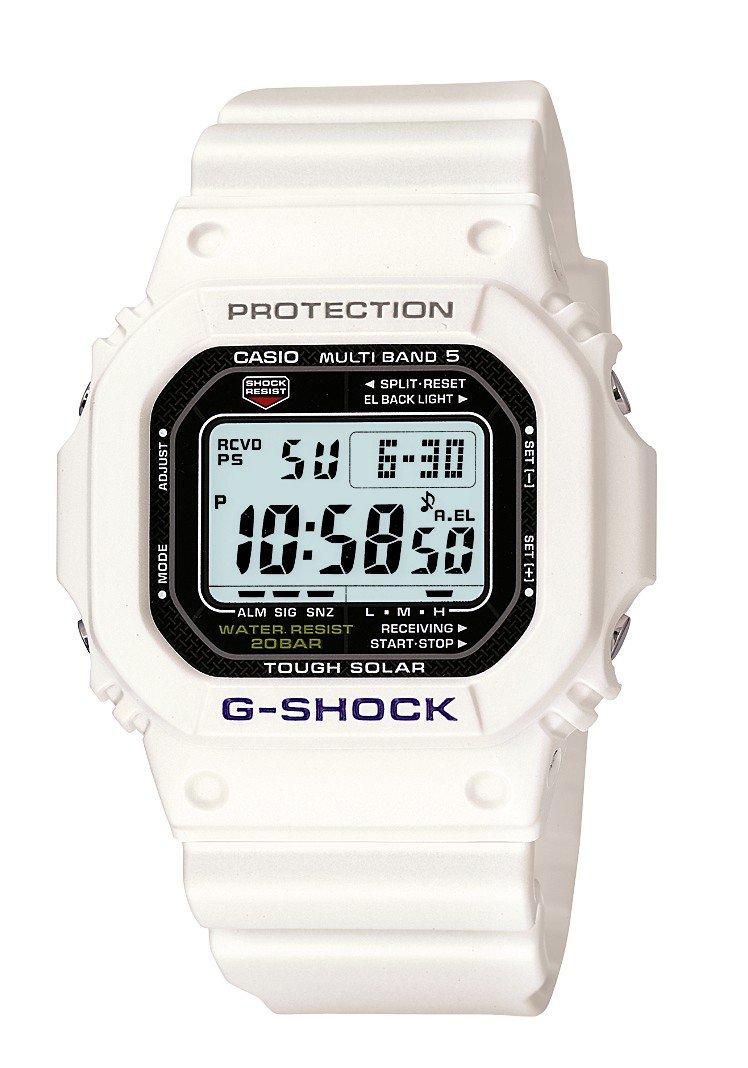
Сүрөт: алдыңкы view of the Casio G-Shock GW-M5600A-7ER watch, showcasing its digital display and resin strap.
Негизги өзгөчөлүктөрү
- Радио менен башкарылуучу убакытты эсептөө: Automatically receives time calibration signals for accurate timekeeping.
- Күн энергиясы: Equipped with a solar panel that converts light into electrical power, eliminating the need for battery replacement.
- 200 метр сууга туруктуулугу: Suitable for swimming, snorkeling, and diving (excluding saturation diving).
- шок каршылык: Таасирлерге жана титирөөгө туруштук берүү үчүн иштелип чыккан.
- Санариптик дисплей: Clear and easy-to-read digital time and function display.
- Секундомер функциясы: Өткөн убакытты, бөлүнгөн убакытты жана 1-2-орундарды өлчөйт.
- Ойготкуч функциясы: Multiple daily alarms and an hourly убакыт сигналы.
- Дүйнөлүк убакыт: Дүйнө жүзүндөгү ири шаарлардагы жана белгилүү бир аймактардагы учурдагы убакытты көрсөтөт.
- Минералдык айнек: Protective, scratch-resistant hard mineral lens.
- Туруктуу чайыр конструкциясы: High-performance and durable resin case and strap.
Жайгашуу
1. Баштапкы заряддоо
Your watch is powered by a solar cell. Before initial use, expose the watch face to bright light for several hours to ensure it is sufficiently charged. The watch may arrive with a low charge, indicated by a flashing 'CHG' or 'LOW' indicator on the display. Avoid prolonged storage in dark places.
2. Setting Your Home City
The Home City setting is crucial for correct time calibration and World Time functionality. Refer to the detailed instructions in the full manual for specific button operations to set your Home City. This setting determines which time calibration signal the watch attempts to receive.
3. Time Calibration Signal Reception
The watch automatically attempts to receive a time calibration signal up to six times a day (or five times a day for the Chinese calibration signal). For optimal reception, place the watch near a window at night, away from metal objects and electronic devices. Manual reception can also be initiated:
- In Timekeeping Mode, hold down the 'A' button (top left) for several seconds until the current time calibration status appears.
- Press the 'D' button (bottom right) to initiate manual reception.
- The watch will display 'RCVD' upon successful reception.
Иштөө нускамалары
Багыттоо режими
Press the 'C' button (bottom left) to cycle through the different modes:
- Убакытты эсепке алуу режими: Учурдагы убакытты жана датаны көрсөтөт.
- Дүйнөлүк убакыт режими: Displays current time in various time zones.
- Ойготкуч режими: Күнүмдүк ойготкучтарды орнотуңуз жана иштетиңиз.
- Секундомер режими: Өткөн убакытты өлчөө.
- Артка таймер режими: Set a countdown from a specified time.
Секундомерди колдонуу
- Navigate to Stopwatch Mode using the 'C' button.
- Press the 'D' button (bottom right) to start/stop the stopwatch.
- Press the 'B' button (top right) to record split times or reset the stopwatch when stopped.
Ойготкучтарды орнотуу
- Navigate to Alarm Mode using the 'C' button.
- Hold down the 'A' button (top left) until the alarm time starts flashing.
- Use the 'B' and 'D' buttons to adjust the hour and minute settings.
- Press 'A' to confirm and exit the setting screen.
- Press 'D' to toggle the alarm ON/OFF.
Жарыктандыруу
Press the 'B' button (top right) to illuminate the display for easy viewing in low light conditions. The duration of illumination can be adjusted in the watch settings.
Техникалык тейлөө
Саатты заряддоо
To maintain optimal performance, ensure your watch is regularly exposed to light. The power indicator on the display shows the current charge level. If the charge level is low, expose the watch to direct sunlight or strong artificial light. Avoid covering the watch face when charging.
Тазалоо
Кирди жана нымдуулукту тазалоо үчүн саатты жумшак, кургак чүпүрөк менен сүртүңүз. Кежир кир үчүн жумшак кездемени колдонуңуз dampсуу жана жумшак нейтралдуу жуучу каражат менен жууп, андан кийин кургатып сүртүңүз. Суюлтуучу же бензин сыяктуу учуучу заттарды колдонуудан алыс болуңуз, анткени алар чайыр компоненттерин бузушу мүмкүн.
Сууга туруктуулукту сактоо чаралары
While your watch is water-resistant to 200 meters, it is important to observe the following:
- Саат нымдуу же суу астында турганда баскычтарды иштетпеңиз.
- Avoid exposing the watch to hot water or steam (e.g., in showers, saunas) as this can compromise seals.
- After exposure to saltwater, rinse the watch thoroughly with fresh water and wipe dry.
Проблемаларды чечүү
Time Not Syncing
- Check Home City Setting: Ensure your Home City is correctly set to a region that receives time calibration signals.
- Reception Environment: Move the watch to a location with better signal reception, ideally near a window, away from electronic interference.
- Кол менен кабыл алуу: Attempt a manual time calibration signal reception (refer to Setup section).
- Заряддоо деңгээли: Ensure the watch has sufficient charge. Low power can affect signal reception.
Дисплей бош же күңүрт
- Заряддоо деңгээли: The watch may be in power-saving mode or have a very low charge. Expose it to bright light for an extended period.
- Энергияны үнөмдөө: The watch enters power-saving mode when left in the dark for a certain period. Press any button or expose it to light to reactivate the display.
Баскычтар жооп бербейт
- Кайтаруу: In rare cases, a full reset might be necessary. Consult the full Casio manual for your specific module number (usually found on the watch's case back) for detailed reset procedures.
- Суу: Ensure the watch is completely dry if it has been exposed to water.
Техникалык шарттар
| Модель номери | GW-M5600A-7ER |
| Өндүрүүчү | G-SHOCK |
| Дисплей түрү | Санарип |
| Кыймыл | Кварц |
| Power Source | Күн энергиясы |
| Сууга каршылыктын тереңдиги | 200 метр |
| Иштин материалдык түрү | чайыр |
| Band Материал түрү | чайыр |
| Терезе материал түрү | Минералдык |
| Иштин диаметри | 49 мм |
| Case Thickness | 17 мм |
| Band Width | 25 мм |
| Класс түрү | Tang Buckle |
| Элементтин формасы | Square |
| Band Color | Ак |
| Терүү түсү | Боз |
Кепилдик жана колдоо
Your Casio G-Shock GW-M5600A-7ER watch comes with a 2 жылдык өндүрүүчүнүн кепилдиги. Бул кепилдик нормалдуу колдонуудагы материалдардагы жана жасалгадагы кемчиликтерди камтыйт. Кепилдик дооматтары үчүн сатып алганыңыздын далилин сактап коюңуз.
For detailed warranty terms, service, or technical support, please refer to the official Casio website or contact your local authorized Casio service center. Contact information can typically be found in the full product manual or on the manufacturer's webсайт.