
1. Киришүү
Thank you for choosing the Comelit Bravo Series 5701 Black and White Video Intercom. This manual provides essential information for the safe and efficient installation, operation, and maintenance of your new video intercom system. Please read this manual thoroughly before use and retain it for future reference.
The Comelit Bravo Series 5701 is a handset-version monitor with a 4-inch black and white screen, featuring a glossy white finish and a silver lower shell. It includes standard door opener buttons, two additional function buttons, a signal LED, and controls for brightness, contrast, and call volume. The privacy function, which temporarily excludes video intercom calls, is standard and activated by setting the call volume to zero. This unit can be converted into a desktop version with article 5712. Dimensions: 212x225x55 mm.
2. Коопсуздук маалыматы
Маанилүү коопсуздук көрсөтмөлөрү:
- Орнотуудан жана колдонуудан мурун бардык нускамаларды кылдат окуп чыгыңыз.
- Орнотуу жергиликтүү электр эрежелерине ылайык квалификациялуу кызматкерлер тарабынан гана аткарылышы керек.
- Агрегатты жамгырга же нымдуулукка дуушар кылбаңыз.
- Агрегатты ачпаңыз casing; ичинде колдонуучу тейлей турган тетиктер жок. Бардык тейлөө иштерин квалификациялуу тейлөө кызматкерлерине тапшырыңыз.
- Ensure the power supply is disconnected before performing any maintenance or installation work.
3. Пакеттин мазмуну
Пакетте бардык компоненттер бар экенин текшериңиз:
- Comelit Bravo Series 5701 Black and White Video Intercom Monitor (1 unit)
- Колдонуучунун Колдонмосу (бул документ)
- Монтаждык аксессуарлар (бурамалар, дубал сайгычтар)
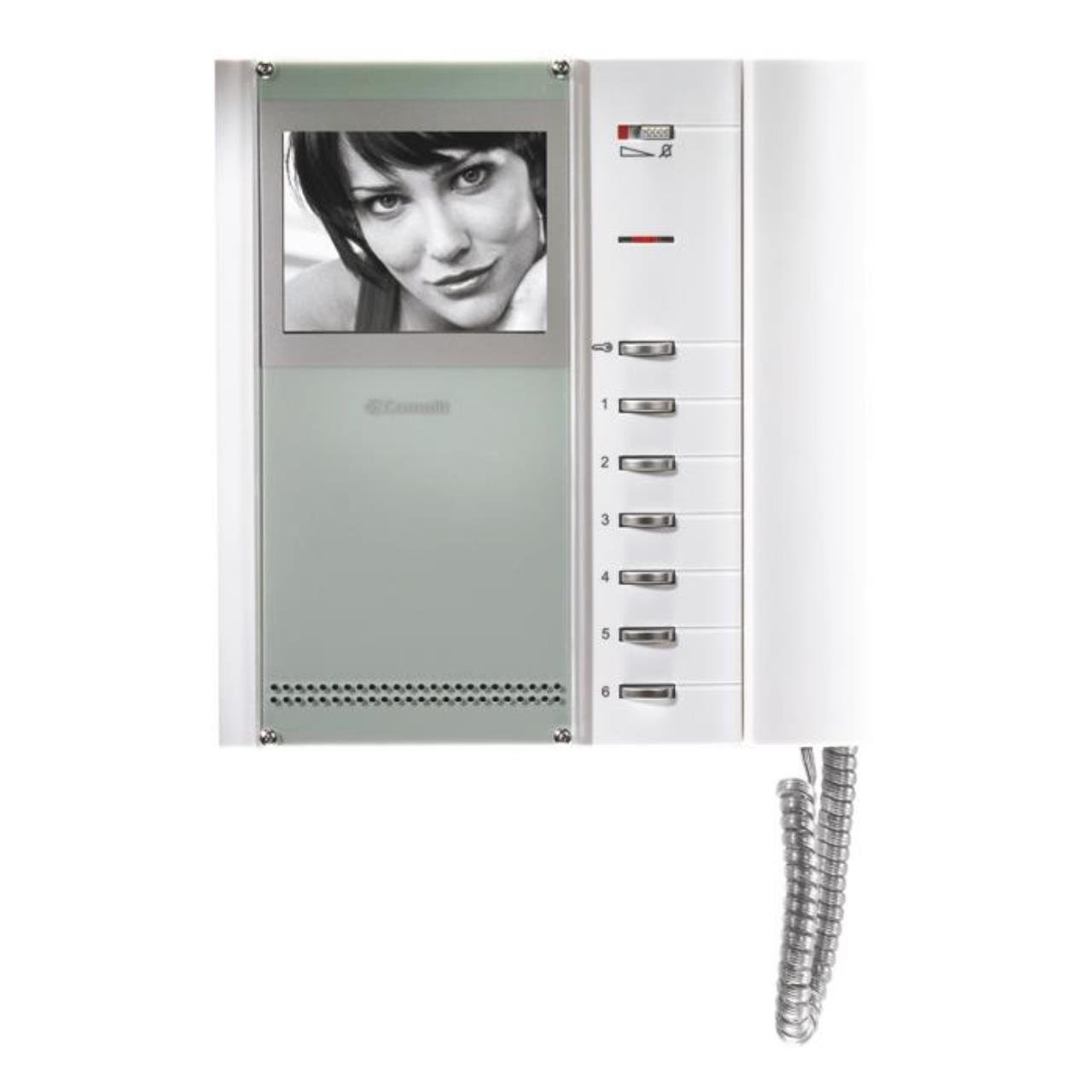
1-сүрөт: Comelit Bravo Series 5701 Black and White Video Intercom Monitor. This image shows the front view of the monitor with its handset, 4-inch black and white screen, and control buttons.
4. Орнотуу жана орнотуу
This section outlines the general steps for setting up your video intercom. For detailed wiring diagrams and specific installation instructions, please refer to the separate installation guide provided with your system or consult a qualified electrician.
4.1 Мониторду орнотуу
- Choose a suitable location for the monitor, typically near the entrance or in a central area of the property.
- Mark the drilling points on the wall using the mounting bracket (if supplied) or the monitor's backplate as a template.
- Тешиктерди бургула жана дубал тыгындарын салгыла.
- Secure the mounting bracket or monitor backplate to the wall with screws.
4.2 Зымдарды туташтыруу
ЭСКЕРТҮҮ: Кандайдыр бир электрдик туташууларды жасоодон мурун электр кубаты өчүрүлгөнүн текшериңиз.
- Connect the system's main bus wires to the designated terminals on the monitor.
- Connect the power supply wires according to the system's wiring diagram.
- Бардык туташуулардын бекем жана туура поляризацияланганын текшериңиз.
4.3 Баштапкы кубаттуулук
- Once all wiring is complete and checked, restore power to the system.
- The monitor should power on, and you may hear an initial tone or see a display.
- Test the basic functions such as receiving a call and opening the door.
5. Иштөө нускамалары
5.1 Чалууларды кабыл алуу
- When a visitor calls from the outdoor station, the monitor will ring, and the screen will display the visitor's image.
- Lift the handset to answer the call and speak with the visitor.
5.2 Эшикти ачуу
- Чалуу учурунда, басыңыз эшикти ачкыч баскычы (usually marked with a key symbol) to unlock the entrance.
- The door will remain unlocked for a short period, then automatically re-lock.
5.3 Орнотууларды тууралоо
- Жарыктыкты көзөмөлдөө: Use the dedicated knob or slider to adjust the screen brightness.
- Контраст көзөмөлдөө: Use the dedicated knob or slider to adjust the screen contrast.
- Чалуу көлөмү: The slide control allows adjustment of the incoming call volume.
- Privacy Function: Set the call volume to zero using the slide control to activate the privacy function. This will temporarily disable incoming call ringing.
- Additional Function Buttons: The two extra buttons can be programmed for various functions depending on your system configuration (e.g., activating a secondary gate, turning on a light). Refer to your system's main manual for specific programming details.
6. Техникалык тейлөө
Regular maintenance ensures optimal performance and longevity of your Comelit Bravo Series 5701 video intercom.
- Тазалоо: Монитордун экранын тазалаңыз жанаasing менен жумшак, кургак же бир аз damp cloth. Do not use abrasive cleaners, solvents, or aerosol sprays.
- Текшерүү: Бардык көрүнгөн кабелдерди жана туташууларды эскирүүнүн же бузулуунун белгилерин мезгил-мезгили менен текшерип туруңуз.
- Программалык камсыздоо жаңыртуулары: This model typically does not require software updates. If your system is part of a larger network, consult your installer for any system-wide updates.
7. Кыйынчылыктарды
If you encounter issues with your video intercom, refer to the following common problems and solutions:
| Көйгөй | Мүмкүн себеп | Чечим |
|---|---|---|
| Экранда сүрөт жок | No power; loose connection; brightness/contrast too low. | Check power supply; verify wiring connections; adjust brightness/contrast controls. |
| No sound from speaker/microphone | Volume too low; faulty handset connection. | Adjust call volume; ensure handset is properly seated; check wiring. |
| Эшикти ачуучу иштебей жатат | Wiring issue; faulty door strike; system not in call mode. | Verify door opener wiring; ensure you are in an active call before pressing the button. |
| Монитор шыңгырабай жатат | Call volume set to zero (privacy mode); faulty outdoor station. | Increase call volume; check outdoor station functionality. |
Эгерде бул чечимдерди колдонуп көргөндөн кийин көйгөй чечилбесе, квалификациялуу техникалык колдоо кызматына кайрылыңыз.
8. Техникалык шарттар
Key technical specifications for the Comelit Bravo Series 5701 Video Intercom:
- Модель номери: 5701
- Экран түрү: Black and White (B/W)
- Экрандын өлчөмү: 4 дюйм
- Түсү: Glossy White with Silver lower shell
- Өзгөчөлүктөрү: Door opener button, 2 additional function buttons, signal LED, brightness adjustment, contrast adjustment, slide call volume control, privacy function.
- Өлчөмдөрү (HxWxD): 212 x 225 x 55 мм
- Салмагы: 700 грамм
- Кубат булагы: System powered (not battery-operated)
- Натыйжалуулугу: A
- Атайын функциялар: Tweeter
- Конвертациялануучу: Can be transformed into a desktop version with article 5712.