Introduction
The Sony SA-NS300 is a compact wireless multi-room audio speaker designed to stream music wirelessly within your home environment. It integrates with your home network to play audio from compatible devices such as a PC or a Sony Blu-ray Disc home theater system. This speaker supports multi-room audio playback, allowing you to enjoy your music in various rooms by adding more compatible speakers.
This manual will guide you through the setup, operation, and maintenance of your SA-NS300 speaker to ensure optimal performance and longevity.
Кутуда эмне бар
Upon unpacking your Sony SA-NS300, ensure all components are present:
- Sony SA-NS300 Wireless Multi-Room Audio Speaker (main unit)
- AC кубат адаптери
- Иштөө нускамалары (бул колдонмо)
Note: The SA-NS300 includes an integrated subwoofer.
Жайгашуу
1. Физикалык жайгаштыруу
Place the speaker on a stable, flat surface. Ensure there is adequate ventilation around the unit. Avoid placing it in direct sunlight, near heat sources, or in excessively humid or dusty environments. For optimal wireless performance, position the speaker within reasonable range of your Wi-Fi router.
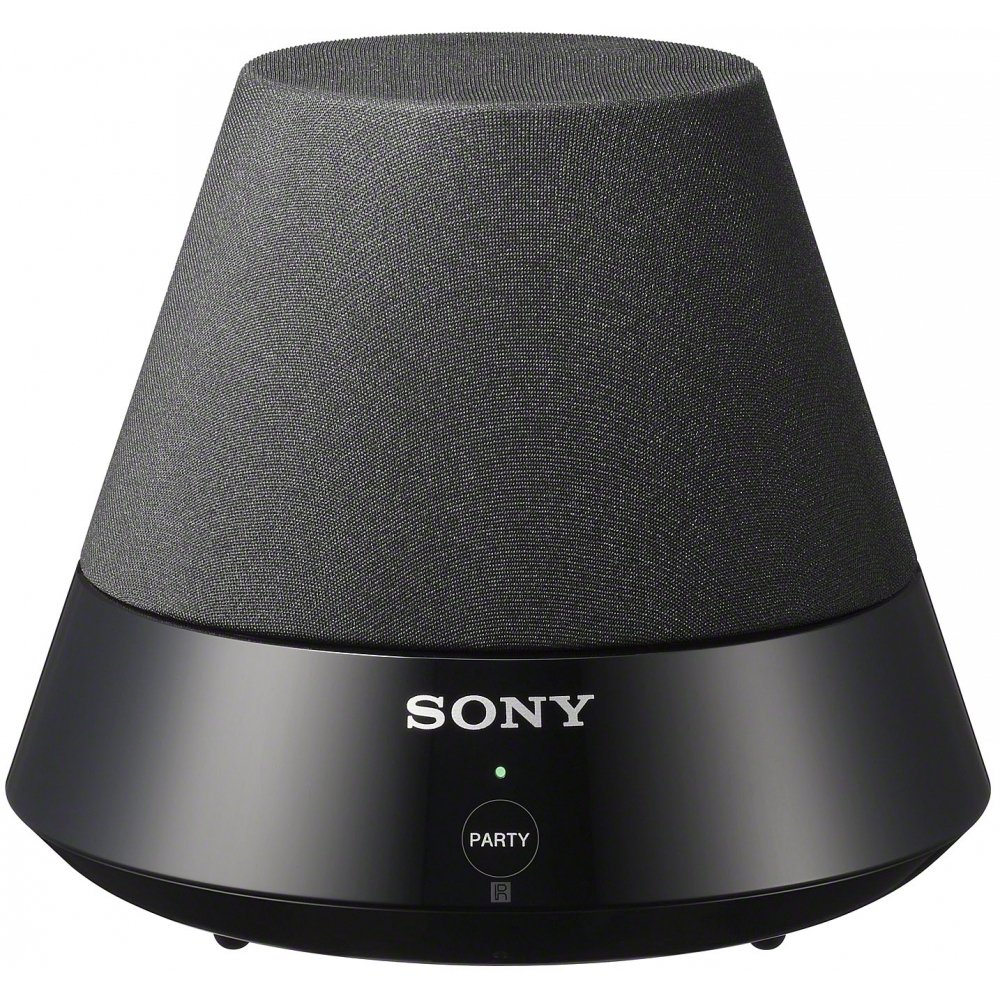
Сүрөт: алдыңкы view of the Sony SA-NS300 Wireless Multi-Room Audio Speaker, showing the speaker grille and the control panel with the Sony logo and 'PARTY' button.
2. Power Connection
- Connect the supplied AC power adapter to the DC IN jack on the rear of the speaker.
- AC кубат адаптерин дубалдагы розеткага сайыңыз.
- The power indicator on the speaker will illuminate, indicating it is receiving power.
3. Network Connection (Wi-Fi Setup)
The SA-NS300 connects to your home network via Wi-Fi. You will need your Wi-Fi network name (SSID) and password.
- Баштапкы орнотуу: For the first-time setup, it is recommended to use the Sony Network Audio Remote application on your smartphone or tablet, or follow the on-screen instructions if connecting via a compatible Sony Blu-ray Disc player or TV.
- WPS (Wi-Fi менен корголгон орнотуу): If your router supports WPS, press the WPS button on your router, then press and hold the "WPS" button (often combined with another function or indicated by an icon) on the SA-NS300 speaker within two minutes. The network indicator will show connection status.
- Кол менен орнотуу: Refer to the detailed instructions in the Sony Network Audio Remote application or your compatible Sony device's manual for manual Wi-Fi configuration.
Ensure your Wi-Fi network is active and within range for a stable connection.
4. Баштапкы конфигурация
Once connected to the network, the speaker may require a brief update or configuration. Follow any prompts from the Sony Network Audio Remote app or your connected Sony device.
Иштөө нускамалары
1. Аудио булактарына туташуу
The SA-NS300 is designed to stream audio from various sources over your Wi-Fi network.
- From a PC: You can stream music from your computer using compatible software, such as Windows Media Player 11 or later, or a DLNA-compliant media server (e.g., Twonky). Ensure your PC is connected to the same Wi-Fi network as the speaker.
- From a Sony Blu-ray Disc Home Theater System: If you have a compatible Sony Blu-ray Disc home theater system, you can stream audio directly from it to the SA-NS300. Refer to your home theater system's manual for specific instructions on enabling network audio streaming.
- DLNA Compatibility: The speaker is DLNA (Digital Living Network Alliance) compliant, allowing it to play media from other DLNA-certified devices on your network.
2. PartyStream Playback
PartyStream allows you to synchronize music playback across multiple compatible Sony network speakers in different rooms.
- Initiate music playback on your primary Sony network device (e.g., Blu-ray player or another network speaker).
- On the SA-NS300, press the ПАРТИЯ button. The indicator light will change to confirm it has joined the PartyStream group.
- To exit PartyStream, press the ПАРТИЯ кайра баскычын.
Note: PartyStream functionality may vary depending on the source device and content. Some internet streaming services may not support PartyStream due to content protection or licensing.
3. Башкаруу каражаттары жана көрсөткүчтөр
The SA-NS300 features a minimalist control panel.
- POWER (I/O) Button: Located on the side/rear, this button turns the speaker on or off.
- КЕЧЕ баскычы: Located on the front panel, used to join or leave a PartyStream group.
- Үндү көзөмөлдөө каражаттары (+/-): Typically located near the power button or controlled via the Network Audio Remote app.
- Көрсөткүчтөр: Various LED indicators (e.g., Power, Network, Party) provide status information. Refer to the full manual for detailed indicator meanings.
Проблемаларды чечүү
If you encounter issues with your SA-NS300 speaker, refer to the following common problems and solutions:
| Көйгөй | Мүмкүн болгон себеп / Чечим |
|---|
| Күч жок | - Ensure the AC power adapter is securely connected to the speaker and a working wall outlet.
- Электр розеткасынын иштешин текшериңиз.
|
| Үн жок | - Check the volume level on the speaker and the source device.
- Ensure the speaker is properly connected to your Wi-Fi network.
- Verify that the correct audio source is selected on your streaming device.
- Restart the speaker and the source device.
|
| Wi-Fi тармагына туташпай жатат | - Wi-Fi роутериңиз күйгүзүлүп, туура иштеп жатканын текшериңиз.
- Verify the Wi-Fi network name (SSID) and password are correct.
- Move the speaker closer to the Wi-Fi router to improve signal strength.
- Wi-Fi роутериңизди жана динамикти өчүрүп-күйгүзүңүз.
- If using WPS, ensure the WPS process is completed within the time limit.
|
| Music playback is intermittent or drops out | - Poor Wi-Fi signal strength. Move the speaker closer to the router or reduce interference.
- Network congestion. Try reducing the number of devices using your Wi-Fi network.
- Interference from other wireless devices (e.g., cordless phones, microwaves).
- Роутериңиздин микропрограммасы жаңыртылганын текшериңиз.
|
| PartyStream not working with certain content | - Some internet streaming services or protected content may not support PartyStream functionality.
- Ensure all PartyStream-enabled devices are on the same network and compatible.
|
For further assistance, please refer to the Sony support webсайтка же кардарларды тейлөөгө кайрылыңыз.
Кепилдик жана колдоо
Кепилдик маалымат
This product is covered by a limited warranty provided by Sony. The specific terms and duration of the warranty may vary by region. Please refer to the warranty card included with your product or visit the official Sony support webтолук кепилдик маалымат алуу үчүн сайт.
Кепилдик дооматтар үчүн сатып алганыңыздын далилин сактаңыз.
Кардарларды колдоо
Техникалык колдоо, мүчүлүштүктөрдү оңдоо боюнча жардам же тейлөө боюнча суроолор үчүн, сураныч, Sony компаниясынын расмий колдоо кызматына кайрылыңыз website or contact Sony customer service in your region. You can typically find contact information and support resources by searching for "Sony Support" and your product model number (SA-NS300).
Online resources often include FAQs, software downloads, and additional troubleshooting guides.