
1. Киришүү
The Hosa HMIC-010 Pro Microphone Cable is designed for reliable audio signal transmission. It features REAN connectors by Neutrik AG, ensuring durable and consistent performance for various audio applications. This cable is 10 feet in length and is suitable for connecting microphones to mixers, audio interfaces, and other sound equipment.
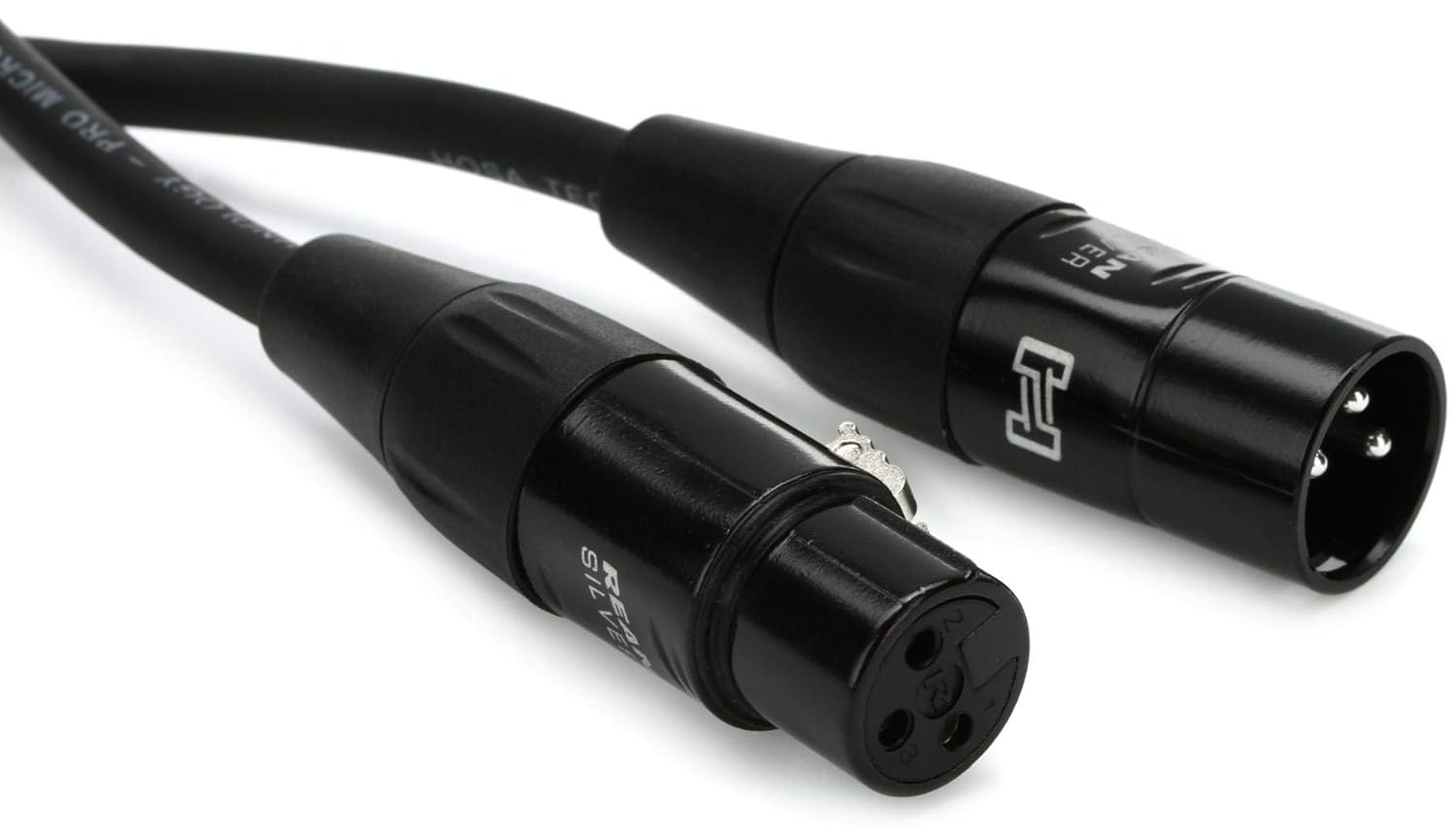
Image 1.1: Hosa HMIC-010 Pro Microphone Cable.
2. Орнотуу
Setting up the Hosa HMIC-010 Pro Microphone Cable involves connecting its XLR connectors to compatible audio equipment. This cable features a male XLR connector on one end and a female XLR connector on the other.
- Туташтыргычтарды аныктоо: Locate the male XLR connector (with pins) and the female XLR connector (with holes) on the cable.
- Connect to Microphone: Insert the female XLR connector of the cable into the male XLR output port of your microphone. Ensure it clicks securely into place.
- Аудио жабдууларга туташуу: Insert the male XLR connector of the cable into the female XLR input port of your mixer, audio interface, or other audio equipment. Ensure it clicks securely into place.

Сүрөт 2.1: Жакын пландан view of the REAN XLR connectors.

Image 2.2: Cable connected to a microphone.
3. Операция
Once the Hosa HMIC-010 Pro Microphone Cable is securely connected between your microphone and audio equipment, it facilitates the transmission of balanced audio signals. No specific operational steps are required for the cable itself beyond proper connection.
- Балансталган сигнал: The XLR connectors provide a balanced audio signal, which helps reduce noise and interference over longer cable runs.
- Коопсуз байланыштар: Ensure all connections are firm to prevent signal loss or intermittent audio. The locking mechanism on XLR connectors should engage properly.
- Кабель багыттоо: Route cables away from power cords and other sources of electromagnetic interference to maintain signal integrity.

Image 3.1: Cable connected to audio equipment.
4. Техникалык тейлөө
Proper maintenance extends the life and performance of your microphone cable.
- Сактагыч: When not in use, coil the cable neatly. Avoid tight coiling or kinking, which can damage the internal wiring. Use an "over-under" coiling method to prevent twists.
- Тазалоо: Keep connectors clean and free of dust and debris. A soft, dry cloth can be used to wipe the cable jacket. For connectors, a specialized contact cleaner can be used if necessary, ensuring the equipment is powered off.
- Текшерүү: Periodically inspect the cable for any signs of wear, such as frayed jackets, bent pins on connectors, or loose connections.
- Стресстен качуу: Do not pull on the cable itself to disconnect it; always grasp the connector housing. Avoid placing heavy objects on the cable or running over it with equipment.

Image 4.1: Properly coiled cable for storage.
5. Кыйынчылыктарды
If you encounter issues with your microphone cable, consider the following troubleshooting steps:
- Үн жок:
- Ensure both ends of the cable are fully and securely connected.
- Verify that the microphone is powered on (if it requires phantom power, ensure it is supplied by your audio equipment).
- Test with a different cable or microphone to isolate the problem.
- Ызы-чуу же ызы-чуу:
- Бардык аудио жабдуулардын туура жерге туташтырылганын текшериңиз.
- Кабель кубат кабелдерине же башка электромагниттик тоскоолдуктарга параллелдүү эмес экенин текшериңиз.
- Verify that the cable is not damaged.
- Үзүлгүс сигнал:
- Inspect connectors for bent pins or loose connections.
- Gently wiggle the cable at both ends to see if the signal cuts in and out, indicating a faulty connection or internal break.
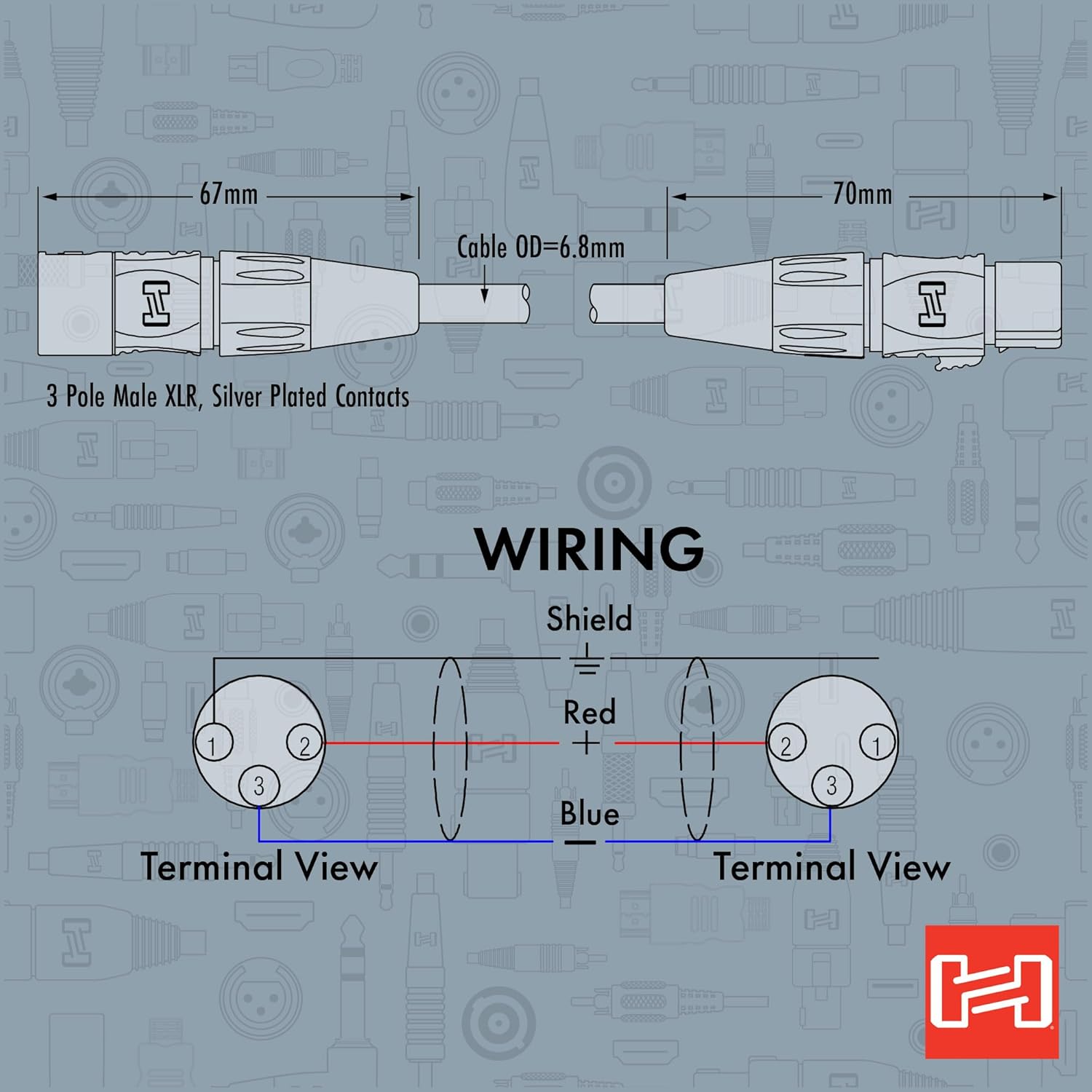
Image 5.1: XLR Wiring Diagram (Terminal View).
6. Техникалык шарттар
| Өзгөчөлүк | Деталь |
|---|---|
| Модел | HMIC-010 |
| Бренд | Hosa |
| Кабель түрү | XLR Audio Cable |
| Туташтыргыч түрү | REAN XLR3F to XLR3M (Female to Male) |
| Узундук | 10 фут (болжол менен 3 метр) |
| ченегич | 20 AWG |
| Өзгөчө өзгөчөлүк | Braided (referring to internal shielding or cable construction) |
| Түс | Кара |
| Элемент Салмагы | 0.28 килограмм |
| Шайкеш түзмөктөр | Microphones, Mixers, Audio Interfaces, and other XLR-equipped audio equipment |
| Ички/тышкы колдонуу | Ички, сырткы |
7. Кепилдик маалыматы
Hosa Technology, Inc. provides a warranty for its products. For the Hosa HMIC-010 Pro Microphone Cable, the following warranty applies:
- Кепилдик мөөнөтү: 90 күн.
- Камтуу: Бул кепилдик материалдагы жана жасалгадагы кемчиликтерди камтыйт.
- Талапкерлик: The warranty is typically valid for the original purchaser.
- Доо процесси: For warranty claims or detailed terms and conditions, please refer to the official Hosa Technology webсайтка же кардарларды тейлөөгө кайрылыңыз.

Image 7.1: Hosa USA Warranty Information.
8. Колдоо
For further assistance, technical support, or product information, please visit the official Hosa webсайтка же кардарларды тейлөө бөлүмүнө кайрылыңыз.
- Hosa Webсайт: www.hosa.com
- Кардарларды тейлөө: Refer to the Hosa webаймакка тиешелүү байланыш маалыматы үчүн сайт.