
1. Киришүү
The Powerwerks PW50 PA System is a highly portable and versatile audio solution designed for amplifying vocals, instruments, keyboards, drum machines, and various audio devices. Its compact design and robust construction make it suitable for a wide range of environments, from small venues to personal practice spaces. The PW50 delivers clear and balanced sound through its two 4.5-inch speakers and high-frequency driver, ensuring excellent vocal clarity and minimizing harsh frequencies.
This manual provides detailed instructions for setting up, operating, and maintaining your Powerwerks PW50 PA System. Please read it thoroughly before use to ensure optimal performance and longevity of your device.
2. Коопсуздук маалыматы
- Кубат булагы: Connect the unit only to the specified power supply (AC 120V~60Hz 80W). Ensure the power cable is not damaged or pinched.
- Вентиляция: Эч кандай желдетүүчү тешиктерди жаап албаңыз. Ашыкча ысып кетүүнүн алдын алуу үчүн аппараттын айланасында адекваттуу аба агымын камсыз кылыңыз.
- Суу жана ным: Түзмөктү жамгырдын, нымдуулуктун же ашыкча нымдуулуктун таасирине дуушар кылбаңыз. Түзмөктүн үстүнө суюктук толтурулган буюмдарды койбоңуз.
- Жылуулук булактары: Аппаратты радиаторлор, жылуулук регистрлери, мештер же жылуулук чыгарган башка аппараттар сыяктуу жылуулук булактарынан алыс кармаңыз.
- Тазалоо: Кургак чүпүрөк менен гана тазалаңыз. Суюк тазалагычтарды же аэрозолдорду колдонуудан алыс болуңуз.
- Тейлөө: Бул продуктуну өзүңүз тейлөөгө аракет кылбаңыз. Бардык тейлөөлөрдү квалификациялуу тейлөө кызматкерлерине тапшырыңыз. Аппарат кандайдыр бир зыянга учураганда, мисалы, кубат берүүчү шнур же сайгыч бузулганда, суюктук төгүлгөндө же аппараттын ичине нерселер түшүп кеткенде, аппарат жамгырга же нымдуулукка дуушар болгондо, нормалдуу иштебей калганда же кулап түшкөндө тейлөө талап кылынат.
- Жайгашкан жери: For optimal stability, place the unit on a flat, stable surface. It can also be positioned on a standard speaker stand using the integrated 35mm mounting socket.
3. Пакеттин мазмуну
Төмөндө тизмеленген нерселердин баары пакетиңизге камтылганын текшериңиз:
- Powered PA Tower (Powerwerks PW50)
- Электр кабели
- Instruction Manual
4. Продукт бүтүп калдыview
The Powerwerks PW50 is a compact and powerful PA system. Below are images illustrating its design and the rear control panel, followed by a description of its key components and controls.

Figure 4.1: Powerwerks PW50 PA System (Angled Front View)
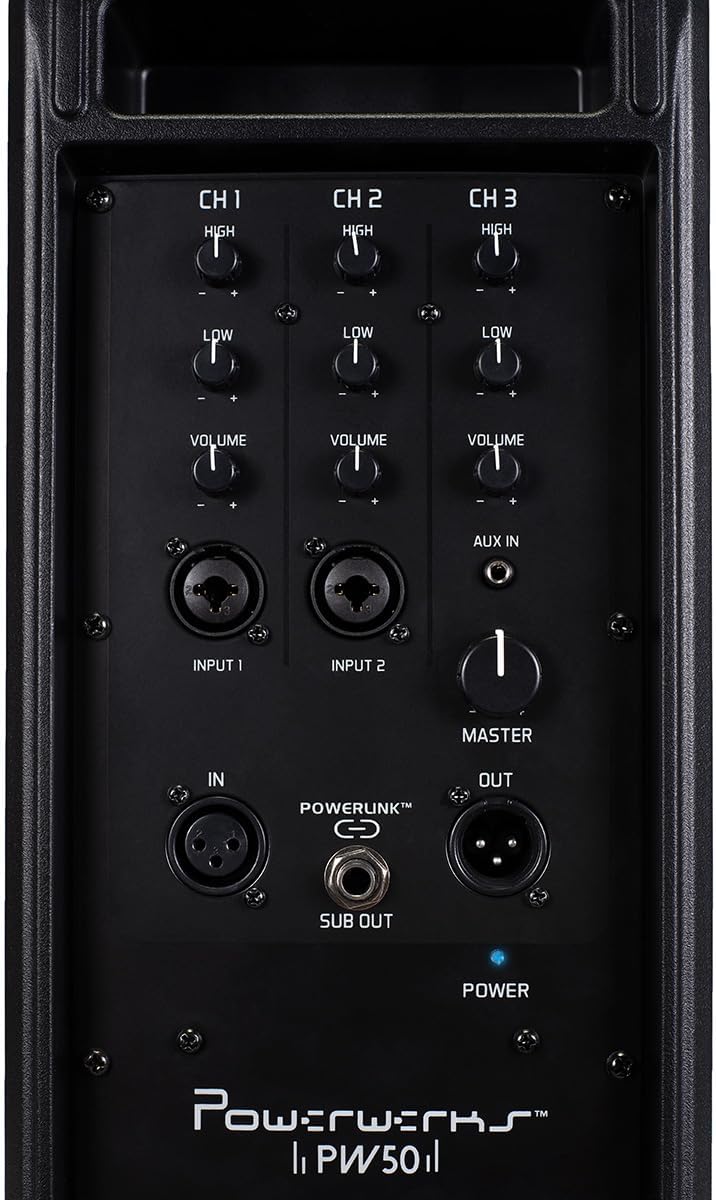
Figure 4.2: Powerwerks PW50 PA System (Rear Control Panel)
Башкаруу панелинин өзгөчөлүктөрү:
- Channels 1 & 2 (MIC/Line Inputs): Each channel features XLR and 1/4" line inputs, allowing connection of microphones or line-level instruments. Each channel has independent High (treble) and Low (bass) EQ controls, and a Volume knob. Phantom power is available for XLR inputs.
- Channel 3 (AUX IN): An 1/8" (3.5mm) stereo jack summed to mono, ideal for connecting external audio devices like smartphones or MP3 players. This channel also has independent High (treble) and Low (bass) EQ controls, and a Volume knob.
- Негизги том: A global control for the overall output level of the PA system.
- POWERLINK™ (IN/OUT): XLR connections that allow two or more PW50 units to be linked together, functioning as a single, synchronized PA system.
- ЧЫГУУ: An output for connecting an external subwoofer, which diverts low frequencies from the PW50's internal speakers to the subwoofer for enhanced bass response.
- POWER Switch and Indicator: Turns the unit on/off. A blue LED indicates power status.
5. Орнотуу
- Жайгашкан жери: Position the PW50 on a stable, flat surface or mount it on a standard speaker stand using the 35mm socket. Ensure proper ventilation.
- Кубат туташуу: Connect the supplied power cable to the AC input on the rear panel of the PW50 and then to a suitable power outlet. Do not power on the unit yet.
- Киргизүүлөрдү туташтыруу:
- For microphones, use an XLR cable and connect to Input 1 or 2.
- For instruments (e.g., guitar, keyboard), use a 1/4" TS cable and connect to Input 1 or 2.
- For external audio devices (e.g., smartphone, MP3 player), use an 1/8" (3.5mm) stereo cable and connect to the AUX IN on Channel 3.
- Баштапкы үндүн жөндөөлөрү: Before powering on, ensure all Channel Volume knobs and the Master Volume knob are set to their minimum (fully counter-clockwise) position.
- Күйгүзүү: Flip the POWER switch to the 'ON' position. The blue power indicator LED will illuminate.
6. Иштөө нускамалары
Once the PW50 is set up, follow these steps to begin operation:
- Каналдын үнүн тууралоо: Slowly increase the Volume knob for the channel you are using (Channel 1, 2, or 3) until you hear sound at a comfortable level.
- Негизги үн көлөмүн тууралоо: Use the Master Volume knob to control the overall output level of the entire system. This allows you to adjust the total loudness without affecting the individual channel mixes.
- Теңдөө (EQ): Use the High and Low EQ knobs on each channel to shape the tone of your input. Turn the High knob clockwise to increase treble, and counter-clockwise to decrease it. Do the same for the Low knob to adjust bass frequencies.
- Using POWERLINK™: To expand your sound system, connect the POWERLINK™ OUT of one PW50 unit to the POWERLINK™ IN of another PW50 unit using an XLR cable. This allows multiple units to function as a single, synchronized PA system.
- Connecting a Subwoofer: For enhanced bass, connect an active subwoofer to the SUB OUT port. This output sends a dedicated low-frequency signal to the subwoofer.
7. Техникалык тейлөө
Proper care and maintenance will ensure the longevity and optimal performance of your Powerwerks PW50 PA System:
- Тазалоо: Regularly wipe the exterior of the unit with a soft, dry, lint-free cloth. Do not use abrasive cleaners, solvents, or waxes.
- Сактагыч: Узак мөөнөткө колдонулбаганда, аппаратты салкын, кургак жерде, тике күн нурунан жана өтө температурадан алыс сактаңыз.
- Вентиляция: Ensure that the ventilation grilles are free from dust and debris. Use a soft brush or vacuum cleaner to gently remove any buildup.
- Кабельге кам көрүү: Inspect all cables regularly for signs of wear or damage. Replace any damaged cables immediately to prevent electrical hazards or signal loss.
8. Кыйынчылыктарды
If you encounter issues with your PW50, refer to the following common problems and solutions:
| Көйгөй | Мүмкүн себеп | Чечим |
|---|---|---|
| Үн чыгышы жок | Unit not powered on; Volume knobs too low; Incorrect input connection; Damaged cable. | Check power switch and indicator; Increase Master and Channel Volume; Verify cables are securely connected to correct inputs; Test with different cables. |
| Бурмаланган үн | Volume levels too high (clipping); Incorrect EQ settings; Damaged speaker. | Reduce Master or Channel Volume; Adjust High/Low EQ knobs; If distortion persists, contact customer support. |
| Ызы-чуу же ызы-чуу | Ground loop issue; Interference from other electronics; Faulty cable. | Try plugging into a different outlet; Move unit away from other electronic devices; Test with different cables. |
If the issue persists after trying these solutions, please contact Powerwerks customer support.
9. Техникалык шарттар
| Өзгөчөлүк | Деталь |
|---|---|
| Чыгуу күчү | 50 Ватт |
| Динамик түрү | Портативдик PA системасы |
| Динамик өлчөмү | Two 4.5-inch Drivers |
| Tweeter диаметри | 4 Inches (High-Frequency Driver) |
| Киргизүүлөр | 2 x MIC/Line (XLR/1/4" Combo), 1 x AUX IN (1/8" Stereo Jack) |
| Чыгуулар | POWERLINK™ Out, Subwoofer Out |
| Controls | High EQ, Low EQ, Volume per channel; Master Volume |
| Материал | Steel Grill and Rigid Corners |
| Түс | Кара |
| Элемент Салмагы | 12 фунт |
| Продукциянын өлчөмдөрү | 18 x 6.5 x 7.5 дюйм |
| Модель номери | PW50 |
| Power Source | Электр зымдары |
10. Кепилдик жана колдоо
The Powerwerks PW50 PA System comes with a limited warranty. For specific warranty terms and conditions, please refer to the warranty card included in your product packaging or visit the official Powerwerks website. For technical support, troubleshooting assistance beyond what is provided in this manual, or service inquiries, please contact Powerwerks customer support through their official channels.