
1. Киришүү
Сатып алганыңыз үчүн рахматasing the Caliber RMD 068-2 Car Radio USB/SD Player. This manual provides detailed instructions for the installation, operation, and maintenance of your new car radio. Please read this manual thoroughly before using the product to ensure proper functionality and safety. Keep this manual for future reference.
2. Коопсуздук маалыматы
- Орнотуу: Ensure the unit is installed by a qualified technician to prevent damage to the vehicle's electrical system. Incorrect wiring can cause fire or electrical shock.
- Электр камсыздоо: Түзмөктү терс жерге туташтырылган 12 В туруктуу токтун унаа аккумуляторуна гана туташтырыңыз.
- Эритиндилер: Always replace fuses with new ones of the specified rating. Using an incorrect fuse can cause damage to the unit or vehicle.
- Үн деңгээли: Do not operate the unit at excessively high volume levels, as this may impair your ability to hear external traffic sounds and could be dangerous.
- Тазалоо: Тазалоо үчүн жумшак, кургак чүпүрөктү колдонуңуз. Абразивдүү тазалагычтарды же эриткичтерди колдонбоңуз.
- Нымдуулук: Агрегатты нымга же сууга тийгизбеңиз.
3. Пакеттин мазмуну
Сураныч, бардык элементтер бар экенин текшериңиз:
- Caliber RMD 068-2 Car Radio Unit
- Алынуучу алдыңкы панел
- ISO зымдары
- Монтаж алкагы
- Disassembly Keys (2 pcs)
- Колдонуучунун Колдонмосу (бул документ)
4. Продукт бүтүп калдыview
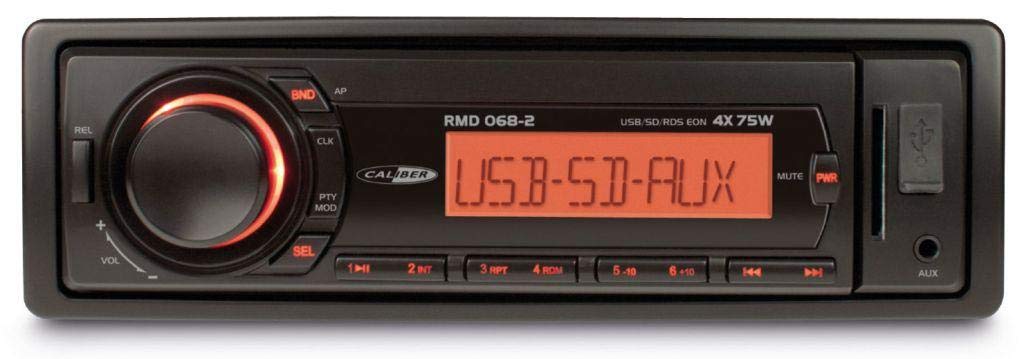
Сүрөт 1: Алдыңкы view of the Caliber RMD 068-2 Car Radio. This image shows the main unit with its detachable front panel, including the display, control buttons, USB port, and SD card slot.
4.1 Алдыңкы панелдин башкаруу элементтери
- КҮЧ/РЕЖИМ баскычы: Press to turn on/off. Short press to switch between Radio, USB, SD, AUX modes.
- VOLUME баскычы: Rotate to adjust volume. Press to access audio settings (Bass, Treble, Balance, Fader).
- КӨРСӨТҮҮ: Shows current time, radio frequency, track information, etc.
- USB порт: Медиа ойнотуу үчүн USB флэш-дисктерди туташтырыңыз.
- SD карта уячасы: Медиа ойнотуу үчүн SD карталарын салыңыз.
- AUX киргизүү (3.5 мм уяча): Тышкы аудио түзмөктөрдү туташтыруу.
- BAND/AMS Button: In radio mode, press to select radio band (FM1, FM2, FM3). Long press for Automatic Memory Store.
- АЛДЫН АЛА ОРНОТУУ баскычтары (1-6): Store and recall radio stations. In USB/SD mode, use for direct track selection.
- ОЙНОО/ТЫНДЫРУУ баскычы: Медиа файлды ойнотууну же тындырууну токтотуу.
- FORWARD/BACKWARD Buttons: Skip tracks or tune radio frequency.
- EJECT баскычы: Release the detachable front panel.
4.2 Арткы байланыштар
The rear of the unit features standard ISO connectors for power and speakers, along with an antenna input.
- ISO Power Connector: For connecting to the vehicle's power supply (constant 12V, ignition 12V, ground).
- ISO Speaker Connector: For connecting to the vehicle's speakers (Front Left, Front Right, Rear Left, Rear Right).
- Антенна киргизүү: For connecting the car's radio antenna.
5. Орнотуу
5.1 Орнотуу
- Батареяны ажыратыңыз: Before starting, disconnect the negative terminal of your car battery to prevent short circuits.
- Эски бирдикти алып салуу: Унааңыздын радиосун башкаруу панелинен этияттык менен алып салыңыз.
- Орнотуу рамасын орнотуу: Insert the supplied mounting frame into the dashboard opening and bend the tabs to secure it.
- Зымдарды туташтыруу: Refer to the wiring diagram in section 5.2. Connect the ISO wiring harness to the car's wiring and then to the Caliber RMD 068-2 unit. Connect the antenna cable.
- Slide Unit In: Carefully slide the Caliber RMD 068-2 unit into the mounting frame until it clicks into place.
- Батареяны кайра туташтыруу: Reconnect the negative terminal of your car battery.
- Алдыңкы панелди тиркөө: Attach the detachable front panel to the main unit.
5.2 Электр өткөргүч схемасы
The Caliber RMD 068-2 uses standard ISO connectors. Ensure correct connections as shown below. If your vehicle does not have ISO connectors, an adapter may be required.
| PIN No. | Зымдын түсү (типтүү) | Функция |
|---|---|---|
| 4 | Сары | Туруктуу 12V (батарея) |
| 7 | Кызыл | 12V (от алдыруу) |
| 8 | Кара | Жер |
| 5 | Көк | Antenna Remote Out |
| PIN No. | Зымдын түсү (типтүү) | Функция |
|---|---|---|
| 1 | Кызгылт көк | Арткы оң (+) |
| 2 | Кызгылт көк/кара | Арткы оң (-) |
| 3 | Жашыл | Арткы сол (+) |
| 4 | Жашыл/Кара | Арткы сол (-) |
| 5 | Боз | Алдыңкы оң (+) |
| 6 | Боз/Кара | Алдыңкы оң (-) |
| 7 | Ак | Алдыңкы Сол (+) |
| 8 | Ак/Кара | Алдыңкы Сол (-) |
Note: Wire colors may vary depending on vehicle manufacturer. Always consult your vehicle's wiring diagram.
6. Иштөө нускамалары
6.1 Негизги функциялар
- Күйгүзүү/өчүрүү: басыңыз КҮЧ / РЕЖИМ аппаратты күйгүзүү же өчүрүү үчүн баскыч.
- Үндү көзөмөлдөө: айлантыңыз VOLUME үнүн жогорулатуу үчүн саат жебеси боюнча, азайтуу үчүн сааттын жебесине каршы.
- Режим тандоо: баскычын кыска басыңыз КҮЧ / РЕЖИМ button to cycle through available modes: Radio (FM), USB, SD, AUX.
- Аудио жөндөөлөрү: басыңыз VOLUME knob to enter audio settings. Rotate the knob to select settings like BASS, TREBLE, BALANCE, FADER. Press the knob again to confirm or move to the next setting.
6.2 Радио менен иштөө
- Топтун тандоосу: Радио режиминде, басыңыз BAND/AMS FM1, FM2 жана FM3 диапазондорунун ортосунда которулуу үчүн баскычты басыңыз.
- Кол менен жөндөө: баскычын кыска басыңыз АЛДЫГА АРТКА жыштыгын тактоо үчүн баскычтар.
- Автоматтык издөө: көпкө басыңыз АЛДЫГА АРТКА Кийинки күчтүү станцияны автоматтык түрдө издөө үчүн баскычтарды басыңыз.
- Store Presets: Tune to your desired station. Long press one of the PRESET (1-6) buttons until you hear a beep. The station is now stored.
- Алдын ала орнотууларды кайра чакырыңыз: Short press one of the PRESET (1-6) buttons to recall a stored station.
- Automatic Memory Store (AMS): көпкө басыңыз BAND/AMS button to automatically scan and store the strongest stations into the current band's presets.
6.3 USB/SD ойнотуу
- Медиа киргизүү: USB флеш-дискти USB портуна же SD картанын уячасына салыңыз. Түзмөк автоматтык түрдө USB/SD режимине которулуп, ойнотуу башталат.
- Ойнотуу/тындыруу: басыңыз ОЙНОО/ТЫНЫТТЫРУ ойнотууну тындыруу же улантуу үчүн баскыч.
- Өткөрүп жиберүү: баскычын кыска басыңыз АЛДЫГА АРТКА кийинки же мурунку трекке өтүү үчүн баскычтарды басыңыз.
- Тез алдыга/артка түрдүрүү: көпкө басыңыз АЛДЫГА АРТКА тректин ичинде алдыга же артка түрүү баскычтары.
- Папка навигациясы: колдонуу АЛДЫН АЛА 5 жана АЛДЫН АЛА 6 buttons to navigate between folders on your USB/SD media.
6.4 AUX киргизүү
- Түзмөктү туташтыруу: Connect your external audio device (e.g., smartphone, MP3 player) to the 3.5mm AUX input jack on the front panel using an audio cable.
- AUX режимин тандаңыз: басыңыз КҮЧ / РЕЖИМ button repeatedly until "AUX" is displayed.
- Ойноону көзөмөлдөө: Control playback (play, pause, skip) directly from your connected external device. The car radio will control the volume.
7. Техникалык тейлөө
- Агрегатты тазалоо: Use a soft, dry cloth to wipe the front panel and display. Do not use harsh chemicals, cleaning sprays, or abrasive cloths, as these can damage the surface.
- Алынуучу алдыңкы панел: When detaching the front panel, handle it carefully. Store it in a protective case (if supplied) to prevent scratches or damage.
- USB/SD порттору: USB портун жана SD карта уячасын чаңдан жана таштандылардан таза кармаңыз.
8. Кыйынчылыктарды
| Көйгөй | Мүмкүн себеп | Чечим |
|---|---|---|
| Күч жок | Blown fuse; Incorrect wiring; Loose connection | Check and replace fuse; Verify wiring connections (Yellow to constant 12V, Red to ignition 12V, Black to ground); Ensure front panel is securely attached. |
| Үн жок | Volume too low; Mute activated; Incorrect speaker wiring; Damaged speakers | Increase volume; Check if mute is active; Verify speaker connections; Test with known good speakers. |
| Радио кабыл алуу начар | Antenna not connected; Damaged antenna; Weak signal area | Ensure antenna is securely connected; Check antenna for damage; Try tuning to a stronger station or move to a different location. |
| USB/SD ойнобой жатат | Колдоого алынбайт file format; Corrupted media; Incorrectly inserted media; Max capacity exceeded | камсыз кылуу files are MP3/WMA format; Try a different USB/SD card; Reinsert media correctly; Check media capacity (max 32GB recommended). |
| Front panel cannot be detached | Eject button not fully pressed; Mechanism jammed | Press the EJECT button firmly; Do not force the panel. |
If the problem persists after trying these solutions, please contact your dealer or a qualified service center.
9. Техникалык шарттар
- Модел: Caliber RMD 068-2
- Чыгуу кубаттуулугу: 4 x 75 Watts Max
- Электр камсыздоо: 12V DC (10.8V-15.6V), Negative Ground
- Страховка: 10A
- Колдоого алынган аудио форматтары: MP3, WMA (via USB/SD)
- USB/SD Compatibility: 32 ГБ чейин (FAT32 форматы)
- FM тюнери: RDS, 18 Presets
- AUX киргизүү: 3.5 мм стерео уя
- Алынуучу алдыңкы панел: Ооба
- Салмагы: Болжол менен 0.95 кг (2.09 фунт)
10. Кепилдик жана колдоо
This Caliber product is covered by a warranty in accordance with applicable European laws. For detailed warranty terms and conditions, please refer to the warranty card included with your product or visit the official Caliber website. For technical support, troubleshooting assistance, or service inquiries, please contact your authorized Caliber dealer or the customer service department in your region. Please have your product model number (RMD 068-2) and proof of purchase ready when contacting support.
Note: Specifications and design are subject to change without notice for improvement.