
InFocus IN126
InFocus IN126 DLP проекторунун Колдонуучу колдонмосу
Model: IN126 | Brand: InFocus
1. Продукт бүтүп калдыview
The InFocus IN126 is a DLP projector designed for various projection needs, offering high brightness and a clear image. This manual provides essential information for the proper setup, operation, and maintenance of your projector.
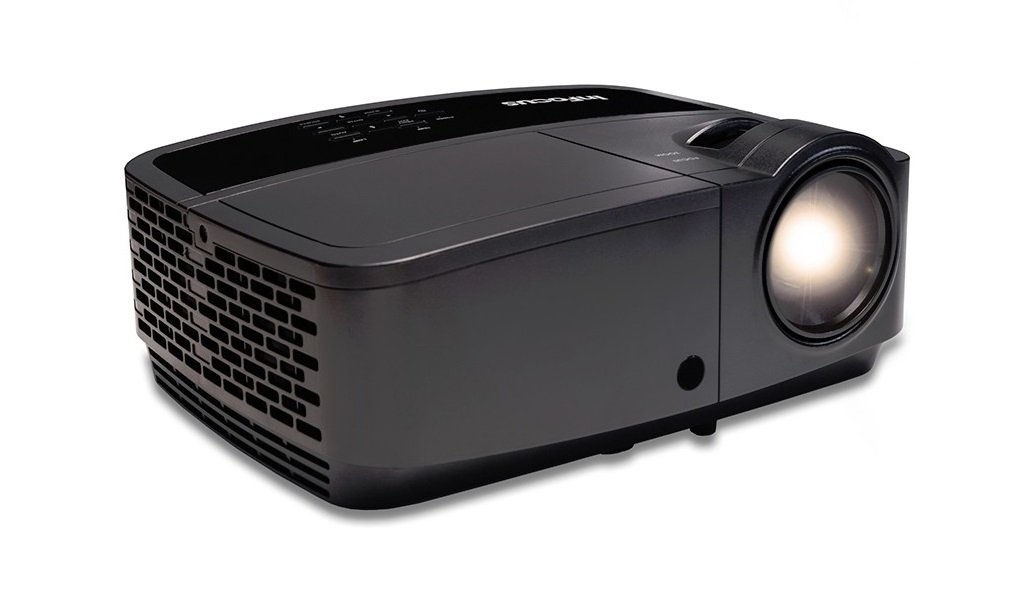
Сүрөт 1.1: Алдыңкы view of the InFocus IN126 DLP Projector.
Негизги өзгөчөлүктөрү:
- High brightness of up to 3200 lumens for clear images in various lighting conditions.
- High 3000:1 contrast ratio for sharp detail.
- Compact and portable design, weighing approximately 4.8 lbs. (2.17 kg).
- 3D-Ready capability for immersive viewтажрыйбаларды.
- HDMI connectivity for versatile input options.
2. Орнотуу жана орнотуу
2.1 Пакеттен чыгаруу
Carefully remove the projector and all accessories from the packaging. Verify that all components are present according to the packing list.
2.2 Проекторду жайгаштыруу
Place the projector on a stable, flat surface or mount it securely. Ensure adequate ventilation around the projector to prevent overheating. Position the projector at an appropriate distance from the screen to achieve the desired image size.
2.3 Түзмөктөрдү туташтыруу
Connect your video source (e.g., laptop, gaming console) to the projector using an HDMI cable. Ensure the cable is securely plugged into both the source device and the projector's HDMI input port.

Image 2.1: An InFocus projector set up for a business presentation, demonstrating typical usage.
2.4 Күйгүзүү/өчүрүү
- Күйгүзүү үчүн: Connect the power cord to the projector and a power outlet. Press the power button on the projector or remote control. The power indicator light will illuminate.
- Өчүрүү үчүн: Press the power button twice. The projector will enter a cooling cycle before completely shutting down. Do not unplug the projector during the cooling cycle.
2.5 Сүрөттү тууралоо
- Фокус: Объективдеги фокус шакекти сүрөт так жана тунук болгонго чейин айлантыңыз.
- Негизги ташты оңдоо: Use the keystone adjustment feature (usually found in the projector's menu or via dedicated buttons) to correct trapezoidal image distortion if the projector is not perfectly perpendicular to the screen.
3. Проекторду иштетүү
3.1 Киргизүү булагын тандоо
Press the 'Source' or 'Input' button on the remote control or projector control panel to cycle through available input sources (e.g., HDMI, VGA). Select the input corresponding to your connected device.
3.2 Меню Навигациясы
Use the arrow buttons on the remote or control panel to navigate the on-screen display (OSD) menu. Press 'Enter' or 'OK' to confirm selections and 'Menu' or 'Exit' to go back or close the menu.
3.3 Сүрөттү тууралоо
Within the OSD menu, you can adjust various picture settings:
- Жарыктык: Сүрөттүн жалпы жарыктыгын же караңгылыгын тууралайт.
- Контраст: Сүрөттүн эң жарык жана эң караңгы бөлүктөрүнүн ортосундагы айырманы башкарат.
- Түсү: Түстөрдүн интенсивдүүлүгүн тууралайт.
- Аспект катышы: Дисплей форматын тандайт (мисалы, 4:3, 16:9).
3.4 Аудио орнотуулары
If your projector has built-in speakers or is connected to an external audio system, you can adjust the volume and other audio settings through the OSD menu.
3.5 3D операциясы
The IN126 projector is 3D-Ready. To view 3D content, you will need compatible 3D glasses, a 3D-enabled source device, and 3D content. Refer to your 3D glasses and source device manuals for specific instructions on enabling 3D mode.
4. Техникалык тейлөө
4.1 Линзаны тазалоо
Проектордун линзасын акырын сүртүү үчүн оптикалык линзалар үчүн атайын иштелип чыккан жумшак, мамыксыз чүпүрөктү колдонуңуз. Абразивдүү тазалоочу каражаттарды же линзаны чийип салышы мүмкүн болгон ашыкча күч колдонуудан алыс болуңуз.
4.2 Проекторду тазалоо Casing
Wipe the projector's exterior casing жумшак менен, гamp кездеме. Катуу химиялык заттарды же эриткичтерди колдонбоңуз.
4.3 Аба чыпкасын тейлөө
Regularly check and clean the air filter to ensure proper airflow and prevent overheating. Refer to the full product manual for instructions on locating and cleaning or replacing the air filter.
4.4 Лamp Алмаштыруу
Проектор лamp has an estimated operating life of up to 20,000 hours. When the lamp reaches the end of its life, a warning message may appear, or the image brightness may significantly decrease. Refer to the full product manual for detailed instructions on safe lamp replacement. Always use genuine InFocus replacement lamps.
5. Кыйынчылыктарды
Бул бөлүмдө InFocus IN126 проекторуңуз менен кездешиши мүмкүн болгон жалпы көйгөйлөр каралат.
5.1 Экранда сүрөт жок
- Ensure the projector is powered on and the power indicator light is solid.
- Бардык кабелдердин туташууларынын (HDMI, кубат) бекем экенин текшериңиз.
- Проектордо туура киргизүү булагы тандалганын текшериңиз.
- Confirm the source device (laptop, etc.) is powered on and outputting a signal.
5.2 Сүрөт бурмаланган же бүдөмүк
- Линзанын фокус шакегин тууралаңыз.
- Use keystone correction to fix trapezoidal distortion.
- Ensure the projector is placed on a stable surface and is not vibrating.
- Check the resolution settings of your source device; ensure it is compatible with the projector's native resolution (1280 x 720).
5.3 Үн жок
- Проектордо да, баштапкы түзмөктө да үнүн жогорулатыңыз.
- Эгер тышкы динамиктерди колдонсоңуз, алардын туура туташып, күйгүзүлгөнүн текшериңиз.
- Check audio settings in the projector's OSD menu.
5.4 Проектордун ысып кетиши
- Ensure there is sufficient space around the projector for ventilation.
- Clean the air filter to remove any dust buildup.
- Вентиляция тешиктерин жаппаңыз.
6. Техникалык шарттар
The following table outlines the key technical specifications for the InFocus IN126 DLP Projector:
| Өзгөчөлүк | Спецификация |
|---|---|
| Бренд | InFocus |
| Модель аты | IN126 DLP |
| Дисплей түрү | DLP |
| Native Resolution | 1280 x 720 |
| Дисплейдин максималдуу чечилиши | 1920 x 1080 |
| Жарыктык | 3200 lumens (ANSI) |
| Контраст катышы | 3000:1 |
| Жарык булагы иштөө мөөнөтү | 20000 саат |
| Lamp Ватtage | 230 Ватт |
| Байланыш технологиясы | HDMI |
| Өзгөчө өзгөчөлүк | 3D даяр |
| Форма фактору | Portable |
| Монтаж түрү | Столдун үстү |
| Элемент Салмагы | 4.85 фунт (2.2 кг) |
| Тышкы тестирлөөнүн сертификаты | UL, c-UL, FCC, CE |
7. Кепилдик маалыматы
The InFocus IN126 DLP Projector comes with a limited manufacturer's warranty. For specific details regarding warranty coverage, duration, and terms, please refer to the warranty card included with your product or visit the official InFocus webсайт. Кепилдик дооматтар үчүн сатып алганыңыздын далилин сактаңыз.
8. Кардарларды колдоо кызматы
For further assistance, technical support, or to inquire about replacement parts, please visit the official InFocus support website or contact their customer service department. Contact information can typically be found on the InFocus website or in the documentation included with your projector.
Ask a question about this manual
Ask about setup, troubleshooting, compatibility, parts, safety, or missing instructions. Manuals+ will review the question and use this page’s manual context to help answer it.