
iLuv iMM514BLK
iLuv ArtStation Pro 30-пиндүү док үн системасынын колдонуучу колдонмосу
Model: iMM514BLK
1. Продукт бүтүп калдыview
The iLuv ArtStation Pro is a versatile docking sound system designed to enhance your audio and visual experience with compatible Apple devices. It features an articulating arm for flexible viewing angles and delivers rich, clear sound through its integrated speaker system.
Негизги өзгөчөлүктөрү:
- Compatibility with 30-pin iPad, iPod, and iPhone models.
- Simultaneously plays and charges your docked device.
- Integrated desktop/bedside speaker system.
- Enhanced jAura Sound Technology for bold acoustic clarity.
- Acoustically tuned 2-way speaker system providing crisp treble and tight bass.
- Articulating arm rotates for portrait or landscape viewing options and allows tilt adjustment for maximum comfort.
- Supports full functions of the iLuv app (available for free on the App Store).
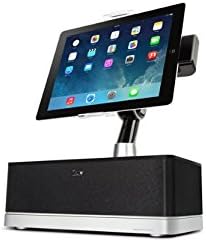
Figure 1.1: The iLuv ArtStation Pro with an iPad docked in portrait orientation, showcasing the main unit and adjustable arm.
2. Орнотуу колдонмосу
Follow these steps to set up your iLuv ArtStation Pro:
- Системаны ачып алыңыз: Carefully remove all components from the packaging. Ensure you have the main speaker unit, the articulating arm, and the power adapter.
- Туташуу кубаты: Insert the power adapter cable into the DC IN port on the back of the ArtStation Pro. Plug the other end of the power adapter into a standard electrical outlet.
- Dock Your Device: Gently align your compatible iPad, iPod, or iPhone (with a 30-pin connector) with the docking connector on the articulating arm. Carefully push down until the device is securely seated. Ensure a firm connection for charging and audio playback.
- Тууралоо Viewбурч: Use the articulating arm to position your device. You can rotate it between portrait and landscape modes and adjust the tilt for optimal viewсооронуч.
- Download iLuv App (Optional): For enhanced functionality and control, download the free iLuv app from the App Store on your docked device.
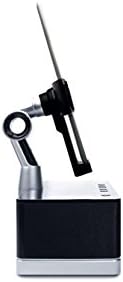
2.1-сүрөт: Каптал view illustrating the adjustable articulating arm, allowing for various viewing angles and device positioning.
3. Иштөө нускамалары
3.1 Негизги операция
- Күйгүзүү/өчүрүү: The unit powers on automatically when a device is docked and power is connected. To turn off, simply undock your device or disconnect power.
- Аудио ойнотуу: Once your device is docked, audio from your device will automatically play through the ArtStation Pro speakers. Control playback (play/pause, skip tracks) directly from your docked device.
- Үндү көзөмөлдөө: Adjust the volume directly on your docked iPad, iPod, or iPhone. The ArtStation Pro's volume output is controlled by your device's volume settings.
- Заряддоо: Your docked device will begin charging automatically as long as the ArtStation Pro is connected to power.
3.2 Articulating Arm Adjustment
- Portrait to Landscape: Gently rotate your docked device to switch between portrait and landscape viewрежимдери.
- Эңкейүүнү тууралоо: The arm allows for forward and backward tilting to reduce glare and optimize your viewбурч.

Figure 3.1: The iLuv ArtStation Pro with an iPad docked in landscape orientation, demonstrating the rotational capability of the articulating arm.
3.3 Remote Control (If Included)
Some versions of the ArtStation Pro may include a magnetic remote control. This remote allows for basic functions such as volume adjustment, play/pause, and track navigation from a distance. Ensure the remote's battery is functional if experiencing issues.
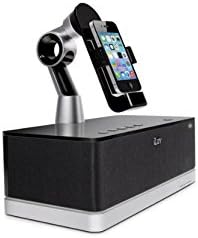
Figure 3.2: The iLuv ArtStation Pro with an iPhone docked, illustrating its compatibility with smaller 30-pin Apple devices.
4. Техникалык тейлөө
- Тазалоо: Use a soft, dry cloth to clean the exterior surfaces of the ArtStation Pro. Do not use liquid cleaners or abrasive materials.
- Туташтыргычка кам көрүү: Keep the 30-pin docking connector free of dust and debris. Avoid applying excessive force when docking or undocking your device.
- Сактагыч: Эгерде аппарат көпкө колдонулбаса, аны салкын, кургак жерде, күн нуру түз тийген жерден жана өтө жогорку температурадан алыс сактаңыз.
5. Кыйынчылыктарды
If you encounter issues with your iLuv ArtStation Pro, refer to the following table for common problems and solutions:
| Көйгөй | Мүмкүн себеп | Чечим |
|---|---|---|
| Электр кубаты жок/Түзмөк күйбөй жатат. | Кубат адаптери туташкан эмес же туура эмес розетка. | Ensure the power adapter is securely plugged into the unit and a working electrical outlet. Try a different outlet. |
| Динамиктерден үн жок. | Device not properly docked; device volume too low; device not playing audio. | Re-seat your device firmly on the 30-pin connector. Increase the volume on your device. Ensure audio is playing on your device. |
| Түзмөк заряддалбай жатат. | Device not properly docked; power issue. | Ensure your device is fully seated on the 30-pin connector. Verify the power adapter is connected and the outlet is functional. |
| Articulating arm is stiff or difficult to move. | Normal operation; dust accumulation. | The arm is designed to hold position firmly. Apply gentle, consistent pressure. Clean any visible dust around the joints. Do not force the arm beyond its intended range of motion. |
| Пульт иштебей жатат. | Dead battery; obstruction. | Replace the remote control battery (if applicable). Ensure there are no obstructions between the remote and the unit. |
6. Техникалык шарттар
| Спецификация | Деталь |
|---|---|
| Модель номери | iMM514BLK |
| Продукциянын өлчөмдөрү (L x W x Y) | 29.97 x 29.46 x 20.07 см |
| Элемент Салмагы | 2.22 кг |
| Түс | Кара |
| Шайкеш түзмөктөр | iPhone 3, iPhone 3G, iPhone 4, iPhone 4G, iPod Touch (1st, 2nd, 3rd Gen), iPod Video (5th Gen), iPod Nano (1st, 2nd, 3rd, 4th, 5th, 6th Gen) |
| Аудио технологиясы | Enhanced jAura Sound Technology, 2-way speaker system |
| Power Source | AC кубат адаптери |
7. Кепилдик жана колдоо
For warranty information and customer support, please refer to the documentation included with your purchase or visit the official iLuv webсайт. Кепилдиктин шарттары аймакка жана сатуучуга жараша өзгөрүшү мүмкүн.
Manufacturer: Dr.Bott LLC
Ask a question about this manual
Ask about setup, troubleshooting, compatibility, parts, safety, or missing instructions. Manuals+ will review the question and use this page’s manual context to help answer it.