
Introduction
This manual provides essential instructions for setting up, operating, and maintaining your Canon PowerShot ELPH 310 HS digital camera. Please read this manual thoroughly to ensure proper use and to maximize your camera's performance.
Кутуда эмне бар
Таңгактан чыгаргандан кийин, төмөнкү нерселердин бардыгы камтылганын текшериңиз:
- Canon PowerShot ELPH 310 HS Camera
- Батарея топтому NB-4L
- CB-2LV батарея кубаттагычы
- Билек боо
- USB кабели
- CD-ROM (Software/Drivers)
Жайгашуу
1. Батареяны заряддоо
Insert the Battery Pack NB-4L into the Battery Charger CB-2LV. Plug the charger into a power outlet. The charging indicator light will show the charging status. Once fully charged, remove the battery.
2. Батареяны жана эстутум картасын салуу
Open the battery/card compartment cover on the camera. Insert the charged battery pack, ensuring correct orientation. Insert a compatible SD/SDHC/SDXC memory card into the card slot until it clicks into place. Close the compartment cover securely.

Сүрөт: алдыңкы view of the Canon PowerShot ELPH 310 HS digital camera, showcasing its silver finish and lens.
Камераны иштетүү
1. Күйгүзүү/өчүрүү
басыңыз КҮЙГҮЗҮҮ/ӨЧҮРҮҮ button located on the top or side of the camera to power it on or off. The lens will extend when powered on.
2. Негизги сүрөт
- Фокустоо: Gently press the shutter button halfway down to focus. The camera will emit a beep and display a green frame when focus is achieved.
- Сүрөт тартуу: Сүрөттү тартуу үчүн жапкычты толугу менен ылдый басыңыз.
- Чоңойтуу: Use the zoom lever around the shutter button to adjust the optical zoom (8x).
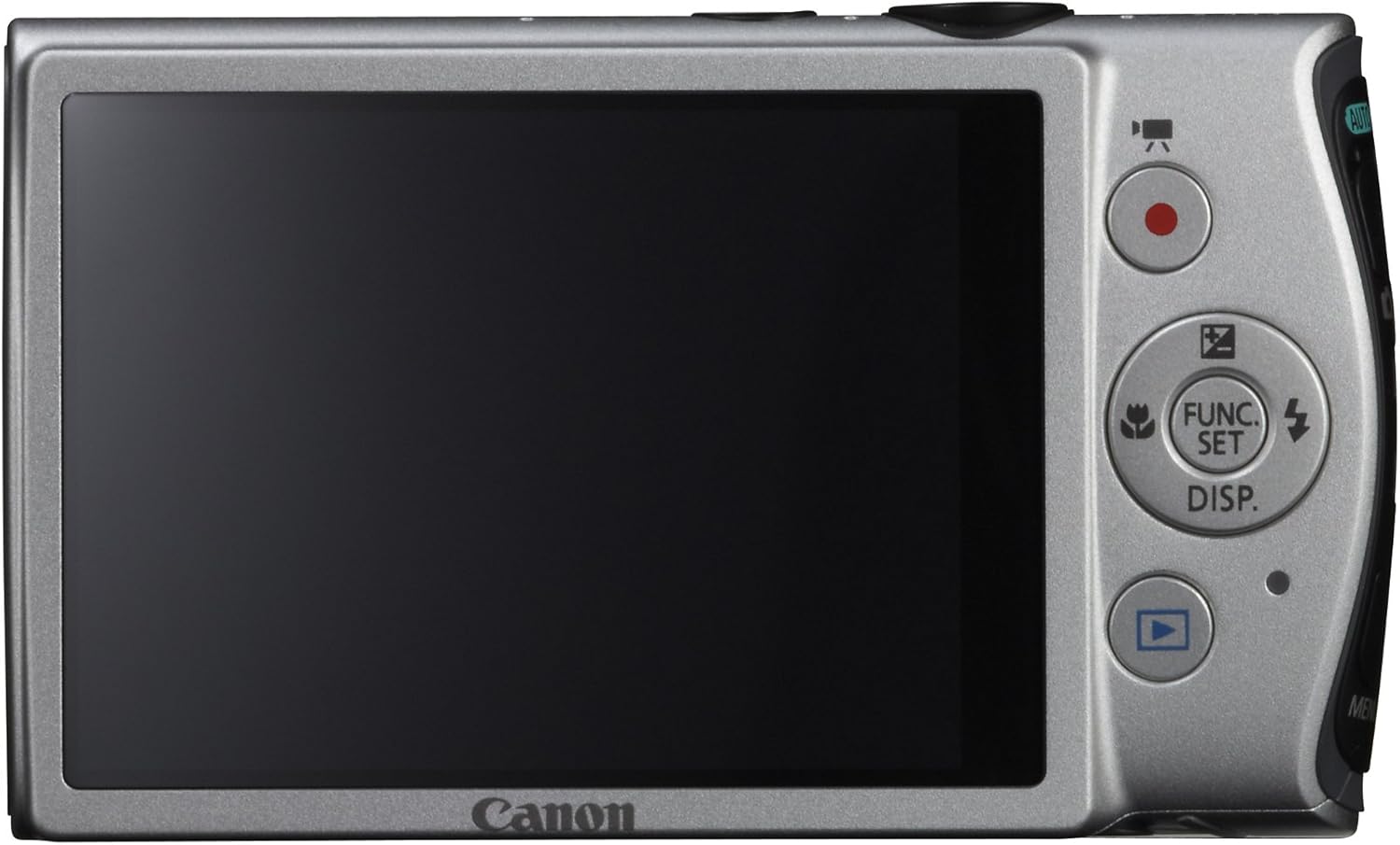
Сүрөт: Арткы view of the Canon PowerShot ELPH 310 HS, displaying the 3.0-inch LCD screen and various control buttons for navigation and function selection.
3. Атуу режимдери
The PowerShot ELPH 310 HS offers various shooting modes to suit different situations. Use the mode dial or menu to select:
- Smart AUTO: Automatically detects scenes and applies optimal settings for point-and-shoot simplicity.
- Программа (P): Allows for automatic aperture/shutter speed selection based on conditions, with some user control.
- Movie Digest: Records a short video clip before each still image, combining them into a daily video.
- Жогорку ылдамдыктагы жарылуу: Captures rapid action at approximately 8.7 frames per second.
- Super Slow Motion Movie: Records video at high frame rates (up to 240 fps) for slow-motion playback.
- Special Scene Modes: Includes options like Handheld Night Scene, Portrait, Beach, Snow, Fireworks, Fisheye Effect, Miniature Effect, Toy Camera Effect, and more for specific photographic effects.
4. Видео жаздыруу
To record videos, press the dedicated movie button. The camera supports Full HD 1080p video at 24 fps and 720p HD video at 30 fps. The iFrame movie format is also supported for easier editing.
5. Image Stabilization (Intelligent IS)
The camera features Intelligent IS, which automatically selects the best shake correction method for your shooting situation. This includes modes for stills (Normal, Panning, Macro, Tripod) and videos (Dynamic, Powered, Macro, Tripod) to ensure steady images and footage.
Техникалык тейлөө
1. Камераны тазалоо
- Объектив: Use a soft, lint-free cloth specifically designed for camera lenses. Avoid touching the lens directly with fingers.
- LCD экран: Жумшак, кургак чүпүрөк менен акырын сүртүңүз. Абразивдүү тазалоочу каражаттарды колдонбоңуз.
- Камеранын корпусу: Use a soft, dry cloth to wipe away dust and smudges.
2. Батареяга кам көрүү
- Батареяларды колдонбогондо салкын, кургак жерде сактаңыз.
- Батареянын иштөө мөөнөтүн узартуу үчүн бат-баттан толук зарядсыздануудан качыңыз.
- Батареяларды экстремалдык температурага калтырбаңыз.
3. Сактоо
Камераны узак убакытка сактаганда, батареяны жана эс тутум картасын алып салыңыз. Камераны кургак, чаңсыз чөйрөдө, мүмкүн болсо камера баштыгында же кутучада сактаңыз.
Проблемаларды чечүү
| Көйгөй | Мүмкүн болгон себеп / Чечим |
|---|---|
| Камера күйбөйт. | Батарея түгөнүшү мүмкүн же туура эмес салынган болушу мүмкүн. Батареянын заряддалганын жана туура салынганын текшериңиз. |
| Сүрөттөр бүдөмүк. | Camera shake, subject movement, or incorrect focus. Ensure proper grip, use Intelligent IS, or check focus settings. |
| Эстутум картасынын катасы. | Memory card may be full, corrupted, or incompatible. Try formatting the card (this will erase all data) or use a different card. |
| Flash күйбөйт. | Flash may be set to OFF or Red-Eye Reduction mode. Check flash settings in the menu. |
| Видео жаздыруу мүмкүн эмес. | Memory card may be full or too slow. Ensure sufficient space and use a high-speed memory card. |
Техникалык шарттар
| Өзгөчөлүк | Деталь |
|---|---|
| Модель аты | Canon PowerShot ELPH 310 HS |
| Сүрөт сенсору | 12.1 мегапиксель CMOS |
| Сүрөт процессору | DIGIC 4 |
| Оптикалык масштаб | 8x |
| Объектив | 28mm Wide-Angle (35mm equivalent: 28-224mm) |
| Image Stabilization | Оптикалык (Акылдуу IS) |
| Видео жаздыруу | Full HD 1080p (24 fps), HD 720p (30 fps) |
| LCD экран | 3.0-inch PureColor LCD (461,000 dots) |
| Сактагыч медиа | SD, SDHC, SDXC эс тутум карталары |
| Байланыш | HDMI, USB |
| Батарея | NB-4L Lithium-ion Battery Pack |
| Салмагы | Болжол менен 0.31 фунт (батарея жана эстутум картасын кошкондо) |
Кепилдик жана колдоо
For warranty information and technical support, please refer to the documentation included with your product or visit the official Canon webсайт. Сатып алуу квитанциясын кепилдик дооматтары үчүн сатып алуунун далили катары сактаңыз.
Canon колдоо Webсайт: www.usa.canon.com/support