
1. Киришүү
This manual provides essential information for the safe and efficient operation of your Datalogic PowerScan M8300-AR910RB Handheld Laser Bar Code Reader. Please read this manual thoroughly before using the device to ensure proper setup, operation, and maintenance. Keep this manual for future reference.
2. Коопсуздук маалыматы
Жарааттарды же аппаратты бузууну болтурбоо үчүн ар дайым төмөнкү коопсуздук чараларын сактаңыз:
- Лазердик коопсуздук: This device emits a laser beam. Do not stare directly into the laser beam or point it at others. Avoid direct eye exposure.
- Батареянын коопсуздугу: Use only Datalogic-approved batteries and charging accessories. Do not expose batteries to extreme temperatures, puncture, or disassemble them. Dispose of batteries according to local regulations.
- Экологиялык шарттар: Do not operate the device in explosive atmospheres or near flammable materials. Keep the device dry and away from extreme temperatures.
- Тейлөө: Refer all servicing to qualified service personnel. Do not attempt to open or modify the device.
3. Пакеттин мазмуну
Пакетте бардык буюмдар бар экенин текшериңиз:
- Datalogic PowerScan M8300-AR910RB Handheld Laser Bar Code Reader
- Алынуучу батарея
- Charging/Communication Cradle (may be sold separately depending on configuration)
- USB or Serial Cable (for cradle connection, may be sold separately)
- Power Supply (for cradle, may be sold separately)
- Quick Start Guide
4. Продукт бүтүп калдыview
The Datalogic PowerScan M8300 is a robust, cordless handheld laser bar code reader designed for industrial applications. It features a durable casing and a 910MHz radio for reliable wireless communication.
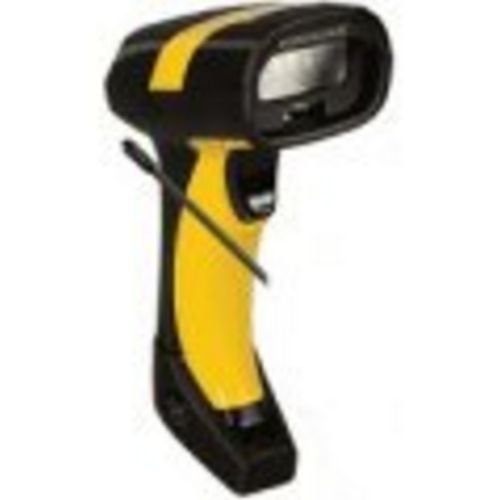
Сүрөт 1: Datalogic PowerScan M8300 Handheld Laser Bar Code Reader. This image displays the front view of the scanner, highlighting its ergonomic design, scan window, and trigger button.
Негизги компоненттер:
- Скандоо терезеси: Located at the front, where the laser beam exits to read barcodes.
- Триггер: Сканерлөө үчүн лазерди иштетет.
- Индикатор жарыктары: Provide feedback on scan status, battery level, and communication.
- Батарея бөлүмү: Located at the base of the handle, housing the removable battery.
- Байланыш интерфейси: For wireless data transmission via the 910MHz radio.
5. Орнотуу
5.1. Батареяны орнотуу
- Сканер өчүрүлгөнүн текшериңиз.
- Locate the battery compartment cover at the bottom of the handle.
- Open the cover and insert the removable battery, ensuring correct polarity.
- Батарея уясынын капкагын бекем жабыңыз.
5.2. Батареяны заряддоо
- Place the scanner into its charging cradle. Ensure the contacts on the scanner align with those on the cradle.
- Connect the power supply to the charging cradle and plug it into an electrical outlet.
- The scanner's indicator light will show charging status (typically amber for charging, green for fully charged).
- Батареяны биринчи жолу колдонуудан мурун толук заряддаңыз (болжол менен 4 саат).
5.3. Connecting to a Host System
The PowerScan M8300 uses a 910MHz radio for wireless communication. It typically connects to a host system (e.g., PC, laptop) via a base station or cradle connected by a USB or serial cable.
- Connect the communication cable (USB or serial) from the charging/communication cradle to your host system.
- Connect the power supply to the cradle and plug it in.
- Place the scanner in the cradle. The scanner and cradle will automatically establish a wireless link.
- Install any necessary drivers or software on your host system as prompted or as instructed by Datalogic documentation for your specific cradle model.
6. Иштөө нускамалары
6.1. Күйгүзүү / Өчүрүү
- Күйгүзүү үчүн: The scanner typically powers on automatically when removed from the cradle or when the trigger is pressed.
- Өчүрүү үчүн: The scanner will enter a low-power sleep mode after a period of inactivity. To fully power off, remove the battery.
6.2. Штрихкоддорду сканерлөө
- Aim the scan window at the barcode you wish to read.
- Press and hold the trigger button. A laser line will appear.
- Position the laser line across the entire barcode.
- Once the barcode is successfully read, the scanner will emit an audible beep and/or an indicator light will illuminate.
- Release the trigger. The scanned data will be transmitted to the connected host system.
6.3. Маалыматтарды өткөрүү
The PowerScan M8300 transmits scanned data wirelessly to its paired base station/cradle. Ensure the scanner is within range of its base station for successful data transfer. Out-of-range scanning capabilities may vary by configuration; refer to advanced programming guides for details.
7. Техникалык тейлөө
7.1. Аспапты тазалоо
- жумшак, таза кездемени колдонуу dampсуу же жумшак тазалоо эритмеси менен.
- Абразивдүү тазалагычтарды, эриткичтерди же катуу химиялык заттарды колдонбоңуз.
- Gently wipe the scan window and the exterior of the scanner.
- түзмөктүн тешиктерине суюктуктун кирбегенин текшериңиз.
7.2. Батареяга кам көрүү
- Батареяны дайыма заряддап туруңуз.
- Батареяны бат-баттан толук кубаттап калуудан алыс болуңуз.
- Store the scanner and spare batteries in a cool, dry place when not in use.
7.3. Сактоо
When storing the scanner for extended periods, ensure the battery is partially charged (around 50%) and remove it from the device if possible. Store in a temperature-controlled environment.
8. Кыйынчылыктарды
If you encounter issues with your PowerScan M8300, refer to the following common problems and solutions:
| Көйгөй | Мүмкүн себеп | Чечим |
|---|---|---|
| Сканер күйбөйт. | Өлүк же туура эмес орнотулган батарея. | Check battery installation. Charge the battery. Replace battery if necessary. |
| Сканер штрих-коддорду окубайт. | Barcode damaged or poorly printed; scan window dirty; incorrect symbology enabled. | Try scanning a different barcode. Clean the scan window. Refer to the programming guide to enable/disable symbologies. |
| Хостко эч кандай маалымат өткөрүлгөн жок. | Scanner out of range; base station not connected; communication issue. | Move scanner closer to the base station. Verify base station connection to host. Check base station power. |
| Батареянын иштөө мөөнөтү кыска. | Battery nearing end of life; frequent use; improper charging. | Replace battery. Ensure full charges. Reduce backlight/power settings if configurable. |
If the problem persists, contact Datalogic technical support.
9. Техникалык шарттар
The following specifications apply to the Datalogic PowerScan M8300-AR910RB model:
- Модель номери: PM8300-AR910RB
- Продукциянын өлчөмдөрү: 2.72 x 4.49 x 8.15 дюйм
- Элемент Салмагы: 13.9 унция
- Өндүрүүчү: Datalogic ADC
- Кубат булагы: Батарея менен иштейт
- Байланыш технологиясы: Зымсыз (910MHz)
- Шайкеш түзмөктөр: Иш такта, ноутбук
- UPC: 053926383351
10. Кепилдик маалыматы
Datalogic products are covered by a limited warranty against defects in materials and workmanship. The specific terms and duration of the warranty may vary by region and product. Please refer to the warranty card included with your product or visit the official Datalogic webтолук кепилдик маалымат жана каттоо жол-жоболору үчүн сайт.
11. Колдоо
For technical assistance, product inquiries, or to report issues, please contact Datalogic customer support:
- Webсайт: Visit the official Datalogic webколдоо ресурстары, көп берилүүчү суроолор жана драйверлерди жүктөп алуу үчүн сайт.
- Байланыш: Refer to the 'Contact Us' section on the Datalogic webсиздин аймагыңызга тиешелүү телефон номерлери жана электрондук почта даректери үчүн сайт.
When contacting support, please have your product model number (PM8300-AR910RB) and serial number ready.