
1. Киришүү
The iRobot Roomba 552 Pet Series is an advanced robotic vacuum cleaner designed to efficiently clean carpets and hard floors. Utilizing iAdapt Responsive Technology, it navigates your home, cleaning multiple times and reaching areas under and around obstacles. The AeroVac technology optimizes airflow for effective debris and pet hair collection. This manual provides essential information for setting up, operating, and maintaining your Roomba 552 Pet Series to ensure optimal performance.
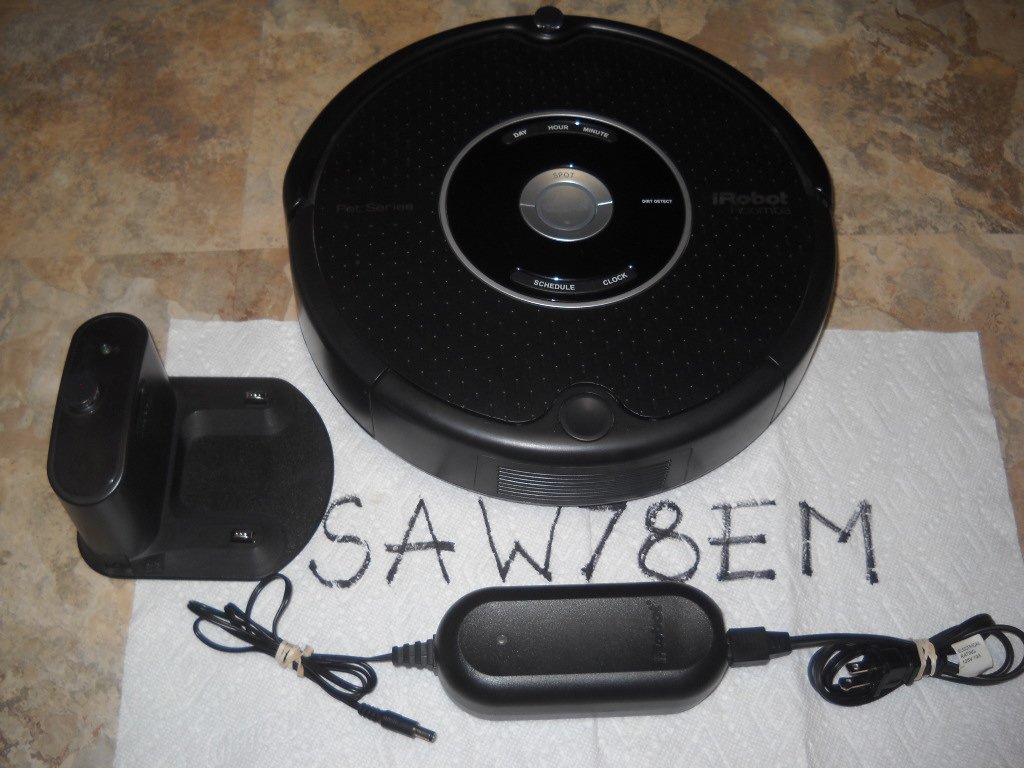
Image 1.1: The iRobot Roomba 552 Pet Series robotic vacuum, its Home Base charging station, and a Virtual Wall barrier device. The Roomba features a central control panel with 'CLEAN', 'SPOT', 'CLOCK', 'SCHEDULE', 'DAY', 'HOUR', and 'MINUTE' buttons. The Home Base is connected via a power cord.
2. Коопсуздук маалыматы
Before using your Roomba, please read all safety instructions. Failure to follow these instructions may result in electric shock, fire, or serious injury.
- Бул шайман физикалык, сенсордук же акыл-эс жөндөмү начар же тажрыйбасы жана билими жок адамдар (анын ичинде балдар) тарабынан колдонууга арналбайт, эгерде алардын коопсуздугуна жооптуу адам тарабынан шайманды колдонуу боюнча көрсөтмө болбосо .
- Do not handle the Roomba or Home Base with wet hands.
- Do not use the Roomba on wet surfaces or in areas with standing water.
- Чачты, кенен кийимдерди, манжаларды жана дененин бардык бөлүктөрүн тешиктерден жана кыймылдуу бөлүктөрдөн алыс кармаңыз.
- Do not operate the Roomba in rooms where infants or children are sleeping.
- Ensure the power cord for the Home Base is not damaged. If damaged, it must be replaced by the manufacturer or a qualified service agent.
- Өндүрүүчү тарабынан берилген заряддагычты гана колдонуңуз.
3. Пакеттин мазмуну
Your iRobot Roomba 552 Pet Series package includes the following items:
- 1 iRobot Roomba 552 Pet Robotic Vacuum (with 1 Robot battery, 1 AeroVac Filter, 1 Side Brush, 1 Bristle Brush, 1 Beater Brush installed)
- 2 Virtual Walls (4 C Batteries included)
- 1 Self-charging Home Base
- 1 Brush Cleaning Tool
- 1 Flat Cleaning Tool
- 2 Extra Side Brushes
- 2 Extra Beater Brushes
- 2 Extra Bristle Brushes
- 3 Additional AeroVac Filters
4. Орнотуу
4.1 Charging the Home Base
- Place the Home Base on a hard, level surface against a wall. Ensure there is at least 3 feet (1 meter) of clear space on either side of the Home Base and 4 feet (1.2 meters) in front of it.
- Plug the Home Base power cord into a standard wall outlet. The power indicator light on the Home Base will illuminate.
4.2 Initial Roomba Charge
- Place your Roomba onto the Home Base, ensuring the metal charging contacts on the Roomba align with those on the Home Base.
- The Roomba will emit a tone, and the 'CLEAN' button will pulse amber, indicating it is charging.
- Allow the Roomba to charge for a full 16 hours before its first use. The 'CLEAN' button will turn green when fully charged.
4.3 Setting up Virtual Walls
Virtual Walls create an invisible barrier that Roomba will not cross, allowing you to confine it to specific rooms or areas.
- Insert the included C batteries into each Virtual Wall device.
- Place a Virtual Wall in the doorway or area you wish Roomba to avoid. Ensure the arrow on top of the Virtual Wall points in the direction of the area you want to block.
- Turn on the Virtual Wall. The indicator light will glow steadily.
5. Иштөө нускамалары
5.1 Тазалоо циклин баштоо
- Ensure Roomba is fully charged and on a flat surface.
- Чоңду басыңыз ТАЗА button in the center of the control panel. The button will illuminate, and Roomba will begin its cleaning cycle.
- To pause Roomba, press the ТАЗА button once. To resume, press it again.
- To end a cleaning cycle and send Roomba back to its Home Base, press and hold the ТАЗА button until Roomba emits a tone and the Home Base icon illuminates.
5.2 Scheduling Cleaning Times
You can schedule Roomba to clean up to seven times per week.
- басыңыз СААТ button to set the current time. Use the КҮН, HOUR, жана MINUTE тууралоо үчүн баскычтар. Басыңыз СААТ сактап калуу үчүн дагы.
- басыңыз ГРАФИК баскычы. Колдонуу КҮН, HOUR, жана MINUTE buttons to set your desired cleaning time.
- Басыңыз ГРАФИК again to save the schedule. Roomba will beep to confirm.
5.3 Тазалоо
For concentrated cleaning of a small area, use the Spot Clean feature.
- Place Roomba in the center of the area you want to clean.
- басыңыз SPOT button. Roomba will clean in a spiral pattern, covering an area of approximately 3 feet (1 meter) in diameter.
6. Техникалык тейлөө
Regular maintenance ensures your Roomba 552 Pet Series operates at peak performance.
6.1 Emptying the AeroVac Bin
Empty the AeroVac bin after each cleaning cycle, especially when cleaning pet hair.
- Press the bin release button on the back of Roomba and pull out the bin.
- Open the bin door and empty all debris into a trash receptacle.
- Tap the bin against the trash can to dislodge any remaining debris.
- Reinsert the bin until it clicks into place.
6.2 Cleaning Brushes (Weekly)
Remove and clean the main brushes and side brush weekly, or more often if you have pets.
- Turn Roomba over. Open the brush guard by lifting the two yellow tabs.
- Remove the bristle and beater brushes. Use the included cleaning tool to remove hair and debris.
- Remove the side brush by unscrewing the center screw. Clean any hair or debris wrapped around it.
- Reinstall all brushes, ensuring they are properly seated.
6.3 Cleaning Filters (Weekly)
Clean the AeroVac filter weekly by tapping it against a trash can to remove dust. Replace filters every 2-3 months, or as needed.
6.4 Cleaning Sensors (Monthly)
Wipe the cliff sensors (located on the bottom of Roomba) and the bumper sensor window (on the front bumper) with a clean, dry cloth to remove dust and debris.
7. Кыйынчылыктарды
If your Roomba encounters an issue, it will often play a sound and speak a message. Refer to the following common issues:
| Көйгөй | Мүмкүн себеп | Чечим |
|---|---|---|
| Roomba not charging | Poor contact with Home Base; Home Base unplugged | Ensure Roomba is properly seated on Home Base. Check Home Base power connection. Clean charging contacts on Roomba and Home Base. |
| Roomba gets stuck frequently | Cords, carpet fringe, or tassels; uneven surfaces | Clear obstacles from the cleaning area. Use Virtual Walls to block problematic zones. Clean brushes to prevent entanglement. |
| Начар тазалоо көрсөткүчү | Full bin; dirty brushes or filters; dirty sensors | Empty the AeroVac bin. Clean or replace brushes and filters. Wipe all sensors. |
| Roomba makes unusual noises | Debris in brushes or wheels; worn parts | Inspect and clean brushes, wheels, and front caster wheel. If noise persists, contact customer support. |
8. Техникалык шарттар
- Бренд: iRobot
- Модель номери: 552
- Беттик сунуш: Килем, катуу полдор
- Өзгөчөлүктөр: Bagless, Cordless, Pet Hair Optimized
- Түсү: Кара
- Контроллердин түрү: Control Button
- Чыпка түрү: Disk (AeroVac)
- Кубат булагы: Батарея менен иштейт
- Форма фактору: Робот
- UPC: 885155002273
9. Кепилдик жана колдоо
For warranty information and technical support, please refer to the documentation included with your product or visit the official iRobot webсайт. Сатып алуу квитанциясын кепилдик дооматтары үчүн сатып алуунун далили катары сактаңыз.


