
Introduction
The Brookstone Tranquil Moments Advanced Sleep Sounds Machine is designed to promote natural relaxation and improve sleep quality. It utilizes advanced sound programs composed with Delta, Alpha, and Theta brainwave frequencies, which are naturally associated with sleep and relaxation. These imperceptible rhythms gently guide the brain into a restful state.
This device features 16 digitally mastered sound programs, including specific sounds to help mask symptoms associated with tinnitus. Experience superior sound quality and integrated sleep enhancement technology.

1-сүрөт: Diagram explaining the science behind the sleep sound programs. It shows how active brain states transition to sleep states through the use of Delta wave programs.
Жайгашуу
1. таңгактан чыгаруу
Carefully remove the sleep sound machine from its packaging. Retain all packaging materials for future storage or transport.
2. Кубат булагы
The device is primarily battery powered. Insert the required batteries into the designated compartment. An optional AC adapter (not included) can also be used for continuous power. Ensure the power source is stable before operation.
3. Жайгаштыруу
Place the sleep sound machine on a flat, stable surface, such as a nightstand or table, away from direct sunlight or heat sources. For optimal sound dispersion, ensure the speakers are not obstructed.

2-сүрөт: The sleep sound machine positioned on a nightstand, demonstrating typical placement for use.
Иштөө нускамалары
1. Баштапкы күйгүзүү
Press the power button to turn on the device. The display will illuminate, showing the current time.
2. Убакытты белгилөө
To set the time, locate the time setting buttons, typically labeled with a clock icon or 'SET'. Press and hold the 'SET' button until the time display flashes. Use the up/down arrow buttons to adjust the hours and minutes. Press 'SET' again to confirm each adjustment and move to the next setting (e.g., AM/PM). Some units may have a temperamental back button for time adjustment; if so, cycle forward to reach the desired setting.
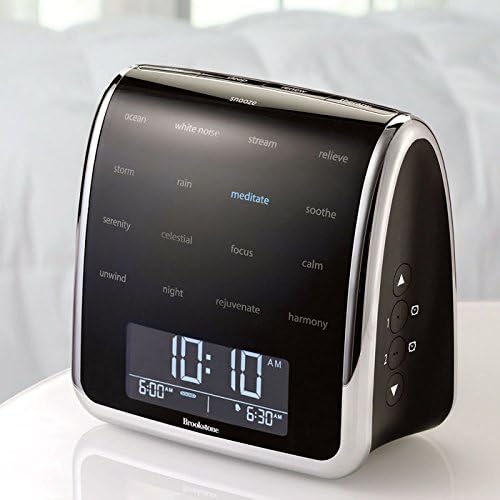
3-сүрөт: The device's front display, showing the digital clock and alarm indicators.
3. Selecting Sound Programs
The device offers 16 sound programs. Use the dedicated sound selection buttons or a dial to cycle through the available programs. The selected program name will typically appear on the display or be indicated by an illuminated button.
Available sound programs include: Ocean, White Noise, Stream, Storm, Rain, Meditate, Soothe, Serenity, Celestial, Focus, Calm, Unwind, Night, Rejuvenate, Harmony, and Relieve. Note that some sound programs are looped and may have a noticeable repeat cycle.
4. Үндү тууралоо
Use the volume up (▲) and volume down (▼) buttons, usually located on the side or front panel, to adjust the sound output level.
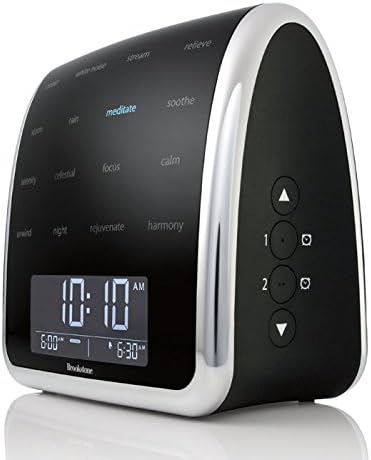
4-сүрөт: Side panel with volume and alarm control buttons.
5. Сигналдарды коюу
The device supports multiple alarms (e.g., Alarm 1, Alarm 2). To set an alarm, press the corresponding alarm button (often labeled with a clock icon and a number). Use the up/down arrow buttons to set the desired alarm time. Confirm by pressing the alarm button again. If alarms reset unexpectedly, re-enter the settings and ensure they are saved correctly.
6. Light Function
The device features a touch-sensitive light and an adjustable backlight for the display. Tap the designated area or button to activate/deactivate the light. Adjust the backlight intensity through the settings menu or dedicated button to suit your preference, avoiding bright lights during sleep.
Техникалык тейлөө
1. Тазалоо
Wipe the exterior of the device with a soft, dry cloth. Do not use abrasive cleaners, solvents, or immerse the unit in water. Ensure no liquids enter the device openings.
2. Батареяны алмаштыруу
If using batteries, replace them when the low battery indicator appears or if the device's performance diminishes. A blinking battery icon indicates low power. Use new, high-quality batteries of the specified type.
3. Сактоо
Түзмөктү көпкө колдонбогондо, салкын, кургак жерде сактаңыз. Агып кетүүнүн алдын алуу үчүн бир нече жумадан ашык сактасаңыз, батарейкаларды алып салыңыз.
Проблемаларды чечүү
- Кубат жок/Түзмөк күйбөй жатат: Ensure batteries are correctly inserted and charged, or that the AC adapter is securely connected to a working power outlet.
- Blinking Battery Icon: Бул батареянын кубаты аз экенин көрсөтүп турат. Батареяларды дароо алмаштырыңыз.
- Difficulty Setting Time/Temperamental Buttons: Press buttons firmly and deliberately. If a specific button (e.g., back button for time) is unresponsive, try cycling through the settings using the forward button until the desired option is reached.
- Alarms Resetting: After setting an alarm, ensure you press the confirmation button to save the setting. If the issue persists, try resetting the device by temporarily removing its power source.
- Repetitive Sound Loops: The sound programs are designed to loop. Some users may perceive the loop point more distinctly than others. This is a characteristic of the device's sound engineering.
- Үн жок: Check the volume level. Ensure the device is not muted.
Техникалык шарттар
| Модель номери | 672519 |
| Продукциянын өлчөмдөрү | 5.75 x 3 x 6 дюйм |
| Элемент Салмагы | 1.3 фунт |
| Power Source | Battery Powered (AC adapter optional, not included) |
| Number of Sound Programs | 16 |
Кепилдик жана колдоо
Кепилдик маалымат
This Brookstone Tranquil Moments Advanced Sleep Sounds Machine is covered by a 365-day limited manufacturer's warranty. This warranty covers defects in materials and workmanship under normal use. Please retain your proof of purchase for warranty claims.
Кардарларды колдоо
For technical assistance, troubleshooting beyond this manual, or warranty service, please contact Brookstone customer support. Refer to the official Brookstone webакыркы байланыш маалыматы үчүн сайт же продукт таңгак.