
Introduction
Сатып алганыңыз үчүн рахматasing the Edifier Tick Tock Retro Multifunctional Alarm Clock. This device combines a retro design with modern functionality, offering an alarm clock, FM radio, and media playback from SD cards, USB drives, and auxiliary input. This manual provides detailed instructions for setup, operation, and maintenance to ensure optimal performance and longevity of your device.
Продукт өзгөчөлүктөрү
- SD card reader and USB input port for media playback.
- LCD display screen for time, date, alarm status, and input mode (SD/USB/FM/AUX).
- Alarm clock function with customizable audio sources: SD card, USB drive, FM radio, or Auxiliary input.
- Auxiliary 3.5mm input jack for connecting external audio devices.
- FM radio function with 24 preset channels for easy access to your favorite stations.
- Two 360° omni-directional full-range speakers for rich, multi-directional sound.
Башкаруу каражаттары жана порттор
Арткы панелдин порттору
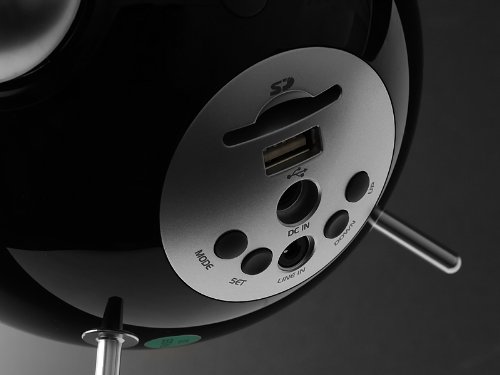
This image displays the rear panel of the Edifier Tick Tock alarm clock. Visible ports and buttons include:
- SD карта уячасы: Insert an SD card for music playback.
- USB порт: Connect a USB flash drive for music playback.
- DC IN: Камтылган AC адаптер үчүн кубат киргизүү.
- LINE IN (AUX): Тышкы түзмөктөр үчүн 3.5 мм аудио киргизүү.
- MODE баскычы: Cycles through input modes (SD, USB, FM, AUX).
- SET баскычы: Used for entering settings menus (e.g., time, alarm).
- ЖОГОРУ/ТӨМӨН баскычтары: Navigate menus, adjust volume, or change settings.
Жогорку панелдин башкаруу элементтери
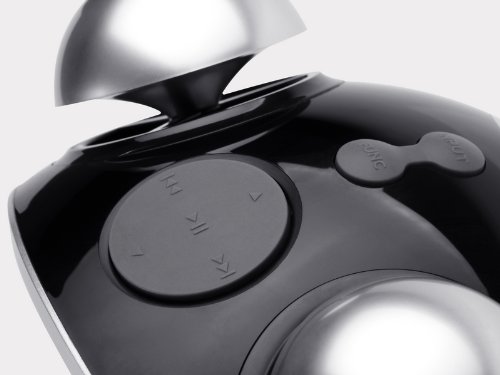
This image shows the top panel controls of the Edifier Tick Tock alarm clock. These include:
- Ойнотуу/тындыруу баскычы: Starts or pauses media playback.
- Мурунку/Кийинки трек баскычтары: Skips to the previous or next track during media playback. Also used for tuning FM radio.
- Көлөмдү өйдө / ылдый баскычтары: Аудио чыгаруунун үнүн тууралайт.
- ТЫНЧТЫК/ЖАРЫК баскычы: Activates snooze during an alarm or adjusts display brightness.
Жайгашуу
- Пакеттен чыгаруу: Carefully remove the alarm clock and all accessories from the packaging. Ensure all components are present: the alarm clock unit, AC power adapter, and this user manual.
- Кубат туташуу: Connect the AC power adapter to the "DC IN" port on the rear of the alarm clock. Plug the adapter into a standard wall outlet. The display should illuminate.
- Баштапкы күйгүзүү: The unit should power on automatically. If not, press the power button (if available, otherwise it's always on when plugged in).
- Antenna (FM Radio): Оптималдуу радио кабыл алуу үчүн түзмөктүн артында жайгашкан FM антеннасын узартыңыз.
Иштөө нускамалары
Убакыт жана дата орнотуу
- басып, кармап туруңуз SET убакыт дисплейи күйүп-өчө баштаганга чейин баскычын басыңыз.
- колдонуу UP жана ылдый саатты тууралоо үчүн баскычтар. Басыңыз SET ырастоо жана мүнөттөргө жылдыруу үчүн.
- Мүнөттөрдү колдонуп тууралаңыз UP жана ылдый. Басыңыз SET ырастоо үчүн.
- Continue this process to set the year, month, and day. Press SET to exit the time/date setting mode.
Ойготкучту орнотуу
- басыңыз SET button once (do not hold) to enter alarm setting mode. The alarm time will flash.
- колдонуу UP жана ылдый ойготкуч саатын тууралоо үчүн баскычтарды басыңыз. SET ырастоо жана мүнөттөргө жылдыруу үчүн.
- Мүнөттөрдү колдонуп тууралаңыз UP жана ылдый. Басыңыз SET ырастоо үчүн.
- Next, select the alarm source (FM, SD, USB, AUX). Use UP жана ылдый to cycle through options. Press SET ырастоо үчүн.
- If FM is selected, use UP жана ылдый to select a preset FM station (P01-P24).
- If SD or USB is selected, ensure a card/drive with audio is inserted. The alarm will play the first track.
- If AUX is selected, ensure an external device is connected and playing audio.
- Басыңыз SET Ойготкучту иштетүү үчүн кайра басыңыз. Дисплейде ойготкуч сүрөтчөсү пайда болот.
- To deactivate the alarm, press SET ойготкуч сүрөтчөсү жок болгонго чейин.
- Ойготкуч басылганда, басыңыз SNOOZE / LIGHT button to activate snooze (typically 9 minutes). To turn off the alarm completely, press any other button.
FM радиосунун иштеши
- басыңыз РЕЖИМ баскычын дисплейде "FM" пайда болгонго чейин кайталап басыңыз.
- Auto Scan and Preset: басып, кармап туруңуз ОЙНОО/ТЫНЫТТЫРУ button. The radio will automatically scan for available stations and save them to presets (P01-P24).
- Кол менен жөндөө: колдонуу МУРУНКУ/КИЙИНКИ ТРЕК жыштыгын тактоо үчүн баскычтар.
- Алдын ала орнотууларды тандоо: FM режиминде, баскычын кыскача басыңыз МУРУНКУ/КИЙИНКИ ТРЕК Сакталган алдын ала коюлган станцияларды алмаштыруу үчүн баскычтарды басыңыз.
- Үнүн колдонуп, үнүн жөндөңүз UP жана ылдый buttons on the rear panel.
SD Card / USB Playback
- Insert an SD card into the SD card slot or a USB flash drive into the USB port on the rear panel.
- басыңыз РЕЖИМ button repeatedly until "SD" or "USB" appears on the display. The device will automatically start playing audio files.
- колдонуу ОЙНОО/ТЫНЫТТЫРУ ойнотууну тындыруу же улантуу үчүн баскыч.
- колдонуу МУРУНКУ/КИЙИНКИ ТРЕК buttons on the top panel to skip tracks.
- Үнүн колдонуп, үнүн жөндөңүз UP жана ылдый buttons on the rear panel.
Көмөкчү киргизүү (LINE IN)
- Connect an external audio device (e.g., smartphone, MP3 player) to the "LINE IN" (3.5mm) port on the rear panel using an audio cable (not included).
- басыңыз РЕЖИМ button repeatedly until "AUX" appears on the display.
- Туташкан тышкы түзмөгүңүздө ойнотууну баштаңыз.
- Үнүн колдонуп, үнүн жөндөңүз UP жана ылдый buttons on the rear panel, and also control volume from your external device.
Дисплей жарыктыгы
баскычын кыскача басыңыз SNOOZE / LIGHT button on the top panel to cycle through different display brightness levels.
Техникалык тейлөө
- Тазалоо: Use a soft, dry cloth to clean the surface of the alarm clock. Do not use abrasive cleaners, waxes, or solvents.
- Жайгашкан жери: Place the unit on a stable, flat surface. Avoid direct sunlight, high temperatures, humidity, or dusty environments.
- Күч: Эгерде түзмөк көпкө чейин колдонулбаса, кубат адаптерин розеткадан сууруп коюңуз.
Проблемаларды чечүү
| Көйгөй | Мүмкүн болгон себеп / Чечим |
|---|---|
| Кубат жок / Дисплей өчүк |
|
| Динамиктерден үн жок |
|
| FM радиосун кабыл алуу начар |
|
| Alarm does not sound or plays static |
|
| Display is too bright at night |
|
Техникалык шарттар
| Бренд | Edifier |
| Модель номери | MF240Reto |
| Дисплей түрү | LCD |
| Байланыш технологиясы | AUX, USB |
| Өзгөчөлүктөр | Alarm, Radio, SD Card Reader, USB Playback |
| Power Source | Электр зымдары |
| Материал | Пластик |
| Элемент Салмагы | 0.74 фунт (болжол менен 0.34 кг) |
| Өндүрүүчү | Edifier USA |
Кепилдик жана колдоо
This Edifier product comes with a 2 жылдык өндүрүүчү кепилдик. For warranty claims, technical support, or further assistance, please contact Edifier USA customer service. Please retain your proof of purchase for warranty validation.
Эң акыркы колдоо маалыматын алуу үчүн, расмий Edifier сайтына кириңиз webсайт.