
1. Киришүү
Thank you for choosing the Ultrak Heat Index Solar Powered Stopwatch, Model 830. This device is designed for precise timing and environmental monitoring, offering features such as temperature, humidity, heat index, and dew point calculations. It is ideal for athletes, coaches, and outdoor enthusiasts who require accurate data in various conditions. This manual provides detailed instructions to help you maximize the functionality and lifespan of your stopwatch.
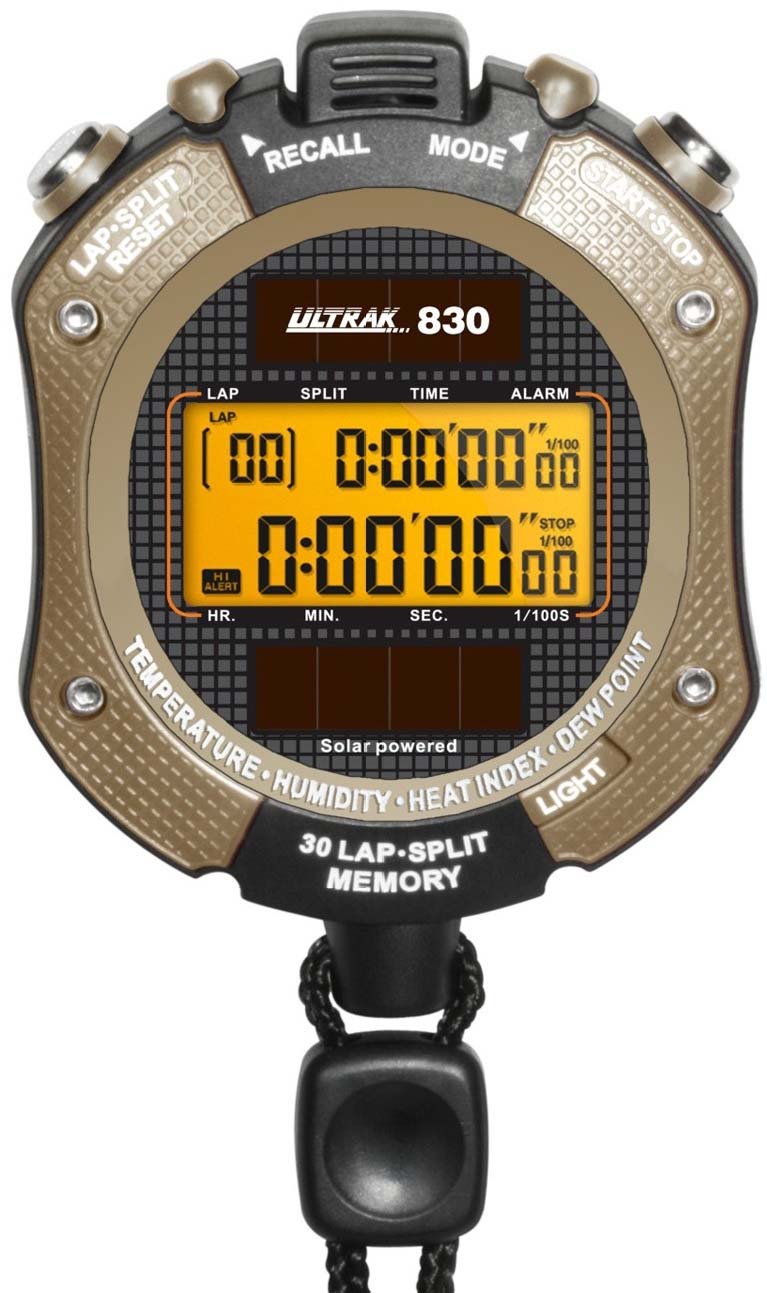
1-сүрөт: Фронт view of the Ultrak Heat Index Solar Powered Stopwatch, displaying its digital screen and control buttons.
2. Негизги өзгөчөлүктөрү
- Accurate calculation of temperature, humidity, heat index, and dew point.
- 30 dual split recallable memory for tracking multiple laps or splits.
- Measures time up to 10 hours with 1/100 second resolution.
- Presettable countdown timer with an auto-repeat function.
- Displays time, calendar, and features an alarm function.
- LED backlight for visibility in low-light conditions.
- Solar-powered with a back-up lithium battery for continuous operation.
- Water-resistant design for use in various environments.
3. Орнотуу жана алгачкы колдонуу
3.1 Күйгүзүү
The Ultrak 830 is solar-powered. Ensure the solar panel on the front of the stopwatch is exposed to light for initial power-up. A built-in lithium battery provides backup power.
3.2 Убакытты жана датаны орнотуу
- Убакыт режиминде басып, кармап туруңуз РЕЖИМ баскычы дисплей жарк этмейинче.
- колдонуу START/STOP жаркылдап күйүүчү цифраны (саат, мүнөт, секунд, жыл, ай, күн) тууралоо үчүн баскычты басыңыз.
- басыңыз LAP/RESET баскычын басып, кийинки параметрге өтүңүз.
- Бардык орнотуулар туура болгондон кийин, басыңыз РЕЖИМ орнотуу режиминен чыгуу үчүн баскыч.
3.3 Activating Backlight
басыңыз ЖАРЫК button (usually located on the side or top) to illuminate the display for a few seconds in low-light conditions.
4. Иштөө нускамалары
4.1 Секундомер функциясы
- Убакыт режиминен, басыңыз РЕЖИМ button repeatedly until "STOPWATCH" or a similar indicator appears.
- Басыңыз START/STOP убакытты баштоо үчүн.
- Басыңыз LAP/RESET to record a lap/split time while the stopwatch continues running. The display will momentarily show the lap time.
- Басыңыз START/STOP секундомерди тындыруу үчүн кайрадан басыңыз.
- Басыңыз LAP/RESET секундомерди нөлгө коюу үчүн тыныгуу учурунда.
4.2 Recalling Memory
The stopwatch can store up to 30 dual split times. After stopping the stopwatch, press the ЭСКЕРТҮҮ button (or a designated button, refer to on-device labels) to scroll through recorded lap and split times.
4.3 Артка эсептөө таймери
- Navigate to the "TIMER" mode using the РЕЖИМ баскычы.
- Басып кармап туруңуз LAP/RESET орнотуу режимине кирүү үчүн.
- Колдонуу START/STOP to adjust the hours, minutes, and seconds. Use LAP/RESET сандар ортосунда жылдыруу.
- Басыңыз РЕЖИМ орнотууну ырастоо үчүн.
- Басыңыз START/STOP артка санаууну баштоо үчүн. Таймер нөлгө жеткенде сигнал чыгат.
- To activate auto-repeat, ensure this option is enabled in the timer setting mode (if available).
4.4 Heat Index and Environmental Readings
In the dedicated "HEAT INDEX" or "ENVIRONMENT" mode (accessed via the РЕЖИМ button), the stopwatch will display current temperature, humidity, heat index, and dew point. Allow a few moments for the sensors to stabilize and provide accurate readings, especially after moving to a new environment.
4.5 Ойготкуч функциясы
- Go to "ALARM" mode using the РЕЖИМ баскычы.
- Басып кармап туруңуз LAP/RESET ойготкуч орнотуу режимине кирүү үчүн.
- Колдонуу менен ойготкуч убактысын тууралаңыз START/STOP and move between digits with LAP/RESET.
- Басыңыз РЕЖИМ ырастоо үчүн.
- Toggle the alarm ON/OFF using START/STOP Ойготкуч режиминде (режимди орнотуу эмес).
5. Техникалык тейлөө
- Тазалоо: Секундомерди жумшак менен сүртүңүз, гamp кездеме. Катуу химиялык заттарды же абразивдүү тазалагычтарды колдонбоңуз.
- Сактагыч: Store in a cool, dry place away from direct sunlight when not in use for extended periods.
- Суу каршылык: The stopwatch is water-resistant, but not waterproof. Avoid submerging it in water or exposing it to high-pressure water jets.
- Батарея: The solar panel charges the internal battery. Ensure regular exposure to light to maintain optimal battery life. No user-replaceable battery is required under normal operation.
6. Кыйынчылыктарды
| Көйгөй | Мүмкүн себеп | Чечим |
|---|---|---|
| Дисплей бош же күңүрт. | Insufficient light exposure for solar charging. | Expose the solar panel to bright light for several hours. |
| Туура эмес убакыт/дата. | Time/date not set correctly or reset after power loss. | Refer to Section 3.2 "Setting Time and Date" to adjust. |
| Stopwatch not responding. | Убактылуу программалык ката. | Attempt a soft reset by pressing all buttons simultaneously for a few seconds (if applicable, consult specific model instructions if available). If not, allow battery to fully drain and recharge. |
| Inaccurate environmental readings. | Sensor obstruction or not enough time for stabilization. | Ensure sensors are clean and unobstructed. Allow 5-10 minutes for readings to stabilize after moving to a new environment. |
7. Техникалык шарттар
- Модел: Ultrak 830
- Timing Resolution: 1/100 секунд
- Maximum Timing Capacity: 10 саат
- Эстутум: 30 dual split recallable memory
- Экологиялык сенсорлор: Temperature, Humidity, Heat Index, Dew Point
- Кубат булагы: Solar powered with lithium backup battery
- Дисплей: Digital with LED backlight
- Суу каршылык: Yes (splash resistant, not submersible)
- GTIN (UPC): 743223008308
8. Кепилдик жана колдоо
Ultrak products are manufactured to high-quality standards. For specific warranty information, please refer to the warranty card included with your purchase or visit the official Ultrak webсайт.
For technical support, troubleshooting assistance beyond this manual, or to inquire about replacement parts, please contact Ultrak customer service through their official webсайты же продуктунун таңгагында берилген байланыш маалыматы.