
1. Киришүү
The ECS Elitegroup A55F-M2 motherboard is designed to integrate AMD FM1 APU processors with the AMD A55 chipset, offering a balanced performance solution. This motherboard supports excellent graphics capabilities, including DirectX 11, and can utilize AMD Dual Graphics technology to combine APU and select Radeon discrete graphics cards for enhanced visual output. Key features include Dual-Channel DDR3 memory support up to 16GB, UVD3.0, SATA 3Gb/s, and USB 2.0 connectivity. This manual provides essential information for the proper installation, configuration, and maintenance of your A55F-M2 motherboard.
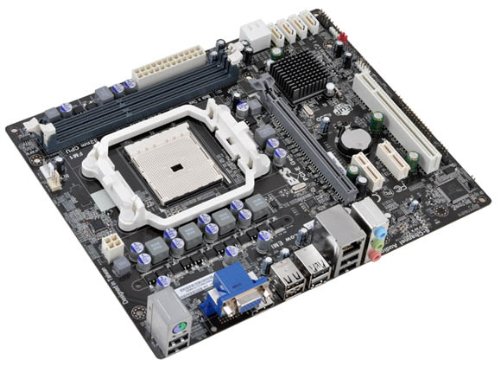
1-сүрөт: ECS Elitegroup A55F-M2 Motherboard. This image displays the overall layout of the motherboard, including the CPU socket, RAM slots, PCIe slots, and various connectors.
2. Негизги өзгөчөлүктөрү
- Supports AMD FM1 socket for AMD A series, E Series, Athlon Quad-core, Athlon Dual-core, and Sempron Dual-core processors.
- Features ESD protection design to prevent damage and extend product lifespan.
- Includes ECS Intelligent EZ Utility suite: eBLU, eDLU, eOC, eSF for system management.
- Supports AMD Dual Graphics technology for enhanced visual performance.
- Equipped with solid capacitors for improved VRM stability and longevity.
- Expansion slots include 1 x PCIe x16 and 1 x PCIe x1.
- Compatible with Microsoft Windows 8, Windows 7, Windows Vista, and Windows XP (32-bit and 64-bit versions).
3. Орнотуу жана орнотуу
Follow these steps for proper installation of the motherboard and its components:
- Ишти даярдоо: Ensure your computer case is compatible with Micro ATX motherboards. Install the I/O shield into the case's rear opening.
- CPU орнотуу:
- CPU розеткасынын рычагын ачыңыз.
- Процессордун үч бурчтук белгиси розеткадагы белгиге дал келишин камсыз кылып, CPU менен розеткага кылдат тууралаңыз.
- Процессорду мажбурлабастан акырын розеткага салыңыз.
- CPUну бекитүү үчүн розетка рычагын жабыңыз.
- Apply a thin layer of thermal paste to the CPU's surface.
- CPU муздаткычын өндүрүүчүнүн көрсөтмөлөрүнө ылайык орнотуңуз.
- RAM модулдарын орнотуу:
- DIMM уячаларынын эки учундагы клиптерди ачыңыз.
- RAM модулун уяча менен тегиздеп, модулдун оюгу уячадагы ачкычка дал келишин камсыз кылыңыз.
- RAM модулунун эки учуна клиптер орнотулганга чейин катуу басыңыз.
- Motherboard орнотуу:
- Place the motherboard into the case, aligning the screw holes with the standoffs.
- Аналык платаны бурамалар менен бекитиңиз. Ашыкча кысып албаңыз.
- Кубат булагына туташтыруу:
- Connect the 24-pin ATX power connector from the power supply to the motherboard.
- Connect the 4-pin or 8-pin ATX 12V power connector (CPU power) to the motherboard.
- Сактагыч түзмөктөрдү туташтыруу: Connect SATA data cables from your storage drives (HDD/SSD) to the SATA ports on the motherboard. Connect power cables from the power supply to the drives.
- Алдыңкы панелдик кабелдерди туташтыруу: Connect the power button, reset button, HDD LED, power LED, and USB/audio headers from the case to the corresponding pins on the motherboard. Refer to the motherboard's silkscreen labels for correct orientation.
- Install Expansion Cards (Optional): If using a discrete graphics card or other PCIe cards, insert them into the appropriate PCIe slots and secure them with the case's retention mechanism.
4. Операциялык системаны колдоо
The ECS Elitegroup A55F-M2 motherboard supports a range of Microsoft Windows operating systems:
- Windows XP (32-бит жана 64-бит)
- Windows Vista (32-bit and 64-bit)
- Windows 7 (32-бит жана 64-бит)
- Windows 8 (32-бит жана 64-бит)
Ensure you install the correct drivers for your operating system after installation for optimal performance and functionality.
5. Техникалык шарттар
| Өзгөчөлүк | Деталь |
|---|---|
| CPU розетка | FM1 розетка |
| Шайкеш процессорлор | AMD A-Series, AMD Athlon, AMD Sempron (FM1) |
| Чипсет | AMD A55 (Hudson D2) |
| Memory Type | DDR3 SDRAM |
| Memory Speed | 1800 МГц чейин |
| Максималдуу RAM сыйымдуулугу | 32 ГБ |
| Графикалык сопроцессор | Integrated AMD Graphics (APU dependent) |
| Кеңейтүү уячалары | 1 x PCIe x16, 1 x PCIe x1 |
| USB 2.0 порттору | 8 (via headers and rear panel) |
| Сактагыч интерфейси | SATA 3 Гб/с |
| Форма фактору | Micro ATX |
| Өлчөмдөрү (LxWxH) | 10.5 x 9 x 2 дюйм |
| Элемент Салмагы | 1.7 фунт |
6. Кыйынчылыктарды
Бул бөлүмдө сиз кабылышы мүмкүн болгон жалпы маселелерди чечүү жолдору каралган.
- Кубат жок:
- Ensure the power supply is connected correctly to the motherboard (24-pin ATX and 4/8-pin CPU power).
- Кубат булагынын которгучу "ON" абалында экенин текшериңиз.
- Алдыңкы панелдеги кубат баскычынын энелик платага туташуусун текшериңиз.
- Мүмкүн болсо, башка кубат менен сынап көрүңүз.
- Дисплей жок:
- Ensure the monitor is connected to the correct video output (onboard or discrete graphics card).
- Reseat the RAM modules. Try booting with only one RAM module.
- Графикалык картаны кайра орнотуңуз (эгер бар болсо).
- Clear CMOS by removing the CMOS battery for 5-10 minutes or using the clear CMOS jumper.
- Системанын туруксуздугу/бузуулар:
- CPU жана GPU температураларын текшериңиз. Ашыкча ысып кетүү туруксуздукка алып келиши мүмкүн.
- Бардык айдоочулар жаңыртылганын текшериңиз.
- RAM бузулганын текшерүү үчүн эстутум диагностикалык куралдарын иштетиңиз.
- Verify power supply is sufficient for all components.
- Peripheral Devices Not Detected:
- Ensure devices are properly connected to the correct ports (USB, SATA).
- Check device manager in your operating system for driver issues.
- Try connecting the device to a different port.
7. Техникалык тейлөө
Туура тейлөө мөөнөтүн узартат жана сиздин энелик платаңыздын оптималдуу иштешин камсыздай алат.
- Чаңды тазалоо: Regularly clean dust from inside your computer case, especially from CPU heatsinks, GPU fans, and case fans. Use compressed air for this purpose. Ensure the system is powered off and unplugged before cleaning.
- Кабелдик башкаруу: Ensure cables are neatly routed to improve airflow and prevent obstruction of components.
- Драйвер жаңыртуулары: Keep your motherboard drivers (chipset, audio, network) and graphics drivers updated to ensure compatibility and performance. Visit the ECS Elitegroup webакыркы айдоочулар үчүн сайт.
- BIOS/UEFI жаңыртуулары: Өндүрүүчүдөн BIOS/UEFI жаңыртууларын мезгил-мезгили менен текшерип туруңуз website. Updates can improve stability, add support for new hardware, or fix bugs. Follow the update instructions carefully.
- Экологиялык көзөмөл: Operate the computer in a well-ventilated area, away from direct sunlight, excessive heat, or humidity.
8. Кепилдик жана колдоо
For specific warranty terms and conditions, please refer to the warranty card included with your product or visit the official ECS Elitegroup webсайт. Кепилдик камтуу адатта материалдардын жана нормалдуу колдонуудагы чеберчиликтин кемчиликтерин камтыйт.
For technical support, driver downloads, and further assistance, please visit the ECS Elitegroup support page. Have your product model number (A55F-M2) and serial number ready when contacting support.
Официалдуу Webсайт: https://www.ecs.com.tw/