
Introduction
Thank you for choosing the Tele System TS6512HD Digital Terrestrial Receiver. This device allows you to receive digital terrestrial television broadcasts and offers additional features such as multimedia playback via USB and recording capabilities. This manual provides essential information for the safe and efficient use of your receiver, including setup, operation, maintenance, and troubleshooting.
Маанилүү коопсуздук маалыматы
- Электр камсыздоо: Белгиленген кубат адаптерин гана колдонуңуз. Voltage сиздин жергиликтүү электр камсыздооңузга дал келет.
- Вентиляция: Do not block ventilation openings. Place the receiver on a stable, flat surface with adequate space around it for proper airflow.
- Суу жана ным: Do not expose the receiver to rain, moisture, or liquids. Do not place objects filled with liquids, such as vases, on the receiver.
- Жылуулук булактары: Keep the receiver away from heat sources such as radiators, heat registers, stoves, or other heat-producing appliances.
- Тазалоо: Unplug the receiver from the power outlet before cleaning. Use a soft, dry cloth. Do not use liquid or aerosol cleaners.
- Тейлөө: Бул продуктту өзүңүз тейлөөгө аракет кылбаңыз. Бардык тейлөөнү квалификациялуу тейлөө кызматкерлерине тапшырыңыз.
- Чагылган: Unplug the receiver during lightning storms or when unused for long periods.
Пакеттин мазмуну
Сураныч, төмөнкү нерселер үчүн кутучаны белгилеңиз:
- Tele System TS6512HD Digital Terrestrial Receiver
- Алыстан башкаруу
- Кубаттуу адаптер
- Колдонуучунун Колдонмосу (бул документ)
Орнотуу колдонмосу
1. Ресиверди туташтыруу
- Сыналгыга туташуу:
- For optimal picture quality, connect an HDMI cable (not included) from the receiver's HDMI OUT port to an available HDMI IN port on your television.
- Alternatively, if your TV does not have an HDMI port, connect a SCART cable (not included) from the receiver's SCART port to the SCART IN port on your television.
- Антеннаны туташтыруу: Connect your terrestrial antenna cable to the ANT IN port on the back of the receiver.
- Туташуу кубаты: Plug the power adapter into the DC IN port on the receiver, then plug the adapter into a wall outlet.
- Батареяларды салыңыз: Пульттун батарея отсегин ачып, туура полярдуулукту сактоо менен эки AAA батарейканы (кошумча эмес) салыңыз.
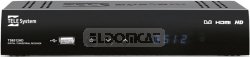
Сүрөт 1: Алдыңкы view of the Tele System TS6512HD receiver, showing its compact design and essential indicators.
2. First-Time Installation
- Turn on your TV and select the correct input source (HDMI or SCART) corresponding to where you connected the receiver.
- Power on the Tele System TS6512HD receiver.
- Биринчи жолу орнотуу устасы сыналгы экраныңызда пайда болушу керек. Тилиңизди, өлкөңүздү тандоо жана каналдарды автоматтык түрдө издөөнү баштоо үчүн экрандагы көрсөтмөлөрдү аткарыңыз.
- Once the scan is complete, the receiver will save the found channels, and you can begin watching TV.
Иштөө нускамалары
Негизги алыстан башкаруу функциялары
- КҮЧ: Turns the receiver on or off (standby mode).
- CH +/-: Каналдарды өйдө же ылдый өзгөртөт.
- VOL +/-: Үн деңгээлин тууралайт.
- Үнсүз: Аудионун үнүн өчүрөт же ачат.
- МЕНЮ: Орнотуулар жана функциялар үчүн негизги менюга кирет.
- ЧЫГУУ: Учурдагы менюдан же экрандагы дисплейден чыгат.
- OK: Менюлардагы тандоолорду ырастайт.
- Жебе баскычтары (Өйдө/Төмөн/Сол/Оң): Менюлар жана параметрлер боюнча чабыттайт.
- МААЛЫМАТ: Учурдагы канал маалыматын көрсөтөт.
- EPG: Электрондук программалык колдонмону колдонот.
Канал багыттоо
колдонуу CH +/- buttons to browse channels sequentially. To directly enter a channel number, use the numeric keypad on the remote control.
Башкы менюну колдонуу
басыңыз МЕНЮ button to access the receiver's main menu. Here you can configure various settings, including:
- Канал издөө: Rescan for channels or perform a manual search.
- Системанын жөндөөлөрү: Adjust language, time, parental control, and other system preferences.
- Сүрөт жөндөөлөрү: Configure aspect ratio, resolution, and other display options.
- Аудио жөндөөлөрү: Adjust audio output preferences.
- USB: Access multimedia files from a connected USB device or manage recordings.
Recording TV Programs (PVR Function)
The TS6512HD receiver supports recording of TV programs to an external USB storage device (e.g., USB flash drive or external hard drive, not included). Ensure your USB device is formatted correctly (FAT32 or NTFS) and has sufficient free space.
- Connect a compatible USB storage device to the USB port on the receiver.
- To record instantly, press the REC button on the remote control while watching a program. Press ТОКТОТ жазууну бүтүрүү үчүн.
- To schedule a recording, use the EPG (Electronic Program Guide) to select a program and follow the on-screen prompts to set a timer recording. Alternatively, access the Timer settings via the main menu.
- Recorded programs can be accessed and played back through the "USB" section in the main menu.
Multimedia Playback via USB
The receiver can play various multimedia files (video, audio, photos) from a connected USB storage device.
- Connect a USB storage device containing your multimedia fileс USB портуна.
- басыңыз МЕНЮ button, navigate to the "USB" section, and select "Multimedia" or "Player".
- Сиздин files жана басыңыз OK ойноо.
- Note: The receiver supports specific file formats (e.g., H.264, MPEG2, MPEG4 for video; AAC+, LC-AAC for audio). Compatibility with all file types is not guaranteed.
Техникалык тейлөө
Тазалоо
To clean the receiver, first unplug it from the power outlet. Use a soft, dry, lint-free cloth to wipe the exterior surfaces. Do not use liquid cleaners, abrasive pads, or chemical solvents, as these can damage the finish or internal components.
Программалык камсыздоо жаңыртуулары
Periodically, Tele System may release software updates to improve performance or add new features. Check the manufacturer's website for available updates and instructions on how to install them via USB.
Проблемаларды чечүү
| Көйгөй | Мүмкүн себеп | Чечим |
|---|---|---|
| No power / Receiver does not turn on. | Power cable not connected properly; Power outlet not working; Faulty power adapter. | Check power cable connection. Try a different power outlet. Ensure the power adapter is working. |
| Сүрөт же үн жок. | Incorrect TV input selected; HDMI/SCART cable loose or faulty; Antenna not connected or signal too weak. | Select the correct TV input source. Check HDMI/SCART cable connections. Ensure antenna is connected and try rescanning channels. |
| Пульт иштебей жатат. | Batteries are dead or inserted incorrectly; Obstruction between remote and receiver; Remote sensor blocked. | Replace batteries, ensuring correct polarity. Remove any obstructions. Ensure the remote sensor on the receiver is clear. |
| Сүрөттүн сапаты начар / пикселдештирүү. | Weak antenna signal; Antenna alignment issue; Interference. | Check antenna connection and alignment. Consider using a signal amplifier if signal is consistently weak. |
| Cannot record to USB device. | USB device not connected; USB device not formatted correctly; Insufficient storage space; USB device incompatible. | Ensure USB device is connected. Format the USB device to FAT32 or NTFS. Check available space. Try a different USB device. |
Техникалык мүнөздөмөлөр
| Модель аты | TS6512HD |
| Модель номери | 21005197 |
| Бренд | Tele System |
| Тюнер түрү | Terrestrial, DVB |
| Video Resolution | 1920 x 810 пиксел |
| Video Codecs | H.264, MPEG2, MPEG4 |
| Аудио кодектер | AAC+, LC-AAC |
| Жалпы USB порттору | 1 |
| Жалпы HDMI порттору | 1 |
| Шайкеш түзмөктөр | Телевидение |
| Түс | Кара |
| Өлчөмдөрү (пакет) | 24 x 23.4 x 5.2 см |
| Салмагы (пакет) | 421.84 г |
| GTIN (EAN/UPC) | 08024427014350 |
Кепилдик жана колдоо
The Tele System TS6512HD receiver comes with a standard manufacturer's warranty. For specific warranty terms and conditions, please refer to the warranty card included with your product or visit the official Tele System website. For technical support, troubleshooting assistance beyond this manual, or service inquiries, please contact Tele System customer support through their official channels.