
1. Киришүү
This manual provides essential information for the safe and efficient operation of your SANYO PLC-XK2200 XGA Ultra-Portable Multimedia Projector. Please read this manual thoroughly before using the projector and retain it for future reference.
The SANYO PLC-XK2200 is designed to deliver clear and bright images with 2200 lumens and a 2000:1 contrast ratio, suitable for various presentation environments.
2. Коопсуздук маалыматы
- Кубат булагы: Use only the specified power supply. Ensure the power cord is securely connected.
- Вентиляция: Вентиляция тешиктерин жаап албаңыз. Ашыкча ысып кетүүнүн алдын алуу үчүн проектордун айланасында туура аба агымы үчүн жетиштүү мейкиндикти камсыз кылыңыз.
- Lamp Эскертүү: Проектор лamp жогорку температурада жана басымда иштейт. Проекторду жылдыруудан же техникалык тейлөөдөн мурун муздатыңыз. Иштеп жатканда линзага түз карабаңыз.amp күйүк.
- Суюктук таасири: Проекторду жамгырдын, нымдуулуктун же суюктуктардын таасирине дуушар кылбаңыз.
- Тейлөө: Бардык тейлөөлөрдү квалификациялуу тейлөө кызматкерлерине тапшырыңыз. Проекторду өзүңүз ачууга же оңдоого аракет кылбаңыз.
3. Продукт бүтүп калдыview
3.1 Жогорку панелдин башкаруу элементтери
The top panel provides access to essential controls for power, menu navigation, focus, and zoom adjustments.

Сүрөт: Жогорку view of the SANYO PLC-XK2200 projector. Visible controls include the focus and zoom rings, the power button, and buttons for menu navigation (Menu, Select, Volume, Auto Setup, Lamp Калыбына келтирүү).
3.2 Арткы панелдин туташуулары
The rear panel houses various input and output ports for connecting external devices.

Сүрөт: Арткы view of the SANYO PLC-XK2200 projector. Ports visible include Control Port, Computer In 1 (S-Video In/Component In), Computer In 2 (Monitor Out), Video In, Audio In/Out, and a network port.
3.3 Каптал жана астыңкы бөлүгү Views
Жак view shows the power input and ventilation, while the bottom view reveals mounting points and product labels.
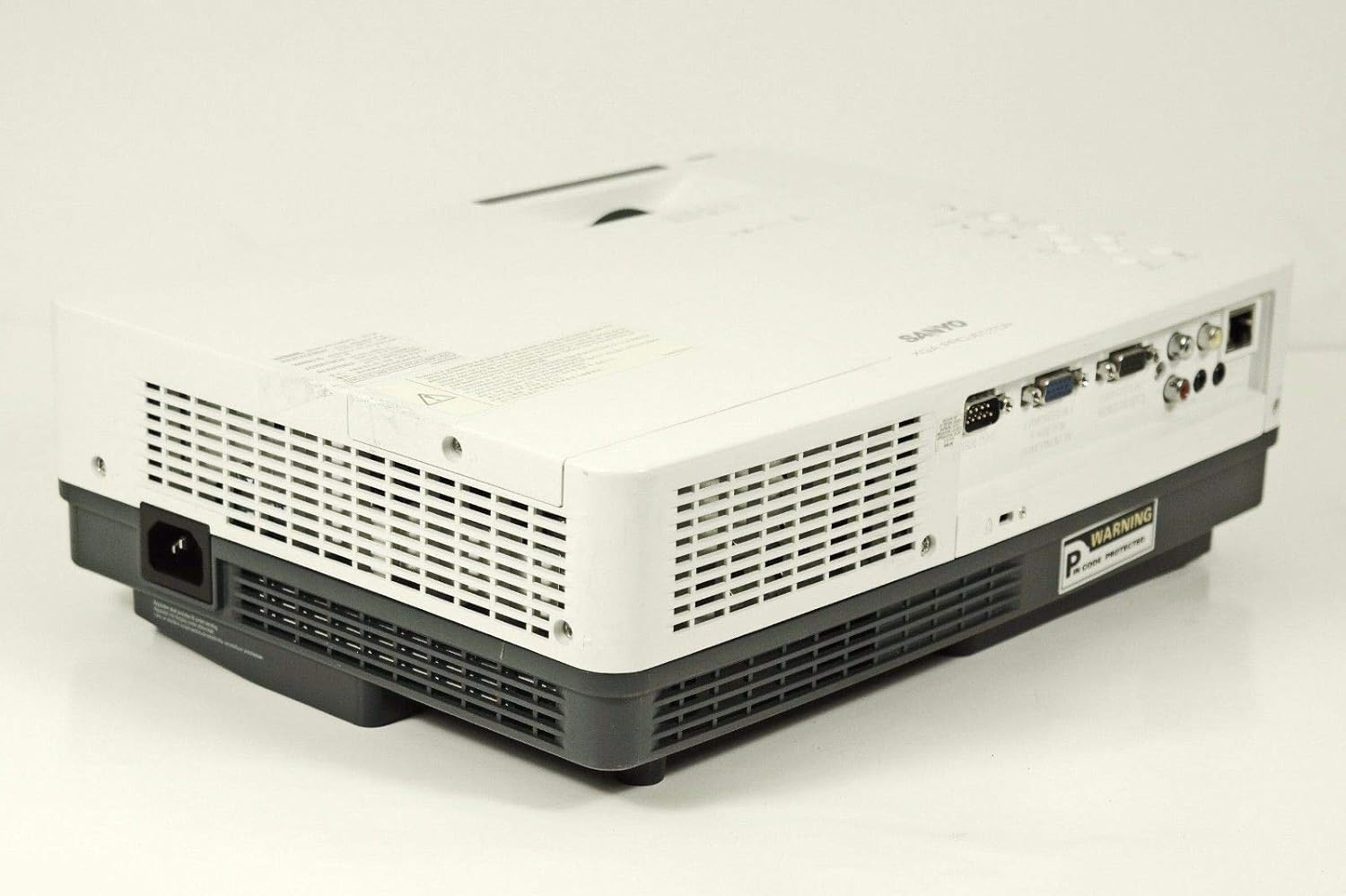
Сүрөт: каптал view of the SANYO PLC-XK2200 projector, highlighting the power input socket and exhaust vents.

Сүрөт: Төмөнкү view of the SANYO PLC-XK2200 projector, displaying screw holes for mounting, ventilation grilles, and the product information label.
4. Орнотуу
4.1 Проекторду жайгаштыруу
Place the projector on a stable, flat surface or mount it securely. Ensure there is sufficient space around the projector for ventilation. Avoid placing it in direct sunlight or near heat sources.
4.2 Кубатты туташтыруу
- Connect the power cord to the AC inlet on the projector.
- Электр шнурунун экинчи учун жерге туташтырылган электр розеткасына сайыңыз.
- The power indicator light will illuminate, typically in amber, indicating standby mode.
4.3 Киргизүү булактарын туташтыруу
Connect your video source (e.g., computer, DVD player) to the appropriate input port on the projector's rear panel. The PLC-XK2200 supports various inputs including VGA (Computer In 1/2), S-Video, and Composite Video.
- Компьютер: Use a VGA cable to connect your computer's video output to the COMPUTER IN 1 or COMPUTER IN 2 port.
- Видео түзмөктөр: For S-Video, connect to the S-VIDEO IN port. For composite video, connect to the VIDEO IN port using an RCA cable.
- Аудио: Connect audio cables from your source device to the AUDIO IN ports if you wish to use the projector's internal speaker or audio output.
5. Иштөө нускамалары
5.1 Күйгүзүү/өчүрүү
- Күйгүзүү үчүн: Press the POWER button on the projector's top panel or remote control. The power indicator will turn green, and the lamp жарык кылат.
- Өчүрүү үчүн: Press the POWER button twice. The projector will enter cooling mode, and the power indicator will flash amber. Once cooled, it will return to standby mode (solid amber).
5.2 Сүрөттү тууралоо
- Фокус: Rotate the FOCUS ring on the lens until the image is sharp and clear.
- Чоңойтуу: Rotate the ZOOM ring on the lens to adjust the image size.
- Негизги ташты оңдоо: Use the AUTO SETUP button or navigate through the menu to adjust vertical keystone distortion, which corrects trapezoidal images.
5.3 Киргизүүнү тандоо
Press the INPUT button on the projector or remote control to cycle through available input sources (e.g., Computer 1, Computer 2, Video, S-Video).
5.4 Меню Навигациясы
Press the MENU button to access the on-screen display (OSD) menu. Use the arrow buttons to navigate and the SELECT button to confirm choices. Press MENU again to exit.
6. Техникалык тейлөө
6.1 Проекторду тазалоо
- Сырткы: Проектордун экранын тазалоо үчүн жумшак, кургак чүпүрөктү колдонуңузasing. For stubborn dirt, dampen the cloth with a mild detergent solution.
- Объектив: Gently wipe the lens with a lens cleaning cloth or lens paper. Avoid harsh chemicals or abrasive materials.
- Аба чыпкасы: Regularly clean the air filter to maintain proper ventilation and prevent overheating. Refer to the filter cover for removal instructions.
6.2 Лamp Алмаштыруу
лamp чектүү өмүрү бар. Качан лamp индикатор күйөт же сүрөт күңүрт болуп калат, лamp алмаштыруу керек болушу мүмкүн. Ар дайым проектордун толук муздаганына жол бериңизamp replacement. Consult a qualified technician for lamp replacement if you are unsure.
Эскертүү: High pressure lamp. Risk of explosion if improperly handled. Refer to the service manual for detailed lamp алмаштыруу процедуралары.
7. Кыйынчылыктарды
| Көйгөй | Мүмкүн себеп | Чечим |
|---|---|---|
| Сүрөт көрсөтүлгөн жок | Incorrect input selected; loose cable connection; projector in standby. | Press INPUT to select correct source; check cable connections; press POWER button to turn on. |
| Сүрөт бүдөмүк | Фокус туураланган эмес; проектор экранга өтө жакын/алыс. | Adjust the FOCUS ring; reposition the projector or use the ZOOM ring. |
| Сүрөт трапеция түрүндө | Проектор экранга перпендикуляр эмес. | Use Auto Vertical Keystone correction or manually adjust. |
| Проектор ысып, өчүп калат | Бөгөттөлгөн желдетүү; кир аба чыпкасы. | Ensure clear airflow around vents; clean or replace air filter. |
8. Техникалык шарттар

Сүрөт: каптал view of the SANYO PLC-XK2200 projector, displaying the model number label (MODEL NO. PLC-XK2200).
- Модель аты: PLC-XK2200
- Бренд: САНЬО
- Дисплей технологиясы: LCD
- Жарыктык: 2200 Lumens
- Контраст катышы: 2000:1
- Түпкү резолюция: XGA (1024 x 768)
- Аспект катышы: 4:3 (Түпкү)
- Форма фактору: Portable
- Монтаж түрү: Столдун үстү
- Киргизүү терминалдары: VGA (x2), S-Video, Composite Video, Audio In (RCA)
- Чыгуу терминалдары: VGA (Monitor Out), Audio Out (RCA)
- Башкаруу порту: RS-232C
- UPC: 086483079498
9. Кепилдик жана колдоо
For warranty information, please refer to the warranty card included with your product or contact your local SANYO dealer. Technical support may be available through authorized service centers.
No official product videos were provided in the input data for this manual.