
1. Киришүү
This manual provides detailed instructions for the safe and effective use of the PeakTech P 4980 Dual Laser Pointer IR Thermometer. This device is designed for non-contact temperature measurements across a wide range, from -50 to +800 °C. It features dual laser pointers for precise targeting of the measurement area. Please read this manual thoroughly before operating the device and keep it for future reference.
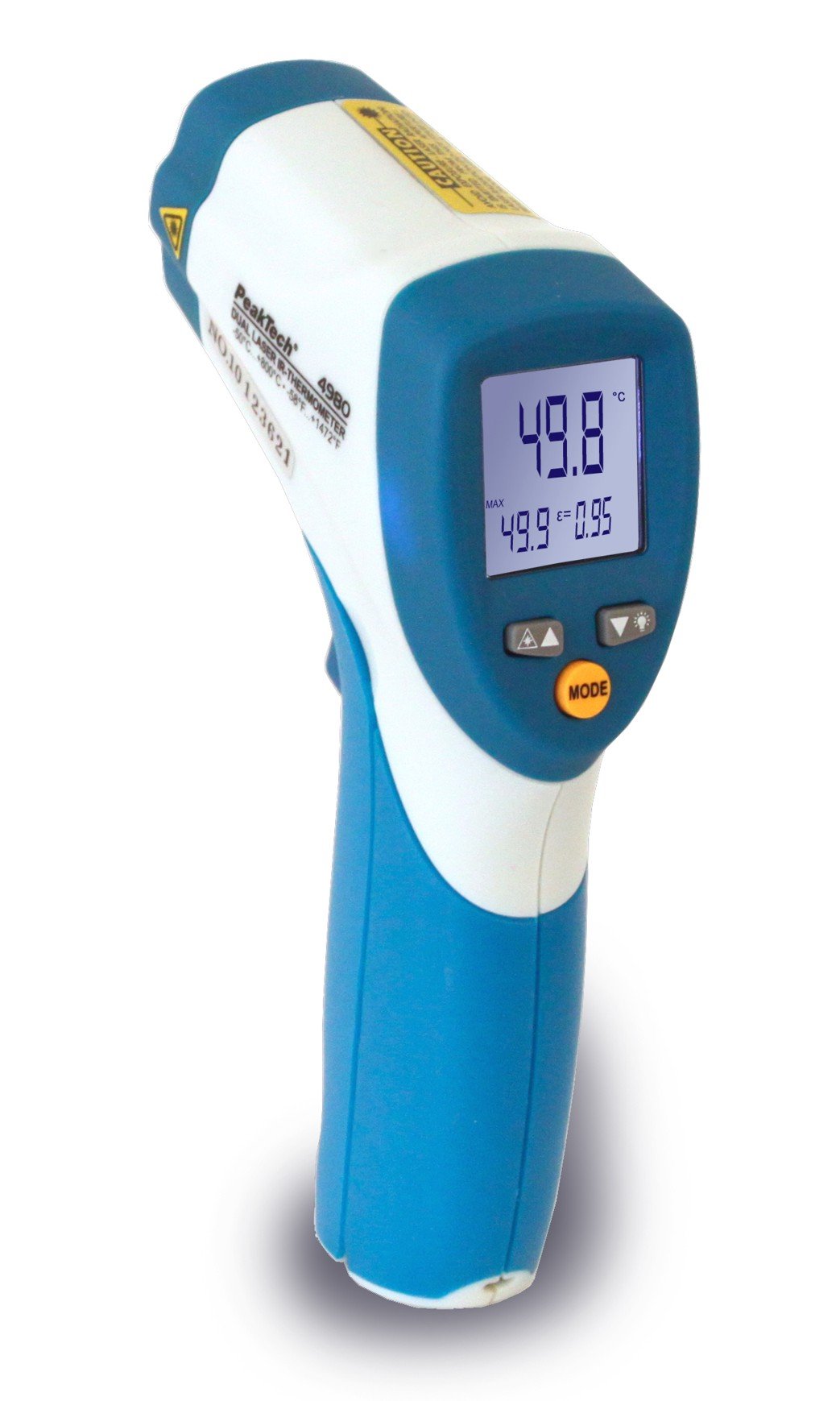
Image 1.1: The PeakTech P 4980 Dual Laser Pointer IR Thermometer, showing its ergonomic design and display.
2. Коопсуздук маалыматы
Always observe the following safety precautions to prevent injury and avoid damage to the device:
- Лазердик коопсуздук: This device uses Class 2 lasers. Do not stare directly into the laser beam or direct it at people or animals. Avoid direct eye exposure.
- Иштөө чөйрөсү: Do not use the thermometer in environments with explosive gases, vapor, or dust.
- Температуранын чектери: Түзмөктү көрсөтүлгөн иштөө диапазонунан тышкары өтө жогорку температурага дуушар кылбаңыз.
- Тейлөө: Only qualified personnel should perform repairs. Do not attempt to modify the device.
- Тазалоо: Тазалоо үчүн жумшак, кургак чүпүрөктү колдонуңуз. Абразивдүү тазалагычтарды же эриткичтерди колдонбоңуз.
- Батарея менен иштөө: Ensure correct battery polarity. Remove batteries if the device will not be used for an extended period. Dispose of batteries according to local regulations.
3. Продукциянын өзгөчөлүктөрү
The PeakTech P 4980 offers advanced features for accurate and convenient temperature measurement:
- Кош лазердик көрсөткүчтөр: Provides precise targeting, indicating the exact measurement spot.
- Кең температура диапазону: Measures temperatures from -50 °C to +800 °C (-58 °F to +1472 °F).
- Байланышсыз өлчөө: Safely measure hot, hazardous, or hard-to-reach surfaces.
- LCD дисплей: Clear digital display for easy reading of temperature values.
- Жөнгө салынуучу эмиссивдүүлүк: Allows for accurate measurements on various surface types (refer to operating instructions for details).
- Маалыматты кармоо функциясы: Оңой жаздыруу үчүн көрсөтүлгөн окууну токтотот.
- Арткы жарык: Improves visibility in dimly lit conditions.
- Автоматтык түрдө өчүрүү: Батареянын иштөө мөөнөтүн үнөмдөйт.
4. Орнотуу
4.1 Батареяны орнотуу
- Батарея бөлүмүнүн капкагын түзмөктүн туткасынан табыңыз.
- Капкакты жылдырып же ачуу менен ачыңыз.
- Insert the included battery, ensuring correct polarity (+ and - terminals).
- Батарея уясынын капкагын бекем жабыңыз.
4.2 Күйгүзүү/өчүрүү
- To power on the device, press the trigger. The display will illuminate.
- Батареянын кубатын үнөмдөө үчүн түзмөк бир аз убакытка иштебей тургандан кийин автоматтык түрдө өчөт.
5. Иштөө нускамалары
5.1 Ченөө
- Термометрди максаттуу бетке багыттаңыз.
- Press and hold the trigger. The dual laser pointers will activate, indicating the measurement area.
- Өлчөнгөн температура LCD дисплейде көрсөтүлөт.
- Көрсөткүчтү дисплейде кармап туруу үчүн триггерди коё бериңиз (Маалыматтарды кармоо функциясы).
5.2 Distance-to-Spot Ratio
The accuracy of the measurement depends on the distance-to-spot ratio. Ensure the target area is larger than the measurement spot size at your chosen distance. The dual lasers help define this spot.
5.3 Эмиссивдүүлүктү жөндөө
Different materials emit infrared energy differently. For accurate readings, adjust the emissivity setting to match the surface being measured. Consult a standard emissivity table for common materials. The P 4980 allows adjustment via dedicated buttons (refer to device interface for specific controls).
5.4 Бирдикти тандоо (°C/°F)
To switch between Celsius (°C) and Fahrenheit (°F), locate the unit selection button (usually labeled '°C/°F' or similar) and press it. The display will change accordingly.
6. Техникалык тейлөө
6.1 Аппаратты тазалоо
- Түзмөктү сүртүңүз casing жумшак менен, гamp кездеме. Абразивдүү материалдарды же эриткичтерди колдонбоңуз.
- For the lens, use a soft cloth or cotton swab with a small amount of isopropyl alcohol.
6.2 Батареяны алмаштыруу
When the low battery indicator appears on the display, replace the battery as described in Section 4.1. Always use the specified battery type.
6.3 Сактоо
Store the thermometer in a cool, dry place, away from direct sunlight and extreme temperatures. Remove batteries if storing for extended periods.
7. Кыйынчылыктарды
| Көйгөй | Мүмкүн себеп | Чечим |
|---|---|---|
| Түзмөк күйбөйт. | Өлүк же туура эмес орнотулган батарея. | Батареянын полярдуулугун текшериңиз же жаңылары менен алмаштырыңыз. |
| Туура эмес окуулар. | Incorrect emissivity setting; distance too far; lens dirty. | Adjust emissivity; move closer to target; clean lens. |
| Laser pointers not visible. | Laser function disabled (if applicable); bright ambient light. | Check laser activation button; use in less bright conditions. |
| Display shows 'ERR' or similar. | Measurement outside range; internal error. | Ensure target temperature is within -50 to +800 °C. If error persists, contact support. |
8. Техникалык шарттар
| Өзгөчөлүк | Спецификация |
|---|---|
| Модел | P 4980 |
| Температура диапазону | -50 ° Cден +800 ° Cге чейин (-58 ° Fден +1472 ° F) |
| Резолюция | 0.1 °C / 0.1 °F |
| Дисплей түрү | LCD |
| Өзгөчө өзгөчөлүк | Non-contact, Dual Laser Pointer |
| Power Source | Батарея менен иштейт |
| Камтылган компоненттер | Батарея |
| Сырткы материал | Пластик |
| Түс | Ак/Көк |
9. Кепилдик жана колдоо
9.1 Кепилдик маалыматы
This PeakTech product is backed by a 3-year manufacturer's warranty, ensuring quality and reliability. Please retain your proof of purchase for warranty claims.
9.2 Кардарларды колдоо
For technical assistance, troubleshooting, or warranty inquiries, please contact PeakTech customer support. Refer to the official PeakTech webакыркы байланыш маалыматы үчүн сайт же продукт таңгак.