
Introduction
Thank you for choosing the Gardena Multi-Control Duo Water Computer. This device is designed to simplify your garden watering by allowing independent programming for two separate watering areas. This manual provides detailed instructions for setup, operation, maintenance, and troubleshooting to ensure optimal performance and longevity of your water computer.
Коопсуздук маалыматы
Please read these safety instructions carefully before using the Gardena Multi-Control Duo Water Computer. Failure to follow these instructions may result in injury or damage to the product.
- This device is intended for outdoor use with clear fresh water only.
- Аппаратты сууга салбаңыз.
- Protect the device from frost. Disconnect and store indoors during winter months.
- Use only 9V alkaline batteries. Do not mix old and new batteries or different types of batteries.
- Балдар жетпеген жерде сактаңыз.
Пакеттин мазмуну
Пакетте бардык компоненттер бар экенин текшериңиз:
- Gardena Multi-Control Duo Water Computer Unit
- Колдонуучунун Колдонмосу (бул документ)
Жайгашуу
1. Батареяны орнотуу
The Gardena Multi-Control Duo requires one 9V alkaline battery (not included). The battery compartment is located on the back of the removable control panel.
- Remove the control panel from the main unit by gently pulling it forward.
- Батарея уясынын капкагын ачыңыз.
- Insert a new 9V alkaline battery, ensuring correct polarity (+/-).
- Батарея уясынын капкагын бекем жабыңыз.
- Reattach the control panel to the main unit, ensuring it clicks into place.
2. Connecting to Water Tap
The water computer connects directly to a standard outdoor water tap.
- Ensure the water tap is turned off.
- Screw the Gardena Multi-Control Duo onto the water tap by hand until it is secure. Do not overtighten.
- Connect your garden hoses or irrigation systems to the two independent outlets (V1 and V2) at the bottom of the water computer.
- Turn on the water tap. The water computer is now ready for programming.

Image: The Gardena Multi-Control Duo Water Computer being installed on an outdoor water tap. A hand is shown interacting with the removable control panel, demonstrating the ease of access for setup and programming.

Image: The Gardena Multi-Control Duo Water Computer installed on a stone pillar in a garden, showcasing its versatile mounting options and integration into various garden environments.
Иштеп жатат
The Multi-Control Duo allows for independent programming of two watering outputs (V1 and V2). The control panel is intuitive and features a large display.

Сүрөт: деталдуу фронт view of the Gardena Multi-Control Duo Water Computer, highlighting its clear digital display and the 'Man.', 'OK', and 'Menu' control buttons, along with the V1 and V2 selection arrows.
1. Учурдагы убакытты жана күндү коюу
- Press the 'Menu' button to access the main menu.
- Navigate to 'Time' or 'Clock' setting using the arrow buttons.
- Ырастоо үчүн "OK" баскычын басыңыз.
- Adjust the hour, minute, and day of the week using the arrow buttons and confirm each setting with 'OK'.
2. Programming Watering Schedules (V1 and V2)
Each output can have up to three watering schedules per day.
- Select the desired output (V1 or V2) using the V1/V2 arrow buttons. The selected output will be highlighted on the display.
- Press 'Menu' and navigate to 'Program' or 'Schedule'. Press 'OK'.
- For each program (1, 2, 3):
- Баштоо убактысы: Set the desired start time for watering using the arrow buttons and 'OK'.
- Узактыгы: Set the watering duration (from 1 minute to 3 hours 59 minutes) using the arrow buttons and 'OK'.
- Жыштыгы: Select the watering frequency (e.g., every day, every 2nd day, specific days of the week) using the arrow buttons and 'OK'.
- Repeat for all desired programs for the selected output.
- Repeat the entire process for the other output (V1 or V2).
3. Кол менен сугаруу
To initiate watering manually, press the 'Man.' button. You can then select the output (V1 or V2) and set a manual watering duration. Press 'OK' to start. Press 'Man.' again to stop manual watering.
4. Connecting Sensors (Optional)
The Gardena Multi-Control Duo is compatible with Gardena Rain Sensors and Soil Moisture Sensors (sold separately) to optimize water usage.
- Connect the sensor cable to the designated port on the water computer.
- In the 'Menu', navigate to 'Sensor' settings and activate the connected sensor.
- The water computer will then automatically interrupt scheduled watering if sufficient rain has fallen or if the soil moisture level is adequate, saving water.
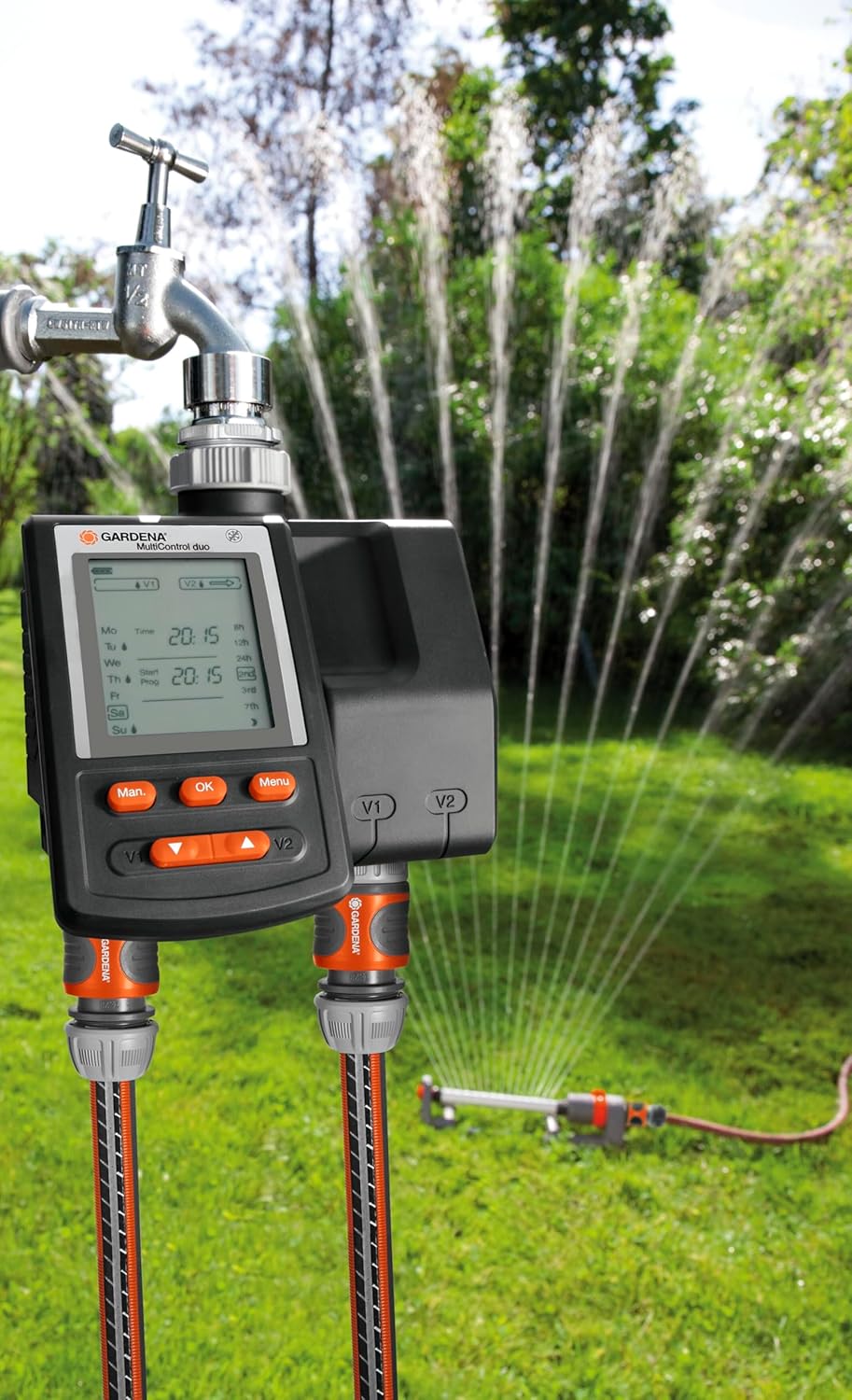
Image: The Gardena Multi-Control Duo Water Computer installed and actively managing a sprinkler system, demonstrating its function in automating garden irrigation.
Техникалык тейлөө
1. Тазалоо
Clean the exterior of the water computer with a soft, damp кездеме. Абразивдүү тазалагычтарды же эриткичтерди колдонбоңуз.
2. Батареяны алмаштыруу
The battery charge level display indicates the battery's charge status. Replace the 9V battery when the low battery indicator appears on the display to ensure continuous operation.
3. Кышка даярдоо
Before the first frost, disconnect the Gardena Multi-Control Duo from the water tap. Remove the battery and store the unit in a dry, frost-free location indoors. This prevents damage from freezing water.
Проблемаларды чечүү
| Көйгөй | Мүмкүн себеп | Чечим |
|---|---|---|
| Суу агымы жок | Water tap is off; Battery is low or dead; Incorrect programming; Filter clogged. | Turn on water tap; Replace battery; Check programming settings; Clean the filter at the water inlet. |
| Дисплей бош | Батарея өлүп калган же туура эмес орнотулган. | Replace battery; Check battery polarity. |
| Туура эмес убакта сугаруу | Incorrect current time setting; Incorrect program start times. | Adjust current time; Review жана программанын башталуу убактысын туура көрсөтүңүз. |
| Аппарат агып жатат | Loose connection to tap or hose; Damaged O-ring. | Ensure all connections are tight; Check and replace O-rings if damaged. |
Техникалык шарттар
| Өзгөчөлүк | Спецификация |
|---|---|
| Модель номери | 271687 |
| Түс | Multicolor (Grey) |
| Элемент Салмагы | 2.22 фунт (1005 грамм) |
| Продукциянын өлчөмдөрү | 8.66 x 6.77 x 7.01 дюйм |
| Орнотуулардын саны | 6 (программалоо параметрлерине шилтеме) |
| Screen Size | 22 сантиметр (диагоналдуу) |
| Батареялар талап кылынат | 1 x 9V батарейка |
| UPC | 798256212413, 772040149420 |
| GTIN | 04078500187404 |
Кепилдик жана колдоо
Gardena products are manufactured to high quality standards and are designed for reliable performance. For specific warranty information, please refer to the warranty card included with your purchase or visit the official Gardena website. For technical support or assistance with your Multi-Control Duo Water Computer, please contact Gardena customer service through their official channels.
No official product videos were available from the seller for embedding in this manual.


