
1. Киришүү
Сатып алганыңыз үчүн рахматasing the Gemini PS3-USB 3 Channel 10-Inch Mixer. This manual provides essential information for the proper setup, operation, and maintenance of your mixer. Please read this manual thoroughly before use to ensure optimal performance and to prevent damage.
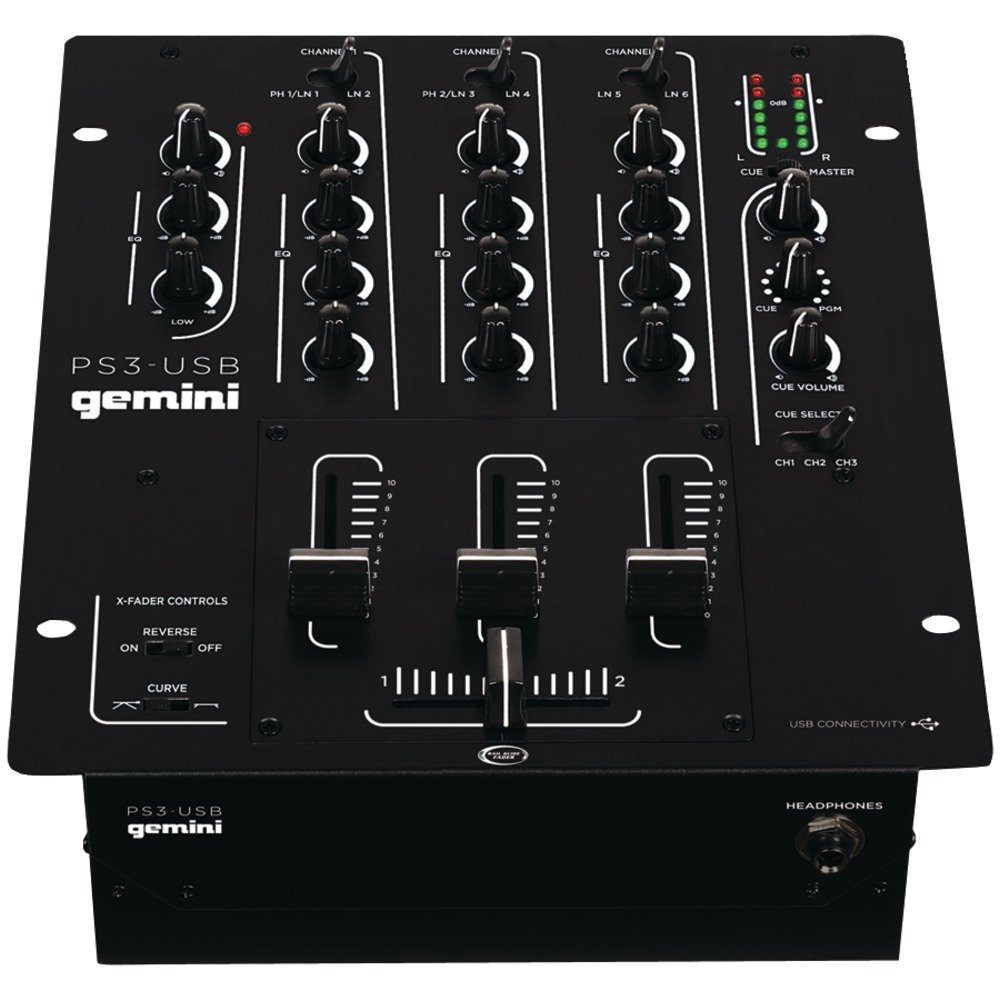
Сүрөт 1: Алдыңкы view of the Gemini PS3-USB Mixer, showing controls and inputs.
2. Коопсуздук нускамалары
- Кубат булагы: Агрегатты көрсөтүлгөн кубат булагына гана туташтырыңыз.
- Вентиляция: Туура желдетүүнү камсыз кылыңыз. Вентиляция тешиктерин жаап албаңыз.
- Суу жана ным: Агрегатты жамгырга же нымдуулукка дуушар кылбаңыз. Агрегаттын үстүнө суюктуктар толтурулган нерселерди койбоңуз.
- Жылуулук: Аппаратты радиаторлор, жылуулук регистрлери, мештер же башка аппараттар (анын ичинде) сыяктуу жылуулук булактарынан алыс кармаңыз. ampкөтөргүчтөр) жылуулукту пайда кылуучу.
- Тазалоо: Кургак чүпүрөк менен гана тазалаңыз.
- Тейлөө: Бардык тейлөөлөрдү квалификациялуу тейлөө кызматкерлерине тапшырыңыз. Бул продуктуну өзүңүз тейлөөгө аракет кылбаңыз.
3. Орнотуу
3.1 Пакеттен чыгаруу
Carefully unpack the mixer and check for any signs of damage. Retain the packaging materials for future transport or storage.
3.2 Кубатты туташтыруу
Берилген кубат адаптерин миксердин кубат киргизүүсүнө, андан кийин тиешелүү электр розеткасына туташтырыңыз.
3.3 Аудио байланыштар
The PS3-USB features 5-line, 3-channel inputs with 2 convertible Phono/Line RCA inputs.
- Phono/Line Inputs: Connect turntables or line-level devices (CD players, media players) to the RCA inputs. Use the Phono/Line switch to select the appropriate input type for each channel.
- Башкы жыйынтык: Connect the Master RCA outputs to your ampкөтөргүч же кубаттуу динамиктер.
- Жазуу чыгаруу: Connect the Record RCA outputs to a recording device if you wish to record your mix.
- Наушник: Plug your 1/4" (6.3mm) headphones into the front panel headphone connector.
3.4 USB туташуу
Connect the mixer to your Mac or PC using a standard USB cable. This allows for simultaneous playback and recording through your computer's media player software.
4. Иштөө нускамалары
4.1 Башкаруу элементтери жана функцияларыview
Familiarize yourself with the mixer's layout:
- Channel Gain Control: Ар бир канал үчүн киргизүү деңгээлин тууралайт.
- 3-Band Rotary EQ: Provides control over High, Mid, and Low frequencies for each channel.
- Канал Faders: Ар бир каналдын үнүн өзүнчө көзөмөлдөңүз.
- Кроссфейдер: A user-replaceable Rail Glide crossfader with curve and reverse controls for blending between channels.
- Негизги том: Миксердин жалпы чыгаруу деңгээлин көзөмөлдөйт.
- VU метрлер: Visual indicators for master or cue levels.
- Cue Section: Includes rotary cue volume, CUE/PGM controls, and a split cue switch for headphone monitoring.
- Микрофон бөлүмү: Features a rotary microphone volume control and a 2-band EQ for microphone input.
4.2 Негизги аралаштыруу
- Connect your audio sources to the appropriate Phono/Line inputs.
- Set the Phono/Line switch for each channel to match your source.
- Adjust the Gain control for each active channel to achieve a healthy input level without clipping (distortion).
- Use the channel faders to bring up the volume of your desired audio sources.
- Utilize the 3-band EQ to shape the sound of each channel.
- Use the crossfader to smoothly transition between channels.
- Monitor your mix using headphones via the Cue section and adjust the Master Volume for the main output.
4.3 USB ойнотуу жана жаздыруу
Once connected via USB, your computer should recognize the PS3-USB as an audio device.
- Ойнотуу: Select the PS3-USB as the output device in your computer's sound settings or media player software to route audio through the mixer.
- Жаздыруу: Select the PS3-USB as the input device in your recording software. The mixer's master output will be sent to your computer for recording.
5. Техникалык тейлөө
- Тазалоо: Миксердин сыртын тазалоо үчүн жумшак, кургак чүпүрөктү колдонуңуз. Суюк тазалоочу каражаттарды же эриткичтерди колдонбоңуз.
- Crossfader Replacement: The Rail Glide crossfader is user-replaceable. Refer to the Gemini website or authorized service centers for replacement parts and instructions if needed.
- Сактагыч: When not in use for extended periods, store the mixer in a cool, dry place, preferably in its original packaging.
6. Кыйынчылыктарды
| Көйгөй | Мүмкүн себеп | Чечим |
|---|---|---|
| No sound output from master. | Master volume too low; incorrect input selection; amplifier/speaker issues. | Increase Master Volume. Check Phono/Line switches. Verify ampкөтөргүч/динамиктин туташуулары жана кубат булагы. |
| Белгилүү бир каналдан үн чыкпайт. | Channel fader down; Gain too low; incorrect Phono/Line selection; source device off/muted. | Raise channel fader. Adjust Gain. Correct Phono/Line switch. Check source device. |
| Бурмаланган аудио. | Input Gain too high; Master Volume too high; faulty cable. | Reduce channel Gain. Reduce Master Volume. Replace cables. |
| USB recording/playback not working. | Incorrect USB connection; computer audio settings incorrect; driver issues. | Ensure USB cable is securely connected. Select PS3-USB as audio device in computer settings. Restart computer. |
7. Техникалык шарттар
- Модел: PS3USB
- Каналдар: 3
- Киргизүүлөр: 5-Line, 2 Convertible Phono/Line RCA, USB
- Чыгуулары: Master RCA, Record RCA, 1/4" (6.3mm) Headphone
- EQ: 3-Band Rotary EQ per channel, 2-Band EQ for Microphone
- Кроссфейдер: User-replaceable Rail Glide with Curve and Reverse controls
- Байланыш: USB for Mac/PC Playback & Recording
- Dimensions (Approximate Shipping): 12.00in x 10.00in x 3.25in
- Weight (Approximate Shipping): 6.2 фунт (2.8 кг)
- UPC: 747705208149
8. Кепилдик жана колдоо
This Gemini product is covered by a 90 күндүк кепилдик сатып алынган күндөн тартып. Бул кепилдик кадимки колдонуудагы өндүрүштүк кемчиликтерди жана чеберчиликти камтыйт. Ал туура эмес колдонуудан, кырсыктан, өзгөртүүдөн же уруксатсыз оңдоодон келип чыккан зыянды камтыбайт.
For technical support, service inquiries, or warranty claims, please contact your authorized Gemini dealer or visit the official Gemini webбайланыш маалыматы үчүн сайт.
Кепилдикти текшерүү үчүн сатып алганыңыздын далилин сактап коюңуз.