
1. Киришүү
The iLuv MobiAir iMM377BLK is a Bluetooth stereo speaker dock designed for smartphones. It allows users to stream music wirelessly via Bluetooth, charge compatible micro-USB smartphones, and engage in hands-free conversations using its built-in speakerphone. This manual provides detailed instructions for the proper setup, operation, and maintenance of your device.
2. Пакеттин мазмуну
Төмөндө тизмеленген нерселердин баары пакетиңизге камтылганын текшериңиз:
- iLuv MobiAir iMM377BLK Bluetooth Stereo Speaker Dock
- AC адаптер
- Quick Start Guide
3. Продукт бүтүп калдыview
Familiarize yourself with the components of your MobiAir speaker dock.

3.1-сүрөт: Фронт view of the iLuv MobiAir iMM377BLK with a smartphone securely docked.
3.1 Front Panel and Docking Area
- Динамик торлору: Located on the left and right sides, providing stereo audio output.
- myBot Robotic Arms: Adjustable arms that secure your smartphone in place, accommodating various phone sizes.
- Sliding Micro-USB Connector: A flexible connector that slides and rotates to align with your smartphone's micro-USB port for charging.

3.2-сүрөт: Top-mounted control buttons for power, playback, volume, and Bluetooth functions.
3.2 Жогорку панелдин башкаруу элементтери
- Кубат баскычы: Агрегатты күйгүзөт же өчүрөт.
- Bluetooth жупташтыруу баскычы: Bluetooth жупташтыруу режимин баштайт.
- Көлөмдү өйдө / ылдый баскычтары: Аудио чыгаруунун үнүн тууралайт.
- Ойнотуу/тындыруу баскычы: Медианы ойнотууну көзөмөлдөйт.
- Көздү өткөрүп жиберүү баскычтары: Кийинки же мурунку трекке өткөрүп жиберет.
- Call Answer/End Button: Bluetooth аркылуу туташканда телефон чалууларды башкарат.
- Микрофон: Үнсүз чалуу үчүн.

3.3-сүрөт: Rear panel with auxiliary input and DC power port.
3.3 Арткы панелдин туташуулары
- DC IN порту: Connects to the provided AC adapter for power.
- AUX IN уячасы: Allows connection of external audio devices via a 3.5mm audio cable (not included).
4. Орнотуу
4.1 Кубат туташтыруу
- Connect the supplied AC adapter to the DC IN port on the rear of the MobiAir dock.
- AC адаптерин стандарттуу розеткага сайыңыз.
- Бирдикти иштетүү үчүн үстүнкү панелдеги Кубат баскычын басыңыз.
4.2 Docking Your Smartphone
The MobiAir features adjustable myBot robotic arms and a sliding micro-USB connector to accommodate various smartphone designs.
- Gently pull apart the myBot robotic arms to create enough space for your smartphone.
- Position your smartphone between the arms.
- Adjust the sliding micro-USB connector to align with your smartphone's charging port. The connector can also rotate to match the port's orientation.
- Carefully push your smartphone onto the micro-USB connector until it is securely seated and charging begins.
- Release the myBot arms to gently secure the smartphone in the dock.

4.1-сүрөт: Horizontal adjustment of the myBot robotic arms to fit various smartphone widths.
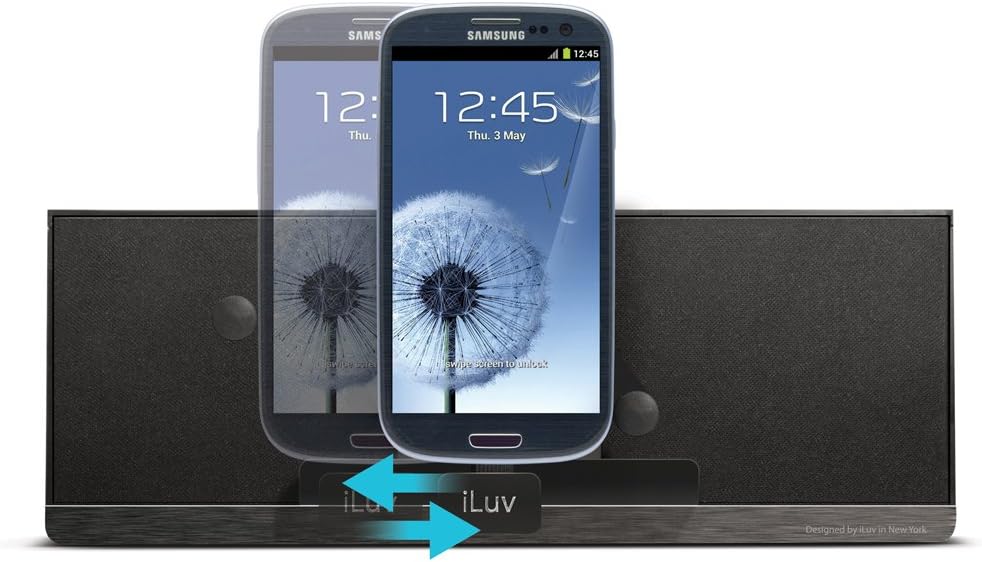
4.2-сүрөт: Vertical adjustment of the myBot robotic arms for different smartphone heights.
5. Иштөө нускамалары
5.1 Bluetooth жупташтыруу жана аудио агым
- Ensure the MobiAir dock is powered on.
- Press and hold the Bluetooth Pairing button on the top panel until the Bluetooth indicator light begins to flash, indicating pairing mode.
- On your smartphone, navigate to the Bluetooth settings and enable Bluetooth.
- Издөө available devices and select "iLuv MobiAir" (or similar name) from the list.
- Once paired, the Bluetooth indicator light will become solid, and you can now stream audio wirelessly from your smartphone to the dock.
- Use the Play/Pause and Track Skip buttons on the dock, or your smartphone, to control playback.
- Adjust volume using the Volume Up/Down buttons on the dock or your smartphone.
5.2 Using the Auxiliary Input (AUX IN)
For devices without Bluetooth capability, or if you prefer a wired connection, use the AUX IN jack.
- Connect one end of a 3.5mm audio cable (not included) to the AUX IN jack on the rear of the MobiAir dock.
- Аудио кабелдин экинчи учун тышкы аудио түзмөгүңүздүн кулакчын уячасына же аудио чыгаруусуна туташтырыңыз.
- The dock will automatically switch to AUX IN mode. If not, ensure no Bluetooth device is actively streaming.
- Control playback and track selection directly from your external audio device. Volume can be adjusted on both the device and the dock.
5.3 Hands-Free Speakerphone Function
When your smartphone is connected via Bluetooth, you can use the MobiAir dock as a speakerphone.
- Чалууга жооп берүү: When a call comes in, press the Call Answer/End button on the top panel.
- Чалууну аяктоо: Press the Call Answer/End button again to end the conversation.
- Чакыруу: Initiate a call from your smartphone. The audio will automatically route through the MobiAir dock.
6. Техникалык тейлөө
- Тазалоо: Түзмөктүн бетин тазалоо үчүн жумшак, кургак чүпүрөктү колдонуңуз. Суюк тазалоочу каражаттарды же абразивдүү материалдарды колдонбоңуз.
- Сактагыч: When not in use for extended periods, unplug the AC adapter and store the unit in a cool, dry place.
- Нымдуулуктан качыңыз: Аппаратты суудан жана жогорку нымдуулуктан алыс кармаңыз.
- Ашыкча температурадан сактаныңыз: Do not expose the unit to direct sunlight or extreme heat/cold.
7. Кыйынчылыктарды
| Көйгөй | Мүмкүн себеп | Чечим |
|---|---|---|
| Күч жок | AC adapter not connected or power outlet not active. | Ensure the AC adapter is securely connected to the dock and a working power outlet. Press the Power button. |
| No audio via Bluetooth | Not paired, out of range, or volume too low. |
|
| Смартфон заряддалбай жатат | Micro-USB connector misalignment or incompatible phone. |
|
| Үн сапаты начар | Low quality audio source, interference, or incorrect volume levels. |
|
8. Техникалык шарттар
| Өзгөчөлүк | Деталь |
|---|---|
| Модель номери | iMM377BLK |
| Бренд | Мен сүйөм |
| Продукциянын өлчөмдөрү | 8.5 x 4.5 x 6.5 дюйм (21.6 x 11.4 x 16.5 см) |
| Элемент Салмагы | 1.2 фунт (0.54 кг) |
| Түс | Кара |
| Аппараттык интерфейс | USB 2.0 (for charging) |
| Шайкеш түзмөктөр | Smartphones with Micro-USB charging and Bluetooth (A2DP) audio capability |
| Жалпы USB порттору | 1 (Micro-USB for charging) |
| Киргизүү көлөмүtage | 5 вольт (ток) |
| Байланыш | Bluetooth (A2DP), 3.5mm AUX IN |
9. Кепилдик жана колдоо
For warranty information and technical support, please refer to the warranty card included with your product or visit the official iLuv webсайт.
iLuv Customer Support: For assistance with product setup, troubleshooting, or warranty claims, please contact iLuv customer service through their official channels.